



linux中计算特定cpu使用率的方法:首先从【/proc/stat】中获取 t1时刻系统总体的值;然后从【/proc/stat】中获取t2时刻系统总的值;最后计算t2与t1之间系统总的cpu使用情况。

【相关学习推荐:linux视频教程】
Linux中计算特定CPU使用率的方法:
1. 背景知识
在/proc/stat中可以查看每一个CPU的使用情况的,如下图:
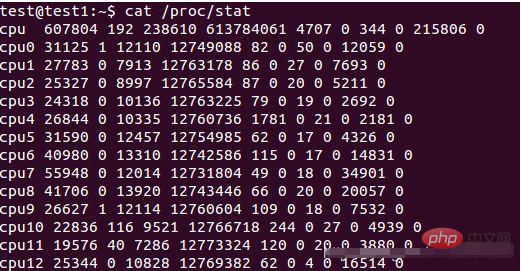
其中cpu(0/1/2/…)后面的那十个数字含义如下:
/proc/stat
kernel/system statistics.  Varies with architecture.
Common entries include:
     user nice system idle iowait  irq  softirq steal guest guest_nice
cpu  4705 356  584    3699   23    23     0       0     0        0
cpu0 1393280 32966 572056 13343292 6130 0 17875 0 23933 0
   The amount of time, measured in units of USER_HZ
   (1/100ths of a second on most architectures, use
   sysconf(_SC_CLK_TCK) to obtain the right value), that
   the system ("cpu" line) or the specific CPU ("cpuN"
   line) spent in various states:
   user   (1) Time spent in user mode.
   nice   (2) Time spent in user mode with low priority
          (nice).
   system (3) Time spent in system mode.
   idle   (4) Time spent in the idle task.  This value
          should be USER_HZ times the second entry in the
          /proc/uptime pseudo-file.
   iowait (since Linux 2.5.41)
          (5) Time waiting for I/O to complete.  This
          value is not reliable, for the following rea‐
          sons:
          1. The CPU will not wait for I/O to complete;
             iowait is the time that a task is waiting for
             I/O to complete.  When a CPU goes into idle
             state for outstanding task I/O, another task
             will be scheduled on this CPU.
          2. On a multi-core CPU, the task waiting for I/O
             to complete is not running on any CPU, so the
             iowait of each CPU is difficult to calculate.
          3. The value in this field may decrease in cer‐
             tain conditions.
   irq (since Linux 2.6.0-test4)
          (6) Time servicing interrupts.
   softirq (since Linux 2.6.0-test4)
          (7) Time servicing softirqs.
   steal (since Linux 2.6.11)
          (8) Stolen time, which is the time spent in
          other operating systems when running in a virtu‐
          alized environment
   guest (since Linux 2.6.24)
          (9) Time spent running a virtual CPU for guest
          operating systems under the control of the Linux
          kernel.
   guest_nice (since Linux 2.6.33)
          (10) Time spent running a niced guest (virtual
          CPU for guest operating systems under the con‐
          trol of the Linux kernel).
2.计算具体CPU使用率
有了上面的背景知识,接下来我们就可以计算具体CPU的使用情况了。具体计算方式如下:

Total CPU time since boot = user+nice+system+idle+iowait+irq+softirq+steal
Total CPU Idle time since boot = idle + iowait
Total CPU usage time since boot = Total CPU time since boot - Total CPU Idle time since boot
Total CPU percentage = Total CPU usage time since boot/Total CPU time since boot * 100%
有了上面的计算公式,计算某一CPU使用率或者系统总的CPU占用率也就是不难了。
示例:计算系统整体CPU占用情况
首先从/proc/stat中获取 t1时刻系统总体的user、nice、system、idle、iowait、irq、softirq、steal、guest、guest_nice的值,得到此时Total CPU time since boot(记为total1)和 Total CPU idle time since boot(记为idle1)。
其次,从/proc/stat中获取t2时刻系统总的Total CPU time since boot(记为total2)和Total CPU idle time since boot(记为idle2)。(方法同上一步)
最后,计算t2与t1之间系统总的CPU使用情况。也就是:
CPU percentage between t1 and t2 = ((total2-total1)-(idle2-idle1))/(total2-total1)* 100%
其中, ((total2-total1)-(idle2-idle1))实际上就是t1与t2时刻之间系统CPU被占用的时间(总时间 - 空闲时间)。
下面是一段计算时间段内CPU被占用情况的脚本:
#!/bin/bash
# by Paul Colby (http://colby.id.au), no rights reserved ;)
PREV_TOTAL=0
PREV_IDLE=0
while true; do
  # Get the total CPU statistics, discarding the 'cpu ' prefix.
  CPU=(`sed -n 's/^cpu\s//p' /proc/stat`)
  IDLE=${CPU[3]} # Just the idle CPU time.
  # Calculate the total CPU time.
  TOTAL=0
  for VALUE in "${CPU[@]}"; do
    let "TOTAL=$TOTAL+$VALUE"
  done
  # Calculate the CPU usage since we last checked.
  let "DIFF_IDLE=$IDLE-$PREV_IDLE"
  let "DIFF_TOTAL=$TOTAL-$PREV_TOTAL"
  let "DIFF_USAGE=(1000*($DIFF_TOTAL-$DIFF_IDLE)/$DIFF_TOTAL+5)/10"
  echo -en "\rCPU: $DIFF_USAGE%  \b\b"
  # Remember the total and idle CPU times for the next check.
  PREV_TOTAL="$TOTAL"
  PREV_IDLE="$IDLE"
  # Wait before checking again.
  sleep 1
done 




