



vue.js遍历数组的方法:1、使用foreach循环,代码为【this.urls.forEach(item =>】;2、使用filter循环,代码为【return this.urls.filter(item =>】。

该方法适用于所有品牌电脑
vue.js遍历数组的方法:
1、foreach
foreach循环对不能使用return来停止循环
立即学习“前端免费学习笔记(深入)”;
search(keyword){
    var newList = []
    this.urls.forEach(item =>{
     if(item.name.indexOf(keyword) != -1){
      newList.push(item)
     }
    })
    return newList
}2、filter
item对象就是遍历数组中的一个元素,includes是es6中的新方法,在search方法中直接返回新数组
search(keyword){
    return this.urls.filter(item =>{
     if(item.name.includes(keyword)){
      return item
   }
 })
}3、findIndex
返回true后index就可以获取到匹配的元素在进行删除

del(row){
     this.$confirm("确定要删除吗?", "删除").then(action=>{
     var index = this.urls.findIndex(item =>{
      if(item.name == row.name){
       return true;
      }
     })
     this.urls.splice(index, 1)
});4、some
如果匹配成功就return true跳出some的循环
del(row){
    this.$confirm("确定要删除吗?", "删除").then(action=>{
      this.urls.some((item, i) =>{
      if(item.name == row.name){
       this.urls.splice(i, 1)
       return true;
      }
     })
  });
}
5、上例子,在一个vue的data中存入一个固定的数组,对数组进行遍历,实现搜索功能,删除功能
在el-table中 :data中绑定一个方法,方法中对固定的数组urls进行遍历,返回一个新的数组实现搜索功能
<template>
  <div>
   <label style="float: left;">
   搜索关键字:
   <input type="text" class="form-control" v-model="keyword">
  </label>
    <el-table :data="search(keyword)" size="small" :stripe="true" :border="true" @select="select" @select-all="select">
      <el-table-column type="selection"></el-table-column>
      <el-table-column type="index"></el-table-column>
      <el-table-column label="网站名" prop="name" width="200">
        <template slot-scope="slot">
          <a href="slot.row.url" target="_blank">{{slot.row.name}}</a>
        </template>
      </el-table-column>
      <el-table-column label="网址" prop="url"></el-table-column>
      <el-table-column label="类型" prop="type" width="50"></el-table-column>
      <el-table-column label="国家" prop="country" width="50"></el-table-column>
      <el-table-column label="操作" width="50">
        <template slot-scope="slot">
          <el-button size="mini" type="text" icon="el-icon-delete" @click="del(slot.row)"></el-button>
        </template>
      </el-table-column>
    </el-table>
    <el-divider content-position="left">表格操作</el-divider>
    <el-button @click="batchDelete" type="danger" icon="el-icon-delete" size="small">批量删除</el-button>
  </div>
</template>
<script>
  export default {
    data() {
      return {
    keyword:'',
        selections: [],
        urls: [{
            name: "新浪",
            url: "http://www.sina.com",
            type: "资讯",
            country: "中国"
          },
          {
            name: "腾讯",
            url: "http://www.tencent.com",
            type: "聊天",
            country: "中国"
          },
          {
            name: "谷歌",
            url: "http://www.google.com",
            type: "资讯",
            country: "美国"
          },
          {
            name: "韬睿",
            url: "http://www.51i-star.com",
            type: "教育",
            country: "中国"
          }
        ]
      };
    },
    methods: {
      del(row){
        this.$confirm("确定要删除吗?", "删除").then(action=>{
     /* this.urls.some((item, i) =>{
      if(item.name == row.name){
       this.urls.splice(i, 1)
       return true;
      }
     }) */
     var index = this.urls.findIndex(item =>{
      if(item.name == row.name){
       return true;
      }
     })
     this.urls.splice(index, 1)
        });
      },
      select(selections, row) {
        this.selections = selections;
      },
      batchDelete() {
        this.$confirm("确定要删除吗?", "删除")
          .then(action => {
            for (var i = this.urls.length - 1; i >= 0; i--) {
              for (var j = this.selections.length - 1; j >= 0; j--) {
                if (this.urls[i].name == this.selections[j].name) {
                  this.urls.splice(i, 1);
                  break;
                }
              }
            }
          })
          .catch(error => {
            alert(error);
            this.$message('删除取消');
          });
      },
   search(keyword){
    /* var newList = []
    this.urls.forEach(item =>{
     if(item.name.indexOf(keyword) != -1){
      newList.push(item)
     }
    })
    return newList */
    return this.urls.filter(item =>{
     if(item.name.includes(keyword)){
      return item
     }
    })
   }
    }
  }
</script>
<style>
</style>
6、效果图为
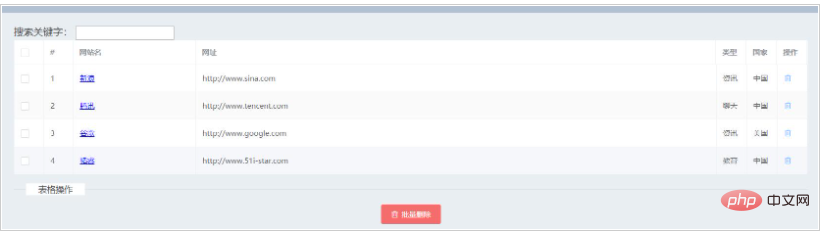
相关免费学习推荐:javascript(视频)




