



免费学习推荐:mysql视频教程
mybatis
mybatis-config.xml详细配置(配置时要把多余的属性删除 不能有中文 否则报错!)
<?xml version="1.0" encoding="UTF-8" ?><!DOCTYPE configuration
        PUBLIC "-//mybatis.org//DTD Config 3.0//EN"
        "http://mybatis.org/dtd/mybatis-3-config.dtd"><!--configuration核心配置  配置文件的根元素 --><configuration>
    <!-- 属性:定义配置外在化 -->
    <properties></properties>
    <!-- 设置:定义mybatis的一些全局性设置 -->
    <settings>
        <!-- 具体的参数名和参数值 -->
        <setting name="" value=""/>
    </settings>
    <!-- 类型名称:为一些类定义别名 -->
    <typeAliases>
        <!-- 实体类少 建议 第一种取别名方式-->
        <typeAlias type="包路径" alias="别名"></typeAlias>
        <!--实体类多 建议  第二种取别名方式
        默认情况下用这种方式 别名为类名 首字母最好小写
        -->
        <package name="包名"/>
    </typeAliases>
    <!-- 类型处理器:定义Java类型与数据库中的数据类型之间的转换关系 -->
    <typeHandlers></typeHandlers>
    <!-- 对象工厂 -->
    <objectFactory type=""></objectFactory>
    <!-- 插件:mybatis的插件,插件可以修改mybatis的内部运行规则 -->
    <plugins>
        <plugin interceptor=""></plugin>
    </plugins>
    <!-- 环境:配置mybatis的环境 -->
    <environments default="development">
        <!-- 环境变量:可以配置多个环境变量,比如使用多数据源时,就需要配置多个环境变量 -->
        <environment id="development">
            <!-- 事务管理器 -->
            <transactionManager type="JDBC"/>
            <!-- 数据源 配置连接我的数据库-->
            <dataSource type="POOLED">
                <property name="driver" value="com.mysql.jdbc.Driver"/>
                <property name="url"
                          value="jdbc:mysql://localhost:3306/mybatis?serverTimezone=GMT%2B8&useSSL=true&useUnicode=true&characterEncoding=UTF-8"/>
                <property name="password" value="123"/>
                <property name="username" value="root"/>
            </dataSource>
        </environment>
    </environments>
    <!-- 数据库厂商标识 -->
    <databaseIdProvider type=""></databaseIdProvider>
    <!-- 映射器:指定映射文件或者映射类 -->
    <mappers>
        <mapper resource="com/kang/w/dao/impl/UserMapper.xml"></mapper>
    </mappers></configuration>
分页
减少数据访问量
limt实现分页
sql语句: select * from 表名 limt 0,5;
- 0:数据开始的位置
- 5:数据的长度
第一种:使用Mybatis
1接口
List<User> getUserByLimit(Map<String, Object> map);
2mapeer.xml
   <select id="getUserByLimit" parameterType="map" resultType="user">
        select *
        from mybatis.user
        limit ${starIndex},${pageSize}    </select>
2-1结果集映射
<resultMap id="map" type="User">
        <result property="pwd" column="password"></result>
    </resultMap>
3测试
 @Test
    public void getUserByLimitTest() {
        SqlSession sqlSession = MyBatisUtils.getSqlSession ();
        UserMapper mapper = sqlSession.getMapper (UserMapper.class);
        HashMap hashMap = new HashMap<String, Object> ();
        hashMap.put ("starIndex", 1);
        hashMap.put ("pageSize", 2);
        List userByLimit = mapper.getUserByLimit (hashMap);
        for (Object o : userByLimit) {
            System.out.println (o);
        }

        sqlSession.close ();
    }
第二种:使用RowBounds方法
1.接口
List getUserList();
2.实现接口
<select id="getUserList" resultType="user">
        select *
        from mybatis.user    </select>
3.测试:
 /**
     * 测试使用RowBounds实现分页
     */@Test
    public void getUserByLimitRowBoundsTest() {
        SqlSession sqlSession = MyBatisUtils.getSqlSession ();
        RowBounds rowBounds = new RowBounds (0, 2);
        List<User> userList = sqlSession.selectList ("com.kuang.w.dao.UserMapper.getUserList", null, rowBounds);
        for (User user : userList) {
            System.out.println (user);
        }
        //关闭
        sqlSession.close ();
    }
第三种:使用Mybatis的分页插件 pageHeIper
sql 多对一处理
数据库 :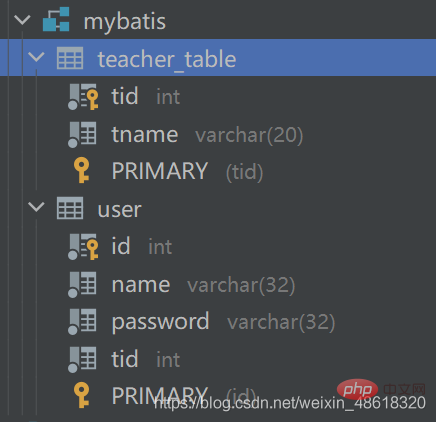
pojo
数据库中teacher-table表 对应实体类 Teacher
package com.kuang.w.pojo;

import lombok.Data;

/**
 * @author W
 */
@Data
public class Teacher {
    private int tId;
    private String tName;

}
数据库中user表 对应 实体类Student

网趣购物系统加强升级版
下载
新版本程序更新主要体现在:完美整合BBS论坛程序,用户只须注册一个帐号,即可全站通用!采用目前流行的Flash滚动切换广告 变换形式多样,受人喜爱!在原有提供的5种在线支付基础上增加北京云网支付!对留言本重新进行编排,加入留言验证码,后台有留言审核开关对购物系统的前台进行了一处安全更新。在原有文字友情链接基础上,增加LOGO友情链接功能强大的6种在线支付方式可选,自由切换。对新闻列表进行了调整,
package com.kuang.w.pojo;import lombok.Data;/**
 * @author W
 */@Datapublic class Student {
    private int id;
    private int tid;
    private String name;
    private String password;
    private Teacher teacher;}
1.接口
List<Student> getStudentList();
2.xml配置实现接口
  <!-- 多对一查询
    1 子查询 mysql 通过一个表里是数据   与另一个表的一个数据相的情况下 查询另一个的数据 一起显示
  -->
    <select id="getStudentList" resultMap="studentTeacher">
        select *
        from mybatis.user;    </select>
    <resultMap id="studentTeacher" type="Student">
        <!--  复杂属性 对象用 :association 集合用:collection-->
        <!--column 数据库中的字段 property 实体类中的属性-->
        <result property="id" column="id"/>
        <result property="name" column="name"/>
        <result property="password" column="password"/>
        <!--javaType	一个 Java 类的全限定名
        ,或一个类型别名(关于内置的类型别名,可以参考上面的表格)。
        如果你映射到一个 JavaBean,MyBatis 通常可以推断类型。
        然而,如果你映射到的是 HashMap,
        那么你应该明确地指定 javaType 来保证行为与期望的相一致。-->
        <association property="teacher" column="tid" javaType="Teacher" select="getTeacher"></association>
    </resultMap>
    <select id="getTeacher" resultType="Teacher">
        select *
        from mybatis.teacher_table
        where tid = #{id};    </select>
<!--2 多表联查-->
<select id="getStudentList" resultMap="StudentList">
select u.id uid,
u.name uname,
u.password upassword,
u.tid utid,
t.tname
from mybatis.user u,
mybatis.teacher_table t
where t.tid = u.tid; </select>
<!-- 映射-->
<resultMap id="StudentList" type="Student">
<result column="uid" property="id"/>
<result column="utid" property="tid"/>
<result column="uname" property="name"/>
<result column="upassword" property="password"/>
<association property="teacher" javaType="Teacher">
<result property="tName" column="tname"></result>
</association>
</resultMap>mybatis-config.xm配置
<?xml version="1.0" encoding="UTF8" ?><!DOCTYPE configuration
        PUBLIC "-//mybatis.org//DTD Config 3.0//EN"
        "http://mybatis.org/dtd/mybatis-3-config.dtd"><configuration>
    <properties resource="db.properties"/>
    <settings>
        <setting name="logImpl" value="STDOUT_LOGGING"/>
    </settings>
    <typeAliases>
        <typeAlias type="com.kuang.w.pojo.Teacher" alias="teacher"/>
        <typeAlias type="com.kuang.w.pojo.Student" alias="student"/>
    </typeAliases>

    <environments default="development">
        <environment id="development">
            <transactionManager type="JDBC"/>
            <dataSource type="POOLED">
                <property name="driver" value="${driver}"/>
                <property name="url" value="${url}"/>
                <property name="password" value="${password}"/>
                <property name="username" value="${username}"/>
            </dataSource>
        </environment>
    </environments>
    <mappers>
        <!--   <mapper resource="com/kuang/w/dao/TeacherMapper.xml"></mapper>
           <mapper resource="com/kuang/w/dao/StudentMapper.xml"></mapper>-->
        <mapper class="com.kuang.w.dao.StudentMapper"></mapper>
        <mapper class="com.kuang.w.dao.TeacherMapper"></mapper>
    </mappers></configuration>
3 测试
 @Test
    public void getStudentListTest() {
        SqlSession sqlSession = MyBatisUtils.getSqlSession ();
        StudentMapper mapper = sqlSession.getMapper (StudentMapper.class);


        List<Student> studentList = mapper.getStudentList ();
        for (Student student : studentList) {
            System.out.println (student);
        }

        sqlSession.commit ();
        sqlSession.close ();
    }
sql 一对多处理
数据表结构 对应的实体类 不变
第一种方式: 多表联查
1接口
List<Teacher> getTeacher(int tid);
2.1 xml实现接口
  <select id="getTeacher" resultMap="TeacherStudent">
        select t.tid, t.tname, u.id, u.name, u.password
        from mybatis.user u,
             mybatis.teacher_table t
        where t.tid = u.tid
          and t.tid = #{tid};    </select>
2.2映射配置
<resultMap id="TeacherStudent" type="Teacher">
        <result property="tName" column="tname"/>
        <result property="tId" column="tid"/>
        <!--  复杂属性 对象用 :association 集合用:collection-->
        <collection property="students" ofType="Student">
            <!--javaType 指定属性类型 一个 Java 类的全限定名-->
            <result column="id" property="id"></result>
            <result column="name" property="name"></result>
            <result column="password" property="password"></result>
            <result column="tid" property="tid"></result>
        </collection>
    </resultMap>
3测试
 /*测试一对多*/
    @Test
    public void getTeacherTest2() {
        SqlSession sqlSession = MyBatisUtils.getSqlSession ();
        TeacherMapper mapper = sqlSession.getMapper (TeacherMapper.class);
        List<Teacher> teacher = mapper.getTeacher (1);
        for (Teacher teacher1 : teacher) {
            System.out.println (teacher1);
        }

		//提交事务   架子  这里可以不要
        sqlSession.commit ();
        // 关闭
        sqlSession.close ();
    }
结果
com.intellij.rt.junit.JUnitStarter -ideVersion5 -junit4 com.kuang.w.dao.myTest,getTeacherTest2
Logging initialized using 'class org.apache.ibatis.logging.stdout.StdOutImpl' adapter.PooledDataSource forcefully closed/removed all connections.PooledDataSource forcefully closed/removed all connections.PooledDataSource forcefully closed/removed all connections.PooledDataSource forcefully closed/removed all connections.Opening JDBC Connection
Created connection 164974746.Setting autocommit to false on JDBC Connection [com.mysql.cj.jdbc.ConnectionImpl@9d5509a]==>  Preparing: select t.tid, t.tname, u.id, u.name, u.password from mybatis.user u, mybatis.teacher_table t where t.tid = u.tid and t.tid = ?; ==> Parameters: 1(Integer)<==    Columns: tid, tname, id, name, password<==        Row: 1, 狂神, 1, 天王盖地虎, 111<==        Row: 1, 狂神, 2, 小波, 123<==        Row: 1, 狂神, 3, 雷神, 922<==        Row: 1, 狂神, 5, 马儿扎哈, 123<==      Total: 4Teacher(tId=1, tName=狂神, students=[Student(id=1, tid=1, name=天王盖地虎, password=111), Student(id=2, tid=1, name=小波, password=123), Student(id=3, tid=1, name=雷神, password=922), Student(id=5, tid=1, name=马儿扎哈, password=123)])Resetting autocommit to true on JDBC Connection [com.mysql.cj.jdbc.ConnectionImpl@9d5509a]Closing JDBC Connection [com.mysql.cj.jdbc.ConnectionImpl@9d5509a]Returned connection 164974746 to pool.Process finished with exit code 0
第二种方式: 子查询
1接口
List<Teacher> getTeacher(int tid);
2 实现接口
 <!--第二种方式: 子查询-->
    <select id="getTeacher3" resultMap="TeacherStudent3">
        select *
        from mybatis.teacher_table
        where tid = #{tid};    </select>
    <resultMap id="TeacherStudent3" type="Teacher">
        <!--  复杂属性 对象用 :association 集合用:collection
        我们需要单独处理对象: association 集合: collection
        javaType=""指定属性的类型!
        集合中的泛型信息,我们使用ofType 获取
        -->
        <result column="tid" property="tId"/>
        <result column="tname" property="tName"/>
        <collection property="students" javaType="ArrayList" ofType="Student" select="getStudentByTeacherId"
                    column="tid">
        </collection>
    </resultMap>
    <select id="getStudentByTeacherId" resultType="Student">
        select *
        from mybatis.user
        where tid = #{tid};    </select>
3测试 同上
。。。。
相关免费学习推荐:mysql数据库(视频)




