



npcap是一个网络数据包抓包工具,是WinPcap的改进版;它支持NDIS 6技术、“只允许管理员Administrator”访问Npcap、与WinPcap兼容或并存两种模式;支持Windows平台的回环数据包采集和发送。

本教程操作环境:windows10系统、Dell G3电脑、Npcap 0.9994。
npcap是什么软件
Npcap是一款著名网络数据包抓包工具WinPcap的改进版。本软件致力于采用Microsoft Light-Weight Filter (NDIS 6 LWF)技术和Windows Filtering Platform (NDIS 6 WFP)技术对当前最流行的WinPcap工具包进行改进。比之前代拥有更好的抓包性能,并且稳定性优异。
软件特点:
1、支持NDIS 6技术;
2、支持“只允许管理员Administrator”访问Npcap;
3、支持与WinPcap兼容或并存两种模式;
4、支持Windows平台的回环(Loopback)数据包采集;
5、支持Windows平台的回环(Loopback)数据包发送;
Npcap 原理
Npcap 实现了 Win10 驱动程序,叫做 NPF(Netgroup Packet Filter),该驱动从 Win10 miniport 驱动获取网卡数据实现监控网络数据包的功能(Win10 使用 miniport 驱动控制网卡)。
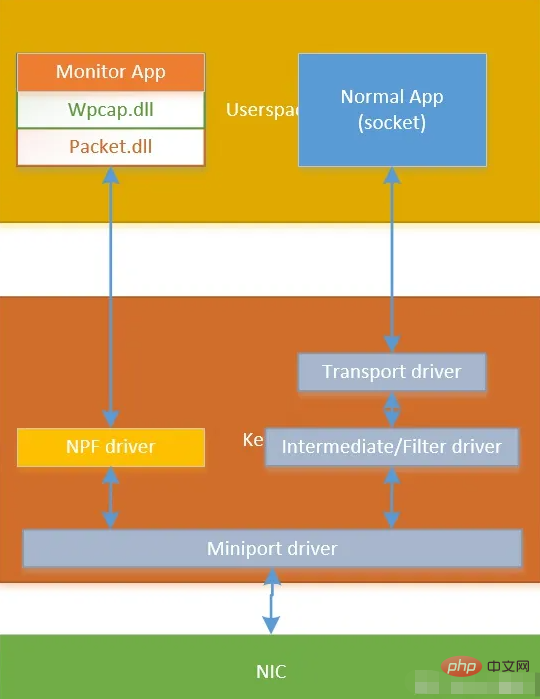
Npcap 使用
Npcap SDK 使用起来很简单,一共分为三步。
1、安装 visual studio
我使用的是 visual studio 2019。

2、安装 npcap 到 win10
安装 Npcap 1.71 installer 到 win10 系统中,主要是安装了 NPF 驱动和 dll 文件(Packet.dll 和 Wpcap.dll)。
下载地址:https://npcap.com/#download
3、下载 Npcap SDK
Npcap SDK 中提供了 lib 和头文件,我们编写抓包程序时需要用到这些。
4、例程
这里,我以 Npcap SDK 中的 npcap-sdk-1.13\Examples-pcap\UDPdump 为例进行说明,UDPdump 用于监控收到的 UDP 数据包。
udpdump.c
在原有文件的基础上我添加了 #pragma comment(lib,"ws2_32.lib") 语句,否则 ntohs() 会导致编译失败。
/* * Copyright (c) 1999 - 2005 NetGroup, Politecnico di Torino (Italy) * Copyright (c) 2005 - 2006 CACE Technologies, Davis (California) * All rights reserved. * * Redistribution and use in source and binary forms, with or without * modification, are permitted provided that the following conditions * are met: * * 1. Redistributions of source code must retain the above copyright * notice, this list of conditions and the following disclaimer. * 2. Redistributions in binary form must reproduce the above copyright * notice, this list of conditions and the following disclaimer in the * documentation and/or other materials provided with the distribution. * 3. Neither the name of the Politecnico di Torino, CACE Technologies * nor the names of its contributors may be used to endorse or promote * products derived from this software without specific prior written * permission. * * THIS SOFTWARE IS PROVIDED BY THE COPYRIGHT HOLDERS AND CONTRIBUTORS * "AS IS" AND ANY EXPRESS OR IMPLIED WARRANTIES, INCLUDING, BUT NOT * LIMITED TO, THE IMPLIED WARRANTIES OF MERCHANTABILITY AND FITNESS FOR * A PARTICULAR PURPOSE ARE DISCLAIMED. IN NO EVENT SHALL THE COPYRIGHT * OWNER OR CONTRIBUTORS BE LIABLE FOR ANY DIRECT, INDIRECT, INCIDENTAL, * SPECIAL, EXEMPLARY, OR CONSEQUENTIAL DAMAGES (INCLUDING, BUT NOT * LIMITED TO, PROCUREMENT OF SUBSTITUTE GOODS OR SERVICES; LOSS OF USE, * DATA, OR PROFITS; OR BUSINESS INTERRUPTION) HOWEVER CAUSED AND ON ANY * THEORY OF LIABILITY, WHETHER IN CONTRACT, STRICT LIABILITY, OR TORT * (INCLUDING NEGLIGENCE OR OTHERWISE) ARISING IN ANY WAY OUT OF THE USE * OF THIS SOFTWARE, EVEN IF ADVISED OF THE POSSIBILITY OF SUCH DAMAGE. * */ #ifdef _MSC_VER /* * we do not want the warnings about the old deprecated and unsecure CRT functions * since these examples can be compiled under *nix as well */ #define _CRT_SECURE_NO_WARNINGS #endif #include#include #include #pragma comment(lib,"ws2_32.lib") #ifdef _WIN32 #include BOOL LoadNpcapDlls() { _TCHAR npcap_dir[512]; UINT len; len = GetSystemDirectory(npcap_dir, 480); if (!len) { fprintf(stderr, "Error in GetSystemDirectory: %x", GetLastError()); return FALSE; } _tcscat_s(npcap_dir, 512, _T("\\Npcap")); if (SetDllDirectory(npcap_dir) == 0) { fprintf(stderr, "Error in SetDllDirectory: %x", GetLastError()); return FALSE; } return TRUE; } #endif /* 4 bytes IP address */ typedef struct ip_address { u_char byte1; u_char byte2; u_char byte3; u_char byte4; }ip_address; /* IPv4 header */ typedef struct ip_header { u_char ver_ihl; // Version (4 bits) + Internet header length (4 bits) u_char tos; // Type of service u_short tlen; // Total length u_short identification; // Identification u_short flags_fo; // Flags (3 bits) + Fragment offset (13 bits) u_char ttl; // Time to live u_char proto; // Protocol u_short crc; // Header checksum ip_address saddr; // Source address ip_address daddr; // Destination address u_int op_pad; // Option + Padding }ip_header; /* UDP header*/ typedef struct udp_header { u_short sport; // Source port u_short dport; // Destination port u_short len; // Datagram length u_short crc; // Checksum }udp_header; /* prototype of the packet handler */ void packet_handler(u_char* param, const struct pcap_pkthdr* header, const u_char* pkt_data); int main() { pcap_if_t* alldevs; pcap_if_t* d; int inum; int i = 0; pcap_t* adhandle; char errbuf[PCAP_ERRBUF_SIZE]; u_int netmask; char packet_filter[] = "ip and udp"; struct bpf_program fcode; #ifdef _WIN32 /* Load Npcap and its functions. */ if (!LoadNpcapDlls()) { fprintf(stderr, "Couldn't load Npcap\n"); exit(1); } #endif /* Retrieve the device list */ if (pcap_findalldevs(&alldevs, errbuf) == -1) { fprintf(stderr, "Error in pcap_findalldevs: %s\n", errbuf); exit(1); } /* Print the list */ for (d = alldevs; d; d = d->next) { printf("%d. %s", ++i, d->name); if (d->description) printf(" (%s)\n", d->description); else printf(" (No description available)\n"); } if (i == 0) { printf("\nNo interfaces found! Make sure Npcap is installed.\n"); return -1; } printf("Enter the interface number (1-%d):", i); scanf("%d", &inum); /* Check if the user specified a valid adapter */ if (inum < 1 || inum > i) { printf("\nAdapter number out of range.\n"); /* Free the device list */ pcap_freealldevs(alldevs); return -1; } /* Jump to the selected adapter */ for (d = alldevs, i = 0; i < inum - 1; d = d->next, i++); /* Open the adapter */ if ((adhandle = pcap_open_live(d->name, // name of the device 65536, // portion of the packet to capture. // 65536 grants that the whole packet will be captured on all the MACs. 1, // promiscuous mode (nonzero means promiscuous) 1000, // read timeout errbuf // error buffer )) == NULL) { fprintf(stderr, "\nUnable to open the adapter: %s\n", errbuf); /* Free the device list */ pcap_freealldevs(alldevs); return -1; } /* Check the link layer. We support only Ethernet for simplicity. */ if (pcap_datalink(adhandle) != DLT_EN10MB) { fprintf(stderr, "\nThis program works only on Ethernet networks.\n"); /* Free the device list */ pcap_freealldevs(alldevs); return -1; } if (d->addresses != NULL) /* Retrieve the mask of the first address of the interface */ netmask = ((struct sockaddr_in*)(d->addresses->netmask))->sin_addr.S_un.S_addr; else /* If the interface is without addresses we suppose to be in a C class network */ netmask = 0xffffff; //compile the filter if (pcap_compile(adhandle, &fcode, packet_filter, 1, netmask) < 0) { fprintf(stderr, "\nUnable to compile the packet filter. Check the syntax.\n"); /* Free the device list */ pcap_freealldevs(alldevs); return -1; } //set the filter if (pcap_setfilter(adhandle, &fcode) < 0) { fprintf(stderr, "\nError setting the filter.\n"); /* Free the device list */ pcap_freealldevs(alldevs); return -1; } printf("\nlistening on %s...\n", d->description); /* At this point, we don't need any more the device list. Free it */ pcap_freealldevs(alldevs); /* start the capture */ pcap_loop(adhandle, 0, packet_handler, NULL); return 0; } /* Callback function invoked by libpcap for every incoming packet */ void packet_handler(u_char* param, const struct pcap_pkthdr* header, const u_char* pkt_data) { struct tm* ltime; char timestr[16]; ip_header* ih; udp_header* uh; u_int ip_len; u_short sport, dport; time_t local_tv_sec; /* * unused parameter */ (VOID)(param); /* convert the timestamp to readable format */ local_tv_sec = header->ts.tv_sec; ltime = localtime(&local_tv_sec); strftime(timestr, sizeof timestr, "%H:%M:%S", ltime); /* print timestamp and length of the packet */ printf("%s.%.6d len:%d ", timestr, header->ts.tv_usec, header->len); /* retireve the position of the ip header */ ih = (ip_header*)(pkt_data + 14); //length of ethernet header /* retireve the position of the udp header */ ip_len = (ih->ver_ihl & 0xf) * 4; uh = (udp_header*)((u_char*)ih + ip_len); /* convert from network byte order to host byte order */ sport = ntohs(uh->sport); dport = ntohs(uh->dport); /* print ip addresses and udp ports */ printf("%d.%d.%d.%d.%d -> %d.%d.%d.%d.%d\n", ih->saddr.byte1, ih->saddr.byte2, ih->saddr.byte3, ih->saddr.byte4, sport, ih->daddr.byte1, ih->daddr.byte2, ih->daddr.byte3, ih->daddr.byte4, dport); }
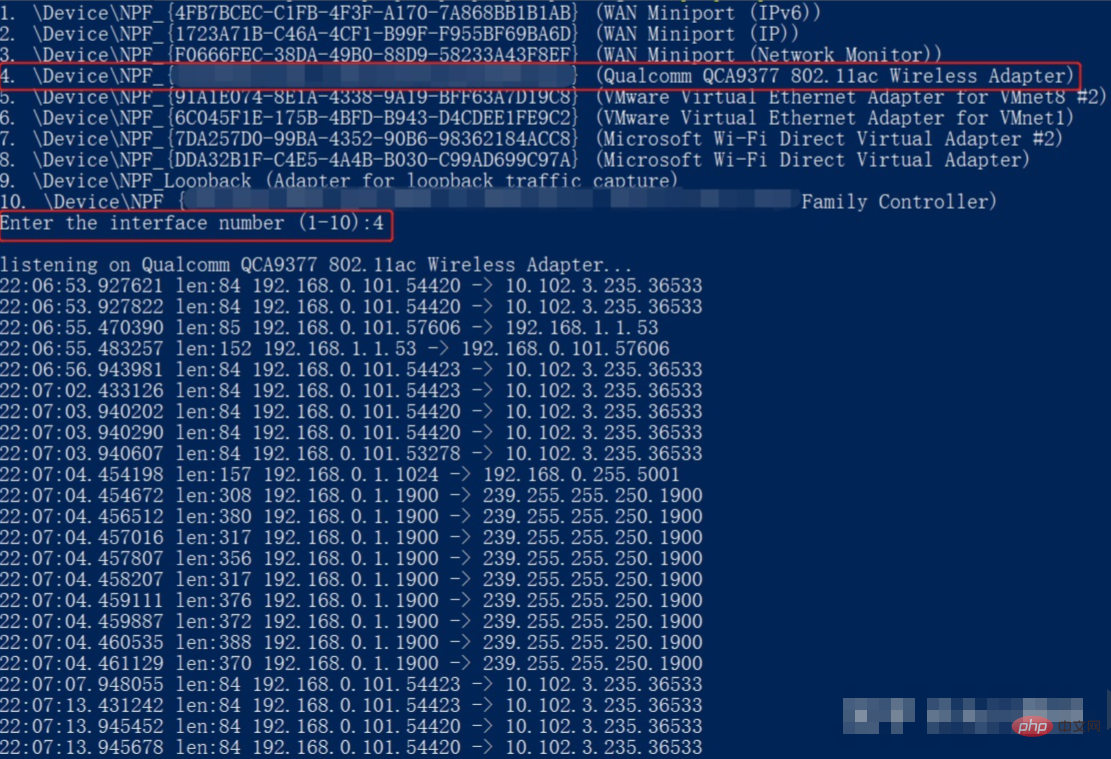
5、执行
比如监控无线网卡收到的数据。
想要查阅更多相关文章,请访问PHP中文网!!




