在laravel 5.6 中使用swagger
写本篇文章时,本人laravel版本为5.6.28
安装
composer require darkaonline/l5-swagger


Using version ^5.6 for darkaonline/l5-swagger
...
  - Installing swagger-api/swagger-ui (v3.17.4)
  - Installing doctrine/annotations (v1.6.0)
  - Installing zircote/swagger-php (2.0.13)
  - Installing darkaonline/l5-swagger (5.6.5)
...
运行
php artisan vendor:publish
选择L5Swagger\L5SwaggerServiceProvider这项
这时会添加两个文件
- /config/l5-swagger.php
- /resources/views/vendor/l5-swagger/index.blade.php
配置
在app/Http/Controllers/Controller.php文件中class前添加注释
<?php

namespace App\Http\Controllers;

use Illuminate\Foundation\Bus\DispatchesJobs;
use Illuminate\Routing\Controller as BaseController;
use Illuminate\Foundation\Validation\ValidatesRequests;
use Illuminate\Foundation\Auth\Access\AuthorizesRequests;
/**
 * @SWG\Swagger(
 *   basePath="/calculate-rates",
 *   @SWG\Info(
 *     title="项目名称 API",
 *     version="1.0.0"
 *   )
 * )
 */
class Controller extends BaseController
{
    use AuthorizesRequests, DispatchesJobs, ValidatesRequests;
}
运行命令
php artisan l5-swagger:generate
打开你的项目网址http://localhost/api/documentation,你会看到swagger已经运行成功了,但是没有显示任何API文档。

盛世企业网站管理系统1.1.2
下载
免费 盛世企业网站管理系统(SnSee)系统完全免费使用,无任何功能模块使用限制,在使用过程中如遇到相关问题可以去官方论坛参与讨论。开源 系统Web代码完全开源,在您使用过程中可以根据自已实际情况加以调整或修改,完全可以满足您的需求。强大且灵活 独创的多语言功能,可以直接在后台自由设定语言版本,其语言版本不限数量,可根据自已需要进行任意设置;系统各模块可在后台自由设置及开启;强大且适用的后台管理支
编写文档
拿http://localhost/home 示例:
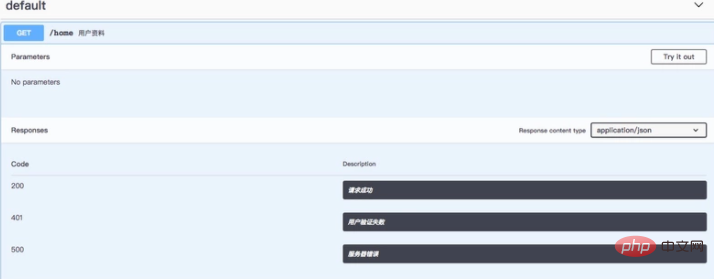
在HomeController的index方法上面编写文档
/**
     * @SWG\Get(
     *   path="/home",
     *   summary="用户资料",
     *   @SWG\Response(response=200, description="请求成功"),
     *   @SWG\Response(response=401, description="用户验证失败"),
     *   @SWG\Response(response=500, description="服务器错误")
     * )
     *
     */
    public function index()
    {
        return view('home');
    }
再次运行命令
php artisan l5-swagger:generate
回到http://localhost/api/documentation中刷新,文档就已经出来了,应该是长这个样子