




已经学习了MySQL的各种操作,如创建表、添加各种约束、产看表结构、以及修改和删除表。给出一个实战演练,全面复习一下数据表的基本操作基础。
案例:创建数据库company,按照下面两个表给出的表结构在company数据库中创建两个数据表offices和employees,按照操作过程完成数据表的基本操作。
(免费学习推荐:mysql视频教程)
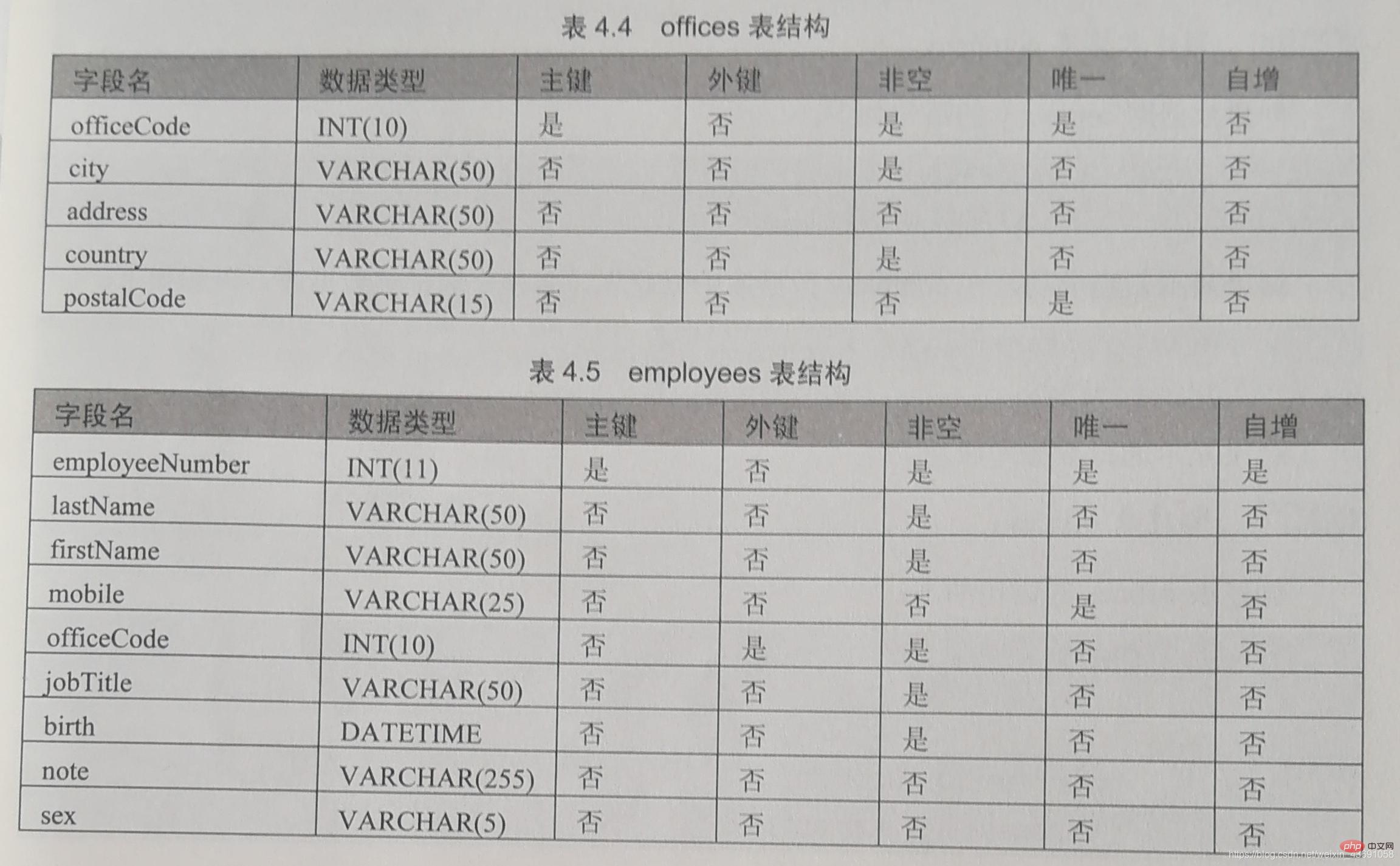
操作过程如下:
(1):登录MySQL。
mysql -h localhost -u root -p
打开windows命令行,输入登录用户名和密码:
C:\Users\Hudie>mysql -h localhost -u root -p
Enter password: ********Welcome to the MySQL monitor.  Commands end with ; or \g.Your MySQL connection id is 19Server version: 8.0.16 MySQL Community Server - GPL

Copyright (c) 2000, 2019, Oracle and/or its affiliates. All rights reserved.Oracle is a registered trademark of Oracle Corporation and/or its
affiliates. Other names may be trademarks of their respective
owners.Type 'help;' or '\h' for help. Type '\c' to clear the current input statement.mysql>_
登录成功,可以输入SQL语句进行操作。
(2):创建数据库company。
create database company;
mysql> create database company;Query OK, 1 row affected (0.06 sec)
创建成功后,在company数据库中创建数据表,必须先选择该数据库。SQL语句如下:
mysql> use company;Database changed
(3):创建表offices。
create table offices
mysql> create table offices    -> (
    -> officeCode int(10) not null unique,
    -> city varchar(50) not null,
    -> address varchar(50) not null,
    -> country varchar(50) not null,
    -> postalCode varchar(15) not null,
    -> primary key (officeCode)
    -> );Query OK, 0 rows affected (0.14 sec)mysql> show tables;+-------------------+| Tables_in_company |+-------------------+| offices           |+-------------------+1 row in set (0.00 sec)
(4):创建表enployees。

create table employees
mysql> create table employees    -> (
    -> employeeNumber int(11) not null primary key auto_increment,
    -> lastNamee varchar(50) not null,
    -> firstName varchar(50) not null,
    -> mobile varchar(25) not null,
    -> officeCode int (10) not null,
    -> jobTitle varchar(50) not null,
    -> birth datetime,
    -> noth varchar(25),
    -> sex varchar(5),
    -> constraint office_fk foreign key(officeCode) references offices(officeCode)
    -> );Query OK, 0 rows affected (0.14 sec)mysql> show tables;+-------------------+| Tables_in_company |+-------------------+| employees         || offices           |+-------------------+2 rows in set (0.01 sec)
创建成功,查看两个表的结构:
mysql> desc offices;+------------+-------------+------+-----+---------+-------+| Field | Type | Null | Key | Default | Extra |+------------+-------------+------+-----+---------+-------+| officeCode | int(10) | NO | PRI | NULL | || city | varchar(50) | NO | | NULL | || address | varchar(50) | NO | | NULL | || country | varchar(50) | NO | | NULL | || postalCode | varchar(15) | NO | | NULL | |+------------+-------------+------+-----+---------+-------+5 rows in set (0.06 sec)mysql> desc employees;+----------------+-------------+------+-----+---------+----------------+| Field | Type | Null | Key | Default | Extra |+----------------+-------------+------+-----+---------+----------------+| employeeNumber | int(11) | NO | PRI | NULL | auto_increment || lastNamee | varchar(50) | NO | | NULL | || firstName | varchar(50) | NO | | NULL | || mobile | varchar(25) | NO | | NULL | || officeCode | int(10) | NO | MUL | NULL | || jobTitle | varchar(50) | NO | | NULL | || birth | datetime | YES | | NULL | || noth | varchar(25) | YES | | NULL | || sex | varchar(5) | YES | | NULL | |+----------------+-------------+------+-----+---------+----------------+9 rows in set (0.01 sec)
(5):将表employees的mobile字段修改到officeCode字段后面。
alter table employees modify mobile varchar(25) after officeCode;
mysql> alter table employees modify mobile varchar(25) after officeCode;Query OK, 0 rows affected (0.18 sec)Records: 0 Duplicates: 0 Warnings: 0mysql> desc employees;+----------------+-------------+------+-----+---------+----------------+| Field | Type | Null | Key | Default | Extra |+----------------+-------------+------+-----+---------+----------------+| employeeNumber | int(11) | NO | PRI | NULL | auto_increment || lastNamee | varchar(50) | NO | | NULL | || firstName | varchar(50) | NO | | NULL | || officeCode | int(10) | NO | MUL | NULL | || mobile | varchar(25) | YES | | NULL | || jobTitle | varchar(50) | NO | | NULL | || birth | datetime | YES | | NULL | || noth | varchar(25) | YES | | NULL | || sex | varchar(5) | YES | | NULL | |+----------------+-------------+------+-----+---------+----------------+9 rows in set (0.01 sec)
(6):将表employees的birth字段改名为employee_birth。
alter table employees change birth employee_birth datetime;
mysql> alter table employees change birth employee_birth datetime;Query OK, 0 rows affected (0.03 sec)Records: 0 Duplicates: 0 Warnings: 0mysql> desc employees;+----------------+-------------+------+-----+---------+----------------+| Field | Type | Null | Key | Default | Extra |+----------------+-------------+------+-----+---------+----------------+| employeeNumber | int(11) | NO | PRI | NULL | auto_increment || lastNamee | varchar(50) | NO | | NULL | || firstName | varchar(50) | NO | | NULL | || officeCode | int(10) | NO | MUL | NULL | || mobile | varchar(25) | YES | | NULL | || jobTitle | varchar(50) | NO | | NULL | || employee_birth | datetime | YES | | NULL | || noth | varchar(25) | YES | | NULL | || sex | varchar(5) | YES | | NULL | |+----------------+-------------+------+-----+---------+----------------+9 rows in set (0.00 sec)
(7):修改sex字段,设置数据类型为char(1),非空约束。
alter table employees modify sex char(1) not null;
mysql> alter table employees modify sex char(1) not null;Query OK, 0 rows affected (0.20 sec)Records: 0 Duplicates: 0 Warnings: 0mysql> desc employees;+----------------+-------------+------+-----+---------+----------------+| Field | Type | Null | Key | Default | Extra |+----------------+-------------+------+-----+---------+----------------+| employeeNumber | int(11) | NO | PRI | NULL | auto_increment || lastNamee | varchar(50) | NO | | NULL | || firstName | varchar(50) | NO | | NULL | || officeCode | int(10) | NO | MUL | NULL | || mobile | varchar(25) | YES | | NULL | || jobTitle | varchar(50) | NO | | NULL | || employee_birth | datetime | YES | | NULL | || noth | varchar(25) | YES | | NULL | || sex | char(1) | NO | | NULL | |+----------------+-------------+------+-----+---------+----------------+9 rows in set (0.01 sec)
(8):删除字段noth。
alter table employees drop noth;
mysql> alter table employees drop noth;Query OK, 0 rows affected (0.15 sec)Records: 0 Duplicates: 0 Warnings: 0mysql> desc employees;+----------------+-------------+------+-----+---------+----------------+| Field | Type | Null | Key | Default | Extra |+----------------+-------------+------+-----+---------+----------------+| employeeNumber | int(11) | NO | PRI | NULL | auto_increment || lastNamee | varchar(50) | NO | | NULL | || firstName | varchar(50) | NO | | NULL | || officeCode | int(10) | NO | MUL | NULL | || mobile | varchar(25) | YES | | NULL | || jobTitle | varchar(50) | NO | | NULL | || employee_birth | datetime | YES | | NULL | || sex | char(1) | NO | | NULL | |+----------------+-------------+------+-----+---------+----------------+8 rows in set (0.01 sec)
(9):增加字段名favoriate_activity,数据类型为varchar(100)
alter table employees add favoriate_activity varchar(100);
mysql> alter table employees add favoriate_activity varchar(100);Query OK, 0 rows affected (0.09 sec)Records: 0 Duplicates: 0 Warnings: 0mysql> desc employees;+--------------------+--------------+------+-----+---------+----------------+| Field | Type | Null | Key | Default | Extra |+--------------------+--------------+------+-----+---------+----------------+| employeeNumber | int(11) | NO | PRI | NULL | auto_increment || lastNamee | varchar(50) | NO | | NULL | || firstName | varchar(50) | NO | | NULL | || officeCode | int(10) | NO | MUL | NULL | || mobile | varchar(25) | YES | | NULL | || jobTitle | varchar(50) | NO | | NULL | || employee_birth | datetime | YES | | NULL | || sex | char(1) | NO | | NULL | || favoriate_activity | varchar(100) | YES | | NULL | |+--------------------+--------------+------+-----+---------+----------------+9 rows in set (0.00 sec)
(10):删除主表offices
①删除表的外键约束:alter table employees drop foreign key office_fk;
②删除表offices:drop table offices;
mysql> alter table employees drop foreign key office_fk;Query OK, 0 rows affected (0.03 sec)Records: 0 Duplicates: 0 Warnings: 0mysql> drop table offices;Query OK, 0 rows affected (0.03 sec)mysql> show tables;+-------------------+| Tables_in_company |+-------------------+| employees |+-------------------+1 row in set (0.06 sec)
(11):修改表employees存储引擎为MyISAM。
alter table employees ENGINE=MyISAM;
mysql> alter table employees ENGINE=MyISAM;Query OK, 0 rows affected (0.17 sec)Records: 0  Duplicates: 0  Warnings: 0mysql> show create table employees \G*************************** 1. row ***************************
       Table: employeesCreate Table: CREATE TABLE `employees` (
  `employeeNumber` int(11) NOT NULL AUTO_INCREMENT,
  `lastNamee` varchar(50) NOT NULL,
  `firstName` varchar(50) NOT NULL,
  `officeCode` int(10) NOT NULL,
  `mobile` varchar(25) DEFAULT NULL,
  `jobTitle` varchar(50) NOT NULL,
  `employee_birth` datetime DEFAULT NULL,
  `sex` char(1) NOT NULL,
  `favoriate_activity` varchar(100) DEFAULT NULL,
  PRIMARY KEY (`employeeNumber`),
  KEY `office_fk` (`officeCode`)) ENGINE=MyISAM DEFAULT CHARSET=utf8mb4 COLLATE=utf8mb4_0900_ai_ci1 row in set (0.00 sec)
(12)将表employees名称修改为employees_info。
alter table employees rename employees_info;
mysql> alter table employees rename employees_info;Query OK, 0 rows affected (0.07 sec)mysql> show tables;+-------------------+| Tables_in_company |+-------------------+| employees_info |+-------------------+1 row in set (0.00 sec)
相关免费学习推荐:mysql数据库(视频)




