




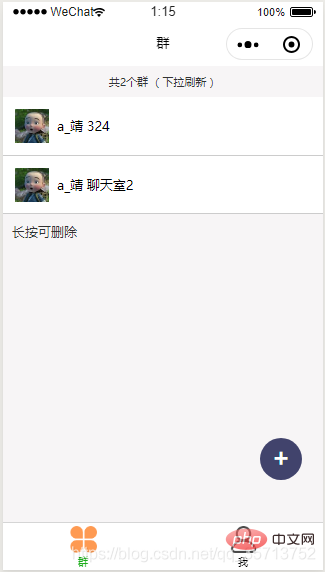
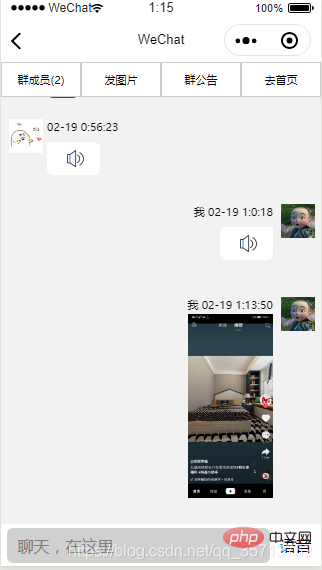
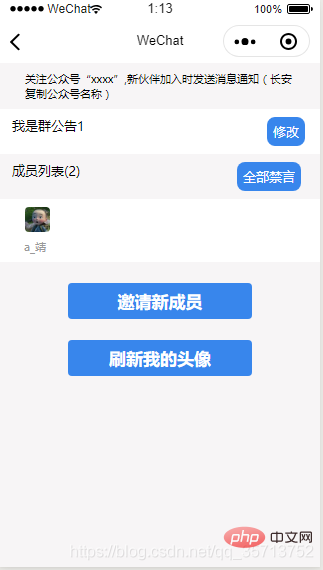
可以创建群,邀请群成员,群成员列表展示,图片发送,设置群公告,踢人,全体禁言,个人禁言,发送语音信息等功能。
效果图:

实现代码:

wxml
    群成员({{userNumber}})
    发图片
    发图片
    群公告
    去首页


        暂无聊天数据


              {{item.sendOutname}} {{item.dataTime}}
              {{item.text}}


              {{item.sendOutname}} {{item.dataTime}}
              {{item.text}}


        语音

      禁言中
wxss
page {
  background: #f2f2f2;
}

.top_bo {
  display: flex;
  background: white;
  flex-direction: row;
}

.top_bo view {
  flex: 1;
  font-size: 28rpx;
  text-align: center;
  border: 1rpx solid #ccc;
  line-height: 80rpx;
}

scroll-view {
  height: 82vh;
  /* padding-bottom: 30rpx; */
}

.noList {
  background: white;
  margin-top: 30rpx;
  /* height: 230rpx; */
  width: 100%;
  padding-top: 25%;
}

.noMsg {
  text-align: center;
  color: #999;
  font-size: 28rpx;
}

.inp {
  position: absolute;
  bottom: 0;
  width: 100%;
  background: white;
  height: 100rpx;
}

.inp input {
  background: #d0d0d0;
  border-radius: 15rpx;
  padding-left: 20rpx;
  height: 84rpx;
  margin-top: 10rpx;
  width: 94%;
  margin-left: 2%;
}

.prohibit {
  background: #d0d0d0;
  border-radius: 15rpx;
  padding-left: 20rpx;
  height: 84rpx;
  margin-top: 10rpx;
  width: 94%;
  margin-left: 2%;
  text-align: center;
  line-height: 84rpx;
  color: rgb(34, 34, 34);
}

.plaCC {
  margin-left: 5rpx;
}

.p_r {
  display: flex;
  flex-direction: row;
}

.flexRoe {
  display: flex;
  flex-direction: row;
}

.body {
  width: 100%;
  position: relative;
  /* border: 1rpx solid #ccc; *//* height: 200rpx */
}

.right_body {
  width: 100%;
  /* border: 1rpx solid red; */
  padding: 20rpx;
  margin-top: 50rpx;
}

.left_body {
  margin-top: 50rpx;
}

.posRit {
  right: 20rpx;
}

.textBo {
  width: 620rpx;
  text-align: right;
}

.lfBo {
  margin-left: 10rpx;
}

.ritTxt {
  background: #44426a;
  padding: 10rpx 20rpx 10rpx 20rpx;
  color: white;
  border-radius: 15rpx 0 15rpx 15rpx;
  margin-top: 20rpx;
  float: right;
  max-width: 500rpx;
  word-wrap: break-word;
  text-align: left;
}

.ritTxt2 {
  background: white;
  color: white;
  border-radius: 15rpx 0 15rpx 15rpx;
  padding: 0rpx 20rpx 10rpx 20rpx;
  margin-top: 20rpx;
  float: right;
  max-width: 500rpx;
  word-wrap: break-word;
  text-align: left;
}

.lftTxt {
  background: #44426a;
  padding: 10rpx 20rpx 10rpx 20rpx;
  color: white;
  border-radius: 0rpx 15rpx 15rpx 15rpx;
  margin-top: 20rpx;
  float: left;
  max-width: 500rpx;
  word-wrap: break-word;
  text-align: left;
}
.lftTxt2 {
  background: #fff;
  padding: 0rpx 20rpx 10rpx 20rpx;
  color: white;
  border-radius: 0rpx 15rpx 15rpx 15rpx;
  margin-top: 20rpx;
  float: left;
  max-width: 500rpx;
  word-wrap: break-word;
  text-align: left;
}
.my_audio {
  height: 60rpx;
  width: 60rpx;
  z-index: 2;
  position: relative;
  top: 10rpx;
  left: 20rpx;
  margin-right: 30rpx;
}


.dataTime {
  font-size: 28rpx;
}

.textImg {
  width: 200rpx;
  margin-top: 5rpx;
}

.head {
  width: 80rpx;
  height: 80rpx;
}

._ {
  height: 130rpx;
  width: 100%;
  background: #ccc;
}

.inpBo {
  display: flex;
  flex-direction: row;
}

.yuyin {
  flex: 1;
  line-height: 104rpx;
  text-align: center;
}

.input {
  flex: 5;
}
js
const DB = wx.cloud.database()
var util = require('../../utils/util.js');
var recorder = wx.getRecorderManager();
const innerAudioContext = wx.createInnerAudioContext() //获取播放对象
var qunId, that;
Page({

  /**
   * 页面的初始数据
   */
  data: {
    list: [],
    userNumber: '0',
    userList: [],
    c: "",
    prohibit: '',
  },

  // 点击录音开始播放事件
  my_audio_click: function (e) {
    var src = e.currentTarget.dataset.src;
      console.log('url地址', src);
      innerAudioContext.src = src
      innerAudioContext.seek(0);
      innerAudioContext.play();
  },
  // 首页
  goHome() {
    wx.switchTab({
      url: '../group/group'
    })

  },

  // 群成员
  number() {
    let userList = JSON.stringify(this.data.userList)
    wx.navigateTo({
      url: '../member/member?qunId=' + qunId,
    })
  },
  bottom: function() {
    var that = this;
    this.setData({
      scrollTop: 100000
    })
  },
  // 动态监听禁言状态
  prohibit() {
    console.log('8888888888888', qunId)
    const watcher = DB.collection('qunList')
      .where({
        _id: qunId
      })
      .watch({
        onChange: function(res) {

          let arr = res.docs[0]
          console.log('动态监听禁言状态', arr._openId + ':' + wx.getStorageSync('openId'))
          let opid = arr._openId
          if (arr.prohibit == '1') {
            if (arr._openId == wx.getStorageSync('openId')) {
              that.setData({
                prohibit: '0'
              })
            } else {
              that.setData({
                prohibit: '1'
              })
            }
          } else {
            const watcher = DB.collection('qunUserList')
              .where({
                qunId: qunId,
                _openId: wx.getStorageSync('openId')
              })
              .watch({
                onChange: function(res) {

                  let arrr = res.docs[0]
                  console.log('动态监听禁言状态', arrr._openId + ':' + wx.getStorageSync('openId'))
                  if (arrr.prohibit == '1') {
                    if (arrr._openId == opid) {
                      that.setData({
                        prohibit: '0'
                      })
                    } else {
                      that.setData({
                        prohibit: '1'
                      })
                    }
                  } else {
                    that.setData({
                      prohibit: '0'
                    })
                  }


                },
                onError: function(err) {
                  // console.error('----------------error', err)
                }
              })
          }


        },
        onError: function(err) {
          // console.error('----------------error', err)
        }
      })
  },

  // 禁言提示
  prohibitTis() {
    wx.showToast({
      title: '禁言中......',
      icon: 'none'
    })
  },
  // 获取成员消息
  onMsg(qunId) {
    console.log('2222222', qunId)
    const watcher = DB.collection('news')
      // 按 progress 降序
      // .orderBy('progress', 'desc')
      // 取按 orderBy 排序之后的前 10 个
      // .limit(10)
      .where({
        _qunId: qunId
      })
      .watch({
        onChange: function(snapshot) {
          console.log('snapshot', snapshot)
          var listArr = snapshot.docs;
          console.log('---', listArr)
          listArr.forEach((item, idx) => {
            console.log('---', item)
            console.log(wx.getStorageSync('openId') + ':' + item._openId)
            item.type = wx.getStorageSync('openId') == item._openId ? 1 : 2;
            item.sendOutname = wx.getStorageSync('openId') == item._openId ? '我' : '';
          })

          that.setData({
            list: listArr
          })
          setTimeout(() => {
            that.bottom()
          }, 500)
          console.log('-----------------------s', listArr)
        },
        onError: function(err) {
          console.error('----------------error', err)
        }
      })
  },
  // 发送图片
  upLoad() {
    var that = this
    // 让用户选择一张图片
    wx.chooseImage({
      success: chooseResult => {
        // 将图片上传至云存储空间
        wx.cloud.uploadFile({
          // 指定上传到的云路径
          cloudPath: util.imgName() + 'textImg.png',
          // 指定要上传的文件的小程序临时文件路径
          filePath: chooseResult.tempFilePaths[0],
          // 成功回调
          success: res => {
            console.log('上传成功', res)
            let imgUrl = res.fileID
            wx.cloud.callFunction({
              name: "news",
              // data: {
              //   imgUrl: imgUrl
              // },
              data: {
                _qunId: qunId,
                _openId: wx.getStorageSync('openId'),
                // 消息
                text: '',
                // 消息
                img: imgUrl,
                // 时间
                dataTime: util.nowTime(),
                // 头像
                sendOutHand: wx.getStorageSync('userInfo').avatarUrl,
                // 昵称
                sendOutname: wx.getStorageSync('userInfo').nickName
              },
              success(res) {
                console.log('图片发送成功', res)
              },
              fail(res) {
                console.log('返回失败', res)
              }
            })
          },
        })
      },
    })
  },
  onLoad: function(options) {
    console.log(options)
    that = this
    qunId = options.qunId
    this.onMsg(options.qunId);
    that.userFun()
    that.prohibit()

  },
  // 获取群成员
  userFun() {
    DB.collection('qunUserList').where({
        qunId: qunId
      })
      .get({
        success: function(res) {
          console.log(666666666, res)
          that.setData({
            userNumber: res.data.length,
            userList: res.data
          })

        }
      })
  },

  // 群公告
  notice() {
    wx.showModal({
      title: '群公告',
      content: this.data.userList[0].qunTitle,
      showCancel: false,
      success(res) {
        if (res.confirm) {
          // console.log('用户点击确定')
        }
      }
    })
  },
  // 发送消息
  sendOut(e) {
    console.log(1111, e)
    let title = e.detail.value
    if (title == '') {
      wx.showToast({
        title: '请输入聊天内容',
        icon: 'none',
      })
    } else {
      var data = {
        _qunId: qunId,
        _openId: wx.getStorageSync('openId'),
        // 消息
        text: title,
        // 消息
        img: '',
        // 时间
        dataTime: util.nowTime(),
        // 头像
        sendOutHand: wx.getStorageSync('userInfo').avatarUrl,
        // 昵称
        sendOutname: wx.getStorageSync('userInfo').nickName
      }
      console.log(data)
      wx.cloud.callFunction({
        name: "news",
        data: data,
        success(res) {
          console.log('消息发送', res)
          that.setData({
            title: ''
          })

        },
        fail(res) {
          console.log('登录失败', res)
        }
      })
    }
  },

  /**
   * 用户点击右上角分享
   */
  onShareAppMessage: function() {

  },

  // 手指点击录音
  voice_ing_start: function () {
    console.log('手指点击录音')
    wx.showToast({
      title: '按住录音,松开发送',
      icon: 'none'
    })
    this.setData({
      voice_ing_start_date: new Date().getTime(), //记录开始点击的时间
    })
    const options = {
      duration: 10000, //指定录音的时长,单位 ms
      sampleRate: 8000, //采样率
      numberOfChannels: 1, //录音通道数
      encodeBitRate: 24000, //编码码率
      format: 'mp3', //音频格式,有效值 aac/mp3
      audioSource: 'auto',
      frameSize: 12, //指定帧大小,单位 KB
    }
    recorder.start(options) //开始录音

    this.animation = wx.createAnimation({
      duration: 1200,
    }) //播放按钮动画
    that.animation.scale(0.8, 0.8); //还原
    that.setData({

      spreakingAnimation: that.animation.export()
    })
  },
  onReady: function () {
    this.on_recorder();
  },

  // 录音监听事件
  on_recorder: function () {
    console.log('录音监听事件');
    recorder.onStart((res) => {
      console.log('开始录音');
    })
    recorder.onStop((res) => {
      let {
        tempFilePath
      } = res;
      console.log('停止录音,临时路径', tempFilePath);
      var x = new Date().getTime() - this.data.voice_ing_start_date
      if (x > 1000) {
        let timestamp = new Date().getTime();
        wx.cloud.uploadFile({
          cloudPath: "sounds/" + timestamp + '.mp3',
          filePath: tempFilePath,
          success: res => {
            console.log('上传成功', res)
            that.setData({
              soundUrl: res.fileID,
            })

            var data = {
              _qunId: 'fb16f7905e4bfa24009098dc34b910c8',
              _openId: wx.getStorageSync('openId'),
              // 消息
              text: '',
              voice: res.fileID,
              img: '',
              // 时间
              dataTime: util.nowTime(),
              // 头像
              sendOutHand: wx.getStorageSync('userInfo').avatarUrl,
              // 昵称
              sendOutname: wx.getStorageSync('userInfo').nickName
            }
            console.log(data)
            wx.cloud.callFunction({
              name: "news",
              data: data,
              success(res) {
                console.log('发送语音发送', res)
              },
              fail(res) {
                console.log('发送语音失败', res)
              }
            })
          },
        })
      }
    })
    recorder.onFrameRecorded((res) => {
      return
      console.log('onFrameRecorded  res.frameBuffer', res.frameBuffer);
      string_base64 = wx.arrayBufferToBase64(res.frameBuffer)

      console.log('string_base64--', string_base64)
    })
  },
  // 手指松开录音
  voice_ing_end: function () {
    console.log('手指松开录音')

    that.setData({
      voice_icon_click: false,
      animationData: {}
    })
    this.animation = "";
    var x = new Date().getTime() - this.data.voice_ing_start_date
    if (x < 1000) {
      console.log('录音停止,说话小于1秒!')
      wx.showModal({
        title: '提示',
        content: '说话要大于1秒!',
      })
      recorder.stop();
    } else {
      // 录音停止,开始上传
      recorder.stop();
    }
  },
  // 点击语音图片
  voice_icon_click: function () {
    this.setData({
      voice_icon_click: !this.data.voice_icon_click
    })
  },
})
相关免费学习推荐:微信小程序开发教程




