



uni-app项目中怎么监听事件?下面uniapp教程栏目给大家介绍一下uni-app中监听触摸事件和滑动事件的方法,希望对大家有所帮助!

uni-app 中监听触摸事件,滑动事件
ColorUI使用文档: https://blog.csdn.net/DevilAngelia/article/details/119447883
手指滑动事件关键点在于三个事件:
1、@touchstart :触摸开始; 2、@touchmove:手指滑动的过程; 3、@touchend:触摸结束,手指离开屏幕。
<view class="margin-top-sm showMore-box"
	:style="{
		transform: 'translateX('+moveX+'px)',
		transition: transition
	}"
	@touchstart="start"
	@touchend="end"
	@touchmove="move">
	<view class="radius bg-gray padding-top-sm margin-right-xl" style="flex: 1; overflow: hidden;">
		<view class="flex align-center justify-between padding-lr-sm">
			<text class="text-bold text-black">和平精英</text>
			<text class="bg-gray radius padding-lr-sm text-green">进入</text>
		</view>
		<view class="margin-top-sm padding-lr-sm">
			<text class="cuIcon-paintfill text-yellow"></text>
			<text class="text-black text-bold padding-lr-sm">战绩</text>
			<text class="text-black">和平战报已送达</text>
		</view>
		<view class="margin-top-sm padding-lr-sm">
			<text class="cuIcon-paintfill text-yellow"></text>
			<text class="text-black text-bold padding-lr-sm">直播</text>
			<text class="text-black">万场老六,细节导师</text>
		</view>
		<view class="padding-sm margin-top-sm flex align-center justify-between" style="background: #AAAAAA;">
			<text class="">更多服务</text>
			<text class="cuIcon-right"></text>
		</view>
	</view>
	<view class="radius bg-gray padding-sm flex align-center" style="width: 100vw; height: 100%; position: absolute; z-index: 1; right: calc(-100vw + 15px); top: 0;">
		<text class="cuIcon-pullleft text-gray"></text>
		<view class="text-gray padding-left-sm" style="width: 16px;">{{rightText}}</view>
	</view>
</view>
data() {
return {
startData: {
clientX: '',
clientY: '',
},
moveX: 0,
touch: {},
}
},
methods: {
// 触摸touch事件
start(e){ //@touchstart 触摸开始
this.transition = '.1s';
this.startData.clientX = e.changedTouches[0].clientX; //手指按下时的X坐标
this.startData.clientY = e.changedTouches[0].clientY; //手指按下时的Y坐标
},
end(e){ //@touchend触摸结束
this.moveX = 0; //触摸事件结束恢复原状
this.transition = '.5s';
if(Math.abs(this.touch.clientX-this.startData.clientX) > 100) { //在事件结束时,判断滑动的距离是否达到出发需要执行事件的要求
console.log('执行查看跳转事件');
// this.touch = {};
} else {
console.log('滑动距离不够,不执行跳转')
// this.touch = {};
}
},
move(event) { //@touchmove触摸移动
let touch = event.touches[0]; //滑动过程中,手指滑动的坐标信息 返回的是Objcet对象
this.touch = touch;
let data = touch.clientX - this.startData.clientX;
if(touch.clientX < this.startData.clientX) { //向左移动
if(data<-250) {
data = -250;
}
}
if(touch.clientX > this.startData.clientX) { //向右移动
if(this.moveX == 0) {
data = 0
} else {
if(data>50) {
data = 50;
}
}
}
this.moveX = data;
},
}.showMore-box{
position: relative;
// transition: all .5s;
}1、手指触摸前
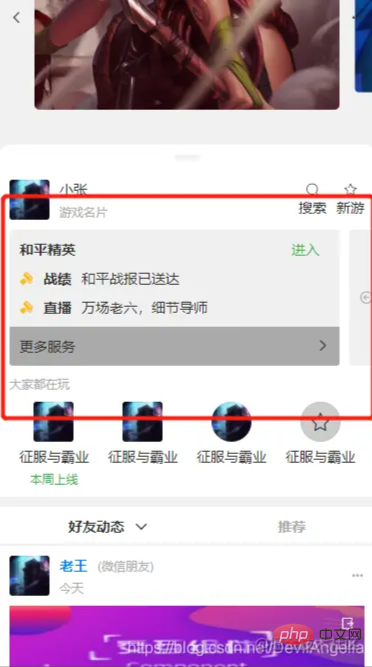
2、手指触摸,并向左滑动
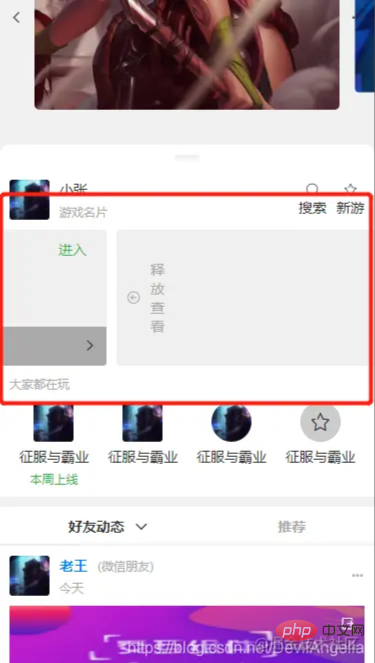

3、松开手指,页面回弹
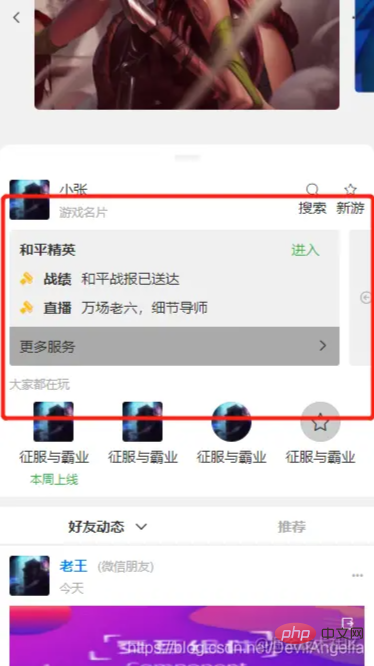
页面采用的colorUI这个css库来写的,自己的css样式写的少,基本全是用他的类,有些地方也懒得去自己调颜色、距离、大小,就直接用colorUI的类,挺方便的。
colorui github下载地址: https://github.com/weilanwl/ColorUI/
第一次写滑动效果,写的不好。 初学者,代码质量堪忧,虚心学习,接受批评指正。
更多编程相关知识,请访问:编程入门!!




