
0

0

初级篇:如何用CSS3制作爱心加载(代码详解)

奋力向前

奋力向前

发布时间:2021-09-16 17:57:19

|

3296人浏览过

|

来源于php中文网

原创

之前的文章《手把手教你使用CSS制作逼真的水波纹效果(附代码)》中,给大家介绍了怎么使用CSS制作逼真的水波纹效果。下面本篇文章给大家介绍如何用CSS3制作爱心加载,我们一起看看怎么做。

初级篇:如何用CSS3制作爱心加载(代码详解)

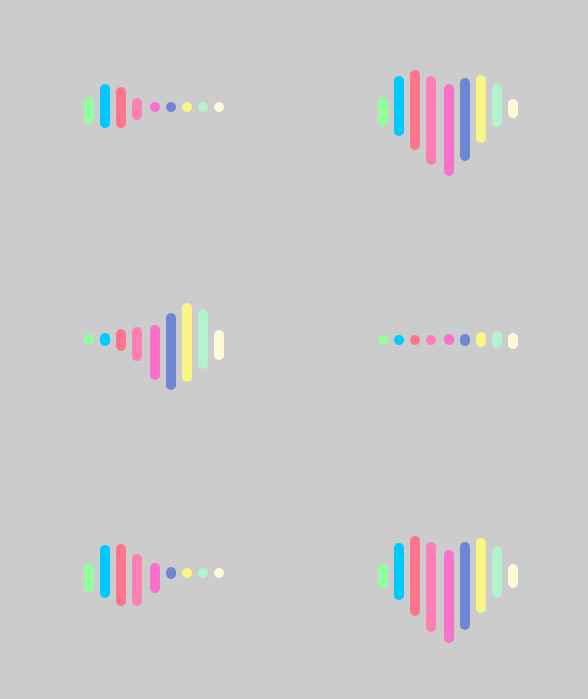
网页中常常有这样的CSS3爱心加载,给大家分享一下看效果图看完效果,我们来研究一下是怎么实现呢,给大家用于讲解html+css图片文字排版的基本流程。

效果大概长这样
21211.gif

1、首先html创建新文件,定义9个div标签。

立即学习前端免费学习笔记(深入)”;

<div class="header-0"></div>
            <div class="header-1"></div>
            <div class="header-2"></div>
            <div class="header-3"></div>
            <div class="header-4"></div>
            <div class="header-5"></div>
            <div class="header-6"></div>
            <div class="header-7"></div>
            <div class="header-8"></div>

2、开始定义css样式来进行修饰添加background-color属性设置背景颜色,宽度设置为100%,高度设置为100%,margin属性设置所有外边距属性。

body {
        width: 100%;
        height: 100%;
        margin: 0;
        background-color: #ccc;
    }

3、container标题文本样式,利用align-items属性居中对齐。

  .container {
        display: flex;
        width: 100%;
        height: 100%;
        justify-content: center;
        align-items: center;

4、header标题文本样式,利用position属性指定一个元素定位。

.header {
        position: relative;
        width: 138px;
        /* display: flex; */

5、class*='header-'标题文本样式,利用position属性定位元素,语法“position: absolute;top: -5px;border-radius: 5px”生成绝对定位的元素。

Face++旷视
Face++旷视

Face⁺⁺ AI开放平台

下载
 [class*='header-']{
        position: absolute;
        width: 10px;
        height: 10px;
        top: -5px;
        border-radius: 5px;
     }

6、header0-8标题文本样式,利用animation(动画)属性绑定到每8个元素,让元素摆动起来。

 .header-0,
    .header-8 {
        animation: header-0 3.2s infinite;
    }
    .header-1,
    .header-7 {
        animation: header-1 3.2s infinite;
    }
    .header-2,
    .header-6 {
        animation: header-2 3.2s infinite;
    }
    .header-3,
    .header-5 {
        animation: header-3 3.2s infinite;
    }
    .header-4 {
        animation: header-4 3.2s infinite;
    }

7、使用4个@keyframes规则,给4个创建动画逐步改变0%是开头动画,100%。

@keyframes header-0 {
    0%,
    10%,
    90%,
    100% {
        height: 10px;
        top: -5px;
    }
    45%,
    55% {
        height: 30px;
        top: -10px;
    }
}
@keyframes header-1 {
    0%,
    10%,
    90%,
    100% {
        height: 10px;
        top: -5px;
    }
    45%,
    55% {
        height: 60px;
        top: -31px;
    }
}
@keyframes header-2 {
    0%,
    10%,
    90%,
    100% {
        height: 10px;
        top: -5px;
    }
    45%,
    55% {
        height: 80px;
        top: -37px;
    }
}
@keyframes header-3 {
    0%,
    10%,
    90%,
    100% {
        height: 10px;
        top: -5px;
    }
    45%,
    55% {
        height: 90px;
        top: -31px;
    }
}
@keyframes header-4 {
    0%,
    10%,
    90%,
    100% {
        height: 10px;
        top: -5px;
    }
    45%,
    55% {
        height: 94px;
        top: -23px;
    }

8、header0-8标题文本样式添加animation-delay属性等待1秒然后开始动画,background属性设置颜色绑定8个元素。

.header-0 {
    left: 0;
    animation-delay: 0s;
    background: #92fe9d;

}
.header-1 {
    left: 16px;
    animation-delay: 0.15s;
    background: #00c9ff;
}
.header-2 {
    left: 32px;
    animation-delay: 0.3s;
    background: #ff758c;
}
.header-3 {
    left: 48px;
    animation-delay: 0.45s;
    background: #ff7eb3;
}
.header-4 {
    left: 66px;
    animation-delay: 0.6s;
    background: #fa71cd;
}
.header-5 {
    left: 82px;
    animation-delay: 0.75s;
    background: #6f86d6;
}
.header-6 {
    left: 98px;
    animation-delay: 0.9s;
    background: #f9f586;
}

.header-7 {
    left: 114px;
    animation-delay: 1.05s;
    background: #b1f4cf;
}
.header-8 {
    left: 130px;
    animation-delay: 1.2s;
    background: #fef9d7;
}

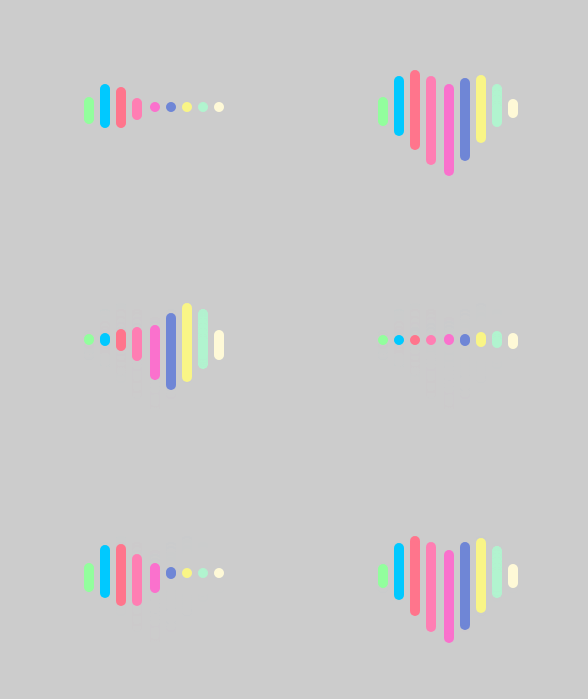
代码效果出来了
21211.gif

下面完整代码

<!DOCTYPE html>
<html>
<head>
    <meta charset="UTF-8">
    <title>爱心加载</title>
    <style>
    html,body {
        width: 100%;
        height: 100%;
        margin: 0;
        background-color: #ccc;
    }
    .container {
        display: flex;
        width: 100%;
        height: 100%;
        justify-content: center;
        align-items: center;

    }
    .header {
        position: relative;
        width: 138px;
        /* display: flex; */
    }
    [class*='header-']{
        position: absolute;
        width: 10px;
        height: 10px;
        top: -5px;
        border-radius: 5px;
        
    }
    .header-0,
    .header-8 {
        animation: header-0 3.2s infinite;
    }
    .header-1,
    .header-7 {
        animation: header-1 3.2s infinite;
    }
    .header-2,
    .header-6 {
        animation: header-2 3.2s infinite;
    }
    .header-3,
    .header-5 {
        animation: header-3 3.2s infinite;
    }
    .header-4 {
        animation: header-4 3.2s infinite;
    }

@keyframes header-0 {
    0%,
    10%,
    90%,
    100% {
        height: 10px;
        top: -5px;
    }
    45%,
    55% {
        height: 30px;
        top: -10px;
    }
}
@keyframes header-1 {
    0%,
    10%,
    90%,
    100% {
        height: 10px;
        top: -5px;
    }
    45%,
    55% {
        height: 60px;
        top: -31px;
    }
}
@keyframes header-2 {
    0%,
    10%,
    90%,
    100% {
        height: 10px;
        top: -5px;
    }
    45%,
    55% {
        height: 80px;
        top: -37px;
    }
}
@keyframes header-3 {
    0%,
    10%,
    90%,
    100% {
        height: 10px;
        top: -5px;
    }
    45%,
    55% {
        height: 90px;
        top: -31px;
    }
}
@keyframes header-4 {
    0%,
    10%,
    90%,
    100% {
        height: 10px;
        top: -5px;
    }
    45%,
    55% {
        height: 94px;
        top: -23px;
    }
}
.header-0 {
    left: 0;
    animation-delay: 0s;
    background: #92fe9d;

}
.header-1 {
    left: 16px;
    animation-delay: 0.15s;
    background: #00c9ff;
}
.header-2 {
    left: 32px;
    animation-delay: 0.3s;
    background: #ff758c;
}
.header-3 {
    left: 48px;
    animation-delay: 0.45s;
    background: #ff7eb3;
}
.header-4 {
    left: 66px;
    animation-delay: 0.6s;
    background: #fa71cd;
}
.header-5 {
    left: 82px;
    animation-delay: 0.75s;
    background: #6f86d6;
}
.header-6 {
    left: 98px;
    animation-delay: 0.9s;
    background: #f9f586;
}

.header-7 {
    left: 114px;
    animation-delay: 1.05s;
    background: #b1f4cf;
}
.header-8 {
    left: 130px;
    animation-delay: 1.2s;
    background: #fef9d7;
}
    </style>
</head>
<body>
    <div class="container">
        <div class="header">
            <div class="header-0"></div>
            <div class="header-1"></div>
            <div class="header-2"></div>
            <div class="header-3"></div>
            <div class="header-4"></div>
            <div class="header-5"></div>
            <div class="header-6"></div>
            <div class="header-7"></div>
            <div class="header-8"></div>
        </div>
    </div>
</body>
</html>

推荐学习:CSS视频教程

热门AI工具

更多
DeepSeek
DeepSeek

幻方量化公司旗下的开源大模型平台

豆包大模型
豆包大模型

字节跳动自主研发的一系列大型语言模型

WorkBuddy
WorkBuddy

腾讯云推出的AI原生桌面智能体工作台

腾讯元宝
腾讯元宝

腾讯混元平台推出的AI助手

文心一言
文心一言

文心一言是百度开发的AI聊天机器人,通过对话可以生成各种形式的内容。

讯飞写作
讯飞写作

基于讯飞星火大模型的AI写作工具,可以快速生成新闻稿件、品宣文案、工作总结、心得体会等各种文文稿

即梦AI
即梦AI

一站式AI创作平台,免费AI图片和视频生成。

ChatGPT
ChatGPT

最最强大的AI聊天机器人程序,ChatGPT不单是聊天机器人,还能进行撰写邮件、视频脚本、文案、翻译、代码等任务。

相关专题

更多
TypeScript类型系统进阶与大型前端项目实践

本专题围绕 TypeScript 在大型前端项目中的应用展开,深入讲解类型系统设计与工程化开发方法。内容包括泛型与高级类型、类型推断机制、声明文件编写、模块化结构设计以及代码规范管理。通过真实项目案例分析,帮助开发者构建类型安全、结构清晰、易维护的前端工程体系,提高团队协作效率与代码质量。

49

2026.03.13

Python异步编程与Asyncio高并发应用实践

本专题围绕 Python 异步编程模型展开,深入讲解 Asyncio 框架的核心原理与应用实践。内容包括事件循环机制、协程任务调度、异步 IO 处理以及并发任务管理策略。通过构建高并发网络请求与异步数据处理案例,帮助开发者掌握 Python 在高并发场景中的高效开发方法,并提升系统资源利用率与整体运行性能。

89

2026.03.12

C# ASP.NET Core微服务架构与API网关实践

本专题围绕 C# 在现代后端架构中的微服务实践展开,系统讲解基于 ASP.NET Core 构建可扩展服务体系的核心方法。内容涵盖服务拆分策略、RESTful API 设计、服务间通信、API 网关统一入口管理以及服务治理机制。通过真实项目案例,帮助开发者掌握构建高可用微服务系统的关键技术,提高系统的可扩展性与维护效率。

276

2026.03.11

Go高并发任务调度与Goroutine池化实践

本专题围绕 Go 语言在高并发任务处理场景中的实践展开,系统讲解 Goroutine 调度模型、Channel 通信机制以及并发控制策略。内容包括任务队列设计、Goroutine 池化管理、资源限制控制以及并发任务的性能优化方法。通过实际案例演示,帮助开发者构建稳定高效的 Go 并发任务处理系统,提高系统在高负载环境下的处理能力与稳定性。

59

2026.03.10

Kotlin Android模块化架构与组件化开发实践

本专题围绕 Kotlin 在 Android 应用开发中的架构实践展开,重点讲解模块化设计与组件化开发的实现思路。内容包括项目模块拆分策略、公共组件封装、依赖管理优化、路由通信机制以及大型项目的工程化管理方法。通过真实项目案例分析,帮助开发者构建结构清晰、易扩展且维护成本低的 Android 应用架构体系,提升团队协作效率与项目迭代速度。

99

2026.03.09

JavaScript浏览器渲染机制与前端性能优化实践

本专题围绕 JavaScript 在浏览器中的执行与渲染机制展开,系统讲解 DOM 构建、CSSOM 解析、重排与重绘原理,以及关键渲染路径优化方法。内容涵盖事件循环机制、异步任务调度、资源加载优化、代码拆分与懒加载等性能优化策略。通过真实前端项目案例,帮助开发者理解浏览器底层工作原理,并掌握提升网页加载速度与交互体验的实用技巧。

105

2026.03.06

Rust内存安全机制与所有权模型深度实践

本专题围绕 Rust 语言核心特性展开,深入讲解所有权机制、借用规则、生命周期管理以及智能指针等关键概念。通过系统级开发案例,分析内存安全保障原理与零成本抽象优势,并结合并发场景讲解 Send 与 Sync 特性实现机制。帮助开发者真正理解 Rust 的设计哲学,掌握在高性能与安全性并重场景中的工程实践能力。

230

2026.03.05

PHP高性能API设计与Laravel服务架构实践

本专题围绕 PHP 在现代 Web 后端开发中的高性能实践展开,重点讲解基于 Laravel 框架构建可扩展 API 服务的核心方法。内容涵盖路由与中间件机制、服务容器与依赖注入、接口版本管理、缓存策略设计以及队列异步处理方案。同时结合高并发场景,深入分析性能瓶颈定位与优化思路,帮助开发者构建稳定、高效、易维护的 PHP 后端服务体系。

619

2026.03.04

AI安装教程大全
AI安装教程大全

2026最全AI工具安装教程专题:包含各版本AI绘图、AI视频、智能办公软件的本地化部署手册。全篇零基础友好,附带最新模型下载地址、一键安装脚本及常见报错修复方案。每日更新,收藏这一篇就够了,让AI安装不再报错!

173

2026.03.04

热门下载

更多
网站特效
/
网站源码
/
网站素材
/
前端模板

精品课程

更多
相关推荐
/
热门推荐
/
最新课程
Sass 教程
Sass 教程

共14课时 | 0.9万人学习

Bootstrap 5教程
Bootstrap 5教程

共46课时 | 3.6万人学习

CSS教程
CSS教程

共754课时 | 43.5万人学习

关于我们 免责申明 举报中心 意见反馈 讲师合作 广告合作 最新更新
php中文网:公益在线php培训,帮助PHP学习者快速成长!
关注服务号 技术交流群
PHP中文网订阅号
每天精选资源文章推送

Copyright 2014-2026 https://www.php.cn/ All Rights Reserved | php.cn | 湘ICP备2023035733号

