



vue实现验证码的方法:1、创建js组件;2、引入组件;3、定义验证对象;4、初始化节点;5、通过validate()方法验证输入的是否正确即可。

本文操作环境:windows7系统、vue2.9.6版,DELL G3电脑。
vue怎么实现验证码
Vue实现验证码功能
具体内容如下
立即学习“前端免费学习笔记(深入)”;
1.效果
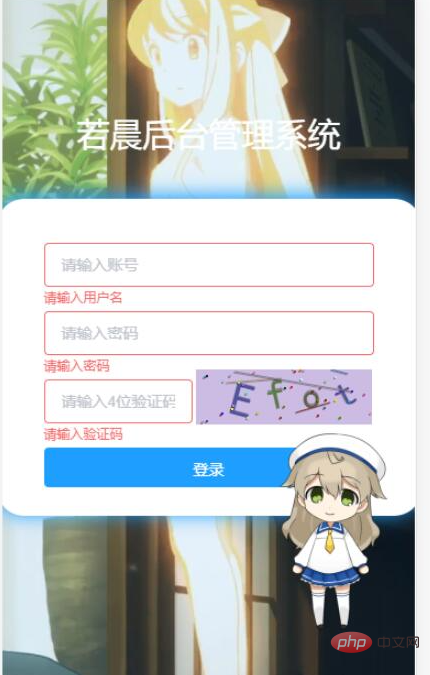
2.代码
2.1 创建js组件
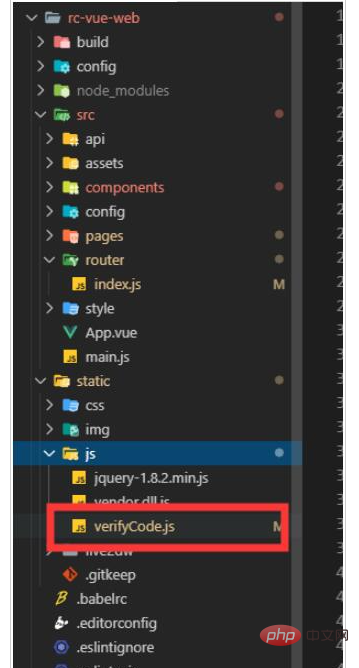
内容
(可直接粘贴过去,需要改宽度和高度,修改_init方法中的宽和高)
function GVerify (options) { // 创建一个图形验证码对象,接收options对象为参数
 this.options = { // 默认options参数值
  id: '', // 容器Id
  canvasId: 'verifyCanvas', // canvas的ID
  width: '80', // 默认canvas宽度
  height: '30', // 默认canvas高度
  type: 'number', // 图形验证码默认类型blend:数字字母混合类型、number:纯数字、letter:纯字母
  code: ''
 }

 if (Object.prototype.toString.call(options) === '[object Object]') { // 判断传入参数类型
  for (var i in options) { // 根据传入的参数,修改默认参数值
   this.options[i] = options[i]
  }
 } else {
  this.options.id = options
 }

 this.options.numArr = '0,1,2,3,4,5,6,7,8,9'.split(',')
 this.options.letterArr = getAllLetter()

 this._init()
 this.refresh()
}

GVerify.prototype = {
 /** 版本号**/
 version: '1.0.0',

 /** 初始化方法**/
 _init: function () {
  var con = document.getElementById(this.options.id)
  var canvas = document.createElement('canvas')
  // this.options.width = con.offsetWidth > 0 ? con.offsetWidth : '30'
  // this.options.height = con.offsetHeight > 0 ? con.offsetHeight : '30'
  this.options.width = '160'
  this.options.height = '50'
  canvas.id = this.options.canvasId
  canvas.width = this.options.width
  canvas.height = this.options.height
  canvas.style.cursor = 'pointer'
  canvas.innerHTML = '您的浏览器版本不支持canvas'
  con.appendChild(canvas)
  var parent = this
  canvas.onclick = function () {
   parent.refresh()
  }
 },

 /** 生成验证码**/
 refresh: function () {
  var canvas = document.getElementById(this.options.canvasId)
  if (canvas.getContext) {
   var ctx = canvas.getContext('2d')
  }
  ctx.textBaseline = 'middle'

  ctx.fillStyle = randomColor(180, 240)
  ctx.fillRect(0, 0, this.options.width, this.options.height)

  if (this.options.type === 'blend') { // 判断验证码类型
   var txtArr = this.options.numArr.concat(this.options.letterArr)
  } else if (this.options.type === 'number') {
   var txtArr = this.options.numArr
  } else {
   var txtArr = this.options.letterArr
  }

  for (var i = 1; i <= 4; i++) {
   var txt = txtArr[randomNum(0, txtArr.length)]
   this.options.code += txt
   ctx.font = randomNum(this.options.height / 2, this.options.height) + 'px SimHei' // 随机生成字体大小
   ctx.fillStyle = randomColor(50, 160) // 随机生成字体颜色
   ctx.shadowOffsetX = randomNum(-3, 3)
   ctx.shadowOffsetY = randomNum(-3, 3)
   ctx.shadowBlur = randomNum(-3, 3)
   ctx.shadowColor = 'rgba(0, 0, 0, 0.3)'
   var x = this.options.width / 5 * i
   var y = this.options.height / 2
   var deg = randomNum(-30, 30)
   /** 设置旋转角度和坐标原点**/
   ctx.translate(x, y)
   ctx.rotate(deg * Math.PI / 180)
   ctx.fillText(txt, 0, 0)
   /** 恢复旋转角度和坐标原点**/
   ctx.rotate(-deg * Math.PI / 180)
   ctx.translate(-x, -y)
  }
  /** 绘制干扰线**/
  for (var i = 0; i < 4; i++) {
   ctx.strokeStyle = randomColor(40, 180)
   ctx.beginPath()
   ctx.moveTo(randomNum(0, this.options.width), randomNum(0, this.options.height))
   ctx.lineTo(randomNum(0, this.options.width), randomNum(0, this.options.height))
   ctx.stroke()
  }
  /** 绘制干扰点**/
  for (var i = 0; i < this.options.width / 4; i++) {
   ctx.fillStyle = randomColor(0, 255)
   ctx.beginPath()
   ctx.arc(randomNum(0, this.options.width), randomNum(0, this.options.height), 1, 0, 2 * Math.PI)
   ctx.fill()
  }
 },

 /** 验证验证码**/
 validate: function (code) {
  var code = code.toLowerCase()
  var v_code = this.options.code.toLowerCase()
  if (code == v_code) {
   return true
  } else {
   return false
  }
 }
}
/** 生成字母数组**/
function getAllLetter () {
 var letterStr = 'a,b,c,d,e,f,g,h,i,j,k,l,m,n,o,p,q,r,s,t,u,v,w,x,y,z,A,B,C,D,E,F,G,H,I,J,K,L,M,N,O,P,Q,R,S,T,U,V,W,X,Y,Z'
 return letterStr.split(',')
}
/** 生成一个随机数**/
function randomNum (min, max) {
 return Math.floor(Math.random() * (max - min) + min)
}
/** 生成一个随机色**/
function randomColor (min, max) {
 var r = randomNum(min, max)
 var g = randomNum(min, max)
 var b = randomNum(min, max)
 return 'rgb(' + r + ',' + g + ',' + b + ')'
}

export {
 GVerify
}
2.2 登录页面
2.2.1 引入组件
[....<script>]

import { GVerify } from '../../static/js/verifyCode';

[export default { ....]
2.2.2 定义验证对象
注意 verifyCode
data: function () {
  return {
   title: '若晨后台管理系统',
   ruleForm: {
    username: '',
    password: '',
    verifyCode: ''
   },
   rules: {
    username: [
     { required: true, message: '请输入用户名', trigger: 'blur' }
    ],
    password: [{ required: true, message: '请输入密码', trigger: 'blur' }],
    verifyCode: [
     { required: true, message: '请输入验证码', trigger: 'blur' }
    ]
   },
   verifyCode: null
  }
 },
2.2.3 初始化节点
<el-form-item prop="verifyCode" class="verifyCodeItemCss">
     <el-input class="verify_css" placeholder="请输入4位验证码" v-model="ruleForm.verifyCode" @keyup.enter.native="submitForm('ruleForm')"></el-input>
     <!--关键 ↓-->
     <div id="v_container"></div>
</el-form-item>
mounted方法中初始化 'v_container' 为div的id
mounted () {
  this.verifyCode = new GVerify('v_container')
}
2.2.4 验证输入的是否正确
通过在data中定义的verifyCode对象的validate()方法,如果输入正确返回true 错误返回 false
var that = this

   // 获取验证码
   var verifyCode = this.ruleForm.verifyCode
   var verifyFlag = this.verifyCode.validate(verifyCode)
   if (!verifyFlag) {
    that.$notify.error({
     title: '系统提示',
     message: '验证码输入错误'
    })
    return;
   } else {
    that.$notify({
     title: '系统提示',
     message: '验证码输入正确',
     type: 'success'
    })
   }
3.全部页面代码
<template>
 <div class="login-wrap">
  <div class="video-bg">
   <video muted="" data-autoplay="" loop="" autoplay="" src="https://gss3.baidu.com/6LZ0ej3k1Qd3ote6lo7D0j9wehsv/tieba-movideo/65886292_9687ec67dfc37bfbf847d82b6b52a276_96e56b0f4bfc.mp4" class="video-tvc" id="video-tvc" data-object-fit="">
   </video>
  </div>
  <div class="ms-title">{{title}}</div>
  <div class="ms-login">
   <el-form :model="ruleForm" :rules="rules" ref="ruleForm" label-width="0px" class="demo-ruleForm">
    <el-form-item prop="username">
     <el-input v-model="ruleForm.username" placeholder="请输入账号"></el-input>
    </el-form-item>
    <el-form-item prop="password">
     <el-input type="password" placeholder="请输入密码" v-model="ruleForm.password" @keyup.enter.native="submitForm('ruleForm')"></el-input>
    </el-form-item>
    <el-form-item prop="verifyCode" class="verifyCodeItemCss">
     <el-input class="verify_css" placeholder="请输入4位验证码" v-model="ruleForm.verifyCode" @keyup.enter.native="submitForm('ruleForm')"></el-input>
     <div id="v_container"></div>
    </el-form-item>
    <div class="login-btn">
     <el-button class="loginBtn" type="primary" @click="submitForm('ruleForm')">登录</el-button>
    </div>
    <!--
        <p style="font-size:12px;line-height:30px;color:#999;">Tips : 用户名和密码随便填。</p>
        -->
   </el-form>
  </div>
 </div>
</template>

<script>
import { GVerify } from '../../static/js/verifyCode';
export default {
 data: function () {
  return {
   title: '若晨后台管理系统',
   ruleForm: {
    username: '',
    password: '',
    verifyCode: ''
   },
   rules: {
    username: [
     { required: true, message: '请输入用户名', trigger: 'blur' }
    ],
    password: [{ required: true, message: '请输入密码', trigger: 'blur' }],
    verifyCode: [
     { required: true, message: '请输入验证码', trigger: 'blur' }
    ]
   },
   verifyCode: null
  }
 },
 mounted () {
  // 随机播放帧数
  this.videoCut()

  this.verifyCode = new GVerify('v_container')
 },
 methods: {
  submitForm (formName) {
   var that = this

   // 获取验证码
   var verifyCode = this.ruleForm.verifyCode
   var verifyFlag = this.verifyCode.validate(verifyCode)
   if (!verifyFlag) {
    that.$notify.error({
     title: '系统提示',
     message: '验证码输入错误'
    })
    return;
   } else {
    that.$notify({
     title: '系统提示',
     message: '验证码输入正确',
     type: 'success'
    })
   }

   this.$refs[formName].validate(valid => {
    if (valid) {
     // 判断是否登录成功

     let param = {
      userName: that.ruleForm.username,
      passWord: that.ruleForm.password
     }

     // this.axios.post(this.$service.user.USER_LOGIN_API.url,param).then(res=>{
     //   console.log("请求成功",res)
     //   if(res.data.data != undefined){
     //     that.$notify({
     //       title: '系统提示',
     //       message: '登录成功',
     //       type:"success"
     //     });
     //           // 存local
     //     localStorage.setItem('ms_username',res.data.data.userNickName);
     //     localStorage.setItem('token',res.data.data.id);
     //     self.$router.push('/index');
     //   }else{
     //     that.$notify.error({
     //     title: '系统提示',
     //     message: '用户账户密码输出错误'
     //     });
     //   }

     localStorage.setItem('ms_username', 'admin')
     localStorage.setItem('token', 'admin')
     that.$router.push('/index')
    } else {
     console.log('error submit!!')
     return false
    }
   })
  },

  videoCut () {
   $('video').on('loadedmetadata', function (event) {
    var duration = Math.ceil(this.duration)
    this.currentTime = Math.round(Math.random() * duration)
   })
  }
 }
}
</script>


<style scoped>
.verify_css {
 width: 45%;
}

.login-wrap {
 position: relative;
 width: 100%;
 height: 100%;
}
.ms-title {
 position: absolute;
 top: 50%;
 width: 100%;
 margin-top: -230px;
 text-align: center;
 font-size: 30px;
 color: #fff;
}

.ms-login {
 position: absolute;
 left: 50%;
 top: 50%;
 width: 300px;
 height: 13rem;
 margin: -150px 0 0 -190px;
 padding: 40px;
 border-radius: 6%;
 background: #fff;
 box-shadow: -2px -2px 17px 1px #1e9fff;
}
.login-btn {
 text-align: center;
}
.login-btn button {
 width: 100%;
 height: 36px;
}
.video-bg {
 min-width: 100%;
 min-height: 100%;
 width: 100%;
 height: 100%;
 opacity: 0.9;
}
video {
 width: 100%;
 height: 100%;
 object-fit: cover;
 /* opacity: 0.6; */
}

.loginBtn:hover {
 box-shadow: 0px 1px 4px rgba(0, 0, 0, 0.3),
  0px 0px 20px rgba(0, 0, 0, 0.1) inset;
}

#v_container {
 width: auto;
 height: auto;
 display: inline-flex;
 position: relative;
 top: 1rem;
 margin-top: -2rem;
}
</style>推荐学习:《最新的5个vue.js视频教程精选》




