



本篇文章带大家继续angular的学习,简单了解一下angular中的自定义服务 notification,希望对大家有所帮助!

在之前的文章中,我们有提到:
service 不仅可以用来处理 API 请求,还有其他的用处
比如,我们这篇文章要讲到的 notification 的实现。【相关教程推荐:《angular教程》】
效果图如下:
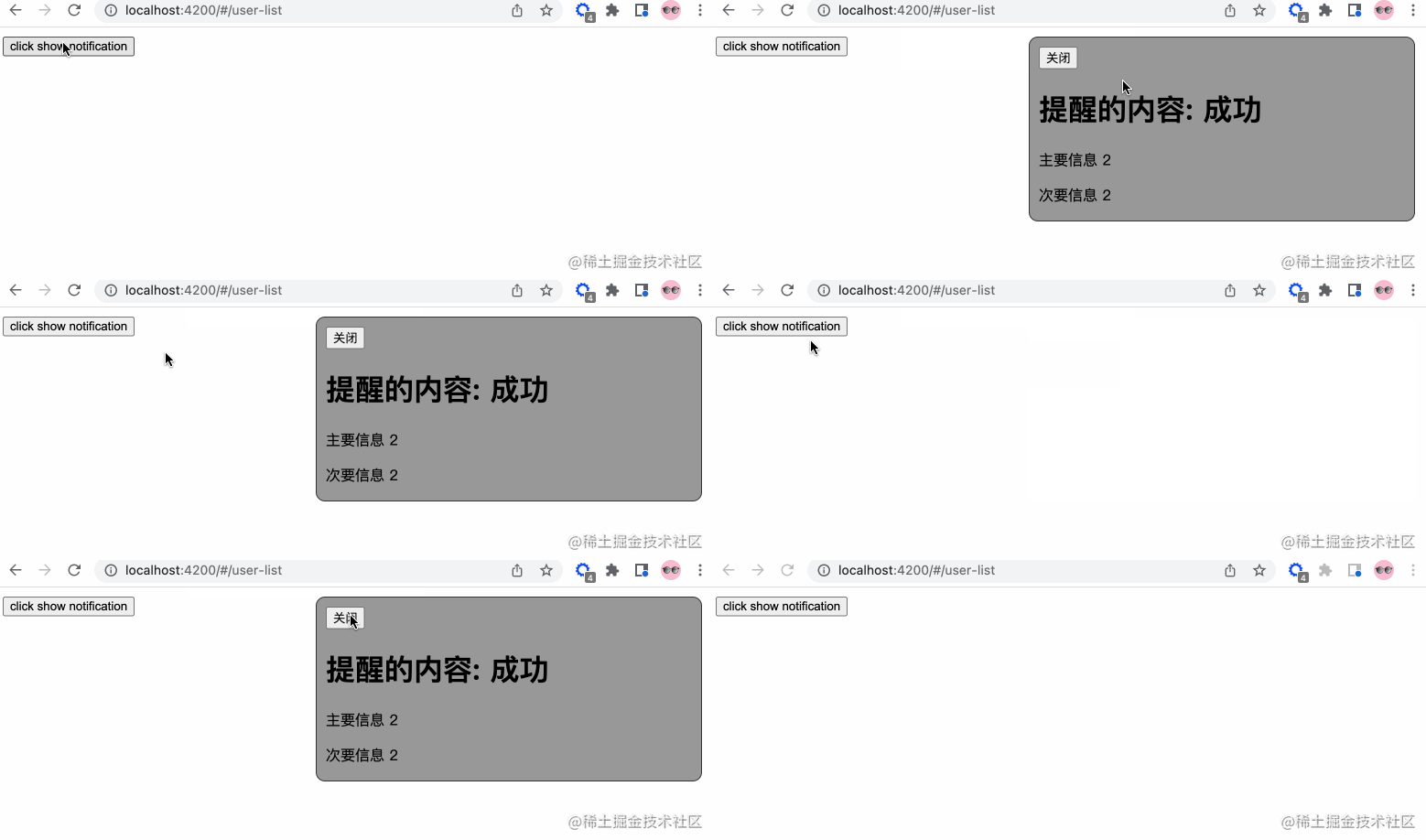
UI 这个可以后期调整
So,我们一步步来分解。
添加服务
我们在 app/services 中添加 notification.service.ts 服务文件(请使用命令行生成),添加相关的内容:
// notification.service.ts

import { Injectable } from '@angular/core';
import { Observable, Subject } from 'rxjs';

// 通知状态的枚举
export enum NotificationStatus {
  Process = "progress",
  Success = "success",
  Failure = "failure",
  Ended = "ended"
}

@Injectable({
  providedIn: 'root'
})
export class NotificationService {

  private notify: Subject = new Subject();
  public messageObj: any = {
    primary: '',
    secondary: ''
  }

  // 转换成可观察体
  public getNotification(): Observable {
    return this.notify.asObservable();
  }

  // 进行中通知
  public showProcessNotification() {
    this.notify.next(NotificationStatus.Process)
  }

  // 成功通知
  public showSuccessNotification() {
    this.notify.next(NotificationStatus.Success)
  }

  // 结束通知
  public showEndedNotification() {
    this.notify.next(NotificationStatus.Ended)
  }

  // 更改信息
  public changePrimarySecondary(primary?: string, secondary?: string) {
    this.messageObj.primary = primary;
    this.messageObj.secondary = secondary
  }

  constructor() { }
}
是不是很容易理解...
我们将 notify 变成可观察物体,之后发布各种状态的信息。
创建组件
我们在 app/components 这个存放公共组件的地方新建 notification 组件。所以你会得到下面的结构:
notification
├── notification.component.html                     // 页面骨架
├── notification.component.scss                     // 页面独有样式
├── notification.component.spec.ts                  // 测试文件
└── notification.component.ts                       // javascript 文件
我们定义 notification 的骨架:
提醒的内容: {{ message }}
{{ primaryMessage }}
{{ secondaryMessage }}

接着,我们简单修饰下骨架,添加下面的样式:
// notification.component.scss

:host {
  position: fixed;
  top: -100%;
  right: 20px;
  background-color: #999;
  border: 1px solid #333;
  border-radius: 10px;
  width: 400px;
  height: 180px;
  padding: 10px;
  // 注意这里的 active 的内容,在出现通知的时候才有
  &.active {
    top: 10px;
  }
  &.success {}
  &.progress {}
  &.failure {}
  &.ended {}
}
success, progress, failure, ended 这四个类名对应 notification service 定义的枚举,可以按照自己的喜好添加相关的样式。
最后,我们添加行为 javascript 代码。
// notification.component.ts

import { Component, OnInit, HostBinding, OnDestroy } from '@angular/core';
// 新的知识点 rxjs
import { Subscription } from 'rxjs';
import {debounceTime} from 'rxjs/operators';
// 引入相关的服务
import { NotificationStatus, NotificationService } from 'src/app/services/notification.service';

@Component({
  selector: 'app-notification',
  templateUrl: './notification.component.html',
  styleUrls: ['./notification.component.scss']
})
export class NotificationComponent implements OnInit, OnDestroy {

  // 防抖时间,只读
  private readonly NOTIFICATION_DEBOUNCE_TIME_MS = 200;

  protected notificationSubscription!: Subscription;
  private timer: any = null;
  public message: string = ''

  // notification service 枚举信息的映射
  private reflectObj: any = {
    progress: "进行中",
    success: "成功",
    failure: "失败",
    ended: "结束"
  }

  @HostBinding('class') notificationCssClass = '';

  public primaryMessage!: string;
  public secondaryMessage!: string;

  constructor(
    private notificationService: NotificationService
  ) { }

  ngOnInit(): void {
    this.init()
  }

  public init() {
    // 添加相关的订阅信息
    this.notificationSubscription = this.notificationService.getNotification()
      .pipe(
        debounceTime(this.NOTIFICATION_DEBOUNCE_TIME_MS)
      )
      .subscribe((notificationStatus: NotificationStatus) => {
        if(notificationStatus) {
          this.resetTimeout();
          // 添加相关的样式
          this.notificationCssClass = `active ${ notificationStatus }`
          this.message = this.reflectObj[notificationStatus]
          // 获取自定义首要信息
          this.primaryMessage = this.notificationService.messageObj.primary;
          // 获取自定义次要信息
          this.secondaryMessage = this.notificationService.messageObj.secondary;
          if(notificationStatus === NotificationStatus.Process) {
            this.resetTimeout()
            this.timer = setTimeout(() => {
              this.resetView()
            }, 1000)
          } else {
            this.resetTimeout();
            this.timer = setTimeout(() => {
              this.notificationCssClass = ''
              this.resetView()
            }, 2000)
          }
        }
      })
  }

  private resetView(): void {
    this.message = ''
  }

  // 关闭定时器
  private resetTimeout(): void {
    if(this.timer) {
      clearTimeout(this.timer)
    }
  }

  // 关闭通知
  public closeNotification() {
    this.notificationCssClass = ''
    this.resetTimeout()
  }

  // 组件销毁
  ngOnDestroy(): void {
    this.resetTimeout();
    // 取消所有的订阅消息
    this.notificationSubscription.unsubscribe()
  }

}
在这里,我们引入了 rxjs 这个知识点,RxJS 是使用 Observables 的响应式编程的库,它使编写异步或基于回调的代码更容易。这是一个很棒的库,接下来的很多文章你会接触到它更多的内容。
这里我们使用了 debounce 防抖函数,函数防抖,就是指触发事件后,在 n 秒后只能执行一次,如果在 n 秒内又触发了事件,则会重新计算函数的执行时间。简单来说:当一个动作连续触发,只执行最后一次。
ps:
throttle节流函数:限制一个函数在一定时间内只能执行一次。
在面试的时候,面试官很喜欢问...
调用
因为这个一个全局的服务,我们在 app.component.html 中调用此组件:
// app.component.html
为了方便演示,我们在 user-list.component.html 中添加按钮,方便触发演示:
// user-list.component.html
触发相关的代码:
// user-list.component.ts

import { NotificationService } from 'src/app/services/notification.service';

// ...
constructor(
  private notificationService: NotificationService
) { }

// 展示通知
showNotification(): void {
  this.notificationService.changePrimarySecondary('主要信息 1');
  this.notificationService.showProcessNotification();
  setTimeout(() => {
    this.notificationService.changePrimarySecondary('主要信息 2', '次要信息 2');
    this.notificationService.showSuccessNotification();
  }, 1000)
}
至此,大功告成,我们成功模拟了 notification 的功能。相关的服务组件我们可以按照实际的需求进行修改,满足业务需求自定义。如果我们是开发内部使用的系统的话,建议使用成熟的 UI 库,它们已经帮我们封装好各种组件和服务,大量节省我们的开发时间。
【完】✅
更多编程相关知识,请访问:编程教学!!




