



react实现图片验证的方法:1、打开相应的react文件;2、通过“randomNum = (min, max) => {...}”方法生成一个随机数;3、通过“drawLine(ctx) {...}”方法绘制干扰线;4、使用“randomCode() {...}”方法随机生成验证码即可。

本教程操作环境:Windows10系统、react18版、Dell G3电脑。
react怎么实现图片验证?
react实现图片验证码
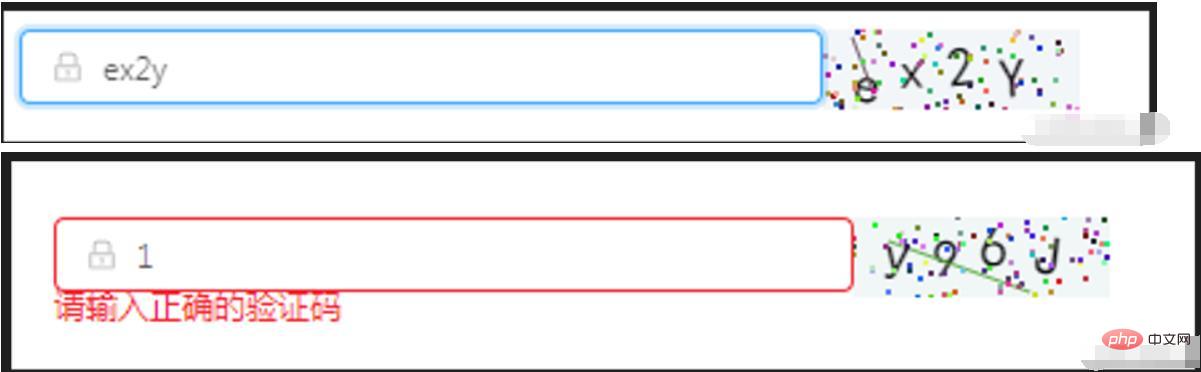
效果如图所示:

import React, { Component } from 'react'
import { Icon, Input, Form } from 'antd';
class OperationalDataManagement extends Component {
  state = {
      code: '',
      codeLength: 4,
      fontSizeMin: 20,
      fontSizeMax: 22,
      backgroundColorMin: 240,
      backgroundColorMax: 250,
      colorMin: 10,
      colorMax: 20,
      lineColorMin: 40,
      lineColorMax: 180,
      contentWidth: 96,
      contentHeight: 38,
      showError: false, // 默认不显示验证码的错误信息
  }
  componentWillMount() {
      this.canvas = React.createRef()
  }
  componentDidMount() {
      this.drawPic()
  }
  // 生成一个随机数
  // eslint-disable-next-line arrow-body-style
  randomNum = (min, max) => {
      return Math.floor(Math.random() * (max - min) + min)
  }
  drawPic = () => {
      this.randomCode()
  }
  // 生成一个随机的颜色
  // eslint-disable-next-line react/sort-comp
  randomColor(min, max) {
      const r = this.randomNum(min, max)
      const g = this.randomNum(min, max)
      const b = this.randomNum(min, max)
      return `rgb(${r}, ${g}, ${b})`
  }
  drawText(ctx, txt, i) {
      ctx.fillStyle = this.randomColor(this.state.colorMin, this.state.colorMax)
      const fontSize = this.randomNum(this.state.fontSizeMin, this.state.fontSizeMax)
      ctx.font = fontSize + 'px SimHei'
      const padding = 10;
      const offset = (this.state.contentWidth - 40) / (this.state.code.length - 1)
      let x = padding;
      if (i > 0) {
          x = padding + (i * offset)
      }
      let y = this.randomNum(this.state.fontSizeMax, this.state.contentHeight - 5)
      if (fontSize > 40) {
          y = 40
      }
      const deg = this.randomNum(-10, 10)
      // 修改坐标原点和旋转角度
      ctx.translate(x, y)
      ctx.rotate(deg * Math.PI / 180)
      ctx.fillText(txt, 0, 0)
      // 恢复坐标原点和旋转角度
      ctx.rotate(-deg * Math.PI / 180)
      ctx.translate(-x, -y)
  }
  drawLine(ctx) {
      // 绘制干扰线
      for (let i = 0; i < 1; i++) {
          ctx.strokeStyle = this.randomColor(this.state.lineColorMin, this.state.lineColorMax)
          ctx.beginPath()
          ctx.moveTo(this.randomNum(0, this.state.contentWidth), this.randomNum(0, this.state.contentHeight))
          ctx.lineTo(this.randomNum(0, this.state.contentWidth), this.randomNum(0, this.state.contentHeight))
          ctx.stroke()
      }
  }
  drawDot(ctx) {
      // 绘制干扰点
      for (let i = 0; i < 100; i++) {
          ctx.fillStyle = this.randomColor(0, 255)
          ctx.beginPath()
          ctx.arc(this.randomNum(0, this.state.contentWidth), this.randomNum(0, this.state.contentHeight), 1, 0, 2 * Math.PI)
          ctx.fill()
      }
  }
  reloadPic = () => {
      this.drawPic()
      this.props.form.setFieldsValue({
          sendcode: '',
      });
  }
  // 输入验证码
  changeCode = e => {
      if (e.target.value.toLowerCase() !== '' && e.target.value.toLowerCase() !== this.state.code.toLowerCase()) {
          this.setState({
              showError: true
          })
      } else if (e.target.value.toLowerCase() === '') {
          this.setState({
              showError: false
          })
      } else if (e.target.value.toLowerCase() === this.state.code.toLowerCase()) {
          this.setState({
              showError: false
          })
      }
  }
  // 随机生成验证码
  randomCode() {
    let random = ''
    // 去掉了I l i o O,可自行添加
    const str = 'QWERTYUPLKJHGFDSAZXCVBNMqwertyupkjhgfdsazxcvbnm1234567890'
    for (let i = 0; i < this.state.codeLength; i++) {
        const index = Math.floor(Math.random() * 57);
        random += str[index];
    }
    this.setState({
        code: random
    }, () => {
        const canvas = this.canvas.current;
        const ctx = canvas.getContext('2d')
        ctx.textBaseline = 'bottom'
        // 绘制背景
        ctx.fillStyle = this.randomColor(this.state.backgroundColorMin, this.state.backgroundColorMax)
        ctx.fillRect(0, 0, this.state.contentWidth, this.state.contentHeight)
        // 绘制文字
        for (let i = 0; i < this.state.code.length; i++) {
            this.drawText(ctx, this.state.code[i], i)
        }
        this.drawLine(ctx)
        this.drawDot(ctx)
    })
  }
  render() {
    const { getFieldDecorator } = this.props.form;
    return (


            {getFieldDecorator('sendcode', {
                rules: [
                  { required: true, message: '请输入校验码!' },
                  {
                    validator: (rule, value, callback) => {
                      if (value) {
                        if(value.toLowerCase()===this.state.code.toLowerCase()){
                              callback()
                              this.setState({
                                sendcode: value,
                                showError: false
                              })
                        } else {
                            callback('请输入正确的验证码')
                            this.setState({
                                showError: true
                            })
                        }
                      } else {
                        callback()
                      }
                    }
                  }
                ],
                  })(
                  }
                      onChange={this.changeCode}
                      placeholder="请输入校验码"
                  />
                )}


    )
  }
}
const WrappedRegistrationForm = Form.create()(OperationalDataManagement);
export default WrappedRegistrationForm;推荐学习:《react视频教程》




