



react实现列表排序的方法:1、将整体设置成一个无序列表,并将子元素放置li内;2、在“Radio.Group”中进行Radio的移动;3、通过arrayMoveImmutable数组重新排序函数实现列表排序即可。

本教程操作环境:Windows10系统、react18.0.0版、Dell G3电脑。
react 自定义拖拽排序列表
一、背景
最近在公司开发时,遇到需要自定表单,并且自定表单中的单选和复选选项需要用户可以自定义拖拽排序,经过一个星期的查阅各种资料和实践,写个总结!
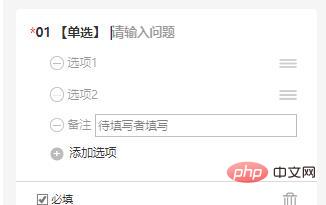
二、实践
经过一系列的查询,发现React Sortable与array-move可以实现这一功能!

附上官网链接React Sortable Higher-order Components
对应git源码 https://www.php.cn/link/64bba6f0069347b04a9de74a54352890
因此借鉴官网案例开始我们的对应的需求开发!
要实现是需要三个主要组件。
1、SortableContainer 整体实现移动的容器
<SortableContainer onSortEnd={onSortEnd} useDragHandle>
    {
     radioList.map((item,index)=>{
         return(
             <SortableItem key={`item-${item.id}`} index={index} item = {item} num={index} />
            )
        })
    }
</SortableContainer>
我们将整体设置成一个无序列表,将子元素放置li内,方便我们进行排序!
  const SortableContainer = sortableContainer(({children}) => {
  return <ul>{children}</ul>;
onSortEnd 移动完毕后执行的函数

 const onSortEnd = ({oldIndex, newIndex}) => {
    var arry1 = arrayMoveImmutable(radioList,oldIndex,newIndex)
    setRadioList(arry1);
  };
useDragHandle 移动的控件(焦点)---如果不需要可以不写
const DragHandle = sortableHandle(() => <UnorderedListOutline style = {{position:'absolute',right:'30px',top:'10px',display:isEdit == true ? '':'none'}}/>);<br/>
2、SortableItem 移动的对象
  const SortableItem = sortableElement(({item,num}) => (
    <li>
      <Radio key = {item.id} value = {item.value} style = {{width:'100%',position:'relative'}} >
      <Input style = {{border:'none',width:'96%'}} placeholder = {`选项${num+1}`} defaultValue={item.value}
        onBlur = {(e)=>{
        item.value = e.target.value
        console.log(item.value);
        setRadioList([...radioList])}}
        readOnly = {isEdit == true ? '':'none'}></Input>
        <DragHandle  />
      <CloseCircleOutline  onClick = {()=>{deleteRadio(item)}} style = {{position:'absolute',right:'10px',top:'10px',display:isEdit == true ? '':'none'}}/>
    </Radio>
    </li>
  ));
对象需要自己构建,我这边由于元素比较多,所以看起来比较复杂。
我们的需求是需要在Radio.Group中进行Radio的移动。所以将Radio封装到SortableItem中。
其中,接受的参数可以自定义,但需要和
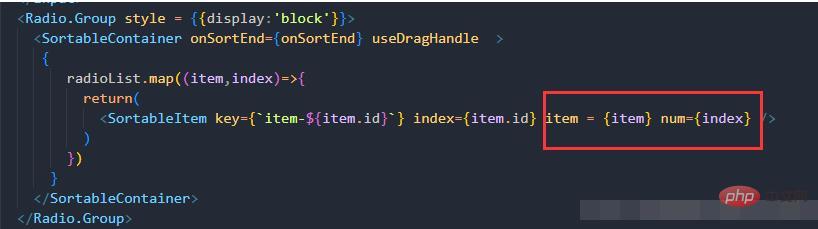
中的名字对应起来,其中不能用index作为参数名。
3、arrayMoveImmutable 数组重新排序函数
 const onSortEnd = ({oldIndex, newIndex}) => {
    var arry1 = arrayMoveImmutable(radioList,oldIndex,newIndex)
    setRadioList(arry1);
  };
arrayMoveImmutable函数接受3个参数,一个是操作的数组,一个是操作元素原本的index,一个是新的操作元素所放置的index。函数返回移动完毕的数组。
三、整体效果
因此,我们的操作步骤结束,整体代码。没有导入的包需要自行npm 安装!
import React, { useState,useEffect } from "react";
import { Input,Radio, Button,Space,Checkbox,Form  } from "antd";
import { DeleteOutline, CloseCircleOutline,UnorderedListOutline } from 'antd-mobile-icons'
import { Dialog, Toast, Divider } from 'antd-mobile'
import {
  sortableContainer,
  sortableElement,
  sortableHandle,
} from 'react-sortable-hoc';
import {arrayMoveImmutable} from 'array-move';

const RadioComponent = (props) => {
  const {onDelete,onListDate,componentIndex,setIsEdit,isEdit,componentTitle,componentDate,previewVisible} = props;
  const [radioList,setRadioList] = useState([])
  const [remark, setRemark] = useState(false)
  const [required, setRequired] = useState(false)
  const [radioTitle, setRadioTitle] = useState('')
  const [id, setId] = useState(2)
  const [radioId, setRadioId] = useState(111211)
  useEffect(()=>{
    if(componentDate !== undefined){
      setRadioList(componentDate)
    }else{
      setRadioList([{id:0,value:''},{id:1,value:''}])
    }
  },[componentIndex])

  useEffect(()=>{
    if(isEdit === false && previewVisible === undefined){
      onListDate(radioList,radioTitle,required,remark)
    }
  },[isEdit])

  const onChange = (e) => {
    console.log(e.target.value);
    setRequired(e.target.checked)
  };
  // 添加备注
  const addRemark = ()=>{
    setRemark(true)
  }
  // 删除备注
  const deleteRemark = ()=>{
    setRemark(false)
  }
  // 删除选项
  const deleteRadio = (item)=>{
    console.log(item);
    if(radioList.indexOf(item) > -1){
      radioList.splice(radioList.indexOf(item),1)
    }
    setRadioList([...radioList])
  }

  const SortableItem = sortableElement(({item,num}) => (
    <li>
      <Radio key = {item.id} value = {item.value} style = {{width:'100%',position:'relative'}} >
      <Input style = {{border:'none',width:'96%'}} placeholder = {`选项${num+1}`} defaultValue={item.value}
        onBlur = {(e)=>{
        item.value = e.target.value
        console.log(item.value);
        setRadioList([...radioList])}}
        readOnly = {isEdit == true ? '':'none'}></Input>
        <DragHandle  />
      <CloseCircleOutline  onClick = {()=>{deleteRadio(item)}} style = {{position:'absolute',right:'10px',top:'10px',display:isEdit == true ? '':'none'}}/>
    </Radio>
    </li>
  ));
  const onSortEnd = ({oldIndex, newIndex}) => {
    var arry1 = arrayMoveImmutable(radioList,oldIndex,newIndex)
    setRadioList(arry1);
  };
  const DragHandle = sortableHandle(() => <UnorderedListOutline  style = {{position:'absolute',right:'30px',top:'10px',display:isEdit == true ? '':'none'}}/>);
  const SortableContainer = sortableContainer(({children}) => {
  return <ul>{children}</ul>;
});
    return(
      <div id = {componentIndex} style = {{backgroundColor:'#fff', paddingTop:'10px',paddingLeft:'20px'}} >
        <span style = {{display: required == true ? '':'none',color:'red',fontSize:'20px'}}>*</span>
          <span style={{fontWeight:'bold',fontSize:'14px'}}>{componentIndex} [单选]</span>
        <Input placeholder = "请输入问题" defaultValue = {radioTitle === ''? componentTitle:componentTitle} autoFocus style = {{width:'80%',border:'none',paddingLfet:'5px'}} onBlur={e=>{setRadioTitle(e.target.value);}} readOnly = {isEdit == true ? '':'none'} >
        </Input>
        <Radio.Group style = {{display:'block'}}>
          <SortableContainer onSortEnd={onSortEnd} useDragHandle  >
           {
              radioList.map((item,index)=>{
                return(
                  <SortableItem key={`item-${item.id}`} index={index} item = {item} num={index} />
                )
              })
            }
          </SortableContainer>
        </Radio.Group>
        <div style = {{display:remark == true ? '':'none',fontSize:'14px'}}>
          <span>备注</span><Input style={{border:'none',width:'80%'}} placeholder='请输入' readOnly = {isEdit == true ? '':'none'}></Input>
          <DeleteOutline onClick={deleteRemark} style={{float:'right',margin:'10px',display:isEdit == true ? '':'none'}}/>
        </div>
        <div style={{display:isEdit == true ? '':'none'}}>
        <Button type="link" onClick={()=>{setRadioList([...radioList,{id:id,value:''}]);setId(id+1);console.log(radioList);}}>添加选项</Button>
          <span style={{display:remark == false ? '':'none'}}>|</span>
        <Button type="link" style={{display:remark == false ? '':'none'}} onClick={addRemark}>添加[备注]项</Button>
        <div style={{borderTop:'1px #d7d7d7 solid ',paddingTop:'10px',marginTop:'15px',marginLeft:'-15px'}}>
        <Checkbox onChange={onChange}>必填</Checkbox>
        <DeleteOutline
          onClick={async () => {
          const result = await Dialog.confirm({
            content: '是否确定删除该题目?',
          })
          if (result) {
            Toast.show({ content: '点击了确认', position: 'bottom' })
            onDelete(componentIndex)
          } else {
            Toast.show({ content: '点击了取消', position: 'bottom' })
          }
          }} style={{float:'right',margin:'10px'}}  />
        </div>
        </div>
      </div>

    )

}
export default RadioComponent
<br/>

推荐学习:《react视频教程》




