



react native设置页面背景色的方法:1、通过“yarn add react-native-linear-gradient”安装“react-native-linear-gradient”组件;2、通过在页面设置“<LinearGradient colors={['#FFD801', '#FF8040', '#F75D59']} style= {...}”来实现背景色。

本教程操作环境:Windows10系统、React Native0.67版、Dell G3电脑。
react native怎么设置页面背景色?
React-Native使用渐变背景色
在 CSS 中使用渐变只需要用 linear-gradient 就可以,但是在 React-Native 项目中却不可以直接通过属性去实现,需要安装一个 react-native-linear-gradient 才可实现。
首先安装组件 react-native-linear-gradient
yarn add react-native-linear-gradient
在页面中使用

import React from 'react';
import {Text, StyleSheet, View, Dimensions} from 'react-native';
import LinearGradinet from 'react-native-linear-gradient';

export default class Home extends React.Component {
  render() {
    return (
     <LinearGradient colors={['#FFD801', '#FF8040', '#F75D59']} style= {styles.linearGradient}>
      <Text style={{color:'#ffffff'}}>
    Sign in with Facebook
      </Text>
</LinearGradient>
    );
  }
}

const styles = StyleSheet.create({
  content: {
           justifyContent:'center',
          alignItems:'center',
          width:200,
          height:50,
          paddingLeft: 15,
          paddingRight: 15,
          borderRadius: 5
  },
});
效果:

LinearGradient的属性:
colors
start/end
locations
- colors
An array of at least two color values that represent gradient colors. Example: ['red', 'blue'] sets gradient from red to blue.
至少2个颜色值,用于颜色渐变。 - start
An optional object of the following type: { x: number, y: number }. Coordinates declare the position that the gradient starts at, as a fraction of the overall size of the gradient, starting from the top left corner. Example: { x: 0.1, y: 0.1 } means that the gradient will start 10% from the top and 10% from the left.
可选的对象,形式如: { x: number, y: number }。坐标宣告了渐变的开始位置。 - end
Same as start, but for the end of the gradient.
和start一样,但是渐变的结束位置。
start和end同时存在,渐变的起点和终点的连线,即使渐变的轨迹方向。
start={{ x : 0.0, y : 0.25 }}end={{ x : 0.5, y : 1.0 }} - locations
An optional array of numbers defining the location of each gradient color stop, mapping to the color with the same index in colors prop. Example: [0.1, 0.75, 1] means that first color will take 0% - 10%, second color will take 10% - 75% and finally third color will occupy 75% - 100%.
可选数组,内容是一些列数字,定义了colors中对应的每个渐变颜色的停止位置。
<LinearGradient    start={{ x : 0.0, y : 0 }} end={{ x : 1, y : 0 }}    locations={[ 0.1, 0.7, 1 ]}    colors={[ 'yellow', 'green', '#ff0000' ]}    style={styles.linearGradient}>    <Text style={styles.buttonText}>
        Sign in with Facebook    </Text></LinearGradient>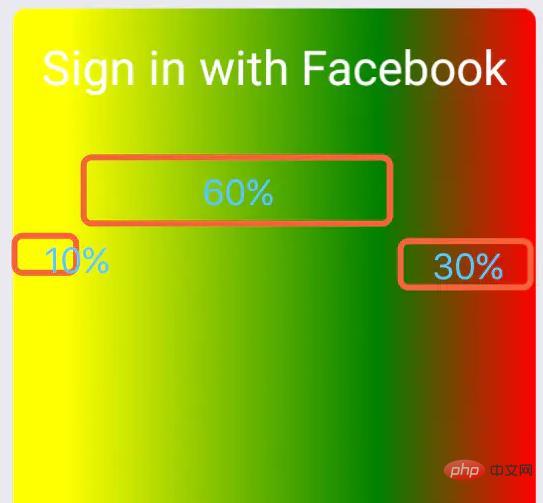
0.1-0.7 是颜色1和颜色2之间渐变的区域,0.7到1是颜色2和颜色3之间渐变的区域。那么还有个0-0.1区域呢?该区域是颜色1。
locations={[ 0, 0.5, 0.8]},则0-0.5是颜色1和颜色2渐变区域,0.5-0.8是颜色2和颜色3的渐变区域,而0.8-1区域的颜色是颜色3。
设置旋转角度
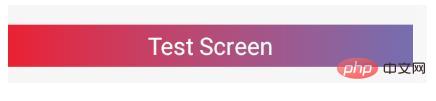
<LinearGradient
    colors={['red', '#375BB1']}
    useAngle={true}// 开启旋转
    angle={90}// 旋转角度,0的时候为从下到上渐变,按照角度顺时针旋转
    angleCenter={{ x: 0.5, y: 0.5}}// 旋转中心
    style={{ height: 50, marginTop: 50 }}>    <View style={{ justifyContent: 'center', alignItems: 'center', height: 50 }}>
        <Text style={{ color: '#ffffff', fontSize: 28 }}>Test Screen</Text>
</View></LinearGradient> 推荐学习:《react视频教程》




