



vue可以做同步,vue实现同步的方法:1、创建一个vue示例文件;2、通过“data(){return { userInfo: {id: '',username: '',password:'',avatar: '',},}}methods:{getUserInfo: function () {let _this = this;this.axios({...})”实现同步即可。
本教程操作环境:Windows10系统、Vue 3版、DELL G3电脑
Vue中同步方法的实现
情景:在实现登录功能的时候,通过表单的用户名,向后台发送请求,前端以为处理完成,继续执行,而还未等后台数据返回,前端获取到的用户数据为空。
立即学习“前端免费学习笔记(深入)”;
实现:等待请求方法返回数据在继续往下执行,及实现同步方法
原代码
data() {
          	return {

                userInfo: {
                    id: '',
                    username: '',
                    password: '',
                    avatar: '',
                },
            }}methods:{
	getUserInfo: function () {
    	let _this = this;
    	this.axios({
        	url: "http://localhost:8088/verifyLogin",
        	headers: {
            	'Content-Type': 'application/json;charset=utf-8'
        	},
        	method: "post",
        	params: {
            	'userName': _this.form.username        	}
    	}).then(function (resp) {
        	_this.userInfo = resp.data;
        	console.log('11111111');
    	})
	},


    onSubmit(formName) {
        let _this = this;
        this.getUserInfo();
		// 为表单绑定验证功能
        this.$refs[formName].validate((valid) => {
            if (valid) {
                console.log("22222222");
                console.log(_this.userInfo);
            } else {
            }
        });
   }}
控制台打印

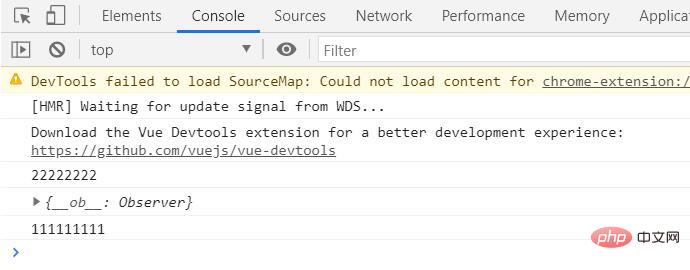
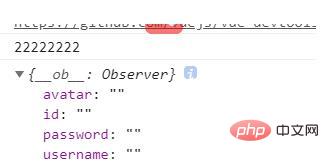
发现问题:1在2面输出,并且从data里面赋值后仍为空
解决方法:使用async/await实现同步
data() {
          	return {

                userInfo: {
                    id: '',
                    username: '',
                    password: '',
                    avatar: '',
                },
            }}methods:{
	async getUserInfo(params) {
    	let _this = this;
    	let isSuccess = false;
    	await this.axios({
        	url: "http://localhost:8088/verifyLogin",
        	headers: {
            	'Content-Type': 'application/json;charset=utf-8'
        	},
        	method: "post",
        	params: {
            	'userName': _this.form.username        	}
    	}).then(function (resp) {
        	_this.userInfo = resp.data;
            console.log("11111111");
        	isSuccess = true;
    	});
    	return isSuccess;
	},

    onSubmit(formName) {
        let _this = this;
        this.getUserInfo(_this.form.username).then(function (result) {
            if (result) {
                // do sth.
                 // 为表单绑定验证功能
                _this.$refs[formName].validate((valid) => {
                    if (valid) {
                            console.log("22222222");
                			console.log(_this.userInfo);
                        }
                    } else {
                    }
                });
            } else {
                // do other sth.
            }
        })

    }}
更改后的结果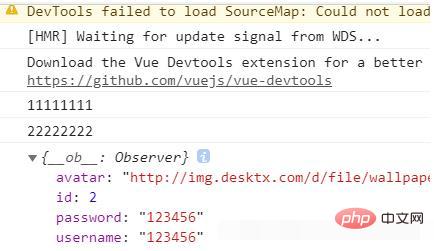
推荐学习:《vue视频教程》




