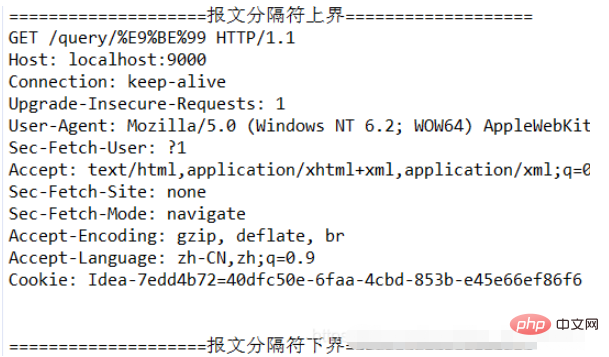
执行结果展示
这里是两个简单的测试展示,最后有更多的测试示例。
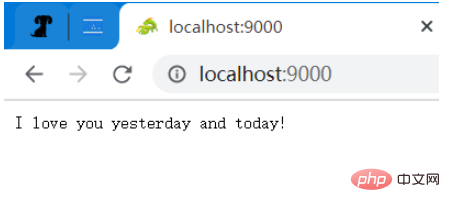
访问根目录,然后会返回一句话(字符串)(注意:那条绿色的龙,只有使用浏览器访问才能看到的,图片本身也是属于一个请求的。) Content-Type: application/json
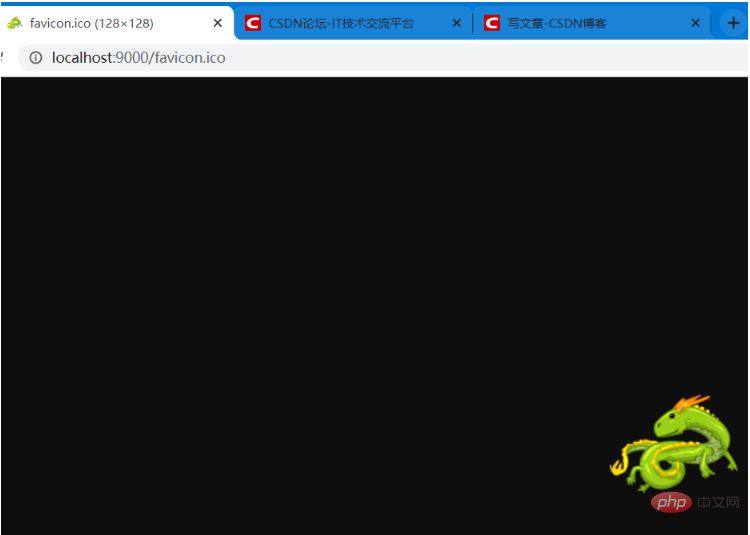
单独访问这张图片,返回值是图片(二进制数据)
立即学习“Java免费学习笔记(深入)”;
请求和响应配置文件
所以只要用户提前设置好请求信息和响应信息,在访问特定请求时,就能返回特定数据。所以,我设计了一个简单的 xml 文件用来配置这些信息,使用 xml 配置比较方便,properties 配置文件无法表达层次信息,只能适用于简单的配置要求。
一个大的 request_and_responses 代表许多个请求和响应配置,每一个 request_and_response 节点代表一个request 请求和 response 响应信息,里面包含了请求和响应的基本信息。GET 方式请求主要包括:(method) 请求方法 和 (path) 请求路径和参数。 POST 方法请求还包括一个 (param )请求参数。 response 包括:content_type(响应内容类型) 和 value(响应内容)。
GET 和 POST 方式的区别在于,GET 方式的请求路径和请求参数是在一起的(都在请求头中,没有请求体),而 POST 方式的请求参数则是在请求体里面的,请求头和请求体之间有一个 CRLF 分隔。
xml 文件
<?xml version="1.0" encoding="UTF-8"?>
<request_and_responses>
	<!-- & 需要使用转义字符 & -->

	<request_and_response>
		<request>
			<method>GET</method>
			<path>/</path>
		</request>
		<response>
			<content_type>application/json</content_type>
			<value>I love you yesterday and today!</value>
		</response>
	</request_and_response>

	<request_and_response>
		<request>
			<method>GET</method>
			<path>/login?account=123&pwd=456</path>
		</request>

		<response>
			<content_type>application/json</content_type>
			<value>success</value>
		</response>
	</request_and_response>

	<request_and_response>
		<request>
			<method>GET</method>
			<path>/query/龙</path>
		</request>
		<response>
			<content_type>application/json</content_type>
			<value>龙是中国等东亚国家古代神话传说生活于海中的神异生物。</value>
		</response>
	</request_and_response>

	<request_and_response>
		<request>
			<method>POST</method>
			<path>/login</path>
			<param>account=123&pwd=456</param>
		</request>

		<response>
			<content_type>application/json</content_type>
			<value>{"result":success}</value>
		</response>
	</request_and_response>


	<request_and_response>
		<request>
			<method>POST</method>
			<path>/login</path>
			<param>workId=12345</param>
		</request>

		<response>
			<content_type>application/json</content_type>
			<value>{"result":"success", "data":{"name":"李工", "sex":"男", "age":35}}</value>
		</response>
	</request_and_response>


	<request_and_response>
		<request>
			<method>GET</method>
			<path>/pictures/husky.jpeg</path>
		</request>

		<response>
			<content_type>image/jpeg</content_type>
			<value>D:/DB/husky.jpeg</value>
		</response>
	</request_and_response>

	<!-- 浏览器访问时的图标 -->
	<request_and_response>
		<request>
			<method>GET</method>
			<path>/favicon.ico</path>
		</request>

		<response>
			<content_type>image/webp</content_type>
			<value>D:/DB/favicon.ico</value>
		</response>
	</request_and_response>

</request_and_responses>
xml 映射的实体类
xml 中的信息,读取到内存中,使用一个实体类来对信息进行封装。
package com.dragon;

public class RequestAndResponse {
	private String method;
	private String path;
	private String param;
	private String content_type;
	private String value;

	public String getMethod() {
		return method;
	}
	public void setMethod(String method) {
		this.method = method;
	}
	public String getPath() {
		return path;
	}
	public void setPath(String path) {
		this.path = path;
	}
	public String getParam() {
		return param;
	}
	public void setParam(String param) {
		this.param = param;
	}
	public String getContent_type() {
		return content_type;
	}
	public void setContent_type(String content_type) {
		this.content_type = content_type;
	}
	public String getValue() {
		return value;
	}
	public void setValue(String value) {
		this.value = value;
	}

	@Override
	public String toString() {
		return "RequestAndResponse [method=" + method + ", path=" + path + ", param=" + param + ", content_type="
				+ content_type + ", value=" + value + "]";
	}
}
xml 文件解析器类
使用一个类专门解析 xml 文件为Java 对象,然后使用一个 List 集合来存储所有的对象。
注:不太会取名字,有点太长了,凑合着看吧!哈哈。 注:这里使用一个xml解析的jar包:dom4j。
package com.dragon;

import java.io.File;
import java.util.ArrayList;
import java.util.Iterator;
import java.util.List;

import org.dom4j.Document;
import org.dom4j.DocumentException;
import org.dom4j.Element;
import org.dom4j.io.SAXReader;

/**
 * 解析 xml 文件中配置的用户请求和响应数据。
 * */
public class RequestAndResponseResolver {
	private static final String method = "method";
	private static final String path = "path";
	private static final String param = "param";
	private static final String content_type = "content_type";
	private static final String value = "value";

	public static List<RequestAndResponse> listRequestAndResponse(String filePath) throws DocumentException{
		File file = new File(filePath);
		SAXReader reader = new SAXReader();
		Document doc = reader.read(file);

		Element root = doc.getRootElement();
		//获取根元素下面所有的子元素,利用迭代器方式
		Iterator<?> it = root.elementIterator();

		List<RequestAndResponse> requestAndResponses = new ArrayList<>();
		while (it.hasNext()) {
			//取出元素request_and_response
			Element e = (Element)it.next();
			//依次遍历每一个 request_and_response,获取相应的信息
			Element request = e.element("request");
			Element response = e.element("response");

			RequestAndResponse requestAndResponse = new RequestAndResponse();
			requestAndResponse.setMethod(request.elementText(method));
			requestAndResponse.setPath(request.elementText(path));
			requestAndResponse.setParam(request.elementText(param));   //GET 方式,这个属性为 null
			requestAndResponse.setContent_type(response.elementText(content_type));
			requestAndResponse.setValue(response.elementText(value));

			requestAndResponses.add(requestAndResponse);
		}

		return requestAndResponses;
	}
}
接收请求并处理的部分
下面介绍一下,使用 Socket 接收并处理请求的部分。 这里涉及的知识和使用 Socket 基本上都是一样的,唯一的区别就是对于内容本身的处理,因为内容本身是包含数据和非数据部分的。(站在 HTTP 的角度,只能看到数据部分。) 使用 Socket 编程,简单来说就是监听一个端口,一旦有连接到来,就进行处理。(这里使用传统的 BIO,NIO 那部分我不会。)
这里我的处理是,使用一个线程池进行处理,每一个连接使用一个线程进行处理。关于这个类(Server 类)的完整代码,见下面。
	public void receive() {
		//使用线程池处理请求
		ExecutorService pool = Executors.newFixedThreadPool(THREAD_NUMBER);

		while (true) {
			try {
				Socket connection = server.accept();
				pool.submit(new UserConnection(connection));
			} catch (IOException e) {
				System.out.println(this.getDate()+" 用户连接断开");
				e.printStackTrace();
			}
		}
	}
接收请求的代码:Server 类
package com.dragon;

import java.io.IOException;
import java.net.ServerSocket;
import java.net.Socket;
import java.text.SimpleDateFormat;
import java.util.Date;
import java.util.concurrent.ExecutorService;
import java.util.concurrent.Executors;

public class Server {
	private static final int THREAD_NUMBER = 10;
	private ServerSocket server;
	private int port;

	public Server(int port) {
		this.port = port;
	}

	//启动服务。
	public void start() {
		try {
			server = new ServerSocket(port);
			System.out.println(this.getDate()+" 服务启动!");
			this.receive();
		} catch (IOException e) {
			System.out.println(this.getDate()+" 服务启动失败!");
			e.printStackTrace();
		}
	}

	public void receive() {
		//使用线程池处理请求
		ExecutorService pool = Executors.newFixedThreadPool(THREAD_NUMBER);

		while (true) {
			try {
				Socket connection = server.accept();
				pool.submit(new UserConnection(connection));
			} catch (IOException e) {
				System.out.println(this.getDate()+" 用户连接断开");
				e.printStackTrace();
			}
		}
	}


	private String getDate() {
		String format = "yyyy-MM-dd HH:mm:ss";
		Date now = new Date();
		SimpleDateFormat dateFormat = new SimpleDateFormat(format);
		return dateFormat.format(now);
	}
}
Http 请求报文从 TCP 的层次来看就是一段二进制数据流(网络是分层的),所以我们可以直接使用 TCP 接收这个流, 因为涉及二进制数据(如文件上传)的报文解析比较复杂,我也不知道该怎么做,所以这里我只是测试简单的不含有二进制文件的请求。)
注:因为具体的解析也是很复杂的,这涉及到 HTTP 报文的结构,但是如果不涉及文件上传,那么整个报文都是一些字符数据,所以一次性读取全部请求报文,然后转成字符串,使用字符串来进行解析。
in = connection.getInputStream();
out = connection.getOutputStream();

//这个数字是随便设置的,因为要一次性读取整个请求报文,不能太小。(但是其实这个也很大了)
byte[] b = new byte[5*1024];
BufferedInputStream input = new BufferedInputStream(in);
int count = input.read(b);
String requestMessage = new String(b, 0, count);
System.out.println("====================报文分隔符上界===================");
System.out.println(requestMessage);
System.out.println("====================报文分隔符下界===================");
处理请求代码:UserConnection 类
请求和响应信息初始化 说明:使用静态初始化块来初始化信息,将用户提前配置好的 xml 信息读取入内存,前面提到过这部分。
// 初始化配置好的信息
	static {
		try {
			requestAndResponses = RequestAndResponseResolver.listRequestAndResponse("./src/com/dragon/request_and_response.xml");
		} catch (DocumentException e) {
			e.printStackTrace();
		}
	}
请求处理和获取响应信息 因为这里是模拟调用,所以我主要关注请求头中的三个部分数据:请求方法(method)、请求路径(path)、请求参数(param)。 对于 GET 方式和 POST 方式分开进行处理,上面简单介绍了 GET 和 POST 的区别(但是不够详细,可以去参考网上的其它资料了解)。
通过这段代码,如果是 GET 方式,就将 RequestAndResponse 对象中的 content_type(返回值数据类型) 和 value (返回值数据)取出来,并赋值给局部变量 content_type 和 value。
if ("GET".compareTo(method) == 0) {
	for (RequestAndResponse r : requestAndResponses) {
		//这里需要对 get 方式时的请求进行解码,因为一些非 ASCII 码字符会被编码,比如汉字。
		path = URLDecoder.decode(path, ENCODE);
		if (r.getMethod().equals(method) && r.getPath().equals(path)) {
			content_type = r.getContent_type();
			value = r.getValue();
			break;
		}
	}
} else {
	//POST 方式,请求参数是在请求体中的,请求头和请求体中间有一个换行符。
	String param = requestMessage.substring(requestMessage.lastIndexOf(CRLF) + 2); //这里是不包括 CRLF 的两个字符的。
	for (RequestAndResponse r : requestAndResponses) {                 //因为这个get方式的 参数为空,所以这里必须是 param 在前。
		if (r.getMethod().equals(method) && r.getPath().equals(path) && param.equals(r.getParam())) {
			content_type = r.getContent_type();
			value = r.getValue();
			break;
		}
	}
}
这里介绍一个知识:URL 中的字符是特定的,不允许中文等字符的出现,所以发送请求时会对中文等字符进行编码,如果直接使用 equals 方法的,当然不会相等了,所以需要先对数据进行解码,然后再调用 equals 方法进行处理。这个是我们平时广泛使用 的东西,有时候使用浏览器可以看到带很多奇怪字符 URL,它们都是被处理过的。
举一个简单的例子:
String str = "我爱你";
String en_str = java.net.URLEncoder.encode(str, "UTF-8");
String de_str = java.net.URLDecoder.decode(en_str, "UTF-8");
System.out.println("编码字符:" + en_str);
System.out.println("解码字符:" + de_str);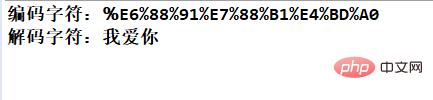
注意:这里有一个特殊的情况,如果发起了没有配置的请求方法和路径,那么程序会出错。所以,这里的 content_type 和 value 有一个默认的值,而且非常有趣!

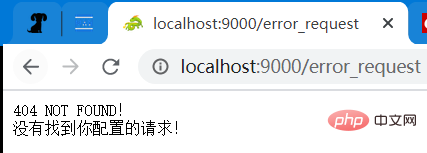
执行响应 响应信息主要关注几点:响应信息长度(Content-Length)(按字节数计算)、响应内容类型(Content-Type)。
虽然发送的请求里不能带二进制文件,但是响应信息是可以返回文件的,而且使用 Content-Length (一次性发送),不使用 Chunked 分块发送(这里我还不太明白,而且只是模拟,应该使用一些简单的小文件。)。
下面是区分响应类型为 json (字符串) 还是 文件(二进制数据) 的代码:
如果是字符串,则 value 的值是字符串的值,如果是文件,则 value 的值为一个具体的本地路径。(不应该使用网络图片,即使修改程序可以做到也没有必要,因为这样就需要依赖网络了。)
	//这里我只处理字符串类和文件类两种响应体
	//响应体
	int len = 0;
	String responseBody = null;   //响应值是 json 数据
	File file = null; //响应值是 文件
	if (content_type.equals("application/json")) {  //如果是 json 数据,否则就是 文件类数据(图片、文档或其它文件)
		 responseBody = value;
		 len = responseBody.getBytes().length;   //响应体的字节数,注意是字节数!
	} else {
		 file = new File(value);
		 len = (int) file.length();
	}
然后就可以准备发送响应数据了,下面是发送响应的代码,注意报文的具体结构。
	//响应头
	responseHeader.append("HTTP/1.1").append(BLANK);
	responseHeader.append(200).append(BLANK);
	responseHeader.append("OK").append(CRLF);
	responseHeader.append("Server:"+"CrazyDragon").append(CRLF);
	responseHeader.append("Date:").append(BLANK).append(date).append(CRLF);
	responseHeader.append("Content-Type:").append(BLANK).append(content_type).append(CRLF);
	responseHeader.append("Content-Length:").append(BLANK).append(len).append(CRLF);
	responseHeader.append(CRLF);

	//如果 字符串变量 responseBody 不为空,则说明返回值是 json 数据(字符串)
	//否则就是文件类的流了。
	if (responseBody != null) {
		String response = responseHeader.toString() + responseBody;
		out.write(response.getBytes("UTF-8"));
	} else {
		out.write(responseHeader.toString().getBytes("UTF-8"));

		int hasRead = 0;
		byte[] data = new byte[4*1024];
		try (BufferedInputStream inputStream = new BufferedInputStream(new FileInputStream(file))) {
			while ((hasRead = inputStream.read(data)) != -1) {
				out.write(data, 0, hasRead);
			}
		}
	}
	out.flush();   //必要的刷新流操作。
User Connection 的完整代码:
package com.dragon;

import java.io.BufferedInputStream;
import java.io.File;
import java.io.FileInputStream;
import java.io.IOException;
import java.io.InputStream;
import java.io.OutputStream;
import java.net.Socket;
import java.net.URLDecoder;
import java.text.SimpleDateFormat;
import java.util.Date;
import java.util.List;
import java.util.Locale;
import java.util.TimeZone;

import org.dom4j.DocumentException;

public class UserConnection implements Runnable{
	private static final String BLANK = " ";
	private static final String CRLF = "
"; //换行符,不能写反了!
	private static final String ENCODE = "UTF-8";
	private static final String default_content_type = "application/json";   //当任何匹配路径都没有时。
	private static final String default_value = "404 NOT FOUND!
没有找到你配置的请求!";


	private static List<RequestAndResponse> requestAndResponses;
	private Socket connection;


	// 初始化配置好的信息
	static {
		try {
			requestAndResponses = RequestAndResponseResolver.listRequestAndResponse("./src/com/dragon/request_and_response.xml");
		} catch (DocumentException e) {
			e.printStackTrace();
		}
	}


	public UserConnection(Socket connection) {
		this.connection = connection;
	}

	@Override
	public void run() {
		InputStream in = null;
		OutputStream out = null;
		try {
			in = connection.getInputStream();
			out = connection.getOutputStream();

			//这个数字是随便设置的,因为要一次性读取整个请求报文,不能太小。(但是其实这个也很大了)
			byte[] b = new byte[5*1024];
			BufferedInputStream input = new BufferedInputStream(in);
			int count = input.read(b);
			String requestMessage = new String(b, 0, count);
			System.out.println("====================报文分隔符上界===================");
			System.out.println(requestMessage);
			System.out.println("====================报文分隔符下界===================");

			//以第一个 换行符 CRLF 为界限取出 请求路径和请求参数
			String requestLine = requestMessage.substring(0, requestMessage.indexOf(CRLF));
			String[] line = requestLine.split("\s");
			String method = line[0];  //考虑大小写。
			String path = line[1];
			//这个数组是有三个元素,最后一个是 协议的版本,这里不需要,就不处理了。
			String content_type = default_content_type;
			String value = default_value;
			if ("GET".compareTo(method) == 0) {
			//	System.out.println("请求方式:" + method + " 请求路径(含参数):" + path);
				for (RequestAndResponse r : requestAndResponses) {
					//这里需要对 get 方式时的请求进行解码,因为一些非 ASCII 码字符会被编码,比如汉字。
					path = URLDecoder.decode(path, ENCODE);
					if (r.getMethod().equals(method) && r.getPath().equals(path)) {
						content_type = r.getContent_type();
						value = r.getValue();
						break;
					}
				}
			} else {
				//POST 方式,请求参数是在请求体中的,请求头和请求体中间有一个换行符。
				String param = requestMessage.substring(requestMessage.lastIndexOf(CRLF) + 2); //这里是不包括 CRLF 的两个字符的。
				for (RequestAndResponse r : requestAndResponses) {                 //因为这个get方式的 参数为空,所以这里必须是 param 在前。
					if (r.getMethod().equals(method) && r.getPath().equals(path) && param.equals(r.getParam())) {
						content_type = r.getContent_type();
						value = r.getValue();
						System.out.println(content_type+" "+value);
						break;
					}
				}
			}

			StringBuilder responseHeader = new StringBuilder();
			String date = this.getDate();


			//这里我只处理字符串类和文件类两种响应体
			//响应体
			int len = 0;
			String responseBody = null;   //响应值是 json 数据
			File file = null; //响应值是 文件
			if (content_type.equals("application/json")) {  //如果是 json 数据,否则就是 文件类数据(图片、文档或其它文件)
				 responseBody = value;
				 len = responseBody.getBytes().length;   //响应体的字节数,注意是字节数!
			} else {
				 file = new File(value);
				 len = (int) file.length();
			}

			//响应头
			responseHeader.append("HTTP/1.1").append(BLANK);
			responseHeader.append(200).append(BLANK);
			responseHeader.append("OK").append(CRLF);
			responseHeader.append("Server:"+"CrazyDragon").append(CRLF);
			responseHeader.append("Date:").append(BLANK).append(date).append(CRLF);
			responseHeader.append("Content-Type:").append(BLANK).append(content_type).append(CRLF);
			responseHeader.append("Content-Length:").append(BLANK).append(len).append(CRLF);
			responseHeader.append(CRLF);

			//如果 字符串变量 responseBody 不为空,则说明返回值是 json 数据(字符串)
			//否则就是文件类的流了。
			if (responseBody != null) {
				String response = responseHeader.toString() + responseBody;
				out.write(response.getBytes("UTF-8"));
			} else {
				out.write(responseHeader.toString().getBytes("UTF-8"));

				int hasRead = 0;
				byte[] data = new byte[4*1024];
				try (BufferedInputStream inputStream = new BufferedInputStream(new FileInputStream(file))) {
					while ((hasRead = inputStream.read(data)) != -1) {
						out.write(data, 0, hasRead);
					}
				}
			}
			out.flush();   //必要的刷新流操作。
		} catch (IOException e) {
			e.printStackTrace();
		} finally {
			try {
				if (in != null)
					in.close();
			} catch (IOException e) {
				e.printStackTrace();
			}
		}
	}

	private String getDate() {
		Date date = new Date();
		SimpleDateFormat format = new SimpleDateFormat("EEE, d MMM yyyy HH:mm:ss 'GMT'", Locale.CHINA);
		format.setTimeZone(TimeZone.getTimeZone("GMT")); // 设置时区为GMT
		return format.format(date);
	}
}
主程序类:Main
package com.dragon;

public class Main {
	public static void main(String[] args) {
		Server server = new Server(9000);
		server.start();
	}
}
更多的测试示例
请求方式:GET 请求路径和参数:/query/龙 预期的响应类型:application/json 预期的响应值:龙是中国等东亚国家古代神话传说生活于海中的神异生物。 测试结果:
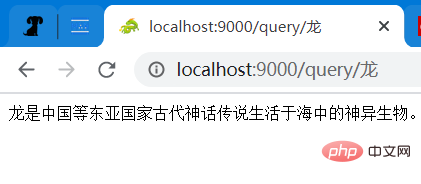
请求方式:GET 请求路径和参数:/login?account=123&pwd=456 预期的响应类型:application/json 预期的响应值:success 测试结果:
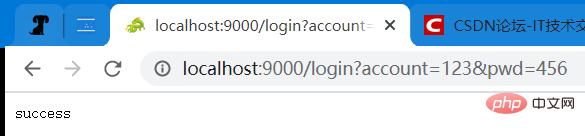
请求方式:GET 请求路径和参数:/pictures/husky.jpeg 预期的响应类型:image/jpeg 预期的响应值:一张图片(地址为:D:/DB/husky.jpeg)
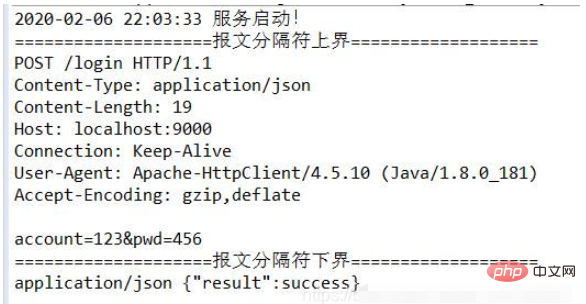
请求方式:POST 请求路径:/login 请求参数:account=123&pwd=456 预期的响应类型:application/json 预期的响应值:{“result”:success} 测试结果:
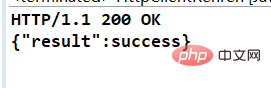
注:这是使用 HttpClient 发送的 POST 请求。

接收到的 POST 请求:
接收到的 GET 请求(含中文参数): /query/龙 注意:“龙” 已经被编码了。