



前言
在一些日常业务中,会遇到一些琐碎文件需要统一打包到一个压缩包中上传,业务方在后台接收到压缩包后自行解压,然后解析相应文件。而且可能涉及安全保密,因此会在压缩时带上密码,要求后台业务可以指定密码进行解压。
应用环境说明:jdk1.8,maven3.x,需要基于java语言实现对zip、rar、7z等常见压缩包的解压工作。
首先关于zip和rar、7z等压缩工具和压缩算法就不在此赘述,下面通过一个数据对比,使用上述三种不同的压缩算法,采用默认的压缩方式,看到压缩的文件大小如下:

转换成图表看得更直观,如下图:
立即学习“Java免费学习笔记(深入)”;
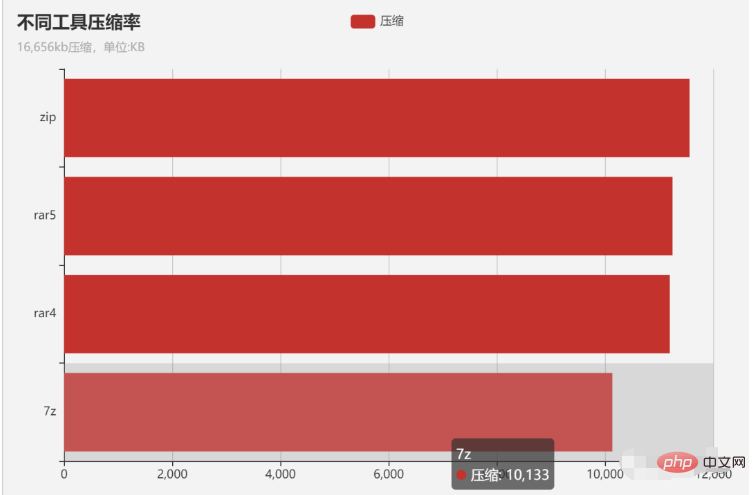
从以上图表可以看到,7z的压缩率是最高,而zip压缩率比较低,rar比zip稍微好点。单纯从压缩率看,7z>rar4>rar5>zip。
实现代码
下面具体说明在java中如何进行相应解压:
1、pom.xml
<project xmlns="http://maven.apache.org/POM/4.0.0"
    xmlns:xsi="http://www.w3.org/2001/XMLSchema-instance"
    xsi:schemaLocation="http://maven.apache.org/POM/4.0.0 http://maven.apache.org/xsd/maven-4.0.0.xsd">
    <modelVersion>4.0.0</modelVersion>
    <groupId>com.yelang</groupId>
    <artifactId>7zdemo</artifactId>
    <version>0.0.1-SNAPSHOT</version>

    <dependencies>
        <dependency>
            <groupId>net.lingala.zip4j</groupId>
            <artifactId>zip4j</artifactId>
            <version>2.9.0</version>
        </dependency>

        <dependency>
            <groupId>net.sf.sevenzipjbinding</groupId>
            <artifactId>sevenzipjbinding</artifactId>
            <version>16.02-2.01</version>
        </dependency>
        <dependency>
            <groupId>net.sf.sevenzipjbinding</groupId>
            <artifactId>sevenzipjbinding-all-platforms</artifactId>
            <version>16.02-2.01</version>
        </dependency>

        <dependency>
            <groupId>org.tukaani</groupId>
            <artifactId>xz</artifactId>
            <version>1.9</version>
        </dependency>
        <dependency>
            <groupId>org.apache.commons</groupId>
            <artifactId>commons-compress</artifactId>
            <version>1.21</version>
        </dependency>

        <!-- https://mvnrepository.com/artifact/org.slf4j/slf4j-api -->
        <dependency>
            <groupId>org.slf4j</groupId>
            <artifactId>slf4j-api</artifactId>
            <version>1.7.30</version>
        </dependency>

        <!-- https://mvnrepository.com/artifact/org.apache.commons/commons-lang3 -->
        <dependency>
            <groupId>org.apache.commons</groupId>
            <artifactId>commons-lang3</artifactId>
            <version>3.12.0</version>
        </dependency>

        <!-- https://mvnrepository.com/artifact/fr.opensagres.xdocreport/xdocreport -->
        <dependency>
            <groupId>fr.opensagres.xdocreport</groupId>
            <artifactId>xdocreport</artifactId>
            <version>1.0.6</version>
        </dependency>

    </dependencies>
</project>
主要依赖的jar包有:zip4j、sevenzipjbinding等。
2、zip解压
 @SuppressWarnings("resource")
private static String unZip(String rootPath, String sourceRarPath, String destDirPath, String passWord) {
        ZipFile zipFile = null;
        String result = "";
        try {
            //String filePath = sourceRarPath;
            String filePath = rootPath + sourceRarPath;
            if (StringUtils.isNotBlank(passWord)) {
                zipFile = new ZipFile(filePath, passWord.toCharArray());
            } else {
                zipFile = new ZipFile(filePath);
            }
            zipFile.setCharset(Charset.forName("GBK"));
            zipFile.extractAll(rootPath + destDirPath);
        } catch (Exception e) {
            log.error("unZip error", e);
            return e.getMessage();
        }
        return result;
    }
3、rar解压
private static String unRar(String rootPath, String sourceRarPath, String destDirPath, String passWord) {
        String rarDir = rootPath + sourceRarPath;
        String outDir = rootPath + destDirPath + File.separator;
        RandomAccessFile randomAccessFile = null;
        IInArchive inArchive = null;
        try {
            // 第一个参数是需要解压的压缩包路径,第二个参数参考JdkAPI文档的RandomAccessFile
            randomAccessFile = new RandomAccessFile(rarDir, "r");
            if (StringUtils.isNotBlank(passWord))
                inArchive = SevenZip.openInArchive(null, new RandomAccessFileInStream(randomAccessFile), passWord);
            else
                inArchive = SevenZip.openInArchive(null, new RandomAccessFileInStream(randomAccessFile));

            ISimpleInArchive simpleInArchive = inArchive.getSimpleInterface();
            for (final ISimpleInArchiveItem item : simpleInArchive.getArchiveItems()) {
                final int[] hash = new int[]{0};
                if (!item.isFolder()) {
                    ExtractOperationResult result;
                    final long[] sizeArray = new long[1];

                    File outFile = new File(outDir + item.getPath());
                    File parent = outFile.getParentFile();
                    if ((!parent.exists()) && (!parent.mkdirs())) {
                        continue;
                    }
                    if (StringUtils.isNotBlank(passWord)) {
                        result = item.extractSlow(data -> {
                            try {
                                IOUtils.write(data, new FileOutputStream(outFile, true));
                            } catch (Exception e) {
                                e.printStackTrace();
                            }
                            hash[0] ^= Arrays.hashCode(data); // Consume data
                            sizeArray[0] += data.length;
                            return data.length; // Return amount of consumed
                        }, passWord);
                    } else {
                        result = item.extractSlow(data -> {
                            try {
                                IOUtils.write(data, new FileOutputStream(outFile, true));
                            } catch (Exception e) {
                                e.printStackTrace();
                            }
                            hash[0] ^= Arrays.hashCode(data); // Consume data
                            sizeArray[0] += data.length;
                            return data.length; // Return amount of consumed
                        });
                    }

                    if (result == ExtractOperationResult.OK) {
                        log.error("解压rar成功...." + String.format("%9X | %10s | %s", hash[0], sizeArray[0], item.getPath()));
                    } else if (StringUtils.isNotBlank(passWord)) {
                        log.error("解压rar成功:密码错误或者其他错误...." + result);
                        return "password";
                    } else {
                        return "rar error";
                    }
                }
            }

        } catch (Exception e) {
            log.error("unRar error", e);
            return e.getMessage();
        } finally {
            try {
                inArchive.close();
                randomAccessFile.close();
            } catch (Exception e) {
                e.printStackTrace();
            }
        }
        return "";
    }
4、7z解压
 private static String un7z(String rootPath, String sourceRarPath, String destDirPath, String passWord) {
        try {
            File srcFile = new File(rootPath + sourceRarPath);//获取当前压缩文件
            // 判断源文件是否存在
            if (!srcFile.exists()) {
                throw new Exception(srcFile.getPath() + "所指文件不存在");
            }
            //开始解压
            SevenZFile zIn = null;
            if (StringUtils.isNotBlank(passWord)) {
                zIn = new SevenZFile(srcFile, passWord.toCharArray());
            }  else {
                zIn = new SevenZFile(srcFile);
            }

            SevenZArchiveEntry entry = null;
            File file = null;
            while ((entry = zIn.getNextEntry()) != null) {
                if (!entry.isDirectory()) {
                    file = new File(rootPath + destDirPath, entry.getName());
                    if (!file.exists()) {
                        new File(file.getParent()).mkdirs();//创建此文件的上级目录
                    }
                    OutputStream out = new FileOutputStream(file);
                    BufferedOutputStream bos = new BufferedOutputStream(out);
                    int len = -1;
                    byte[] buf = new byte[1024];
                    while ((len = zIn.read(buf)) != -1) {
                        bos.write(buf, 0, len);
                    }
                    // 关流顺序,先打开的后关闭
                    bos.close();
                    out.close();
                }
            }

        } catch (Exception e) {
            log.error("un7z is error", e);
            return e.getMessage();
        }
        return "";
    }
5、解压统一入口封装
public static Map<String,Object> unFile(String rootPath, String sourcePath, String destDirPath, String passWord) {
        Map<String,Object> resultMap = new HashMap<String, Object>();
        String result = "";
        if (sourcePath.toLowerCase().endsWith(".zip")) {
            //Wrong password!
            result = unZip(rootPath, sourcePath, destDirPath, passWord);
        } else if (sourcePath.toLowerCase().endsWith(".rar")) {
            //java.security.InvalidAlgorithmParameterException: password should be specified
            result = unRar(rootPath, sourcePath, destDirPath, passWord);
            System.out.println(result);
        } else if (sourcePath.toLowerCase().endsWith(".7z")) {
            //PasswordRequiredException: Cannot read encrypted content from G:ziptestI11111.7z without a password
            result = un7z(rootPath, sourcePath, destDirPath, passWord);
        }

        resultMap.put("resultMsg", 1);
        if (StringUtils.isNotBlank(result)) {
            if (result.contains("password")) resultMap.put("resultMsg", 2);
            if (!result.contains("password")) resultMap.put("resultMsg", 3);
        }
        resultMap.put("files", null);
        //System.out.println(result + "==============");
        return resultMap;
    }
6、测试代码
Long start = System.currentTimeMillis();
unFile("D:/rarfetch0628/","apache-tomcat-8.5.69.zip","apache-tomcat-zip","222");
long end = System.currentTimeMillis();
System.out.println("zip解压耗时==" + (end - start) + "毫秒");
System.out.println("============================================================");

Long rar4start = System.currentTimeMillis();
unFile("D:/rarfetch0628/","apache-tomcat-8.5.69-4.rar","apache-tomcat-rar4","222");
long rar4end = System.currentTimeMillis();
System.out.println("rar4解压耗时==" + (rar4end - rar4start)+ "毫秒");
System.out.println("============================================================");

Long rar5start = System.currentTimeMillis();
unFile("D:/rarfetch0628/","apache-tomcat-8.5.69-5.rar","apache-tomcat-rar5","222");
long rar5end = System.currentTimeMillis();
System.out.println("rar5解压耗时==" + (rar5end - rar5start)+ "毫秒");
System.out.println("============================================================");

Long zstart = System.currentTimeMillis();
unFile("D:/rarfetch0628/","apache-tomcat-8.5.69.7z","apache-tomcat-7z","222");
long zend = System.currentTimeMillis();
System.out.println("7z解压耗时==" + (zend - zstart)+ "毫秒");
System.out.println("============================================================");
在控制台中可以看到以下结果:
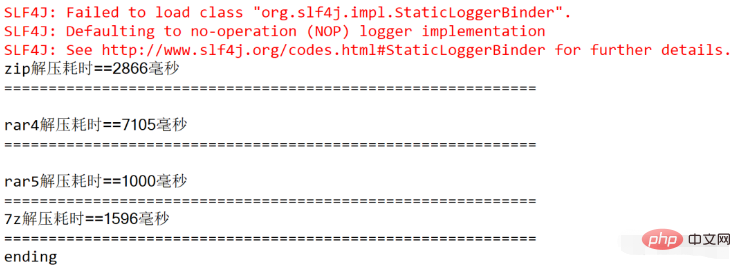

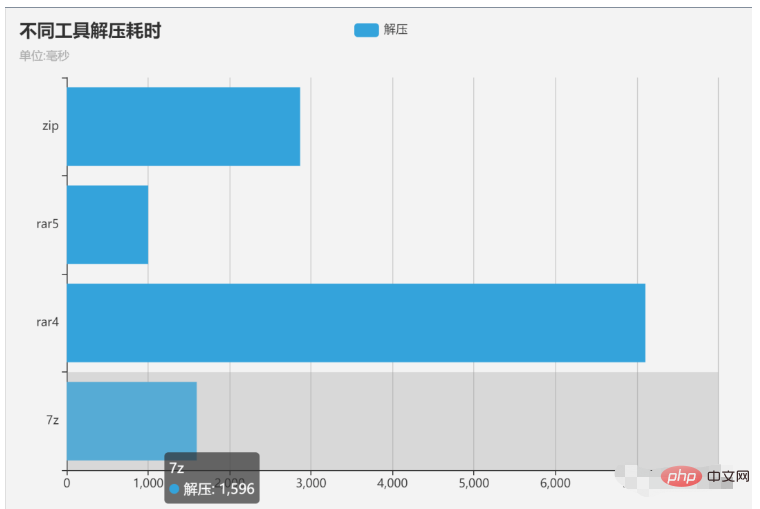
总结:本文采用java语言实现了对zip和rar、7z文件的解压统一算法。并对比了相应的解压速度,支持传入密码进行在线解压。
本文参考代码在补充内容里,不过代码直接运行有问题,这里进行了调整,主要优化的点如下:
1、pom.xml 遗漏了slf4j、commons-lang3、xdocreport等依赖
2、zip路径优化
3、去掉一些无用信息
4、优化异常信息
补充
1.maven引用
<dependency>
   <groupId>net.lingala.zip4j</groupId>
   <artifactId>zip4j</artifactId>
   <version>2.9.0</version>
</dependency>

<dependency>
   <groupId>net.sf.sevenzipjbinding</groupId>
   <artifactId>sevenzipjbinding</artifactId>
   <version>16.02-2.01</version>
</dependency>
<dependency>
   <groupId>net.sf.sevenzipjbinding</groupId>
   <artifactId>sevenzipjbinding-all-platforms</artifactId>
   <version>16.02-2.01</version>
</dependency>

<dependency>
   <groupId>org.tukaani</groupId>
   <artifactId>xz</artifactId>
   <version>1.9</version>
</dependency>
<dependency>
    <groupId>org.apache.commons</groupId>
    <artifactId>commons-compress</artifactId>
    <version>1.21</version>
</dependency>
2.实现代码如下
import fr.opensagres.xdocreport.core.io.IOUtils;
import net.lingala.zip4j.ZipFile;
import net.sf.sevenzipjbinding.*;
import net.sf.sevenzipjbinding.impl.RandomAccessFileInStream;
import net.sf.sevenzipjbinding.simple.ISimpleInArchive;
import net.sf.sevenzipjbinding.simple.ISimpleInArchiveItem;
import org.apache.commons.compress.archivers.sevenz.SevenZArchiveEntry;
import org.apache.commons.compress.archivers.sevenz.SevenZFile;
import org.apache.commons.lang3.StringUtils;
import org.slf4j.Logger;
import org.slf4j.LoggerFactory;
import java.io.*;
import java.util.*;


public class ZipAndRarTools {
    private static final Logger log = LoggerFactory.getLogger(ZipAndRarTools.class);

    /*
    解压zip
    */
    private static String unZip(String rootPath, String sourceRarPath, String destDirPath, String passWord) {
        ZipFile zipFile = null;

        try {

            if (StringUtils.isNotBlank(passWord)) {
                zipFile = new ZipFile(filePath, passWord.toCharArray());
            } else {
                zipFile = new ZipFile(filePath);
            }
            zipFile.extractAll(rootPath + destDirPath);
        } catch (Exception e) {
            log.error("unZip error", e);
            return e.getMessage();
        }
        return "";
    }


    /*
       解压rar rar5
       */
    private static String unRar(String rootPath, String sourceRarPath, String destDirPath, String passWord) {
         /*final File rar = new File(rootPath + sourceRarPath);
       final File destinationFolder = new File(rootPath + destDirPath);
        destinationFolder.mkdir();
        try {
            Junrar.extract(rar, destinationFolder);
        } catch (Exception e) {
            log.error("unRar error", e);
            return e.getMessage();
        }*/

        String rarDir = rootPath + sourceRarPath;
        String outDir = rootPath + destDirPath + File.separator;
        RandomAccessFile randomAccessFile = null;
        IInArchive inArchive = null;
        try {
            // 第一个参数是需要解压的压缩包路径,第二个参数参考JdkAPI文档的RandomAccessFile
            randomAccessFile = new RandomAccessFile(rarDir, "r");
            if (StringUtils.isNotBlank(passWord))
                inArchive = SevenZip.openInArchive(null, new RandomAccessFileInStream(randomAccessFile), passWord);
            else
                inArchive = SevenZip.openInArchive(null, new RandomAccessFileInStream(randomAccessFile));

            ISimpleInArchive simpleInArchive = inArchive.getSimpleInterface();
            for (final ISimpleInArchiveItem item : simpleInArchive.getArchiveItems()) {
                final int[] hash = new int[]{0};
                if (!item.isFolder()) {
                    ExtractOperationResult result;
                    final long[] sizeArray = new long[1];

                    File outFile = new File(outDir + item.getPath());
                    File parent = outFile.getParentFile();
                    if ((!parent.exists()) && (!parent.mkdirs())) {
                        continue;
                    }
                    if (StringUtils.isNotBlank(passWord)) {
                        result = item.extractSlow(data -> {
                            try {
                                IOUtils.write(data, new FileOutputStream(outFile, true));
                            } catch (Exception e) {
                                e.printStackTrace();
                            }
                            hash[0] ^= Arrays.hashCode(data); // Consume data
                            sizeArray[0] += data.length;
                            return data.length; // Return amount of consumed
                        }, passWord);
                    } else {
                        result = item.extractSlow(data -> {
                            try {
                                IOUtils.write(data, new FileOutputStream(outFile, true));
                            } catch (Exception e) {
                                e.printStackTrace();
                            }
                            hash[0] ^= Arrays.hashCode(data); // Consume data
                            sizeArray[0] += data.length;
                            return data.length; // Return amount of consumed
                        });
                    }

                    if (result == ExtractOperationResult.OK) {
                        log.error("解压rar成功...." + String.format("%9X | %10s | %s", hash[0], sizeArray[0], item.getPath()));
                    } else if (StringUtils.isNotBlank(passWord)) {
                        log.error("解压rar成功:密码错误或者其他错误...." + result);
                        return "password";
                    } else {
                        return "rar error";
                    }
                }
            }

        } catch (Exception e) {
            log.error("unRar error", e);
            return e.getMessage();
        } finally {
            try {
                inArchive.close();
                randomAccessFile.close();
            } catch (Exception e) {
                e.printStackTrace();
            }
        }
        return "";
    }


    /*
     * 解压7z
     */
    private static String un7z(String rootPath, String sourceRarPath, String destDirPath, String passWord) {
        try {
            File srcFile = new File(rootPath + sourceRarPath);//获取当前压缩文件
            // 判断源文件是否存在
            if (!srcFile.exists()) {
                throw new Exception(srcFile.getPath() + "所指文件不存在");
            }
            //开始解压
            SevenZFile zIn = null;
            if (StringUtils.isNotBlank(passWord))
                new SevenZFile(srcFile, passWord.getBytes());
            else
                new SevenZFile(srcFile);

            SevenZArchiveEntry entry = null;
            File file = null;
            while ((entry = zIn.getNextEntry()) != null) {
                if (!entry.isDirectory()) {
                    file = new File(rootPath + destDirPath, entry.getName());
                    if (!file.exists()) {
                        new File(file.getParent()).mkdirs();//创建此文件的上级目录
                    }
                    OutputStream out = new FileOutputStream(file);
                    BufferedOutputStream bos = new BufferedOutputStream(out);
                    int len = -1;
                    byte[] buf = new byte[1024];
                    while ((len = zIn.read(buf)) != -1) {
                        bos.write(buf, 0, len);
                    }
                    // 关流顺序,先打开的后关闭
                    bos.close();
                    out.close();
                }
            }

        } catch (Exception e) {
            log.error("un7z is error", e);
            return e.getMessage();
        }
        return "";
    }

    public static void unFile(String rootPath, String sourcePath, String destDirPath, String passWord) {
        String result = "";
        if (sourcePath.toLowerCase().endsWith(".zip")) {
            //Wrong password!
            result = unZip(rootPath, sourcePath, destDirPath, passWord);
        } else if (sourcePath.toLowerCase().endsWith(".rar")) {
            //java.security.InvalidAlgorithmParameterException: password should be specified
            result = unRar(rootPath, sourcePath, destDirPath, passWord);
        } else if (sourcePath.toLowerCase().endsWith(".7z")) {
            //PasswordRequiredException: Cannot read encrypted content from G:ziptestI11111.7z without a password
            result = un7z(rootPath, sourcePath, destDirPath, passWord);
        }

        resultMap.put("resultMsg", 1);
        if (StringUtils.isNotBlank(result)) {
            if (result.contains("password")) resultMap.put("resultMsg", 2);
            if (!result.contains("password")) resultMap.put("resultMsg", 3);
        }
        resultMap.put("files", data);
//        System.out.println(result + "==============");
        return resultMap;
    }


    public static void main(String[] args) {
        getFileList("G:\ziptest\", "测试.zip", "test3333", "密码");
    }

} 




