



引言:
在Sping中,一般使用<bean>这样的元素来配置一个bean,Spring在创建容器的时候会扫描这些配置,根据配置创建对象存放于容器中,然后我们再从容器中取出,或者在配置其他bean的时候作为属性注入。使用bean配置的一个限制是我们必须遵循配置文件的XML Schema定义,这在大多数情况下不会出现问题。但是在一些情况下,我们希望实现更为灵活的bean配置。Spring为此提供了 Custom tag Support,也称为Extensible XML Authoring。通过这个拓展点,我们可以灵活定制自己需要的配置格式。
例如,如果我们使用了责任链设计应用程序,那么我们可能希望用下面的方式来配置责任链:
<chain id="orderChain" class="foo.bar">
    <handler> handler1</handler>
    <hadnler> handler2</handler>
</chain>
档Spring创建容器时,扫描到这样的元素的时候,会根据我们事先的定义实例化一个责任链对象,并填充属性。因此,这种特殊的<chain>标签可以作为<bean>标签以外的另一种形式。借助Spring的Custome Tag,我们完全可以实现这样的bean配置。在产品级的应用框架中,可以实现更为复杂的定制标签元素。作为一个入门级别的介绍,我们定义一个用于配置日期格式化的一个类SimpleDateFormat。当然,使用传统的<bean>完全够用,我们这里只是作为例子。
一个HelloWorld例子:
立即学习“Java免费学习笔记(深入)”;
定制标签的第一步是要定义标签元素的XML结构,也就是采用XSD来元素我们要定制的元素的结构时怎样的。
我们定义如下一个简单的XSD:
<?xml version="1.0" encoding="UTF-8"?>
<xsd:schema xmlns="http://www.mycompany.com/schema/myns"
        xmlns:xsd="http://www.w3.org/2001/XMLSchema"
        xmlns:beans="http://www.springframework.org/schema/beans"
        targetNamespace="http://www.mycompany.com/schema/myns"
        elementFormDefault="qualified"
        attributeFormDefault="unqualified">

    <xsd:import namespace="http://www.springframework.org/schema/beans"/>

    <xsd:element name="dateformat">
        <xsd:complexType>
            <xsd:complexContent>
                <xsd:extension base="beans:identifiedType">
                    <xsd:attribute name="lenient" type="xsd:boolean"/>
                    <xsd:attribute name="pattern" type="xsd:string" use="required"/>
                </xsd:extension>
            </xsd:complexContent>
        </xsd:complexType>
    </xsd:element>
</xsd:schema>
在这个XSD定义中,有一个标签叫dateformat,这就是我们用来替换bean标签的自定义标签。注意到我们导入了Spring本身的beans命名空间,并且在beans:identifiedType基础之上定义dateformat标签。也就是我们这个标签可以像<bean>标签一样拥有id属性。同时我们增加了两个属性lenient和pattern。这有点继承的味道。
定义完XSD之后,我们要告诉Spring遇到这样的标记(命名空间+元素名称)时,如何创建对象。Spring中,完成这个任务的是NamespaceHandler。因此我们需要提供一个NamespaceHandler实现来处理自定义的<dateformat>标签元素。
一个简单的实现如下:
package extensiblexml.customtag;
import org.springframework.beans.factory.xml.NamespaceHandlerSupport;
public class MyNamespaceHandler extends NamespaceHandlerSupport {
	public void init() {
		registerBeanDefinitionParser("dateformat",
				new SimpleDateFormatBeanDefinitionParser());
	}

}
我们在初始化方法中注册了一个Bean定义的解析器,这个解析器就是用来解析定制的配置标签的。
其实现如下:
package extensiblexml.customtag;
import org.springframework.beans.factory.support.BeanDefinitionBuilder;
import org.springframework.beans.factory.xml.AbstractSingleBeanDefinitionParser;
import org.springframework.util.StringUtils;
import org.w3c.dom.Element;
import java.text.SimpleDateFormat;
public class SimpleDateFormatBeanDefinitionParser extends AbstractSingleBeanDefinitionParser {
    protected Class<SimpleDateFormat> getBeanClass(Element element) {
        return SimpleDateFormat.class;
    }
    @SuppressWarnings("deprecation")
	protected void doParse(Element element, BeanDefinitionBuilder bean) {
        // this will never be null since the schema explicitly requires that a value be supplied
        String pattern = element.getAttribute("pattern");
        bean.addConstructorArg(pattern);

        // this however is an optional property
        String lenient = element.getAttribute("lenient");
        if (StringUtils.hasText(lenient)) {
            bean.addPropertyValue("lenient", Boolean.valueOf(lenient));
        }
    }

}
这个解析器的doParse中,实现了解析的具体逻辑,借助Spring提供的支持类,我们可以很轻松地完成解析。以上三个文件放在同一个目录下,即把XSD文件跟Java代码放在同一目录。编码完毕之后,还需要做一些配置工作。我们必须告诉Spring我们准备使用自定义的标签元素,告诉Spring如何解析元素,否则Spring没那么聪明。这里需要2个配置文件,在与代码根路径同一级别下,床垫一个叫META-INF的文件。并在里面创建名为spring.handlers和spring.schemas,用于告诉Spring自定义标签的文档结构以及解析它的类。两个文件内容分别如下:
spring.handlers:
http\://www.mycompany.com/schema/myns=extensiblexml.customtag.MyNamespaceHandler
等号的左边是XSD定义中的targetNamespace属性,右边是NamespaceHandler的全称限定名。
spring.schemas:
http\://www.mycompany.com/schema/myns/myns.xsd=extensiblexml/customtag/myns.xsd
然后像往常一样配置bean,作为简单的测试,我们定义一个bean:
<?xml version="1.0" encoding="UTF-8"?>
<beans xmlns="http://www.springframework.org/schema/beans"
	xmlns:xsi="http://www.w3.org/2001/XMLSchema-instance" xmlns:myns="http://www.mycompany.com/schema/myns"
	xsi:schemaLocation="http://www.springframework.org/schema/beans http://www.springframework.org/schema/beans/spring-beans.xsd
		http://www.mycompany.com/schema/myns http://www.mycompany.com/schema/myns/myns.xsd" >

	<myns:dateformat id="defaultDateFormat" pattern="yyyy-MM-dd HH:mm"
		lenient="true" />
</beans>
在Eclipse中,整个项目结构如下图:
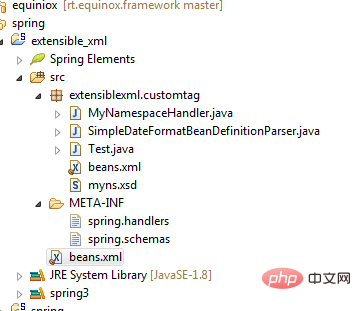
最后我们写个测试类测试一下能否工作:
package extensiblexml.customtag;
import java.text.SimpleDateFormat;
import java.util.Date;
import org.springframework.context.ApplicationContext;
import org.springframework.context.support.ClassPathXmlApplicationContext;
public class Test {
	public static void main(String[] args) {
		ApplicationContext context = new ClassPathXmlApplicationContext(
				"beans.xml");
		SimpleDateFormat format = (SimpleDateFormat) context
				.getBean("defaultDateFormat");
		System.out.println(format.format(new Date()));

	}

}
一切正常,输出如下:

更实用的例子

第一个例子主要是为了举例,在实际中用处不大,我们接着来看一个更复杂的自定义标签。我们自定义一个<fileList>标签,当Spring扫描到这个标签的时候,创建一个指定目录下的File类的集合。另外,可以使用<fileFilter>对该目录的文件进行过滤。
如下:
<core-commons:fileList id="xmlList" directory="src/extensiblexml/example">
    <core-commons:fileFilter>
	<bean class="org.apache.commons.io.filefilter.RegexFileFilter">
	    <constructor-arg value=".*.java" />
	</bean>
    </core-commons:fileFilter>
</core-commons:fileList>上面的bean定义中,我们从“src/extensible/example”目录中筛选出java源码文件。
使用下面的测试迭代输出文件名:
@SuppressWarnings("unchecked")
List<File> fileList = (List<File>) context.getBean("xmlList");
for (File file : fileList) {
	System.out.println(file.getName());
}
输出结果如下:
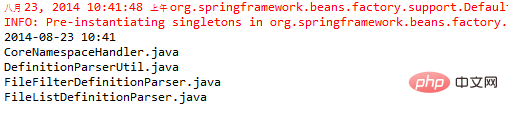
根据第一个例子中的步骤,各部分配置及代码如下:
core-commons-1.0.xsd:
<?xml version="1.0" encoding="UTF-8"?>
<xsd:schema xmlns="http://www.example.com/schema/core-commons-1.0"
	targetNamespace="http://www.example.com/schema/core-commons-1.0"
	xmlns:xsi="http://www.w3.org/2001/XMLSchema-instance"
	xmlns:xsd="http://www.w3.org/2001/XMLSchema"
	xmlns:beans="http://www.springframework.org/schema/beans"
	elementFormDefault="qualified"
	attributeFormDefault="unqualified"
	version="1.0">

	<xsd:import namespace="http://www.springframework.org/schema/beans" schemaLocation="http://www.springframework.org/schema/beans/spring-beans-3.0.xsd"/>

    <xsd:element name="fileList">
        <xsd:complexType>
            <xsd:complexContent>
                <xsd:extension base="beans:identifiedType">
                    <xsd:sequence>
                        <xsd:element ref="fileFilter" minOccurs="0" maxOccurs="1"/>
                        <xsd:element ref="fileList" minOccurs="0" maxOccurs="unbounded"/>
                    </xsd:sequence>
                    <xsd:attribute name="directory" type="xsd:string"/>
                    <xsd:attribute name="scope" type="xsd:string"/>
                </xsd:extension>
            </xsd:complexContent>
        </xsd:complexType>
    </xsd:element>

    <xsd:element name="fileFilter">
        <xsd:complexType>
            <xsd:complexContent>
                <xsd:extension base="beans:identifiedType">
                    <xsd:group ref="limitedType"/>
                    <xsd:attribute name="scope" type="xsd:string"/>
                </xsd:extension>
            </xsd:complexContent>
        </xsd:complexType>
    </xsd:element>

    <xsd:group name="limitedType">
        <xsd:sequence>
            <xsd:choice minOccurs="1" maxOccurs="unbounded">
                <xsd:element ref="beans:bean"/>
                <xsd:element ref="beans:ref"/>
                <xsd:element ref="beans:idref"/>
                <xsd:element ref="beans:value"/>
                <xsd:any minOccurs="0"/>
            </xsd:choice>
        </xsd:sequence>
    </xsd:group>
</xsd:schema>
CoreNamespaceHandler.java:
package extensiblexml.example;
import org.springframework.beans.factory.xml.NamespaceHandlerSupport;
public class CoreNamespaceHandler
    extends NamespaceHandlerSupport
{
    @Override
    public void init() {
        this.registerBeanDefinitionParser("fileList", new FileListDefinitionParser());
        this.registerBeanDefinitionParser("fileFilter", new FileFilterDefinitionParser());
    }
}
FileListDefinitionParser.java:
public class FileListDefinitionParser
	extends AbstractSingleBeanDefinitionParser
{
	/**
	 * The bean that is created for this tag element
	 *
	 * @param element The tag element
	 * @return A FileListFactoryBean
	 */
	@Override
	protected Class<?> getBeanClass(Element element) {
		return FileListFactoryBean.class;
	}

	/**
	 * Called when the fileList tag is to be parsed
	 *
	 * @param element The tag element
	 * @param ctx The context in which the parsing is occuring
	 * @param builder The bean definitions build to use
	 */
	@Override
	protected void doParse(Element element, ParserContext ctx, BeanDefinitionBuilder builder) {
		// Set the directory property
		builder.addPropertyValue("directory", element.getAttribute("directory"));

		// Set the scope
		builder.setScope(element.getAttribute("scope"));

		// We want any parsing to occur as a child of this tag so we need to make
		// a new one that has this as it's owner/parent
		ParserContext nestedCtx = new ParserContext(ctx.getReaderContext(), ctx.getDelegate(), builder.getBeanDefinition());

		// Support for filters
		Element exclusionElem = DomUtils.getChildElementByTagName(element, "fileFilter");
		if (exclusionElem != null) {
			// Just make a new Parser for each one and let the parser do the work
			FileFilterDefinitionParser ff = new FileFilterDefinitionParser();
			builder.addPropertyValue("filters", ff.parse(exclusionElem, nestedCtx));
		}

		// Support for nested fileList
		List<Element> fileLists = DomUtils.getChildElementsByTagName(element, "fileList");
		// Any objects that created will be placed in a ManagedList
		// so Spring does the bulk of the resolution work for us
		ManagedList<Object> nestedFiles = new ManagedList<Object>();
		if (fileLists.size() > 0) {
			// Just make a new Parser for each one and let them do the work
			FileListDefinitionParser fldp = new FileListDefinitionParser();
			for (Element fileListElem : fileLists) {
				nestedFiles.add(fldp.parse(fileListElem, nestedCtx));
			}
		}

		// Support for other tags that return File (value will be converted to file)
		try {
			// Go through any other tags we may find.  This does not mean we support
			// any tag, we support only what parseLimitedList will process
			NodeList nl = element.getChildNodes();
			for (int i=0; i<nl.getLength(); i++) {
				// Parse each child tag we find in the correct scope but we
				// won't support custom tags at this point as it coudl destablize things
				DefinitionParserUtil.parseLimitedList(nestedFiles, nl.item(i), ctx,
					builder.getBeanDefinition(), element.getAttribute("scope"), false);
			}
		}
		catch (Exception e) {
			throw new RuntimeException(e);
		}

		// Set the nestedFiles in the properties so it is set on the FactoryBean
		builder.addPropertyValue("nestedFiles", nestedFiles);

	}

	public static class FileListFactoryBean
		implements FactoryBean<Collection<File>>
	{

		String directory;
		private Collection<FileFilter> filters;
		private Collection<File> nestedFiles;

		@Override
		public Collection<File> getObject() throws Exception {
			// These can be an array list because the directory will have unique's and the nested is already only unique's
			Collection<File> files = new ArrayList<File>();
			Collection<File> results = new ArrayList<File>(0);

			if (directory != null) {
				// get all the files in the directory
				File dir = new File(directory);
				File[] dirFiles = dir.listFiles();
				if (dirFiles != null) {
					files = Arrays.asList(dirFiles);
				}
			}

			// If there are any files that were created from the nested tags,
			// add those to the list of files
			if (nestedFiles != null) {
				files.addAll(nestedFiles);
			}

			// If there are filters we need to go through each filter
			// and see if the files in the list pass the filters.
			// If the files does not pass any one of the filters then it
			// will not be included in the list
			if (filters != null) {
				boolean add;
				for (File f : files) {
					add = true;
					for (FileFilter ff : filters) {
						if (!ff.accept(f)) {
							add = false;
							break;
						}
					}
					if (add) results.add(f);
				}
				return results;
			}

			return files;
		}

		@Override
		public Class<?> getObjectType() {
			return Collection.class;
		}

		@Override
		public boolean isSingleton() {
			return false;
		}

		public void setDirectory(String dir) {
			this.directory = dir;
		}
		public void setFilters(Collection<FileFilter> filters) {
			this.filters = filters;
		}

		/**
		 * What we actually get from the processing of the nested tags
		 * is a collection of files within a collection so we flatten it and
		 * only keep the uniques
		 */
		public void setNestedFiles(Collection<Collection<File>> nestedFiles) {
			this.nestedFiles = new HashSet<File>(); // keep the list unique
			for (Collection<File> nested : nestedFiles) {
				this.nestedFiles.addAll(nested);
			}
		}

	}
}
FileFilterDefinitionParser.java
public class FileFilterDefinitionParser
	extends AbstractSingleBeanDefinitionParser
{

	/**
	 * The bean that is created for this tag element
	 *
	 * @param element The tag element
	 * @return A FileFilterFactoryBean
	 */
	@Override
	protected Class<?> getBeanClass(Element element) {
		return FileFilterFactoryBean.class;
	}

	/**
	 * Called when the fileFilter tag is to be parsed
	 *
	 * @param element The tag element
	 * @param ctx The context in which the parsing is occuring
	 * @param builder The bean definitions build to use
	 */
	@Override
	protected void doParse(Element element, ParserContext ctx, BeanDefinitionBuilder builder) {

		// Set the scope
		builder.setScope(element.getAttribute("scope"));

		try {
			// All of the filters will eventually end up in this list
			// We use a 'ManagedList' and not a regular list because anything
			// placed in a ManagedList object will support all of Springs
			// functionalities and scopes for us, we dont' have to code anything
			// in terms of reference lookups, EL, etc
			ManagedList<Object> filters = new ManagedList<Object>();

			// For each child node of the fileFilter tag, parse it and place it
			// in the filtes list
			NodeList nl = element.getChildNodes();
			for (int i=0; i<nl.getLength(); i++) {
				DefinitionParserUtil.parseLimitedList(filters, nl.item(i), ctx, builder.getBeanDefinition(), element.getAttribute("scope"));
			}

			// Add the filtes to the list of properties (this is applied
			// to the factory beans setFilters below)
			builder.addPropertyValue("filters", filters);
		}
		catch (Exception e) {
			throw new RuntimeException(e);
		}
	}

	public static class FileFilterFactoryBean
		implements FactoryBean<Collection<FileFilter>>
	{

		private final List<FileFilter> filters = new ArrayList<FileFilter>();

		@Override
		public Collection<FileFilter> getObject() throws Exception {
			return filters;
		}

		@Override
		public Class<?> getObjectType() {
			return Collection.class;
		}

		@Override
		public boolean isSingleton() {
			return false;
		}

		/**
		 * Go through the list of filters and convert the String ones
		 * (the ones that were set with <value> and make them NameFileFilters
		 */
		public void setFilters(Collection<Object> filterList) {
			for (Object o : filterList) {
				if (o instanceof String) {
					filters.add(new NameFileFilter(o.toString()));
				}
				else if (o instanceof FileFilter) {
					filters.add((FileFilter)o);
				}
			}
		}

	}
}
DefinitionParserUtil.java:
package extensiblexml.example;

import org.springframework.beans.factory.config.BeanDefinition;
import org.springframework.beans.factory.config.BeanDefinitionHolder;
import org.springframework.beans.factory.support.BeanDefinitionReaderUtils;
import org.springframework.beans.factory.support.DefaultListableBeanFactory;
import org.springframework.beans.factory.support.ManagedList;
import org.springframework.beans.factory.xml.BeanDefinitionParserDelegate;
import org.springframework.beans.factory.xml.ParserContext;
import org.springframework.expression.Expression;
import org.springframework.expression.ExpressionParser;
import org.springframework.expression.spel.standard.SpelExpressionParser;
import org.w3c.dom.Element;
import org.w3c.dom.Node;

public class DefinitionParserUtil {

	/**
	 * Parses the children of the passed in ParentNode for the following tags:
	 * <br/>
	 * value
	 * ref
	 * idref
	 * bean
	 * property
	 * *custom*
	 * <p/>
	 *
	 * The value tag works with Spring EL even in a Spring Batch scope="step"
	 *
	 * @param objects The list of resultings objects from the parsing (passed in for recursion purposes)
	 * @param parentNode The node who's children should be parsed
	 * @param ctx The ParserContext to use
	 * @param parentBean The BeanDefinition of the bean who is the parent of the parsed bean
	 * 		(i.e. the Bean that is the parentNode)
	 * @param scope The scope to execute in.  Checked if 'step' to provide Spring EL
	 * 		support in a Spring Batch env
	 * @throws Exception
	 */
	public static void parseLimitedList(ManagedList<Object> objects, Node node,
		ParserContext ctx, BeanDefinition parentBean, String scope)
		throws Exception
	{
		parseLimitedList(objects, node, ctx, parentBean, scope, true);
	}

	/**
	 * Parses the children of the passed in ParentNode for the following tags:
	 * <br/>
	 * value
	 * ref
	 * idref
	 * bean
	 * property
	 * *custom*
	 * <p/>
	 *
	 * The value tag works with Spring EL even in a Spring Batch scope="step"
	 *
	 * @param objects The list of resultings objects from the parsing (passed in for recursion purposes)
	 * @param parentNode The node who's children should be parsed
	 * @param ctx The ParserContext to use
	 * @param parentBean The BeanDefinition of the bean who is the parent of the parsed bean
	 * 		(i.e. the Bean that is the parentNode)
	 * @param scope The scope to execute in.  Checked if 'step' to provide Spring EL
	 * 		support in a Spring Batch env
	 * @param supportCustomTags Should we support custom tags within our tags?
	 * @throws Exception
	 */
	@SuppressWarnings("deprecation")
	public static void parseLimitedList(ManagedList<Object> objects, Node node,
		ParserContext ctx, BeanDefinition parentBean, String scope, boolean supportCustomTags)
		throws Exception
	{
		// Only worry about element nodes
		if (node.getNodeType() == Node.ELEMENT_NODE) {
			Element elem = (Element)node;
			String tagName = node.getLocalName();

			if (tagName.equals("value")) {
				String val = node.getTextContent();
				// to get around an issue with Spring Batch not parsing Spring EL
				// we will do it for them
				if (scope.equals("step")
					&& (val.startsWith("#{") && val.endsWith("}"))
					&& (!val.startsWith("#{jobParameters"))
					)
				{
					// Set up a new EL parser
					ExpressionParser parser = new SpelExpressionParser();
					// Parse the value
					Expression exp = parser.parseExpression(val.substring(2, val.length()-1));
					// Place the results in the list of created objects
					objects.add(exp.getValue());
				}
				else {
					// Otherwise, just treat it as a normal value tag
					objects.add(val);
				}
			}
			// Either of these is a just a lookup of an existing bean
			else if (tagName.equals("ref") || tagName.equals("idref")) {
				objects.add(ctx.getRegistry().getBeanDefinition(node.getTextContent()));
			}
			// We need to create the bean
			else if (tagName.equals("bean")) {
				// There is no quick little util I could find to create a bean
				// on the fly programmatically in Spring and still support all
				// Spring functionality so basically I mimic what Spring actually
				// does but on a smaller scale.  Everything Spring allows is
				// still supported

				// Create a factory to make the bean
				DefaultListableBeanFactory beanFactory = new DefaultListableBeanFactory();
				// Set up a parser for the bean
				BeanDefinitionParserDelegate pd = new BeanDefinitionParserDelegate(ctx.getReaderContext());
				// Parse the bean get its information, now in a DefintionHolder
				BeanDefinitionHolder bh = pd.parseBeanDefinitionElement(elem, parentBean);
				// Register the bean will all the other beans Spring is aware of
				BeanDefinitionReaderUtils.registerBeanDefinition(bh, beanFactory);
				// Get the bean from the factory.  This will allows Spring
				// to do all its work (EL processing, scope, etc) and give us
				// the actual bean itself
				Object bean = beanFactory.getBean(bh.getBeanName());
				objects.add(bean);
			}
			/*
			 * This is handled a bit differently in that it actually sets the property
			 * on the parent bean for us based on the property
			 */
			else if (tagName.equals("property")) {
				BeanDefinitionParserDelegate pd = new BeanDefinitionParserDelegate(ctx.getReaderContext());
				// This method actually set eh property on the parentBean for us so
				// we don't have to add anything to the objects object
				pd.parsePropertyElement(elem, parentBean);
			}
			else if (supportCustomTags) {
				// handle custom tag
				BeanDefinitionParserDelegate pd = new BeanDefinitionParserDelegate(ctx.getReaderContext());
				BeanDefinition bd = pd.parseCustomElement(elem, parentBean);
				objects.add(bd);
			}
		}
	}
}
spring.schemas
http\://www.mycompany.com/schema/myns/myns.xsd=extensiblexml/customtag/myns.xsd
http\://www.example.com/schema/core-commons-1.0.xsd=extensiblexml/example/core-commons-1.0.xsd
spring.handlers
http\://www.mycompany.com/schema/myns=extensiblexml.customtag.MyNamespaceHandler
http\://www.example.com/schema/core-commons-1.0=extensiblexml.example.CoreNamespaceHandler
小结:
要自定义Spring的配置标签,需要一下几个步骤:
使用XSD定义XML配置中标签元素的结构(myns.XSD)
提供该XSD命名空间的处理类,它可以处理多个标签定义(MyNamespaceHandler.java)
为每个标签元素的定义提供解析类。(SimpleDateFormatBeanDefinitionParser.java)
两个特殊文件通知Spring使用自定义标签元素(spring.handlers 和spring.schemas)





