程序环境
在程序中导入jar,如下两种方法:
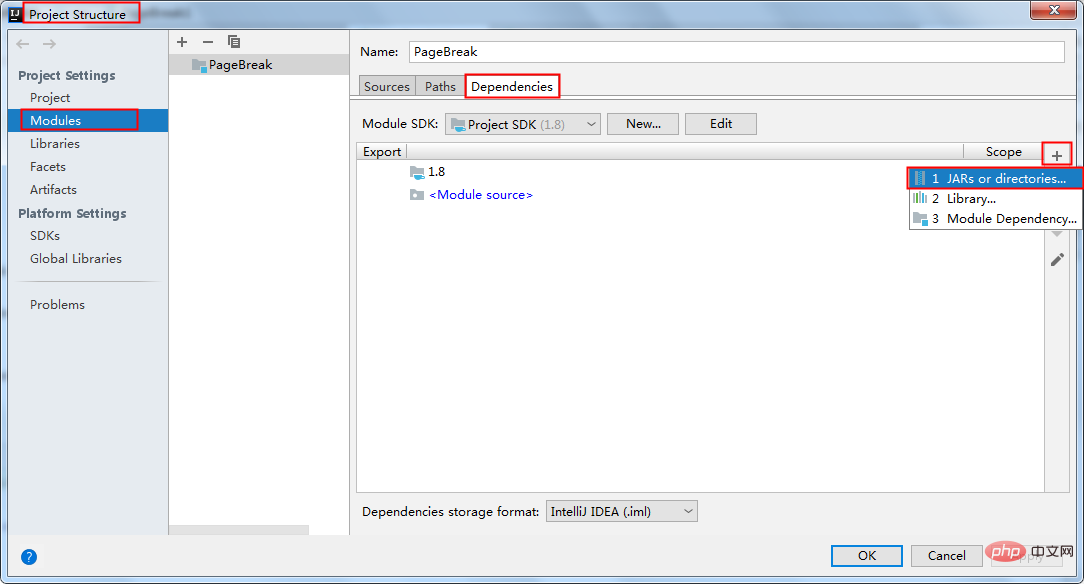
方法1:手动引入。将 Free Spire.Doc for Java 下载到本地,解压,找到lib文件夹下的Spire.Doc.jar文件。在IDEA中打开如下界面,将本地路径中的jar文件引入Java程序:
方法2(推荐使用):通过 Maven 仓库下载。如下配置pom.xml:
<repositories>
        <repository>
            <id>com.e-iceblue</id>
            <url>https://repo.e-iceblue.cn/repository/maven-public/</url>
        </repository>
    </repositories>
<dependencies>
    <dependency>
        <groupId>e-iceblue</groupId>
        <artifactId>spire.doc.free</artifactId>
        <version>5.2.0</version>
    </dependency>
</dependencies>
插入分页符
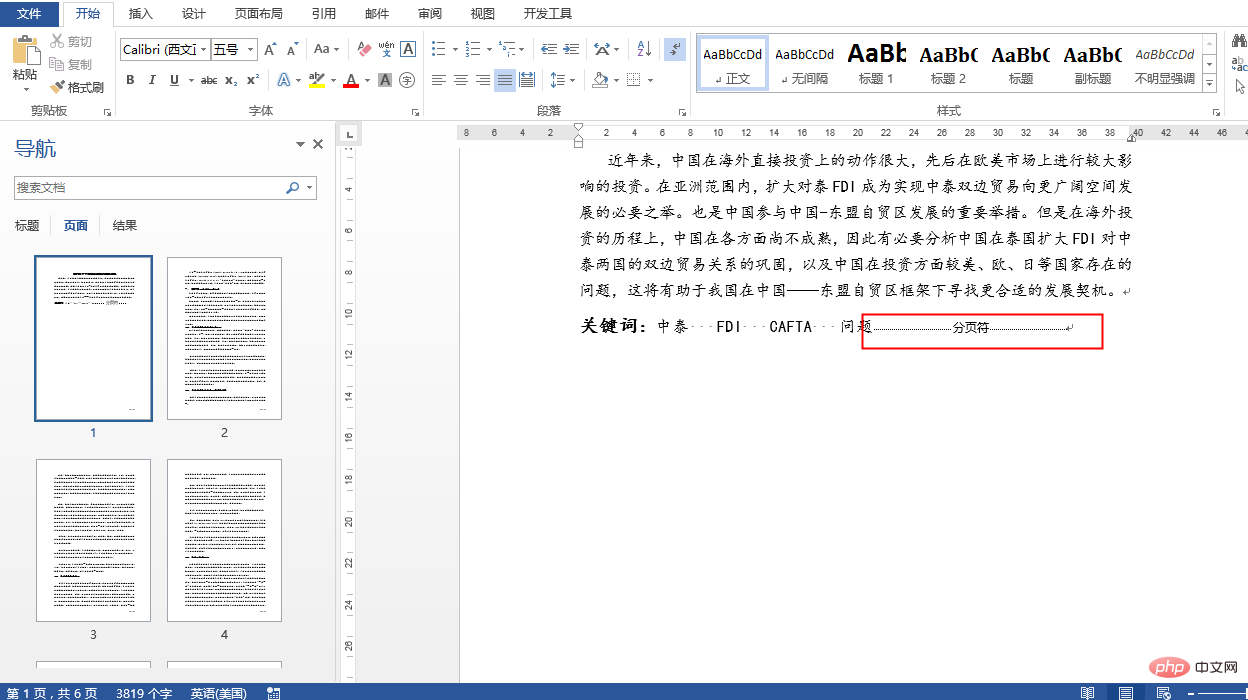
1.在指定段落后插入分页符
Java
立即学习“Java免费学习笔记(深入)”;
import com.spire.doc.Document;
import com.spire.doc.FileFormat;
import com.spire.doc.Section;
import com.spire.doc.documents.BreakType;
import com.spire.doc.documents.Paragraph;

public class PageBreak1 {
    public static void main(String[] args) {
        //创建Document类的对象
        Document document = new Document();
        //加载Word文档
        document.loadFromFile("test.docx");

        //获取第一节
        Section section = document.getSections().get(0);
        //获取第一节中的第3个段落
        Paragraph paragraph = section.getParagraphs().get(2);

        //添加分页符
        paragraph.appendBreak(BreakType.Page_Break);

        //保存文档
        document.saveToFile("output.docx", FileFormat.Docx_2013);
    }
}
效果图
Android 开发者指南 第一部分:入门
下载
Android文档-开发者指南-第一部分:入门-中英文对照版 Android提供了丰富的应用程序框架,它允许您在Java语言环境中构建移动设备的创新应用程序和游戏。在左侧导航中列出的文档提供了有关如何使用Android的各种API来构建应用程序的详细信息。第一部分:Introduction(入门) 0、Introduction to Android(引进到Android) 1、Application Fundamentals(应用程序基础) 2、Device Compatibility(设备兼容性) 3、
2.在指定文本位置后插入分页符
Java
立即学习“Java免费学习笔记(深入)”;
import com.spire.doc.Break;
import com.spire.doc.Document;
import com.spire.doc.FileFormat;
import com.spire.doc.documents.BreakType;
import com.spire.doc.documents.Paragraph;
import com.spire.doc.documents.TextSelection;
import com.spire.doc.fields.TextRange;

public class PageBreak2 {
    public static void main(String[] args) {
        //创建Document类的实例
        Document document = new Document();

        //加载Word文档
        document.loadFromFile("test.docx");

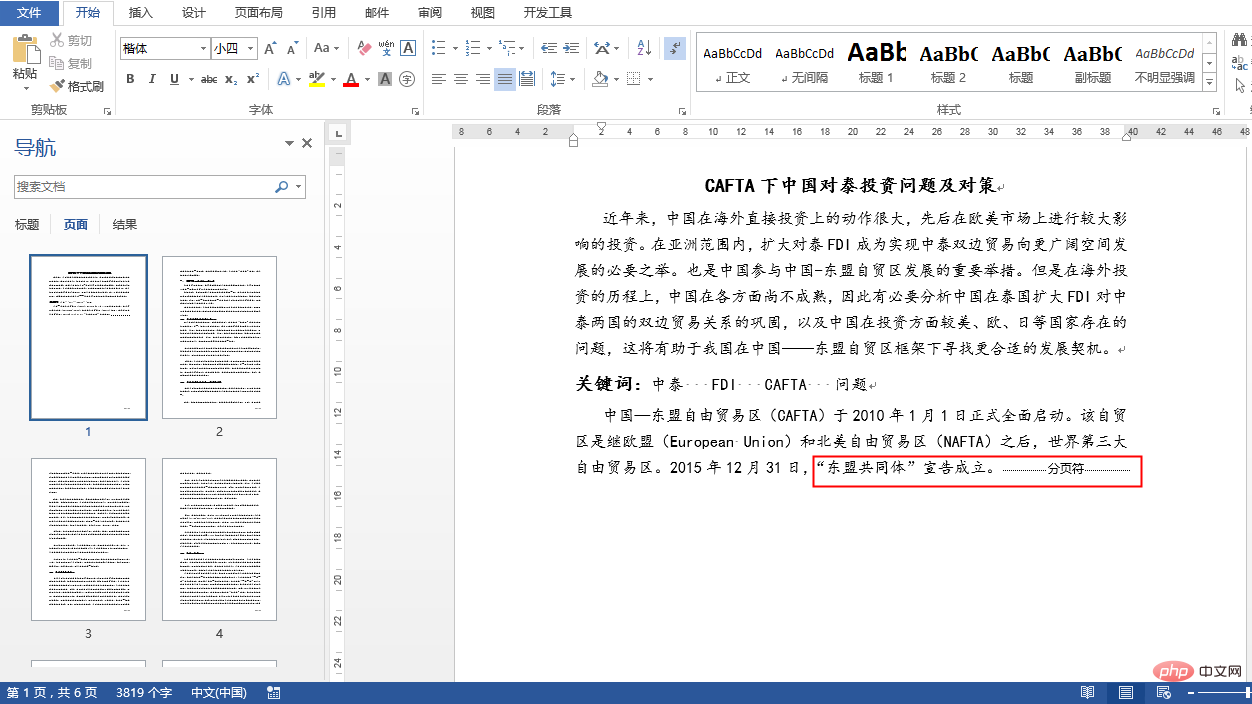
        //查找指定文本
        TextSelection selection = document.findString("“东盟共同体”宣告成立。", true, true);
        //获取查找的文本范围
        TextRange range = selection.getAsOneRange();
        //获取文本范围所在的段落
        Paragraph paragraph = range.getOwnerParagraph();

        //获取文本范围在段落中的位置索引
        int index = paragraph.getChildObjects().indexOf(range);

        //创建分页
        Break pageBreak = new Break(document, BreakType.Page_Break);

        //在查找的文本位置后面插入分页符
        paragraph.getChildObjects().insert(index + 1, pageBreak);

        //保存文档
        document.saveToFile("InsertPageBreakAfterText.docx", FileFormat.Docx_2013);
    }
}
效果图