



一、XSSF
package com.yy.demo01;

import java.io.FileInputStream;
import java.io.FileOutputStream;
import java.io.IOException;
import java.util.Date;

import org.apache.poi.ss.usermodel.Cell;
import org.apache.poi.ss.usermodel.CellStyle;
import org.apache.poi.ss.usermodel.DataFormat;
import org.apache.poi.ss.usermodel.Row;
import org.apache.poi.ss.usermodel.Sheet;
import org.apache.poi.ss.usermodel.Workbook;
import org.apache.poi.xssf.streaming.SXSSFWorkbook;
import org.apache.poi.xssf.usermodel.XSSFWorkbook;

public class dd {public static void main(String[] args) {
	//开始时间
	long begin = System.currentTimeMillis();
	try (//读取一个已存在的Excel文件
			 Workbook workbook = new XSSFWorkbook(new FileInputStream("D:\\1\\demo-data.xlsx"));
					FileOutputStream out = new FileOutputStream("D:\\1\\100w.xlsx")) {

			    //在“已存在”的Excel文件中,创建新的sheet
				Sheet sheet = workbook.createSheet();

				//获取格式编码值
				DataFormat dataFormat = workbook.createDataFormat();
				Short dateFormatCode = dataFormat.getFormat("yyyy年MM月dd日 HH:mm:ss");
				Short moneyFormatCode = dataFormat.getFormat("¥#,###");

				//创建日期格式对象
				CellStyle dateCellStyle = workbook.createCellStyle();
				dateCellStyle.setDataFormat(dateFormatCode);//设置格式编码

				//创建货币格式对象
				CellStyle moneyCellStyle = workbook.createCellStyle();
				moneyCellStyle.setDataFormat(moneyFormatCode);//设置格式编码值

			    for(int i = 0; i< 300000;i++) {
			    	String name = "A" + i;

			    	//创建行
			    	Row row = sheet.createRow(i + 1);

			    	//创建单元格
			    	Cell cell0 = row.createCell(0);//序号
			    	cell0.setCellValue(String.valueOf(i + 1));

			    	Cell cell1 = row.createCell(1);//姓名
			    	cell1.setCellValue(name);

			    	Cell cell2 = row.createCell(2);//日期
			    	cell2.setCellStyle(dateCellStyle);//货币金额格式对象
			    	cell2.setCellValue(new Date());

			    	Cell cell3 = row.createCell(3);//红包金额
			    	cell3.setCellStyle(moneyCellStyle);//货币金额格式对象
			    	cell3.setCellValue((int)(Math.random()*10000));

			    }
			    //写入文件
				workbook.write(out);
				//结束时间
				long end = System.currentTimeMillis();

				System.out.println("共耗时:" +(end - begin) + "毫秒");

			} catch (IOException e) {

				e.printStackTrace();
			}
}

}
二、SXSSF
package com.yy.demo01;

import java.io.FileOutputStream;
import java.io.IOException;
import java.util.Date;

import org.apache.poi.ss.usermodel.Cell;
import org.apache.poi.ss.usermodel.CellStyle;
import org.apache.poi.ss.usermodel.DataFormat;
import org.apache.poi.ss.usermodel.Row;
import org.apache.poi.ss.usermodel.Sheet;
import org.apache.poi.ss.usermodel.Workbook;
import org.apache.poi.xssf.streaming.SXSSFWorkbook;

public class Demo10 {
	public static void main(String[] args) {
		//开始时间
		long begin = System.currentTimeMillis();
		try (//读取一个已存在的Excel文件
				 Workbook workbook = new SXSSFWorkbook(100);
						FileOutputStream out = new FileOutputStream("D:\\1\\100w.xlsx")) {

				    //在“已存在”的Excel文件中,创建新的sheet
					Sheet sheet = workbook.createSheet();

					//获取格式编码值
					DataFormat dataFormat = workbook.createDataFormat();
					Short dateFormatCode = dataFormat.getFormat("yyyy年MM月dd日 HH:mm:ss");
					Short moneyFormatCode = dataFormat.getFormat("¥#,###");

					//创建日期格式对象
					CellStyle dateCellStyle = workbook.createCellStyle();
					dateCellStyle.setDataFormat(dateFormatCode);//设置格式编码

					//创建货币格式对象
					CellStyle moneyCellStyle = workbook.createCellStyle();
					moneyCellStyle.setDataFormat(moneyFormatCode);//设置格式编码值

				    for(int i = 0; i< 300000;i++) {
				    	String name = "A" + i;

				    	//创建行
				    	Row row = sheet.createRow(i + 1);

				    	//创建单元格
				    	Cell cell0 = row.createCell(0);//序号
				    	cell0.setCellValue(String.valueOf(i + 1));

				    	Cell cell1 = row.createCell(1);//姓名
				    	cell1.setCellValue(name);

				    	Cell cell2 = row.createCell(2);//日期
				    	cell2.setCellStyle(dateCellStyle);//货币金额格式对象
				    	cell2.setCellValue(new Date());

				    	Cell cell3 = row.createCell(3);//红包金额
				    	cell3.setCellStyle(moneyCellStyle);//货币金额格式对象
				    	cell3.setCellValue((int)(Math.random()*10000));

				    }
				    //写入文件
					workbook.write(out);
					//结束时间
					long end = System.currentTimeMillis();

					System.out.println("共耗时:" +(end - begin) + "毫秒");

				} catch (IOException e) {

					e.printStackTrace();
				}
	}

}
三、easyExcel
准备实体类
public class Order {
    @ExcelProperty("订单编号")
    private String orderId; // 订单编号

    @ExcelProperty("支付金额")
    @NumberFormat("¥#,###")
    private Double payment; // 支付金额

    @ExcelProperty(value = "创建日期",converter = LocalDateTimeConverter.class)
    private LocalDateTime creationTime; // 创建时间

    public Order() {
        this.orderId = LocalDateTime.now().format(DateTimeFormatter.ofPattern("yyyyMMddhhmmss"))
                + UUID.randomUUID().toString().substring(0, 5);
        this.payment = Math.random() * 10000;
        this.creationTime = LocalDateTime.now();
    }

    public String getOrderId() {
        return orderId;
    }

    public void setOrderId(String orderId) {
        this.orderId = orderId;
    }

    public Double getPayment() {
        return payment;
    }

    public void setPayment(Double payment) {
        this.payment = payment;
    }

    public LocalDateTime getCreationTime() {
        return creationTime;
    }

    public void setCreationTime(LocalDateTime creationTime) {
        this.creationTime = creationTime;
    }


    @Override
    public String toString() {
        return "Order [orderId=" + orderId + ", payment=" + payment + ", creationTime=" + creationTime + "]";
    }
}
准备converter转换类(兼容LocateDateTime日期时间类)
public class LocalDateTimeConverter implements Converter{ @Override public Class supportJavaTypeKey() { return LocalDateTime.class; } @Override public CellDataTypeEnum supportExcelTypeKey() { return CellDataTypeEnum.STRING; } @Override public LocalDateTime convertToJavaData(CellData cellData, ExcelContentProperty contentProperty, GlobalConfiguration globalConfiguration) { return LocalDateTime.parse(cellData.getStringValue(), DateTimeFormatter.ofPattern("yyyy-MM-dd HH:mm:ss")); } @Override public CellData convertToExcelData(LocalDateTime value, ExcelContentProperty contentProperty, GlobalConfiguration globalConfiguration) { return new CellData<>(value.format(DateTimeFormatter.ofPattern("yyyy-MM-dd HH:mm:ss"))); } }
写入300000条数据
public class Demo {
    public static void main(String[] args) {
        // 写入100w
        EasyExcel.write("c:\\test\\run\\easy.xlsx", Order.class)
                 .sheet("订单列表")
                 .doWrite(data());
    }

    // 创建100w条订单数据
    private static List data() {
        List list = new ArrayList();
        for (int i = 0; i < 300000; i++) {
            list.add(new Order());
        }
        return list;
    }
} 

立即学习“Java免费学习笔记(深入)”;
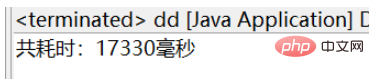
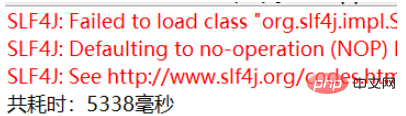
所以easyExcel最快,XSSF最慢且占用cpu最高




