一、项目概述
1.项目内容
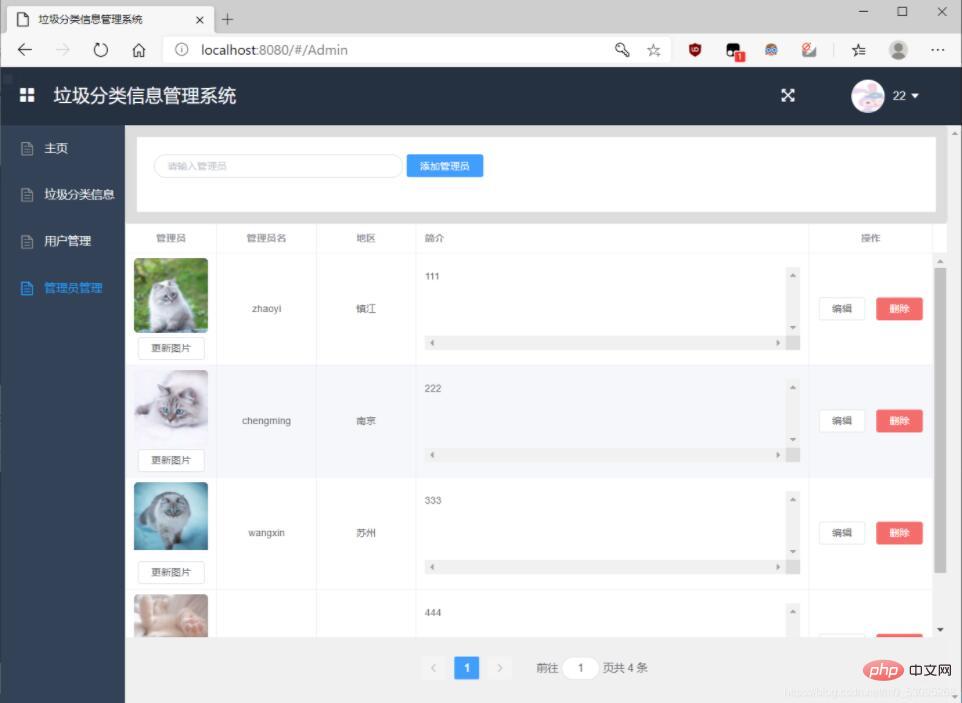
本项目利用IDEA,Visual Studio Code 开发工具,借助Mysql,Navicat for MySQL 工具,实现了一个基于springboot+vue的垃圾分类管理系统。系统为两种类型的用户提供服务,用户和管理员。
2.实现功能
(1)登陆功能
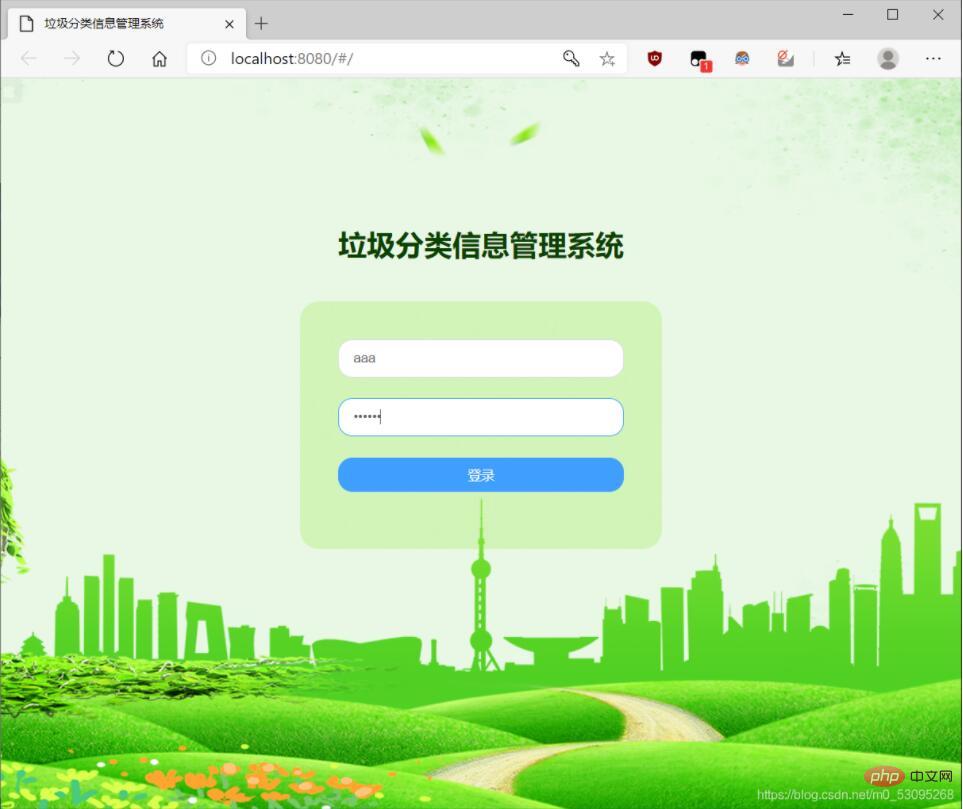
通过和数据库建立联系后,数据库内的用户和管理员可在登录页面输入账号和密码登陆网页。
(2)数据的增、查、改、删功能
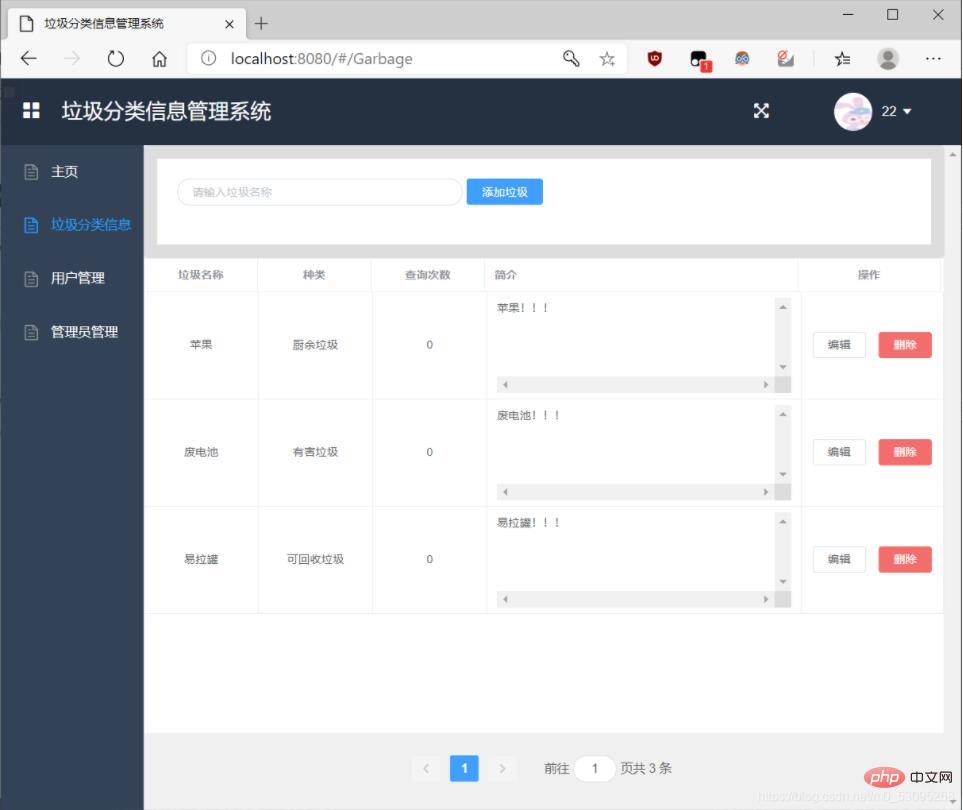
① 垃圾的增、查、改、删
② 管理员的增、查、改、删
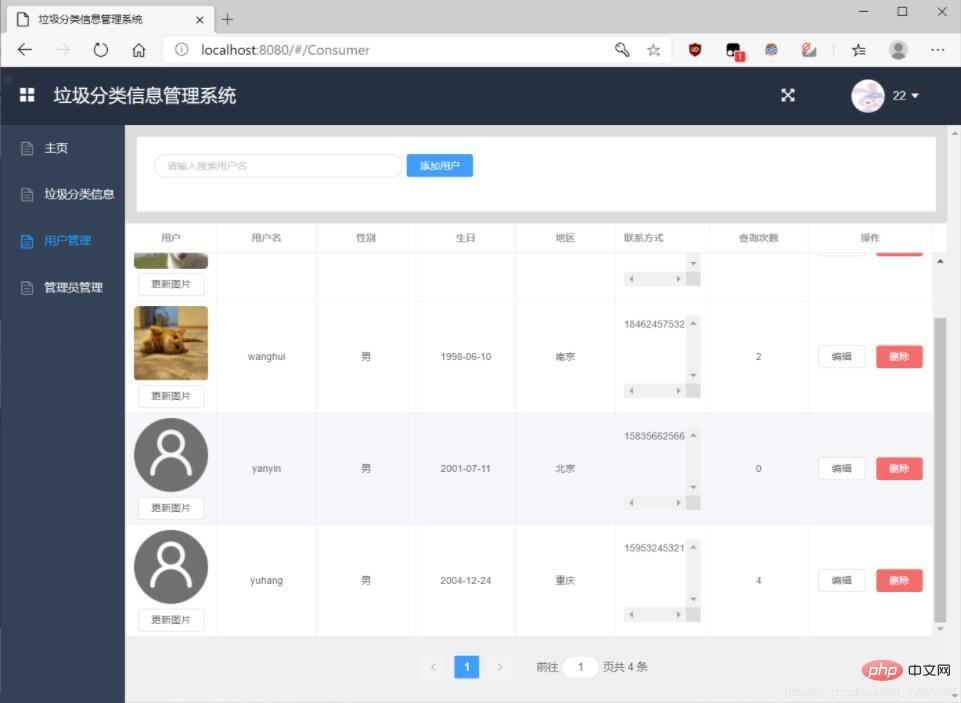
③ 用户的增、查、改、删
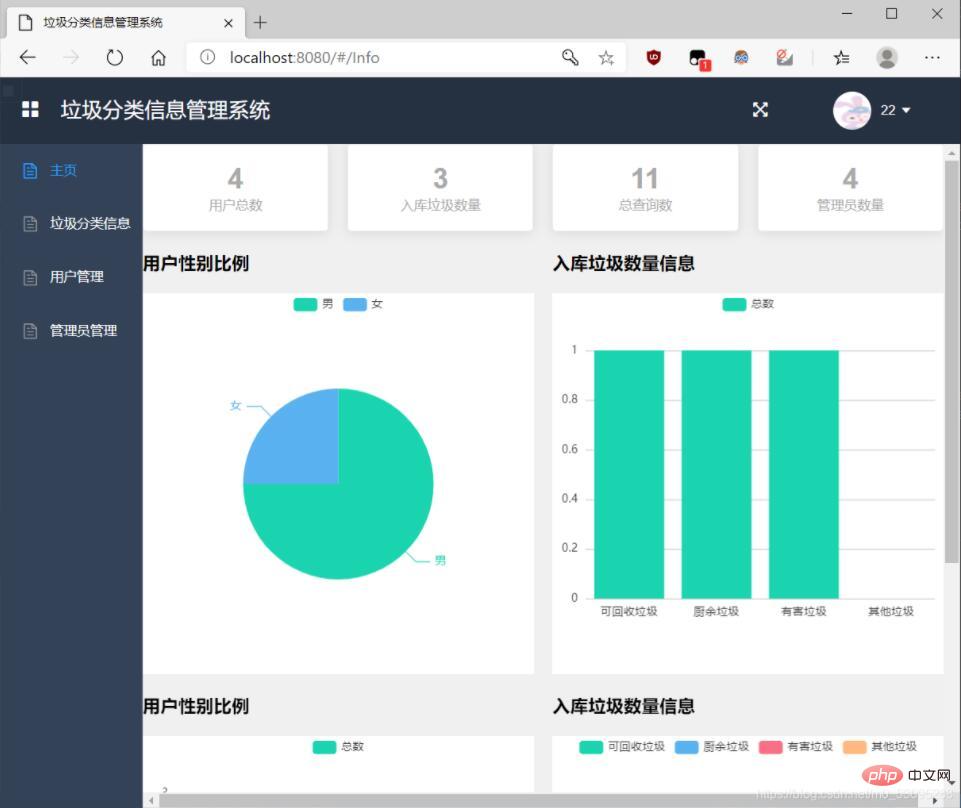
(3)通过饼状图,柱状图可显示用户的性别比例,入库垃圾的数量信息,用户总数,管理员总数,入库垃圾数量,查询次数等。
二、具体实现
1.前端登陆界面
<template>
  <div class="login-wrap">
    <div class="ms-title">垃圾分类信息管理系统</div>
    <div class="ms-login">
      <el-form :model="ruleForm" :rules="rules" ref="ruleForm">
        <el-form-item prop="username">
          <el-input v-model="ruleForm.username" placeholder="用户名"></el-input>
        </el-form-item>
        <el-form-item prop="password">
          <el-input type="password" v-model="ruleForm.password" placeholder="密码"></el-input>
        </el-form-item>
        <div class="login-btn">
          <el-button type="primary" @click="submitForm">登录</el-button>
        </div>
      </el-form>
    </div>
  </div>
</template>

<script>
import {mixin} from "../mixins/index";
import {getLoginStatus} from "../api/index";
export default {
  mixins:[mixin],
  data: function(){
    return {
      ruleForm:{
        username: "admin",
        password: "123"
      },
      rules:{
        username:[
          {required:true,message:"请输入用户名",trigger:"blur"}
        ],
        password:[
          {required:true,message:"请输入密码",trigger:"blur"}
        ]
      }
    };
  },
  methods:{
    submitForm(){
      let params = new URLSearchParams();
      params.append("name",this.ruleForm.username);
      params.append("password",this.ruleForm.password);
      getLoginStatus(params)
        .then((res) =>{
          if(res.code == 1){
            this.$router.push("/Info");
            this.notify("登录成功","success");
          }else{
            this.notify("登录失败","error");
          }
        });
    }
  }
}
</script>
2.增删改查实现
(1)管理员信息增删改查:
 /**
  * 添加管理员
  **/
    @RequestMapping(value = "/add",method = RequestMethod.POST)
    public Object addAdminGuanli(HttpServletRequest request){
        JSONObject jsonObject = new JSONObject();
        String name = request.getParameter("name").trim();
        String username = request.getParameter("username").trim();
        String password = request.getParameter("password").trim();
        String pic = request.getParameter("pic").trim();
        String location = request.getParameter("location").trim();
        String introduction = request.getParameter("introduction").trim();

        //保存到管理员的对象中
        AdminGuanli adminGuanli = new AdminGuanli();
        adminGuanli.setName(name);
        adminGuanli.setUsername(username);
        adminGuanli.setPassword(password);
        adminGuanli.setPic(pic);
        adminGuanli.setLocation(location);
        adminGuanli.setIntroduction(introduction);
        boolean flag = AdminGuanliService.insert(adminGuanli);
        if(flag){
            jsonObject.put(Consts.CODE,1);
            jsonObject.put(Consts.MSG,"添加成功");
            return jsonObject;
        }
        jsonObject.put(Consts.CODE,0);
        jsonObject.put(Consts.MSG,"添加失败");
        return jsonObject;
    }
    /**
     * 修改管理员
     **/
    @RequestMapping(value ="/update",method = RequestMethod.POST)
    public Object updateAdminGuanli(HttpServletRequest request){

        JSONObject jsonObject = new JSONObject();
        String id = request.getParameter("id").trim();
        String name = request.getParameter("name").trim();
        String username = request.getParameter("username").trim();
        String password = request.getParameter("password").trim();

        String location = request.getParameter("location").trim();
        String introduction = request.getParameter("introduction").trim();
        //保存到管理员的对象中
        AdminGuanli adminGuanli = new AdminGuanli();
        adminGuanli.setId(Integer.parseInt(id));
        adminGuanli.setName(name);
        adminGuanli.setUsername(username);
        adminGuanli.setPassword(password);

        adminGuanli.setLocation(location);
        adminGuanli.setIntroduction(introduction);
        boolean flag = AdminGuanliService.update(adminGuanli);
        if(flag){
            jsonObject.put(Consts.CODE,1);
            jsonObject.put(Consts.MSG,"修改成功");
            System.out.println("11111111111111111");
            return jsonObject;
        }
        jsonObject.put(Consts.CODE,0);
        jsonObject.put(Consts.MSG,"修改失败");
        return jsonObject;
    }

    /**
     * 删除管理员
     **/
    @RequestMapping(value ="/delete",method = RequestMethod.GET)
    public Object deleteAdminGuanli(HttpServletRequest request){

        String id = request.getParameter("id").trim();
        boolean flag = AdminGuanliService.delete(Integer.parseInt(id));
        return flag;
    }

    /**
     * 查询管理员
     **/
    @RequestMapping(value ="/selectByPrimaryKey",method = RequestMethod.GET)
    public Object selectByPrimaryKey(HttpServletRequest request){
        String id = request.getParameter("id").trim();
        return AdminGuanliService.selectByPrimaryKey(Integer.parseInt(id));
    }


    @RequestMapping(value ="/allAdminGuanli",method = RequestMethod.GET)
    public Object allAdminGuanli(HttpServletRequest request){
        return AdminGuanliService.allAdminGuanli();
    }

    @RequestMapping(value ="/AdminGuanliOfName",method = RequestMethod.GET)
    public Object AdminGuanliOfName(HttpServletRequest request){
        String name = request.getParameter("name").trim();
        return AdminGuanliService.AdminGuanliOfName("%"+name+"#");
    }


    /**
     * 更新管理员图片
     **/
    @RequestMapping(value ="/updateAdminPic",method = RequestMethod.POST)
    public Object updateAdminPic(@RequestParam("file") MultipartFile avatorFile, @RequestParam("id")int id){
        JSONObject jsonObject = new JSONObject();
        if(avatorFile.isEmpty()){
            jsonObject.put(Consts.CODE,0);
            jsonObject.put(Consts.MSG,"文件上传失败");
            return jsonObject;
        }
        //文件名=当前时间到毫秒+原来文件名
        String fileName = System.currentTimeMillis()+avatorFile.getOriginalFilename();
        //文件路径
        String filePath = System.getProperty("user.dir")+System.getProperty("file.separator")+"img"
                +System.getProperty("file.separator")+"AdminPic";
        //如果文件路径不存在,新增该路径
        File file1 = new File(filePath);
        if(file1.exists()){
            file1.mkdir();
        }
        //实际文件路径
        File dest = new File(filePath+System.getProperty("file.separator")+fileName);
        //存储到数据库的相对文件地址
        String storeAvatorPath = "/img/AdminPic/"+fileName;
        try {
            avatorFile.transferTo(dest);
            AdminGuanli adminGuanli = new AdminGuanli();
            adminGuanli.setId(id);
            adminGuanli.setPic(storeAvatorPath);
            boolean flag = AdminGuanliService.update(adminGuanli);
            if(flag){
                jsonObject.put(Consts.CODE,1);
                jsonObject.put(Consts.MSG,"上传成功");
                jsonObject.put("pic",storeAvatorPath);
                return jsonObject;
            }
            jsonObject.put(Consts.CODE,0);
            jsonObject.put(Consts.MSG,"修改失败");
            return jsonObject;
        } catch (IOException e) {
            jsonObject.put(Consts.CODE,0);
            jsonObject.put(Consts.MSG,"修改失败"+e.getMessage());
        }finally {
            return jsonObject;
        }

    }

}
(2)垃圾信息增删改查

/**
 * 添加垃圾信息
 **/
    @RequestMapping(value="/add",method= RequestMethod.POST)
    public Object addGarbage(HttpServletRequest request){
        JSONObject jsonObject=new JSONObject();
        String name=request.getParameter("name").trim();
        String type=request.getParameter("type").trim();
        String introduction=request.getParameter("introduction").trim();

        //保存到垃圾信息的对象当中
        Garbage garbage=new Garbage();
        garbage.setName(name);
        garbage.setType(type);
        garbage.setIntroduction(introduction);
        boolean flag=GarbageService.insert(garbage);
        if(flag){
            jsonObject.put(Consts.CODE,1);
            jsonObject.put(Consts.MSG,"添加成功");
            return jsonObject;
        }
        jsonObject.put(Consts.CODE,0);
        jsonObject.put(Consts.MSG,"添加失败");
        return jsonObject;
    }


    /**
     * 修改垃圾信息
     **/
    @RequestMapping(value = "/update",method = RequestMethod.POST)
    public Object updateGarbage(HttpServletRequest request){
        JSONObject jsonObject=new JSONObject();
        String id=request.getParameter("id").trim();
        String name=request.getParameter("name").trim();
        String type=request.getParameter("type").trim();
        String introduction=request.getParameter("introduction");

        //保存到垃圾信息的对象中去
        Garbage garbage=new Garbage();
        garbage.setId(Integer.parseInt(id));
        garbage.setName(name);
        garbage.setType(type);
        garbage.setIntroduction(introduction);
        boolean flag=GarbageService.update(garbage);
        if(flag){
            jsonObject.put(Consts.CODE,1);
            jsonObject.put(Consts.MSG,"修改成功");
            return jsonObject;
        }
        jsonObject.put(Consts.CODE,0);
        jsonObject.put(Consts.MSG,"修改失败");
        return jsonObject;
    }

/**
 * 删除垃圾信息
 **/
    @RequestMapping(value = "/delete",method = RequestMethod.GET)
    public Object deleteGarbage(HttpServletRequest request){

        String id=request.getParameter("id").trim();
        boolean flag=GarbageService.delete(Integer.parseInt(id));
        return flag;
    }

/**
 * 查询垃圾信息
 **/

    @RequestMapping(value = "/allGarbage",method = RequestMethod.GET)
    public Object allGarbage(HttpServletRequest request){
        return GarbageService.allGarbage();
    }


}
(3)用户信息增删改查
/**
 * 添加用户
 **/
    @RequestMapping(value = "/add",method = RequestMethod.POST)
    public Object addUser(HttpServletRequest request){
        JSONObject jsonObject = new JSONObject();
        String name = request.getParameter("name").trim();
        String username = request.getParameter("username").trim();
        String password = request.getParameter("password").trim();
        String sex = request.getParameter("sex").trim();
        String pic = request.getParameter("pic").trim();
        String birth = request.getParameter("birth").trim();
        String location = request.getParameter("location").trim();
        String contact = request.getParameter("contact").trim();
        DateFormat dateFormat = new SimpleDateFormat("yyyy-MM-dd");
        Date birthDate = new Date();
        try {
            birthDate = dateFormat.parse(birth);
        } catch (ParseException e) {
            e.printStackTrace();
        }
        System.out.println(name);
        //保存到用户的对象中
        User user=new User();
        user.setName(name);
        user.setUsername(username);
        user.setPassword(password);
        user.setSex(new Byte(sex));
        user.setPic(pic);
        user.setBirth(birthDate);
        user.setLocation(location);
        user.setContact(contact);

        boolean flag = UserService.insert(user);
        if(flag){
            jsonObject.put(Consts.CODE,1);
            jsonObject.put(Consts.MSG,"添加成功");
            return jsonObject;
        }
        jsonObject.put(Consts.CODE,0);
        jsonObject.put(Consts.MSG,"添加失败");
        return jsonObject;
    }
/**
 * 修改用户
 **/
    @RequestMapping(value ="/update",method = RequestMethod.POST)
    public Object updateUser(HttpServletRequest request){

        JSONObject jsonObject = new JSONObject();
        String id = request.getParameter("id").trim();
        String name = request.getParameter("name").trim();
        String username = request.getParameter("username").trim();
        String password = request.getParameter("password").trim();
        String sex = request.getParameter("sex").trim();
        String pic = request.getParameter("pic").trim();
        String birth = request.getParameter("birth").trim();
        String location = request.getParameter("location").trim();
        String contact = request.getParameter("contact").trim();
        DateFormat dateFormat = new SimpleDateFormat("yyyy-MM-dd");
        Date birthDate = new Date();
        try {
            birthDate = dateFormat.parse(birth);
        } catch (ParseException e) {
            e.printStackTrace();
        }
        //保存到用户的对象中
        User user=new User();
        user.setId(Integer.parseInt(id));
        user.setName(name);
        user.setPassword(password);
        user.setSex(new Byte(sex));
        user.setPic(pic);
        user.setBirth(birthDate);
        user.setLocation(location);
        user.setContact(contact);
        boolean flag = UserService.update(user);
        if(flag){
            jsonObject.put(Consts.CODE,1);
            jsonObject.put(Consts.MSG,"修改成功");
            System.out.println("11111111111111111");
            return jsonObject;
        }
        jsonObject.put(Consts.CODE,0);
        jsonObject.put(Consts.MSG,"修改失败");
        return jsonObject;
    }

/**
 * 删除用户
 **/
    @RequestMapping(value ="/delete",method = RequestMethod.GET)
    public Object deleteUser(HttpServletRequest request){

        String id = request.getParameter("id").trim();
        boolean flag = UserService.delete(Integer.parseInt(id));
        return flag;
    }

/**
 * 查询用户
 **/
    @RequestMapping(value ="/selectByPrimaryKey",method = RequestMethod.GET)
    public Object selectByPrimaryKey(HttpServletRequest request){
        String id = request.getParameter("id").trim();
        return UserService.selectByPrimaryKey(Integer.parseInt(id));
    }


    @RequestMapping(value ="/allUser",method = RequestMethod.GET)
    public Object allUser(HttpServletRequest request){
        return UserService.allUser();
    }

    @RequestMapping(value ="/UserOfName",method = RequestMethod.GET)
    public Object UserOfName(HttpServletRequest request){
        String name = request.getParameter("name").trim();
        return UserService.userOfName("%"+name+"#");
    }


/**
 * 更新用户图片
 **/
    @RequestMapping(value ="/updateUserPic",method = RequestMethod.POST)
    public Object updateUserPic(@RequestParam("file") MultipartFile avatorFile, @RequestParam("id")int id){
        JSONObject jsonObject = new JSONObject();
        if(avatorFile.isEmpty()){
            jsonObject.put(Consts.CODE,0);
            jsonObject.put(Consts.MSG,"文件上传失败");
            return jsonObject;
        }
        //文件名=当前时间到毫秒+原来文件名
        String fileName = System.currentTimeMillis()+avatorFile.getOriginalFilename();
        //文件路径
        String filePath = System.getProperty("user.dir")+System.getProperty("file.separator")+"img"
                +System.getProperty("file.separator")+"userPic";
        //如果文件路径不存在,新增该路径
        File file1 = new File(filePath);
        if(file1.exists()){
            file1.mkdir();
        }
        //实际文件路径
        File dest = new File(filePath+System.getProperty("file.separator")+fileName);
        //存储到数据库的相对文件地址
        String storeAvatorPath = "/img/userPic/"+fileName;
        try {
            avatorFile.transferTo(dest);
            User user = new User();
            user.setId(id);
            user.setPic(storeAvatorPath);
            boolean flag = UserService.update(user);
            if(flag){
                jsonObject.put(Consts.CODE,1);
                jsonObject.put(Consts.MSG,"上传成功");
                jsonObject.put("pic",storeAvatorPath);
                return jsonObject;
            }
            jsonObject.put(Consts.CODE,0);
            jsonObject.put(Consts.MSG,"修改失败");
            return jsonObject;
        } catch (IOException e) {
            jsonObject.put(Consts.CODE,0);
            jsonObject.put(Consts.MSG,"修改失败"+e.getMessage());
        }finally {
            return jsonObject;
        }

    }

}
3.解决跨域问题
public class WebMvcConfig implements WebMvcConfigurer {
    @Override
    public void addCorsMappings(CorsRegistry registry) {
        registry.addMapping("/**")
                .allowCredentials(true) /*访问是否需要验证*/
                .allowedOriginPatterns("*")
                .allowedMethods("*");
    }
}
三、功能演示
1.跟随前端网址访问网页
2.登陆主页
3.查看垃圾信息
4.用户管理页面
5.管理员管理页面