



一、查看centos的版本
cat /etc/redhat-release
二、添加资源库
在 centos 系统上安装 nginx ,得先去添加一个资源库:
vim /etc/yum.repos.d/nginx.repo
  [nginx]
  name=nginx repo
  baseurl=http://nginx.org/packages/centos/$releasever/$basearch/
  gpgcheck=0
  enabled=1
三、安装nginx
yum -y install nginx
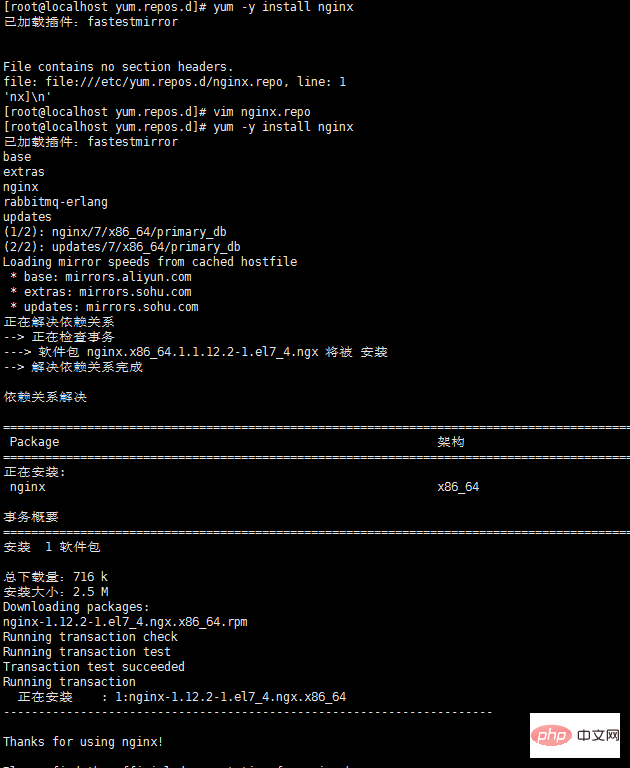
四、测试nginx配置文件是否正确
nginx -t
打印如下:
nginx: the configuration file /etc/nginx/nginx.conf syntax is ok
nginx: configuration file /etc/nginx/nginx.conf test is successful ERMEB域名PHP离线网络授权系统下载
感谢您选择使用ERMEB域名授权离线网络验证系统(简称:ERMEB域名授权系统)是ERMEB团队开发,ERMEB域名授权系统是国内最稳定,最强大,最先进的域名授权管理平台解决方案之一,ERMEB域名授权系统采用PHP +Mysql的技术,ERMEB域名授权系统框架使用Thinkphp6/mysql数据库基于Markdown开发者文档开发而成,项目安装请参考ThinkPHP官方文档及下面的服务环境说
五、centos7.0+ nginx实现停止、启动、重启
systemctl stop nginx.service
systemctl start nginx.service
systemctl restart nginx.service
systemctl status nginx.service
开机自启:
systemctl enable nginx.service
取消开机自启:
systemctl disable nginx.service
六、nginx.conf配置示例
我的配置:
user nginx;
worker_processes 4;

error_log /var/log/nginx/error.log warn;
pid    /var/run/nginx.pid;


events {
  worker_connections 1024;
}


http {
  include    /etc/nginx/mime.types;
  default_type application/octet-stream;

  log_format main '$remote_addr - $remote_user [$time_local] "$request" '
           '$status $body_bytes_sent "$http_referer" '
           '"$http_user_agent" "$http_x_forwarded_for"';

  access_log /var/log/nginx/access.log main;

  sendfile    on;
  #tcp_nopush   on;

  keepalive_timeout 65;

  #gzip on;

  include /etc/nginx/conf.d/*.conf;

  #设定负载均衡的服务器列表
  upstream pay_server {
    ip_hash;
    server 10.74.248.01:8088 max_fails=2 fail_timeout=2;
    server 10.74.248.02:8088 max_fails=2 fail_timeout=2;
  }

  upstream print_server {
    ip_hash;
    server 10.74.248.03:2001 max_fails=2 fail_timeout=2;
    server 10.74.248.04:2001 max_fails=2 fail_timeout=2;
  }

  upstream accss_door_server {
    ip_hash;
    server 10.74.248.05:2002 max_fails=2 fail_timeout=2;
    server 10.74.248.06:2002 max_fails=2 fail_timeout=2;
  }

  server {
    listen 80;
    server_name wab.kupu.ccoop.com.cn;
    location /invengo {
         proxy_pass http://pay_server;
         index index.jsp index.html index.htm;
    }
    location /invengo/epc {
         proxy_pass http://print_server;
         index index.jsp index.html index.htm;
    }
    location /invengo/print {
         proxy_pass http://print_server;
         index index.jsp index.html index.htm;
    }

    location /checkout {
         proxy_pass http://accss_door_server;
         index index.jsp index.html index.htm;
    }
    location /asset {
         proxy_pass http://accss_door_server;
         index index.jsp index.html index.htm;
    }
  }
常用的nginx.conf配置:
user www www;
worker_processes 2;
error_log logs/error.log;
#error_log logs/error.log notice;
#error_log logs/error.log info;
pid    logs/nginx.pid;
events {
  use epoll;
  worker_connections 2048;
}
http {
  include    mime.types;
  default_type application/octet-stream;
  #log_format main '$remote_addr - $remote_user [$time_local] "$request" '
  #         '$status $body_bytes_sent "$http_referer" '
  #         '"$http_user_agent" "$http_x_forwarded_for"';
  #access_log logs/access.log main;
  sendfile    on;
  # tcp_nopush   on;
  keepalive_timeout 65;
 # gzip压缩功能设置
  gzip on;
  gzip_min_length 1k;
  gzip_buffers  4 16k;
  gzip_http_version 1.0;
  gzip_comp_level 6;
  gzip_types text/html text/plain text/css text/javascript application/json application/javascript application/x-javascript application/xml;
  gzip_vary on;

 # http_proxy 设置
  client_max_body_size  10m;
  client_body_buffer_size  128k;
  proxy_connect_timeout  75;
  proxy_send_timeout  75;
  proxy_read_timeout  75;
  proxy_buffer_size  4k;
  proxy_buffers  4 32k;
  proxy_busy_buffers_size  64k;
  proxy_temp_file_write_size 64k;
  proxy_temp_path  /usr/local/nginx/proxy_temp 1 2;
 # 设定负载均衡后台服务器列表
  upstream backend {
       #ip_hash;
       server  192.168.10.100:8080 max_fails=2 fail_timeout=30s ;
       server  192.168.10.101:8080 max_fails=2 fail_timeout=30s ;
  }
 # 很重要的虚拟主机配置
  server {
    listen    80;
    server_name itoatest.example.com;
    root  /apps/oaapp;
    charset utf-8;
    access_log logs/host.access.log main;
    #对 / 所有做负载均衡+反向代理
    location / {
      root  /apps/oaapp;
      index index.jsp index.html index.htm;
      proxy_pass    http://backend;
      proxy_redirect off;
      # 后端的web服务器可以通过x-forwarded-for获取用户真实ip
      proxy_set_header host $host;
      proxy_set_header x-real-ip $remote_addr;
      proxy_set_header x-forwarded-for $proxy_add_x_forwarded_for;
      proxy_next_upstream error timeout invalid_header http_500 http_502 http_503 http_504;

    }
    #静态文件,nginx自己处理,不去backend请求tomcat
    location ~* /download/ {
      root /apps/oa/fs;

    }
    location ~ .*\.(gif|jpg|jpeg|bmp|png|ico|txt|js|css)$
    {
      root /apps/oaapp;
      expires   7d;
    }
    location /nginx_status {
      stub_status on;
      access_log off;
      allow 192.168.10.0/24;
      deny all;
    }
    location ~ ^/(web-inf)/ {
      deny all;
    }
    #error_page 404       /404.html;
    # redirect server error pages to the static page /50x.html
    #
    error_page  500 502 503 504 /50x.html;
    location = /50x.html {
      root  html;
    }
  }
 ## 其它虚拟主机,server 指令开始
} 




