



新建springboot项目的问题
使用idea,一路next,到最后生成项目
然后pom文件报错
我特意换了一个全新的maven,发现是因为jar拉不下来,就配置了国内镜像
找到maven ,conf 打开 settings.xml。在mirrors里面写入
<!-- 阿里云镜像 -->
	<mirror>
		<id>alimaven</id>
		<name>aliyun maven</name>
		<url>http://maven.aliyun.com/nexus/content/groups/public/</url>
		<mirrorOf>central</mirrorOf>
	</mirror>
	<mirror>
		<id>central</id>
		<name>Maven Repository Switchboard</name>
		<url>http://repo1.maven.org/maven2/</url>
		<mirrorOf>central</mirrorOf></mirror>
	<mirror>
		<id>repo2</id>
		<mirrorOf>central</mirrorOf>
		<name>Human Readable Name for this Mirror.</name>
		<url>http://repo2.maven.org/maven2/</url>
	</mirror>

	<mirror>
		<id>ibiblio</id>
		<mirrorOf>central</mirrorOf>
		<name>Human Readable Name for this Mirror.</name>
		<url>http://mirrors.ibiblio.org/pub/mirrors/maven2/</url>
		</mirror>
<!-- 中央仓库在中国的镜像 -->
	<mirror>
		<id>maven.net.cn</id>
		<name>oneof the central mirrors in china</name>
		<url>http://maven.net.cn/content/groups/public/</url>
		<mirrorOf>central</mirrorOf>
	</mirror>
然后发现还是有点问题,有些拉不下来。
继续设置idea,打开设置,搜索maven
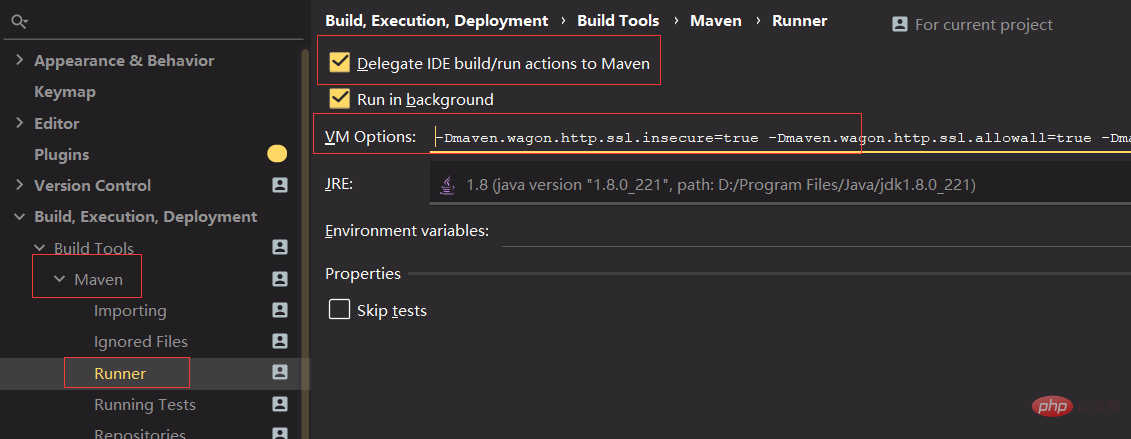
将上面的勾打上
然后在VM Options下面输入
-Dmaven.wagon.http.ssl.insecure=true
-Dmaven.wagon.http.ssl.allowall=true
-Dmaven.wagon.http.ssl.ignore.validity.dates=true
然后点击最右面maven,重新安装一下
(拉完jar之后再把勾去掉,还原)
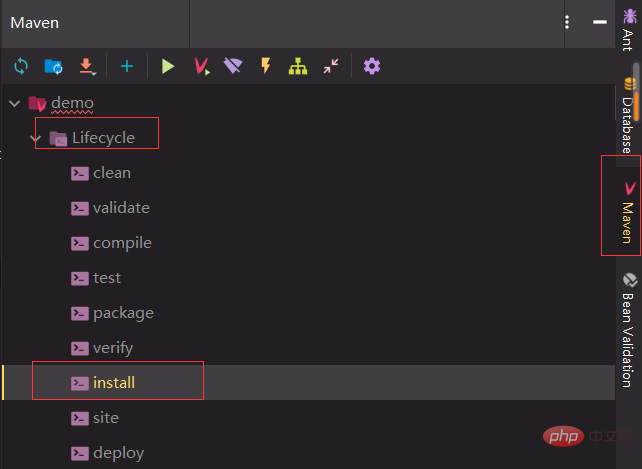
此时已经解决了我所有报错的问题,然后启动项目是启动不起来的,因为没有web
继续在pom加入spring-boot-starter-web
        <dependency>
            <groupId>org.springframework.boot</groupId>
            <artifactId>spring-boot-starter-web</artifactId>
        </dependency>
启动类中加入hello代码校验

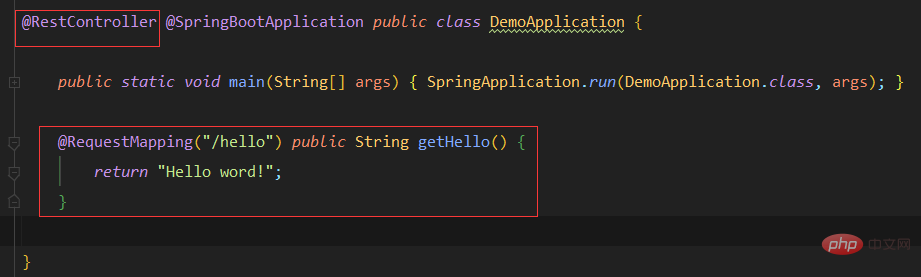
启动,浏览器输入http://localhost:8080/hello

创建Springboot之后pom.xml文件报错解决
记录创建项目遇到的一个问题(Maven相关)
通过IDEA 创建Springboot项目之后,pom.xml 在以下代码中报错
提示spring-boot-starter-parent not found
<parent>
   <groupId>org.springframework.boot</groupId>
   <artifactId>spring-boot-starter-parent</artifactId>
   <version>2.4.4</version>
   <relativePath/>
</parent>
我自己在网上查到解决方法有两个:
鼠标右键----Maven----Reload Project
通过右侧Maven菜单栏----Reload Project
其实就是一个。不管怎么reload,或者是download source都没用(还试过修改版本号),然后我就重启,果然重启就好了
遇到的另一个问题,也是提醒我spring-boot-maven-plugin not found
<groupId>org.springframework.boot</groupId>
<artifactId>spring-boot-maven-plugin</artifactId>
解决办法:
添加与上面spring-boot-starter-parent相对应的版本号。我上面用的是2.4.4,这里我也就尝试了一下2.4.4,结果真的好了
如果报错还是没解决的话也可以尝试 reload project 或者 重启idea




