一、技术介绍
chatgpt-java是一款支持开箱即用的openai java sdk。目前以支持官网全部api。我们赞成使用最新版本的gpt-3.5-turbo和whisper-1模型。
2.Spring Boot是由Pivotal团队提供的全新框架,其设计目的是用来简化新Spring应用的初始搭建以及开发过程。这个框架采用特定的配置方式,无需开发人员再定义通用配置。通过这种方式,Spring Boot致力于在蓬勃发展的快速应用开发领域(rapid application development)成为领导者。
3.ChatUI Pro 是在ChatUI 基础组件的基础上,结合阿里小蜜的最佳实践,沉淀和总结出来的一个开箱即用的,可快速搭建智能对话机器人的框架。它简单易上手,通过简单的配置就能搭建出对话机器人;同时它强大易扩展,通过丰富的接口和自定义卡片满足各种定制化需求。
二、项目介绍
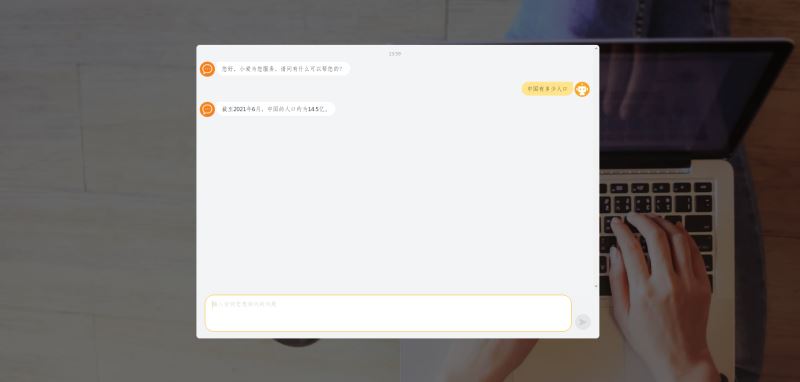
本项目采用了GPT-3.5-Turb模型作为基础,通过springboot结合redis、chat-java以及chatUI Pro实现简单的人工智能机器人。因为访问openAI的API返回结果比较慢,项目中当前端将问题请求发送到后端后,后端会将生成一个UUID,返回前端,同时后端也会重新开启一个线程去访问openAI,当openAI返回结果后,后端将UUID做为key,openAI返回的结果做为value存储到redis中。前端会根据后端第一次请求的结果中UUID做为参数每个5s请求一次后端的answer接口,answer接口会根据UUID查询redis是否有值,直到后端answer接口返回结果后前端将结果输出给用户
三、项目搭建
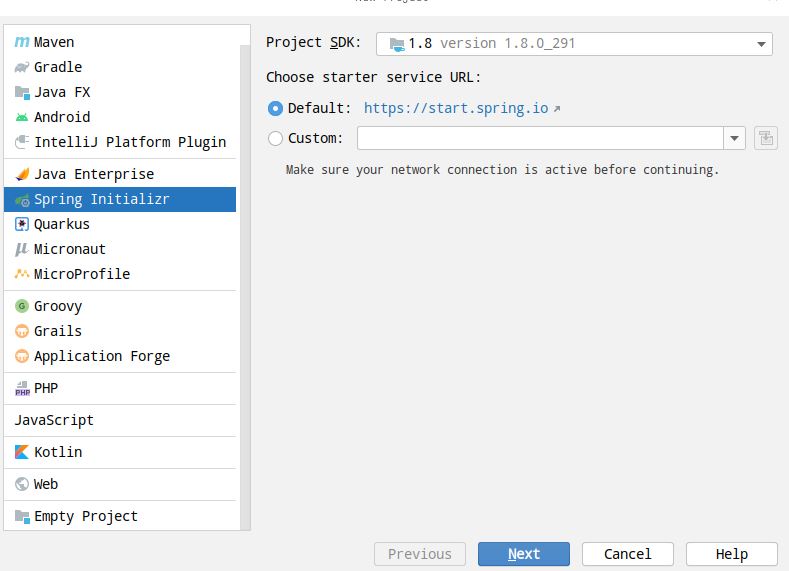
1.创建springboot项目,项目命名mychatgpt。
2.导入项目pom的依赖
<?xml version="1.0" encoding="UTF-8"?>
<project xmlns="http://maven.apache.org/POM/4.0.0" xmlns:xsi="http://www.w3.org/2001/XMLSchema-instance"
         xsi:schemaLocation="http://maven.apache.org/POM/4.0.0 https://maven.apache.org/xsd/maven-4.0.0.xsd">
    <modelVersion>4.0.0</modelVersion>
    <parent>
        <groupId>org.springframework.boot</groupId>
        <artifactId>spring-boot-starter-parent</artifactId>
        <version>2.5.12</version>
        <relativePath/> <!-- lookup parent from repository -->
    </parent>
    <groupId>com.xyh</groupId>
    <artifactId>mychatgpt</artifactId>
    <version>0.0.1-SNAPSHOT</version>
    <name>mychatgpt</name>
    <description>Demo project for Spring Boot</description>
    <properties>
        <java.version>8</java.version>
    </properties>
    <dependencies>
        <dependency>
            <groupId>org.springframework.boot</groupId>
            <artifactId>spring-boot-starter-data-redis</artifactId>
        </dependency>
        <dependency>
            <groupId>org.springframework.boot</groupId>
            <artifactId>spring-boot-starter-web</artifactId>
        </dependency>
        <dependency>
            <groupId>org.springframework.boot</groupId>
            <artifactId>spring-boot-starter-aop</artifactId>
        </dependency>
        <dependency>
            <groupId>org.springframework.boot</groupId>
            <artifactId>spring-boot-starter-test</artifactId>
            <exclusions>
                <exclusion>
                    <groupId>org.apache.logging.log4j</groupId>
                    <artifactId>log4j-api</artifactId>
                </exclusion>
                <exclusion>
                    <groupId>org.apache.logging.log4j</groupId>
                    <artifactId>log4j-to-slf4j</artifactId>
                </exclusion>
            </exclusions>
            <scope>test</scope>
        </dependency>
        <dependency>
            <groupId>org.projectlombok</groupId>
            <artifactId>lombok</artifactId>
            <optional>true</optional>
        </dependency>
        <dependency>
            <groupId>org.apache.httpcomponents</groupId>
            <artifactId>httpcore</artifactId>
        </dependency>
        <dependency>
            <groupId>com.theokanning.openai-gpt3-java</groupId>
            <artifactId>api</artifactId>
            <version>0.10.0</version>
        </dependency>
        <dependency>
            <groupId>com.theokanning.openai-gpt3-java</groupId>
            <artifactId>service</artifactId>
            <version>0.10.0</version>
        </dependency>
        <dependency>
            <groupId>com.theokanning.openai-gpt3-java</groupId>
            <artifactId>client</artifactId>
            <version>0.10.0</version>
        </dependency>
        <dependency>
            <groupId>cn.hutool</groupId>
            <artifactId>hutool-all</artifactId>
            <version>5.8.12</version>
        </dependency>
        <dependency>
            <groupId>com.unfbx</groupId>
            <artifactId>chatgpt-java</artifactId>
            <version>1.0.5</version>
        </dependency>
        <dependency>
            <groupId>mysql</groupId>
            <artifactId>mysql-connector-java</artifactId>
            <version>8.0.17</version>
        </dependency>
        <dependency>
            <groupId>com.alibaba</groupId>
            <artifactId>druid-spring-boot-starter</artifactId>
            <version>1.2.8</version>
        </dependency>
        <dependency>
            <groupId>com.baomidou</groupId>
            <artifactId>mybatis-plus-boot-starter</artifactId>
            <version>3.5.2</version>
            <exclusions>
                <exclusion>
                    <groupId>com.baomidou</groupId>
                    <artifactId>mybatis-plus-generator</artifactId>
                </exclusion>
            </exclusions>
        </dependency>
        <dependency>
            <groupId>com.github.yulichang</groupId>
            <artifactId>mybatis-plus-join</artifactId>
            <version>1.4.2</version>
        </dependency>
        <!--集成随机生成数据包 -->
        <dependency>
            <groupId>com.apifan.common</groupId>
            <artifactId>common-random</artifactId>
            <version>1.0.19</version>
        </dependency>
        <!--集成随机生成数据包 -->
        <dependency>
            <groupId>junit</groupId>
            <artifactId>junit</artifactId>
            <scope>test</scope>
        </dependency>
    </dependencies>
    <build>
        <plugins>
            <plugin>
                <groupId>org.springframework.boot</groupId>
                <artifactId>spring-boot-maven-plugin</artifactId>
                <configuration>
                    <excludes>
                        <exclude>
                            <groupId>org.projectlombok</groupId>
                            <artifactId>lombok</artifactId>
                        </exclude>
                    </excludes>
                </configuration>
            </plugin>
        </plugins>
    </build>
</project>
3.编写chatGPT实现工具类

package com.xyh.mychatgpt.utils;
import com.unfbx.chatgpt.OpenAiClient;
import com.unfbx.chatgpt.entity.chat.ChatChoice;
import com.unfbx.chatgpt.entity.chat.ChatCompletion;
import com.unfbx.chatgpt.entity.chat.Message;
import com.unfbx.chatgpt.entity.common.Choice;
import com.unfbx.chatgpt.entity.completions.Completion;
import org.springframework.beans.factory.annotation.Autowired;
import org.springframework.beans.factory.annotation.Value;
import org.springframework.stereotype.Component;
import java.util.Arrays;
import java.util.List;
/**
 * @author xiangyuanhong
 * @description: TODO
 * @date 2023/3/21上午9:28
 */
@Component
public class ChatGPTUtils {
    @Value("${xyh.openai.key}")
    private  String token;
    @Autowired
    private RedisUtils redisUtils;
    public void ask(String model,String question,String uuid){
        StringBuffer result=new StringBuffer();
        try {
            OpenAiClient openAiClient = new OpenAiClient(token, 3000, 300, 300, null);
            if("GPT-3.5-Turb".equals(model)){
            // GPT-3.5-Turb模型
            Message message=Message.builder().role(Message.Role.USER).content(question).build();
            ChatCompletion chatCompletion = ChatCompletion.builder().messages(Arrays.asList(message)).build();
            List<ChatChoice> resultList = openAiClient.chatCompletion(chatCompletion).getChoices();
            for (int i = 0; i < resultList.size(); i++) {
                result.append(resultList.get(i).getMessage().getContent());
            }
            }else{
                //text-davinci-003/text-ada-003
                Completion completion = Completion.builder()
                        .prompt(question)
                        .model(model)
                        .maxTokens(2000)
                        .temperature(0)
                        .echo(false)
                        .build();
                Choice[] resultList = openAiClient.completions(completion).getChoices();
                for (Choice choice : resultList) {
                    result.append(choice.getText());
                }
            }
        }catch (Exception e) {
            System.out.println(e.getMessage());
            result.append("小爱还不太懂,回去一定努力学习补充知识");
        }
        redisUtils.set(uuid,result.toString());
    }
}
4.开发项目Controller类,用来与前端进行交互
package com.xyh.mychatgpt.controller;
import cn.hutool.core.thread.ThreadUtil;
import cn.hutool.core.util.IdUtil;
import cn.hutool.core.util.StrUtil;
import com.xyh.mychatgpt.utils.ChatGPTUtils;
import com.xyh.mychatgpt.utils.R;
import com.xyh.mychatgpt.utils.RedisUtils;
import org.springframework.beans.factory.annotation.Autowired;
import org.springframework.web.bind.annotation.GetMapping;
import org.springframework.web.bind.annotation.RestController;
import javax.servlet.http.HttpServletRequest;
/**
 * @author xiangyuanhong
 * @description: TODO
 * @date 2023/2/28下午4:57
 */
@RestController
public class IndexController {
    @Autowired
    private RedisUtils redisUtils;
    @Autowired
    private ChatGPTUtils chatGPTUtils;
    @GetMapping("/ask")
    public R ask(String question,HttpServletRequest request) {
        String uuid=IdUtil.simpleUUID();
        if (StrUtil.isBlank(question)) {
            question = "今天天气怎么样?";
        }
        String finalQuestion = question;
        ThreadUtil.execAsync(()->{
            chatGPTUtils.ask("GPT-3.5-Turb", finalQuestion,uuid);
        });
        return R.ok().put("data",uuid);
    }
    @GetMapping("/answer")
    public R answer(String uuid){
        String result=redisUtils.get(uuid);
          return R.ok().put("data",result);
    }
}
5.前端页面开发,在项目templates目录创建index.html页面,并引入chatUI pro相关文件
<!DOCTYPE html>
<html lang="zh-CN">
<head>
    <meta name="renderer" content="webkit" />
    <meta name="force-rendering" content="webkit" />
    <meta http-equiv="X-UA-Compatible" content="IE=edge,chrome=1" />
    <meta charset="UTF-8" />
    <meta name="viewport" content="width=device-width, initial-scale=1.0, user-scalable=0, minimum-scale=1.0, maximum-scale=1.0, viewport-fit=cover" />
    <title>滴答小爱</title>
    <link rel="stylesheet" href="//g.alicdn.com/chatui/sdk-v2/0.2.4/sdk.css" rel="external nofollow" >
</head>
<body>
<div id="root"></div>
<script src="//g.alicdn.com/chatui/sdk-v2/0.2.4/sdk.js"></script>
<script src="//g.alicdn.com/chatui/extensions/0.0.7/isv-parser.js"></script>
<script src="js/setup.js"></script>
<script src="js/jquery-3.6.3.min.js"></script>
<script src="//g.alicdn.com/chatui/icons/0.3.0/index.js" async></script>
</body>
</html>
6.创建setup.js实现chatUI Pro与后端通信交换。
var bot = new ChatSDK({
    config: {
        // navbar: {
        //     title: '滴答小爱'
        // },
        robot: {
            avatar: 'images/chat.png'
        },
        // 用户头像
        user: {
            avatar: 'images/user.png',
        },
        // 首屏消息
        messages: [
            {
                type: 'text',
                content: {
                    text: '您好,小爱为您服务,请问有什么可以帮您的?'
                }
            }
        ],
        // 快捷短语
        // quickReplies: [
        //     { name: '健康码颜色',isHighlight:true },
        //     { name: '入浙通行申报' },
        //     { name: '健康码是否可截图使用' },
        //     { name: '健康通行码适用范围' },
        // ],
        // 输入框占位符
        placeholder: '输入任何您想询问的问题',
    },
    requests: {
        send: function (msg) {
            if (msg.type === 'text') {
                return {
                    url: '/ask',
                    data: {
                        question: msg.content.text
                    }
                };
            }
        }
    },
    handlers: {
        /**
         *
         * 解析请求返回的数据
         * @param {object} res - 请求返回的数据
         * @param {object} requestType - 请求类型
         * @return {array}
         */
        parseResponse: function (res, requestType) {
            // 根据 requestType 处理数据
            if (requestType === 'send' && res.code==0) {
                // 用 isv 消息解析器处理数据
                $.ajaxSettings.async=false;
                var answer="";
                var isOK=false;
                while(!isOK){
                    $.get("/answer",{uuid:res.data},function(result){
                        console.log(result.data)
                        if(null != result.data){
                            isOK=true;
                            answer=result.data;
                        }
                    },"json");
                    if(!isOK){
                        sleep(5000);
                    }
                }
                $.ajaxSettings.async=true;
                return [{"_id":res.data,type:"text",content:{text:answer},position:"left"}];
            }
        },
    },
});
function sleep(n) { //n表示的毫秒数
    var start = new Date().getTime();
    while (true) {
        if (new Date().getTime() - start > n) {
            break;
        }
    }
}
bot.run();
一旦完成项目搭建,启动 Spring Boot 项目并访问 http://ip:端口 即可。项目最终效果:http://hyrun.vip/
四、项目展示