开发自定义Web框架
接收web服务器的动态资源请求,给web服务器提供处理动态资源请求的服务。根据请求资源路径的后缀名进行判断:
如果请求资源路径的后缀名是.html则是动态资源请求, 让web框架程序进行处理。
否则是静态资源请求,让web服务器程序进行处理。
1.开发Web服务器主体程序
1、接受客户端HTTP请求(底层是TCP)
# -*- coding: utf-8 -*-
# @File  : My_Web_Server.py
# @author: Flyme awei
# @email : 1071505897@qq.com
# @Time  : 2022/7/24 21:28


from socket import *
import threading


# 开发自己的Web服务器主类
class MyHttpWebServer(object):

    def __init__(self, port):
        # 创建 HTTP服务的 TCP套接字
        server_socket = socket(AF_INET, SOCK_STREAM)
        # 设置端口号互用,程序退出之后不需要等待,直接释放端口
        server_socket.setsockopt(SOL_SOCKET, SO_REUSEADDR, True)
        # 绑定 ip和 port
        server_socket.bind(('', port))
        # listen使套接字变为了被动连接
        server_socket.listen(128)
        self.server_socket = server_socket

    # 处理请求函数
    @staticmethod  # 静态方法
    def handle_browser_request(new_socket):
        # 接受客户端发来的数据
        recv_data = new_socket.recv(4096)
        # 如果没有数据,那么请求无效,关闭套接字,直接退出
        if len(recv_data) == 0:
            new_socket.close()
            return

# 启动服务器,并接受客户端请求
    def start(self):
        # 循环并多线程来接收客户端请求
        while True:
            # accept等待客户端连接
            new_socket, ip_port = self.server_socket.accept()
            print("客户端ip和端口", ip_port)
            # 一个客户端的请求交给一个线程来处理
            sub_thread = threading.Thread(target=MyHttpWebServer.handle_browser_request, args=(new_socket, ))
            # 设置当前线程为守护线程
            sub_thread.setDaemon(True)
            sub_thread.start()  # 启动子线程


# Web 服务器程序的入口
def main():
    web_server = MyHttpWebServer(8080)
    web_server.start()


if __name__ == '__main__':
    main()
2、判断请求是否是静态资源还是动态资源
立即学习“Python免费学习笔记(深入)”;
 # 对接收的字节数据进行转换为字符数据
        request_data = recv_data.decode('utf-8')
        print("浏览器请求的数据:", request_data)
        request_array = request_data.split(' ', maxsplit=2)

        # 得到请求路径
        request_path = request_array[1]
        print("请求的路径是:", request_path)
        if request_path == "/":
            # 如果请求路径为根目录,自动设置为:/index.html
            request_path = "/index.html"
        # 判断是否为:.html 结尾
        if request_path.endswith(".html"):
            "动态资源请求"
           pass
        else:
            "静态资源请求"
            pass
3、如果静态资源怎么处理?
"静态资源请求"
            # 根据请求路径读取/static 目录中的文件数据,相应给客户端
            response_body = None  # 响应主体
            response_header = None  # 响应头的第一行
            response_first_line = None  # 响应头内容
            response_type = 'test/html'  # 默认响应类型
            try:
                # 读取 static目录中相对应的文件数据,rb模式是一种兼容模式,可以打开图片,也可以打开js
                with open('static'+request_path, 'rb') as f:
                    response_body = f.read()
                if request_path.endswith('.jpg'):
                    response_type = 'image/webp'

                response_first_line = 'HTTP/1.1 200 OK'
                response_header = 'Content-Length:' + str(len(response_body)) + '\r\n' + \
                                  'Content-Type: ' + response_type + '; charset=utf-8\r\n' + \
                                  'Date:' + time.strftime('%Y-%m-%d %H:%M:%S', time.localtime()) + '\r\n' + \
                                  'Server: Flyme awei Server\r\n'

            # 浏览器读取的文件可能不存在
            except Exception as e:
                with open('static/404.html', 'rb') as f:
                    response_body = f.read()  # 响应的主体页面内容
                # 响应头
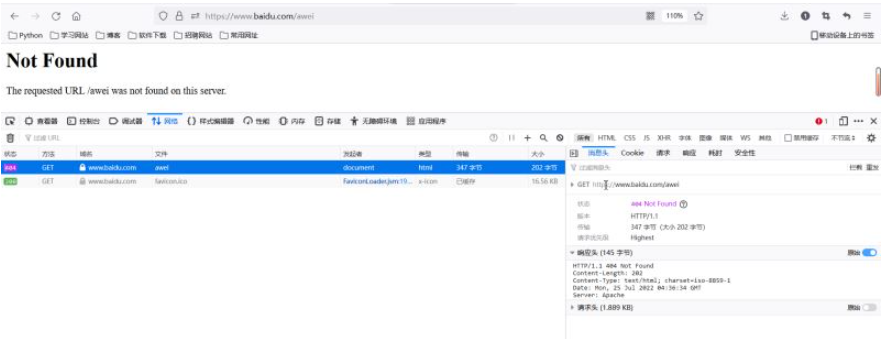
                response_first_line = 'HTTP/1.1 404 Not Found\r\n'
                response_header = 'Content-Length:'+str(len(response_body))+'\r\n' + \
                                  'Content-Type: text/html; charset=utf-8\r\n' + \
                                  'Date:' + time.strftime('%Y-%m-%d %H:%M:%S', time.localtime()) + '\r\n' + \
                                  'Server: Flyme awei Server\r\n'
            # 最后都会执行的代码
            finally:
                # 组成响应数据发送给(客户端)浏览器
                response = (response_first_line + response_header + '\r\n').encode('utf-8') + response_body
                new_socket.send(response)
                # 关闭套接字
                new_socket.close()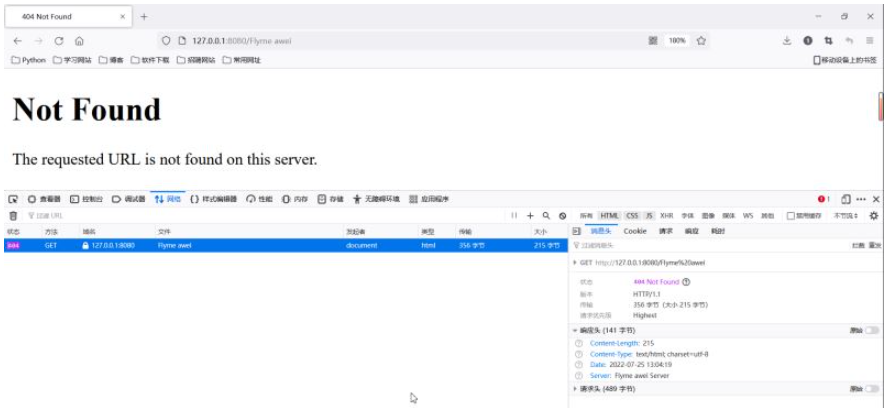
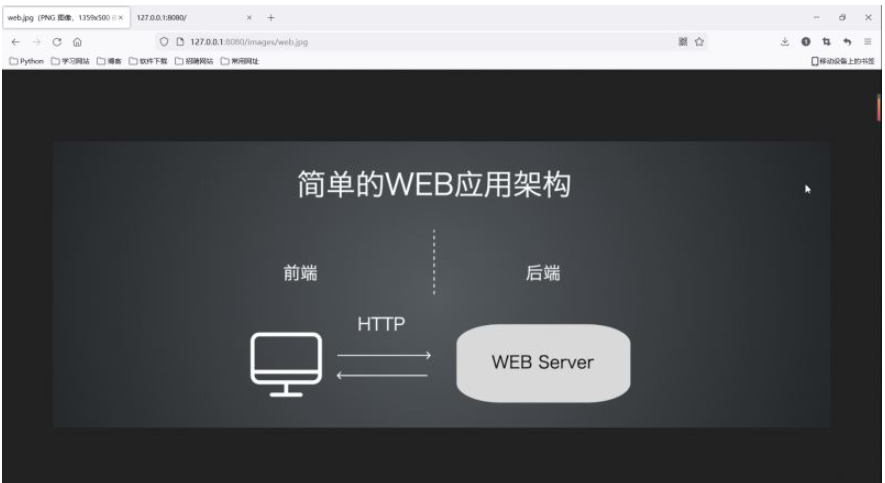
静态资源请求验证:
4、如果动态资源又怎么处理
if request_path.endswith(".html"):
            "动态资源请求"
            # 动态资源的处理交给Web框架来处理,需要把请求参数交给Web框架,可能会有多个参数,采用字典结构
            params = {
                'request_path': request_path
            }
            # Web框架处理动态资源请求后,返回一个响应
            response = MyFramework.handle_request(params)
            new_socket.send(response)
            new_socket.close()
5、关闭Web服务器
new_socket.close()
Web服务器主体框架总代码展示:
# -*- coding: utf-8 -*-
# @File  : My_Web_Server.py
# @author: Flyme awei
# @email : 1071505897@qq.com
# @Time  : 2022/7/24 21:28


import sys
import time
from socket import *
import threading
import MyFramework


# 开发自己的Web服务器主类
class MyHttpWebServer(object):

    def __init__(self, port):
        # 创建 HTTP服务的 TCP套接字
        server_socket = socket(AF_INET, SOCK_STREAM)
        # 设置端口号互用,程序退出之后不需要等待,直接释放端口
        server_socket.setsockopt(SOL_SOCKET, SO_REUSEADDR, True)
        # 绑定 ip和 port
        server_socket.bind(('', port))
        # listen使套接字变为了被动连接
        server_socket.listen(128)
        self.server_socket = server_socket

    # 处理请求函数
    @staticmethod  # 静态方法
    def handle_browser_request(new_socket):
        # 接受客户端发来的数据
        recv_data = new_socket.recv(4096)
        # 如果没有数据,那么请求无效,关闭套接字,直接退出
        if len(recv_data) == 0:
            new_socket.close()
            return

        # 对接收的字节数据进行转换为字符数据
        request_data = recv_data.decode('utf-8')
        print("浏览器请求的数据:", request_data)
        request_array = request_data.split(' ', maxsplit=2)

        # 得到请求路径
        request_path = request_array[1]
        print("请求的路径是:", request_path)
        if request_path == "/":
            # 如果请求路径为根目录,自动设置为:/index.html
            request_path = "/index.html"
        # 判断是否为:.html 结尾
        if request_path.endswith(".html"):
            "动态资源请求"
            # 动态资源的处理交给Web框架来处理,需要把请求参数交给Web框架,可能会有多个参数,采用字典结构
            params = {
                'request_path': request_path
            }
            # Web框架处理动态资源请求后,返回一个响应
            response = MyFramework.handle_request(params)
            new_socket.send(response)
            new_socket.close()
        else:
            "静态资源请求"
            # 根据请求路径读取/static 目录中的文件数据,相应给客户端
            response_body = None  # 响应主体
            response_header = None  # 响应头的第一行
            response_first_line = None  # 响应头内容
            response_type = 'test/html'  # 默认响应类型
            try:
                # 读取 static目录中相对应的文件数据,rb模式是一种兼容模式,可以打开图片,也可以打开js
                with open('static'+request_path, 'rb') as f:
                    response_body = f.read()
                if request_path.endswith('.jpg'):
                    response_type = 'image/webp'

                response_first_line = 'HTTP/1.1 200 OK'
                response_header = 'Content-Length:' + str(len(response_body)) + '\r\n' + \
                                  'Content-Type: ' + response_type + '; charset=utf-8\r\n' + \
                                  'Date:' + time.strftime('%Y-%m-%d %H:%M:%S', time.localtime()) + '\r\n' + \
                                  'Server: Flyme awei Server\r\n'

            # 浏览器读取的文件可能不存在
            except Exception as e:
                with open('static/404.html', 'rb') as f:
                    response_body = f.read()  # 响应的主体页面内容
                # 响应头
                response_first_line = 'HTTP/1.1 404 Not Found\r\n'
                response_header = 'Content-Length:'+str(len(response_body))+'\r\n' + \
                                  'Content-Type: text/html; charset=utf-8\r\n' + \
                                  'Date:' + time.strftime('%Y-%m-%d %H:%M:%S', time.localtime()) + '\r\n' + \
                                  'Server: Flyme awei Server\r\n'
            # 最后都会执行的代码
            finally:
                # 组成响应数据发送给(客户端)浏览器
                response = (response_first_line + response_header + '\r\n').encode('utf-8') + response_body
                new_socket.send(response)
                # 关闭套接字
                new_socket.close()

    # 启动服务器,并接受客户端请求
    def start(self):
        # 循环并多线程来接收客户端请求
        while True:
            # accept等待客户端连接
            new_socket, ip_port = self.server_socket.accept()
            print("客户端ip和端口", ip_port)
            # 一个客户端的请求交给一个线程来处理
            sub_thread = threading.Thread(target=MyHttpWebServer.handle_browser_request, args=(new_socket, ))
            # 设置当前线程为守护线程
            sub_thread.setDaemon(True)
            sub_thread.start()  # 启动子线程


# Web 服务器程序的入口
def main():
    web_server = MyHttpWebServer(8080)
    web_server.start()


if __name__ == '__main__':
    main()
2.开发Web框架主体程序
1、根据请求路径,动态的响应对应的数据
# -*- coding: utf-8 -*-
# @File  : MyFramework.py
# @author: Flyme awei
# @email : 1071505897@qq.com
# @Time  : 2022/7/25 14:05

import time

# 自定义Web框架


# 处理动态资源请求的函数
def handle_request(parm):
    request_path = parm['request_path']

    if request_path == '/index.html':  # 当前请求路径有与之对应的动态响应,当前框架只开发了 index.html的功能
        response = index()
        return response
    else:
        # 没有动态资源的数据,返回404页面
        return page_not_found()


# 当前 index函数,专门处理index.html的请求
def index():
    # 需求,在页面中动态显示当前系统时间
    data = time.strftime('%Y-%m-%d %H:%M:%S', time.localtime())
    response_body = data
    response_first_line = 'HTTP/1.1 200 OK\r\n'
    response_header = 'Content-Length:' + str(len(response_body)) + '\r\n' + \
                      'Content-Type: text/html; charset=utf-8\r\n' + \
                      'Date:' + time.strftime('%Y-%m-%d %H:%M:%S', time.localtime()) + '\r\n' + \
                      'Server: Flyme awei Server\r\n'
    response = (response_first_line + response_header + '\r\n' + response_body).encode('utf-8')
    return response


def page_not_found():
    with open('static/404.html', 'rb') as f:
        response_body = f.read()  # 响应的主体页面内容
    # 响应头
    response_first_line = 'HTTP/1.1 404 Not Found\r\n'
    response_header = 'Content-Length:' + str(len(response_body)) + '\r\n' + \
                      'Content-Type: text/html; charset=utf-8\r\n' + \
                      'Date:' + time.strftime('%Y-%m-%d %H:%M:%S', time.localtime()) + '\r\n' + \
                      'Server: Flyme awei Server\r\n'

    response = (response_first_line + response_header + '\r\n').encode('utf-8') + response_body
    return response
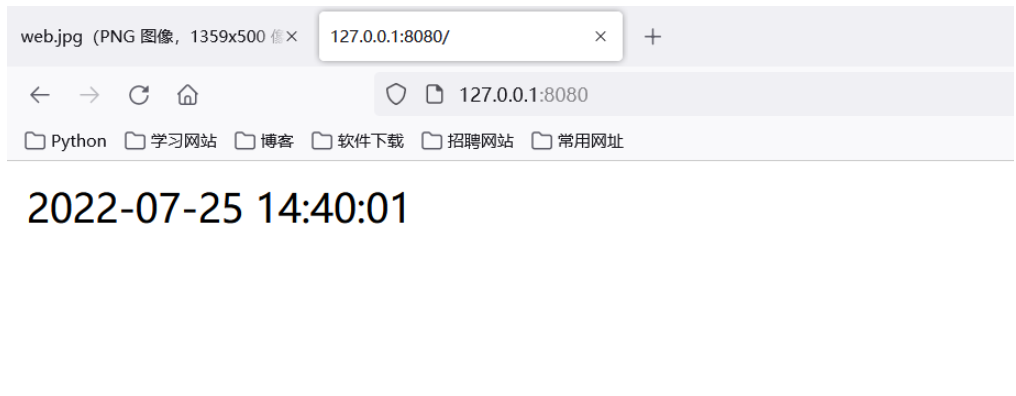
2、如果请求路径,没有对应的响应数据也需要返回404页面
3.使用模板来展示响应内容
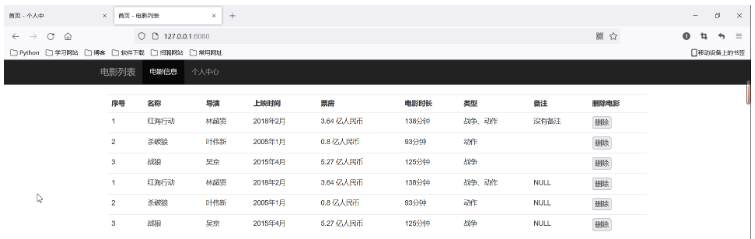
1、自己设计一个模板 index.html ,中有一些地方采用动态的数据来替代
<!DOCTYPE html>
<html lang="zh-CN">
<head>
    <meta charset="utf-8">
    <meta http-equiv="X-UA-Compatible" content="IE=edge">
    <meta name="viewport" content="width=device-width, initial-scale=1">
    <title>首页 - 电影列表</title>
    <link href="/css/bootstrap.min.css" rel="stylesheet">
    <script src="/js/jquery-1.12.4.min.js"></script>
    <script src="/js/bootstrap.min.js"></script>
</head>

<body>
<div class="navbar navbar-inverse navbar-static-top ">
        <div class="container">
        <div class="navbar-header">
                <button class="navbar-toggle" data-toggle="collapse" data-target="#mymenu">
                        <span class="icon-bar"></span>
                        <span class="icon-bar"></span>
                        <span class="icon-bar"></span>
                 </button>
                 <a href="#" class="navbar-brand">电影列表</a>
        </div>
        <div class="collapse navbar-collapse" id="mymenu">
                <ul class="nav navbar-nav">
                        <li class="active"><a href="">电影信息</a></li>
                        <li><a href="">个人中心</a></li>
                </ul>
        </div>
        </div>
</div>
<div class="container">

    <div class="container-fluid">

        <table class="table table-hover">
            <tr>
                    <th>序号</th>
                    <th>名称</th>
                    <th>导演</th>
                    <th>上映时间</th>
                    <th>票房</th>
                    <th>电影时长</th>
                    <th>类型</th>
                    <th>备注</th>
                    <th>删除电影</th>
            </tr>
            {%datas%}
        </table>
    </div>
</div>
</body>
</html>
2、怎么替代,替代什么数据

response_body = response_body.replace('{%datas%}', data)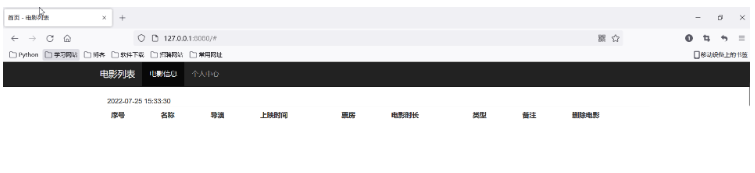
4.开发框架的路由列表功能
1、以后开发新的动作资源的功能,只需要:
a、增加一个条件判断分支
b、增加一个专门处理的函数
2、路由: 就是请求的URL路径和处理函数直接的映射。
3、路由表
| 请求路径 | 处理函数 |
|---|---|
| /index.html | index函数 |
| /user_info.html | user_info函数 |
# 定义路由表
route_list = {
    ('/index.html', index),
    ('/user_info.html', user_info)
}


for path, func in route_list:
    if request_path == path:
        return func()
    else:
        # 没有动态资源的数据,返回404页面
        return page_not_found()
注意:用户的动态资源请求,通过遍历路由表找到对应的处理函数来完成的。
5.采用装饰器的方式添加路由
1、采用带参数的装饰器
# -*- coding: utf-8 -*-
# @File  : My_Web_Server.py
# @author: Flyme awei
# @email : 1071505897@qq.com
# @Time  : 2022/7/24 21:28


# 定义路由表
route_list = []
# route_list = {
# ('/index.html', index),
# ('/user_info.html', user_info)
# }


# 定义一个带参数的装饰器
def route(request_path):  # 参数就是URL请求
    def add_route(func):
        # 添加路由表
        route_list.append((request_path, func))

        @wraps(func)
        def invoke(*args, **kwargs):
            # 调用指定的处理函数,并返回结果
            return func()
        return invoke
    return add_route


# 处理动态资源请求的函数
def handle_request(parm):
    request_path = parm['request_path']

    # if request_path == '/index.html':  # 当前请求路径有与之对应的动态响应,当前框架只开发了 index.html的功能
    #     response = index()
    #     return response
    # elif request_path == '/user_info.html':  # 个人中心的功能
    #     return user_info()
    # else:
    #     # 没有动态资源的数据,返回404页面
    #     return page_not_found()
    for path, func in route_list:
        if request_path == path:
            return func()
        else:
            # 没有动态资源的数据,返回404页面
            return page_not_found()
2、在任何一个处理函数的基础上增加一个添加路由的功能
@route('/user_info.html')小结:使用带参数的装饰器,可以把我们的路由自动的,添加到路由表中。
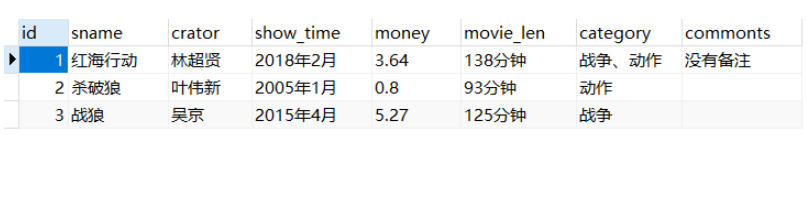
6.电影列表页面的开发案例
1、查询数据
my_web.py
# -*- coding: utf-8 -*-
# @File  : My_Web_Server.py
# @author: Flyme awei
# @email : 1071505897@qq.com
# @Time  : 2022/7/24 21:28


import socket
import sys
import threading
import time
import MyFramework


# 开发自己的Web服务器主类
class MyHttpWebServer(object):

    def __init__(self, port):
        # 创建HTTP服务器的套接字
        server_socket = socket.socket(socket.AF_INET, socket.SOCK_STREAM)
        # 设置端口号复用,程序退出之后不需要等待几分钟,直接释放端口
        server_socket.setsockopt(socket.SOL_SOCKET, socket.SO_REUSEADDR, True)
        server_socket.bind(('', port))
        server_socket.listen(128)
        self.server_socket = server_socket

    # 处理浏览器请求的函数
    @staticmethod
    def handle_browser_request(new_socket):
        # 接受客户端发送过来的数据
        recv_data = new_socket.recv(4096)
        # 如果没有收到数据,那么请求无效,关闭套接字,直接退出
        if len(recv_data) == 0:
            new_socket.close()
            return

        # 对接受的字节数据,转换成字符
        request_data = recv_data.decode('utf-8')
        print("浏览器请求的数据:", request_data)
        request_array = request_data.split(' ', maxsplit=2)
        # 得到请求路径
        request_path = request_array[1]
        print('请求路径是:', request_path)

        if request_path == '/':  # 如果请求路径为跟目录,自动设置为/index.html
            request_path = '/index.html'

        # 根据请求路径来判断是否是动态资源还是静态资源
        if request_path.endswith('.html'):
            '''动态资源的请求'''
            # 动态资源的处理交给Web框架来处理,需要把请求参数传给Web框架,可能会有多个参数,所有采用字典机构
            params = {
                'request_path': request_path,
            }
            # Web框架处理动态资源请求之后,返回一个响应
            response = MyFramework.handle_request(params)
            new_socket.send(response)
            new_socket.close()


        else:
            '''静态资源的请求'''
            response_body = None  # 响应主体
            response_header = None  # 响应头
            response_first_line = None  # 响应头的第一行
            # 其实就是:根据请求路径读取/static目录中静态的文件数据,响应给客户端
            try:
                # 读取static目录中对应的文件数据,rb模式:是一种兼容模式,可以打开图片,也可以打开js
                with open('static' + request_path, 'rb') as f:
                    response_body = f.read()
                if request_path.endswith('.jpg'):
                    response_type = 'image/webp'
                response_first_line = 'HTTP/1.1 200 OK'
                response_header = 'Server: Laoxiao_Server\r\n'

            except Exception as e:  # 浏览器想读取的文件可能不存在
                with open('static/404.html', 'rb') as f:
                    response_body = f.read()  # 响应的主体页面内容(字节)
                # 响应头 (字符数据)
                response_first_line = 'HTTP/1.1 404 Not Found\r\n'
                response_header = 'Server: Laoxiao_Server\r\n'
            finally:
                # 组成响应数据,发送给客户端(浏览器)
                response = (response_first_line + response_header + '\r\n').encode('utf-8') + response_body
                new_socket.send(response)
                new_socket.close()  # 关闭套接字

    # 启动服务器,并且接受客户端的请求
    def start(self):
        # 循环并且多线程来接受客户端的请求
        while True:
            new_socket, ip_port = self.server_socket.accept()
            print("客户端的ip和端口", ip_port)
            # 一个客户端请求交给一个线程来处理
            sub_thread = threading.Thread(target=MyHttpWebServer.handle_browser_request, args=(new_socket,))
            sub_thread.setDaemon(True)  # 设置当前线程为守护线程
            sub_thread.start()  # 子线程要启动


# web服务器程序的入口
def main():
    web_server = MyHttpWebServer(8080)
    web_server.start()


if __name__ == '__main__':
    main()
MyFramework.py
# -*- coding: utf-8 -*-
# @File  : My_Web_Server.py
# @author: Flyme awei
# @email : 1071505897@qq.com
# @Time  : 2022/7/24 21:28


import time
from functools import wraps
import pymysql

# 定义路由表
route_list = []


# route_list = {
#     # ('/index.html',index),
#     # ('/userinfo.html',user_info)
# }

# 定义一个带参数装饰器
def route(request_path):  # 参数就是URL请求
    def add_route(func):
        # 添加路由到路由表
        route_list.append((request_path, func))

        @wraps(func)
        def invoke(*arg, **kwargs):
            # 调用我们指定的处理函数,并且返回结果
            return func()

        return invoke

    return add_route


# 处理动态资源请求的函数
def handle_request(params):
    request_path = params['request_path']

    for path, func in route_list:
        if request_path == path:
            return func()
    else:
        # 没有动态资源的数据,返回404页面
        return page_not_found()
    # if request_path =='/index.html': # 当前的请求路径有与之对应的动态响应,当前框架,我只开发了index.html的功能
    #     response = index()
    #     return response
    #
    # elif request_path =='/userinfo.html': # 个人中心的功能,user_info.html
    #     return user_info()
    # else:
    #     # 没有动态资源的数据,返回404页面
    #     return page_not_found()


# 当前user_info函数,专门处理userinfo.html的动态请求
@route('/userinfo.html')
def user_info():
    # 需求:在页面中动态显示当前系统时间
    date = time.strftime('%Y-%m-%d %H:%M:%S', time.localtime())
    # response_body =data

    with open('template/user_info.html', 'r', encoding='utf-8') as f:
        response_body = f.read()

    response_body = response_body.replace('{%datas%}', date)

    response_first_line = 'HTTP/1.1 200 OK\r\n'
    response_header = 'Server: Laoxiao_Server\r\n'

    response = (response_first_line + response_header + '\r\n' + response_body).encode('utf-8')
    return response


# 当前index函数,专门处理index.html的请求
@route('/index.html')
def index():
    # 需求:从数据库中取得所有的电影数据,并且动态展示
    # date = time.strftime('%Y-%m-%d %H:%M:%S', time.localtime())
    # response_body =data
    # 1、从MySQL中查询数据
    conn = pymysql.connect(host='localhost', port=3306, user='root', password='******', database='test', charset='utf8')
    cursor = conn.cursor()
    cursor.execute('select * from t_movies')
    result = cursor.fetchall()
    # print(result)

    datas = ""
    for row in result:
        datas += '''<tr>
                <td>%s</td>
                <td>%s</td>
                <td>%s</td>
                <td>%s</td>
                <td>%s 亿人民币</td>
                <td>%s</td>
                <td>%s</td>
                <td>%s</td>
                <td> <input type='button'  value='删除'/> </td>
                </tr>
                ''' % row
    print(datas)

    # 把查询的数据,转换成动态内容
    with open('template/index.html', 'r', encoding='utf-8') as f:
        response_body = f.read()

    response_body = response_body.replace('{%datas%}', datas)

    response_first_line = 'HTTP/1.1 200 OK\r\n'
    response_header = 'Server: Laoxiao_Server\r\n'

    response = (response_first_line + response_header + '\r\n' + response_body).encode('utf-8')
    return response


# 处理没有找到对应的动态资源
def page_not_found():
    with open('static/404.html', 'rb') as f:
        response_body = f.read()  # 响应的主体页面内容(字节)
    # 响应头 (字符数据)
    response_first_line = 'HTTP/1.1 404 Not Found\r\n'
    response_header = 'Server: Laoxiao_Server\r\n'
    response = (response_first_line + response_header + '\r\n').encode('utf-8') + response_body
    return response
2、根据查询的数据得到动态的内容