一.什么是Thymeleaf
官网原话:thymeleaf是适用于web和独立环境的现代服务器端java模板引擎,能够处理html,xml,javascript,css甚至纯文本。thymeleaf旨在提供一种优美而易于维护的模板创建方式。它以自然模板为蓝本,以不影响模板作为设计原型的方式,将逻辑注入模板文件。这样可以改善设计沟通,并缩小设计团队与开发团队之间的差距。thymeleaf是一种用于web应用程序开发的html5模板引擎。thymeleaf提供了一个用于整合spring mvc的可选模块,在应用开发中,你可以使用thymeleaf来完全代替jsp或其他模板引擎,如velocity、freemarker等。thymeleaf的主要目的是为了提供一种能够生成格式良好的模板,并能被浏览器正确显示的创建方式。thymeleaf模板引擎,替代jsp。
二.SpringBoot中使用Thymeleaf模板
1.pom.xml中添加thymeleaf依赖
        <dependency>
            <groupId>org.springframework.boot</groupId>
            <artifactId>spring-boot-starter-thymeleaf</artifactId>
        </dependency>
2.关闭thymeleaf缓存
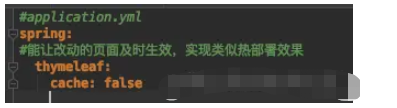
在application.yml中的spring:下添加如下代码(能让改动的页面及时生效,实现类似热部署效果):
#能让改动的页面及时生效,实现类似热部署效果
thymeleaf:
    cache: false
注意缩进,添加后缩进如下:
3.创建thymeleaf模板页面
创建一个普通的html文件hello.html,如下:

<!DOCTYPE html>
<html lang="en">
<head>
    <meta charset="UTF-8">
    <title>Title</title>
</head>
<body>
</body>
</html>在html的标签上加入名称空间xmlns:th="http://www.thymeleaf.org"表示该页面是一个thymeleaf模板页面。 即把上述代码中<html lang="en">换成<html lang="en" xmlns:th="http://www.thymeleaf.org"> 这样就可以在页面中的标签内使用th属性取出model中的值,类似于EL表达式。 具体用法代码如下:
<!DOCTYPE html>
<html lang="en" xmlns:th="http://www.thymeleaf.org">
<head>
    <meta charset="UTF-8">
    <title>Title</title>
</head>
<body>
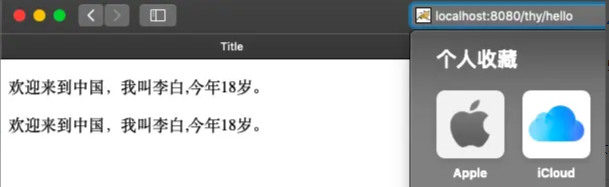
    <p th:text="'欢迎来到中国,我叫'+${name}+',今年'+${age}+'岁。'"></p>
    <p>欢迎来到中国,我叫<span th:text="${name}"></span>,今年<span th:text="${age}"></span>岁。</p>
</body>
</html>
4.创建一个类(用于与上述html页面交互)
ackage com.ysw.springboot01.controller;
import org.springframework.stereotype.Controller;
import org.springframework.ui.Model;
import org.springframework.web.bind.annotation.RequestMapping;
@Controller
@RequestMapping("/thy")
public class ThymeleafController {
    @RequestMapping("/hello")
    public String hello0(Model model){
        //向model中存入数据
        model.addAttribute("name","李白");
        model.addAttribute("age","18");
        //跳转到hello.html模版引擎
        return "hello";
    }
}
5.访问服务路径
效果如下: