1、keepalive功能
keepalive是vue3中的一个全局组件
keepalive 本身不会渲染出来,也不会出现在dom节点当中,但是它会被渲染为vnode,通过vnode可以跟踪到keepalive中的cache和keys,当然也是在开发环境才可以,build打包以后没有暴露到vnode中(这个还要再确认一下)
keepalive 最重要的功能就是缓存组件
keepalive 通过LRU缓存淘汰策略来更新组件缓存,可以更有效的利用内存,防止内存溢出,源代码中的最大缓存数max为10,也就是10个组件之后,就开始淘汰最先被缓存的组件了
2、keepalive使用场景
-
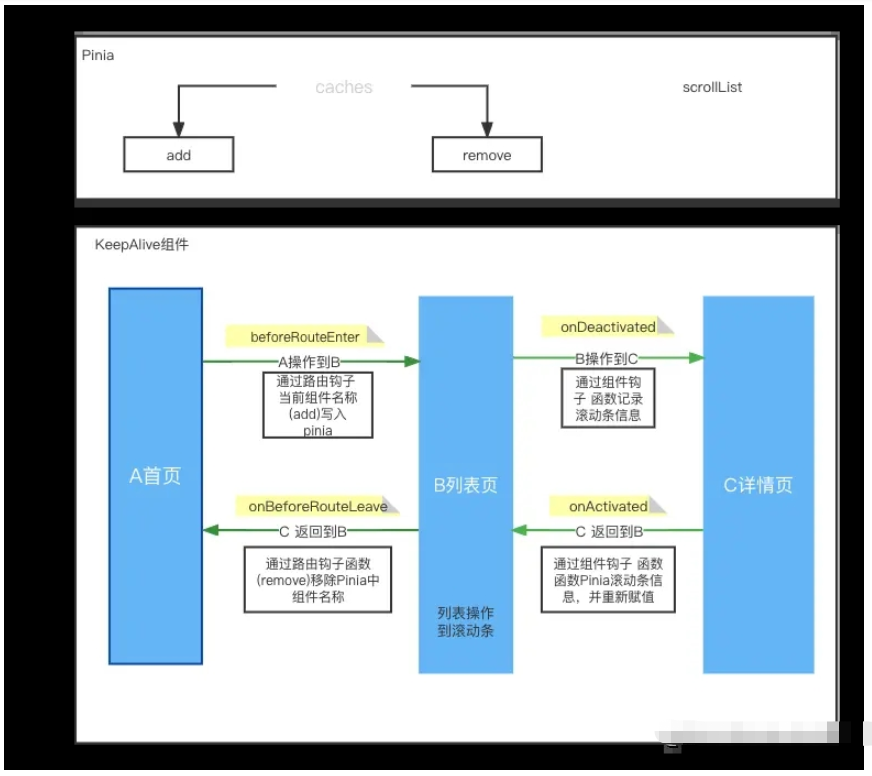
这里先假设一个场景: A页面是首页=====> B页面列表页面(需要缓存的页面)=======> C 详情页 由C详情页到到B页面的时候,要返回到B的缓存页面,包括页面的基础数据和列表的滚动条位置信息 如果由B页面返回到A页面,则需要将B的缓存页清空
立即学习“前端免费学习笔记(深入)”;
上述另外一个场景:进入页面直接缓存,然后就结束了,这个比较简单本文就不讨论了
3、在项目中的使用过程
keepalive组件总共有三个参数
include:可传字符串、正则表达式、数组,名称匹配成功的组件会被缓存
exclude:可传字符串、正则表达式、数组,名称匹配成功的组件不会被缓存
max:可传数字,限制缓存组件的最大数量,默认为10
首先在App.vue根代码中添加引入keepalive组件,通过这里可以发现,我这里缓存的相当于整个页面,当然你也可以进行更细粒度的控制页面当中的某个区域组件
    <template>
        <router-view v-slot="{ Component }">
            <keep-alive :include="keepAliveCache">
                <component :is="Component" :key="$route.name" />
            </keep-alive>
        </router-view>
    </template>
    <script lang="ts" setup>
    import { computed } from "vue";
    import { useKeepAliverStore } from "@/store";
    const useStore = useKeepAliverStore();
    const keepAliveCache = computed(() => {
        return useStore.caches;
    });
    </script>
通过App.vue可以发现,通过pinia(也就是vue2中使用的vuex)保存要缓存的页面组件, 来处理include缓存,和保存页面组件中的滚动条信息数据
    import { defineStore } from "pinia";
    export const useKeepAliverStore = defineStore("useKeepAliverStore", {
        state: () => ({
            caches: [] as any,
            scrollList: new Map(),  // 缓存页面组件如果又滚动条的高度
        }),
        actions: {
            add(name: string) {
                this.caches.push(name);
            },
            remove(name: string) {
                console.log(this.caches, 'this.caches')
                this.caches = this.caches.filter((item: any) => item !== name);
                console.log(this.caches, 'this.caches')
            },
            clear() {
                this.caches = []
            }
        }
    });
组件路由刚刚切换时,通过beforeRouteEnter将组件写入include, 此时组件生命周期还没开始。如果都已经开始执行组件生命周期了,再写入就意义了。
所以这个钩子函数就不能写在setup中,要单独提出来写。当然你也可以换成路由的其他钩子函数处理beforeEach,但这里面使用的话,好像使用不了pinia,这个还需要进一步研究一下。
    import { useRoute, useRouter, onBeforeRouteLeave } from "vue-router";
    import { useKeepAliverStore } from "@/store";
    const useStore = useKeepAliverStore()
    export default {
        name:"record-month",
        beforeRouteEnter(to, from, next) {
            next(vm => {
                if(from.name === 'Home' && to.name === 'record-month') {
                useStore.add(to.name)
                }
            });
        }
    }
    </script>
组件路由离开时判断,是否要移出缓存,这个钩子就直接写在setup中就可以了。
    onBeforeRouteLeave((to, from) => {
        console.log(to.name, "onBeforeRouteLeave");
        if (to.name === "new-detection-detail") {
            console.log(to, from, "进入详情页面不做处理");
        } else {
            useStore.remove(from.name)
            console.log(to, from, "删除组件缓存");
        }
    });
在keepalive两个钩子函数中进行处理scroll位置的缓存,onActivated中获取缓存中的位置, onDeactivated记录位置到缓存
    onActivated(() => {
        if(useStore.scrollList.get(routeName)) {
            const top = useStore.scrollList.get(routeName)
            refList.value.setScrollTop(Number(top))
        }
    });
    onDeactivated(() => {
        const top = refList.value.getScrollTop()
        useStore.scrollList.set(routeName, top)
    });
这里定义一个方法,设置scrollTop使用了原生javascript的api

    const setScrollTop = (value: any) => {
        const dom = document.querySelector('.van-pull-refresh')
        dom!.scrollTop = value
    }
同时高度怎么获取要先注册scroll事件,然后通过getScrollTop 获取当前滚动条的位置进行保存即可
    onMounted(() => {
        scrollDom.value = document.querySelector('.van-pull-refresh') as HTMLElement
        const throttledFun = useThrottleFn(() => {
            console.log(scrollDom.value?.scrollTop, 'addEventListener')
            state.scrollTop = scrollDom.value!.scrollTop
        }, 500)
        if(scrollDom.value) {
            scrollDom.value.addEventListener('scroll',throttledFun)
        }
    })
    const getScrollTop = () => {
        console.log('scrollDom.vaue', scrollDom.value?.scrollTop)
        return state.scrollTop
    }
上面注册scroll事件中使用了一个useThrottleFn,这个类库是@vueuse/core中提供的,其中封装了很多工具都非常不错,用兴趣的可以研究研究
https://vueuse.org/shared/usethrottlefn/#usethrottlefn
此时也可以查看找到实例的vnode查找到keepalive,是在keepalive紧挨着的子组件里
    const instance = getCurrentInstance()
    console.log(instance.vnode.parent) // 这里便是keepalive组件vnode
    // 如果是在开发环境中可以查看到cache对象
    instance.vnode.parent.__v_cache
    // vue源码中,在dev环境对cache进行暴露,生产环境是看不到的
    if (__DEV__ || __FEATURE_PROD_DEVTOOLS__) {
        ;(instance as any).__v_cache = cache
    }
4、vue3 keepalive源码调试
1、克隆代码
git clone git@github.com:vuejs/core.git
2、安装依赖
pnpm i
3、如果不能使用pnpm,可以先通过npm安装一下
npm i pnpm -g
4、安装完成以后,找到根目录package.json文件中的scripts
    // 在dev命令后添加 --source-map是从已转换的代码,映射到原始的源文件
    "dev": "node scripts/dev.js  --sourcemap"
参考 https://www.yisu.com/article/154583.htm
5、执行pnpm run dev则会build vue源码
    pnpm run dev
    //则会出现以下,代表成功了(2022年5月27日),后期vue源代码作者可能会更新,相应的提示可能发生变更,请注意一下
    > @3.2.36 dev H:\github\sourceCode\core
    > node scripts/dev.js  --sourcemap
    watching: packages\vue\dist\vue.global.js
    //到..\..\core\packages\vue\dist便可以看到编译成功,以及可以查看到examples样例demo页面
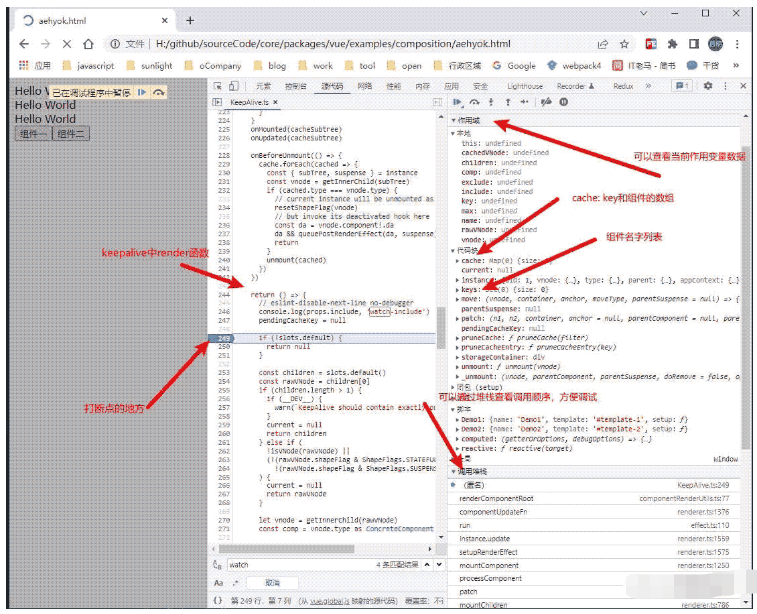
6、然后在 ....\core\packages\vue\examples\composition中添加一个aehyok.html文件,将如下代码进行拷贝,然后通过chrome浏览器打开,F12,找到源代码的Tab页面,通过快捷键Ctrl+ P 输入KeepAlive便可以找到这个组件,然后通过左侧行标右键就可以添加断点,进行调试,也可以通过右侧的【调用堆栈】进行快速跳转代码进行调试。
    <script src="../../dist/vue.global.js"></script>
    <script type="text/x-template" id="template-1">
        <div>template-1</div>
        <div>template-1</div>
    </script>
    <script type="text/x-template" id="template-2">
        <div>template-2</div>
        <div>template-2</div>
    </script>
    <script>
    const { reactive, computed } = Vue
    const Demo1 = {
        name: 'Demo1',
        template: '#template-1',
        setup(props) {
        }
    }
    const Demo2 = {
        name: 'Demo2',
        template: '#template-2',
        setup(props) {
        }
    }
    </script>
    <!-- App template (in DOM) -->
    <div id="demo">
        <div>Hello World</div>
        <div>Hello World</div>
        <div>Hello World</div>
        <button @click="changeClick(1)">组件一</button>
        <button @click="changeClick(2)">组件二</button>
        <keep-alive :include="includeCache">
            <component :is="componentCache" :key="componentName" v-if="componentName" />
        </keep-alive>
    </div>
    <!-- App script -->
    <script>
    Vue.createApp({
    components: {
        Demo1,
        Demo2
    },
    data: () => ({
        includeCache: [],
        componentCache: '',
        componentName: '',
    }),
    methods:{
        changeClick(type) {
            if(type === 1) {
                if(!this.includeCache.includes('Demo1')) {
                    this.includeCache.push('Demo1')
                }
                console.log(this.includeCache, '000')
                this.componentCache = Demo1
                this.componentName = 'Demo1'
            }
            if(type === 2) {
                if(!this.includeCache.includes('Demo2')) {
                    this.includeCache.push('Demo2')
                }
                console.log(this.includeCache, '2222')
                this.componentName = 'Demo2'
                this.componentCache = Demo2
            }
        }
    }
    }).mount('#demo')
    </script>
7、调试源码发现 keepalive中的render函数(或者说时setup中的return 函数)在子组件切换时就会去执行,变更逻辑缓存
第一次进入页面初始化keepalive组件会执行一次,
然后点击组件一,再次执行render函数
然后点击组件二,会再次执行render函数
8、调试截图说明
5、vue3 keealive源码粗浅分析
通过查看vue3 KeepAlive.ts源码
    // 在setup初始化中,先获取keepalive实例
    // getCurrentInstance() 可以获取当前组件的实例
    const instance = getCurrentInstance()!
    // KeepAlive communicates with the instantiated renderer via the
    // ctx where the renderer passes in its internals,
    // and the KeepAlive instance exposes activate/deactivate implementations.
    // The whole point of this is to avoid importing KeepAlive directly in the
    // renderer to facilitate tree-shaking.
    const sharedContext = instance.ctx as KeepAliveContext
    // if the internal renderer is not registered, it indicates that this is server-side rendering,
    // for KeepAlive, we just need to render its children
    /// SSR 判断,暂时可以忽略掉即可。
    if (__SSR__ && !sharedContext.renderer) {
        return () => {
            const children = slots.default && slots.default()
            return children && children.length === 1 ? children[0] : children
        }
    }
    // 通过Map存储缓存vnode,
    // 通过Set存储缓存的key(在外面设置的key,或者vnode的type)
    const cache: Cache = new Map()
    const keys: Keys = new Set()
    let current: VNode | null = null
    if (__DEV__ || __FEATURE_PROD_DEVTOOLS__) {
    ;(instance as any).__v_cache = cache
    }
    const parentSuspense = instance.suspense
    const {
    renderer: {
        p: patch,
        m: move,
        um: _unmount,
        o: { createElement }
    }
    } = sharedContext
    // 创建了隐藏容器
    const storageContainer = createElement('div')
    // 在实例上注册两个钩子函数 activate,  deactivate
    sharedContext.activate = (vnode, container, anchor, isSVG, optimized) => {
        const instance = vnode.component!
        move(vnode, container, anchor, MoveType.ENTER, parentSuspense)
        // in case props have changed
        patch(
            instance.vnode,
            vnode,
            container,
            anchor,
            instance,
            parentSuspense,
            isSVG,
            vnode.slotScopeIds,
            optimized
        )
        queuePostRenderEffect(() => {
            instance.isDeactivated = false
            if (instance.a) {
            invokeArrayFns(instance.a)
            }
            const vnodeHook = vnode.props && vnode.props.onVnodeMounted
            if (vnodeHook) {
            invokeVNodeHook(vnodeHook, instance.parent, vnode)
            }
        }, parentSuspense)
        if (__DEV__ || __FEATURE_PROD_DEVTOOLS__) {
            // Update components tree
            devtoolsComponentAdded(instance)
        }
    }
    sharedContext.deactivate = (vnode: VNode) => {
        const instance = vnode.component!
        move(vnode, storageContainer, null, MoveType.LEAVE, parentSuspense)
        queuePostRenderEffect(() => {
            if (instance.da) {
            invokeArrayFns(instance.da)
            }
            const vnodeHook = vnode.props && vnode.props.onVnodeUnmounted
            if (vnodeHook) {
            invokeVNodeHook(vnodeHook, instance.parent, vnode)
            }
            instance.isDeactivated = true
        }, parentSuspense)
        if (__DEV__ || __FEATURE_PROD_DEVTOOLS__) {
            // Update components tree
            devtoolsComponentAdded(instance)
        }
    }
    // 组件卸载
    function unmount(vnode: VNode) {
        // reset the shapeFlag so it can be properly unmounted
        resetShapeFlag(vnode)
        _unmount(vnode, instance, parentSuspense, true)
    }
    // 定义 include和exclude变化时,对缓存进行动态处理
    function pruneCache(filter?: (name: string) => boolean) {
        cache.forEach((vnode, key) => {
            const name = getComponentName(vnode.type as ConcreteComponent)
            if (name && (!filter || !filter(name))) {
            pruneCacheEntry(key)
            }
        })
    }
    function pruneCacheEntry(key: CacheKey) {
        const cached = cache.get(key) as VNode
        if (!current || cached.type !== current.type) {
            unmount(cached)
        } else if (current) {
            // current active instance should no longer be kept-alive.
            // we can't unmount it now but it might be later, so reset its flag now.
            resetShapeFlag(current)
        }
        cache.delete(key)
        keys.delete(key)
    }
    // 可以发现通过include 可以配置被显示的组件,
    // 当然也可以设置exclude来配置不被显示的组件,
    // 组件切换时随时控制缓存
    watch(
    () => [props.include, props.exclude],
    ([include, exclude]) => {
        include && pruneCache(name => matches(include, name))
        exclude && pruneCache(name => !matches(exclude, name))
    },
    // prune post-render after `current` has been updated
    { flush: 'post', deep: true }
    )
    // 定义当前组件Key
    // cache sub tree after render
        let pendingCacheKey: CacheKey | null = null
        // 这是一个重要的方法,设置缓存
        const cacheSubtree = () => {
        // fix #1621, the pendingCacheKey could be 0
        if (pendingCacheKey != null) {
            cache.set(pendingCacheKey, getInnerChild(instance.subTree))
        }
        }
        onMounted(cacheSubtree)
        onUpdated(cacheSubtree)
        // 组件卸载的时候,对缓存列表进行循环判断处理
        onBeforeUnmount(() => {
            cache.forEach(cached => {
                const { subTree, suspense } = instance
                const vnode = getInnerChild(subTree)
                if (cached.type === vnode.type) {
                // current instance will be unmounted as part of keep-alive's unmount
                resetShapeFlag(vnode)
                // but invoke its deactivated hook here
                const da = vnode.component!.da
                da && queuePostRenderEffect(da, suspense)
                return
                }
                unmount(cached)
            })
        })
    // 同时在keepAlive组件setup生命周期中,return () => {} 渲染的时候,对组件进行判断逻辑处理,同样对include和exclude判断渲染。
    // 判断keepalive组件中的子组件,如果大于1个的话,直接警告处理了
    // 另外如果渲染的不是虚拟dom(vNode),则直接返回渲染即可。
    return () => {
        // eslint-disable-next-line no-debugger
        console.log(props.include, 'watch-include')
        pendingCacheKey = null
        if (!slots.default) {
            return null
        }
        const children = slots.default()
        const rawVNode = children[0]
        if (children.length > 1) {
            if (__DEV__) {
            warn(`KeepAlive should contain exactly one component child.`)
            }
            current = null
            return children
        } else if (
            !isVNode(rawVNode) ||
            (!(rawVNode.shapeFlag & ShapeFlags.STATEFUL_COMPONENT) &&
            !(rawVNode.shapeFlag & ShapeFlags.SUSPENSE))
        ) {
            current = null
            return rawVNode
        }
        // 接下来处理时Vnode虚拟dom的情况,先获取vnode
        let vnode = getInnerChild(rawVNode)
        // 节点类型
        const comp = vnode.type as ConcreteComponent
        // for async components, name check should be based in its loaded
        // inner component if available
        // 获取组件名称
        const name = getComponentName(
            isAsyncWrapper(vnode)
            ? (vnode.type as ComponentOptions).__asyncResolved || {}
            : comp
        )
        //这个算是最熟悉的通过props传递进行的参数,进行解构
        const { include, exclude, max } = props
        // include判断 组件名称如果没有设置, 或者组件名称不在include中,
        // exclude判断 组件名称有了,或者匹配了
        // 对以上两种情况都不进行缓存处理,直接返回当前vnode虚拟dom即可。
        if (
            (include && (!name || !matches(include, name))) ||
            (exclude && name && matches(exclude, name))
        ) {
            current = vnode
            return rawVNode
        }
        // 接下来开始处理有缓存或者要缓存的了
        // 先获取一下vnode的key设置,然后看看cache缓存中是否存在
        const key = vnode.key == null ? comp : vnode.key
        const cachedVNode = cache.get(key)
        // 这一段可以忽略了,好像时ssContent相关,暂时不管了,没看明白??
        // clone vnode if it's reused because we are going to mutate it
        if (vnode.el) {
            vnode = cloneVNode(vnode)
            if (rawVNode.shapeFlag & ShapeFlags.SUSPENSE) {
            rawVNode.ssContent = vnode
            }
        }
        // 上面判断了,如果没有设置key,则使用vNode的type作为key值
        pendingCacheKey = key
        //判断上面缓存中是否存在vNode
        // if 存在的话,就将缓存中的vnode复制给当前的vnode
        // 同时还判断了组件是否为过渡组件 transition,如果是的话 需要注册过渡组件的钩子
        // 同时先删除key,然后再重新添加key
        // else 不存在的话,就添加到缓存即可
        // 并且要判断一下max最大缓存的数量是否超过了,超过了,则通过淘汰LPR算法,删除最旧的一个缓存
        // 最后又判断了一下是否为Suspense。也是vue3新增的高阶组件。
        if (cachedVNode) {
            // copy over mounted state
            vnode.el = cachedVNode.el
            vnode.component = cachedVNode.component
            if (vnode.transition) {
            // recursively update transition hooks on subTree
            setTransitionHooks(vnode, vnode.transition!)
            }
            // avoid vnode being mounted as fresh
            vnode.shapeFlag |= ShapeFlags.COMPONENT_KEPT_ALIVE
            // make this key the freshest
            keys.delete(key)
            keys.add(key)
        } else {
            keys.add(key)
            // prune oldest entry
            if (max && keys.size > parseInt(max as string, 10)) {
            pruneCacheEntry(keys.values().next().value)
            }
        }
        // avoid vnode being unmounted
        vnode.shapeFlag |= ShapeFlags.COMPONENT_SHOULD_KEEP_ALIVE
        current = vnode
return isSuspense(rawVNode.type) ? rawVNode : vnode