



一.引言
我们的朋友给我们发来一张照片我们如何获取到她的位置呢?
用手机拍照会带着GPS信息,原来没注意过这个,因此查看下并使用代码获取照片里的GPS信息
查看图片文件属性
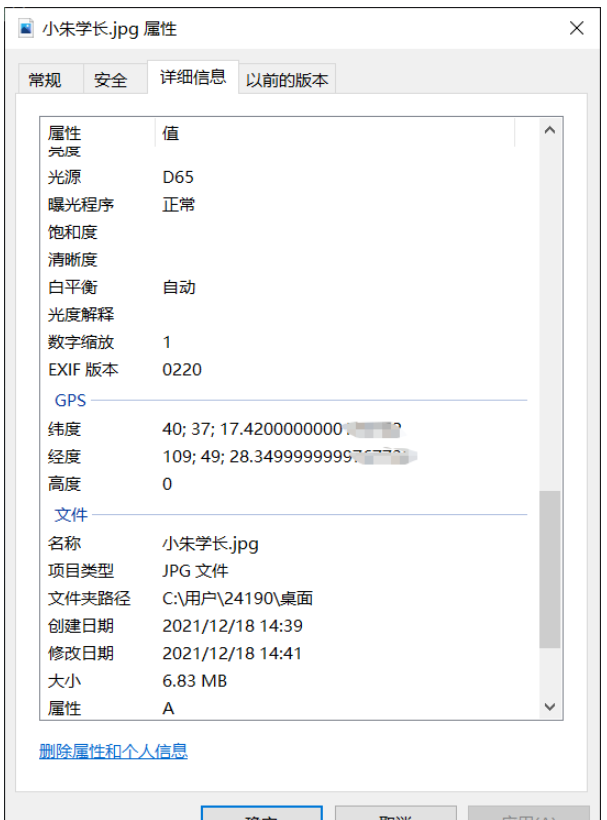
1.读取照片信息,获取坐标
ExifRead
立即学习“Python免费学习笔记(深入)”;
Python library to extract EXIF data from tiff and jpeg files.
安装
pip install exifread
读取GPS
import exifread
import re

def read():
    GPS = {}
    date = ''
    f = open("C:\Users\24190\Desktop\小朱学长.jpg",'rb')
    contents = exifread.process_file(f)
    for key in contents:
        if key == "GPS GPSLongitude":
            print("经度 =", contents[key],contents['GPS GPSLatitudeRef'])
        elif key =="GPS GPSLatitude":
            print("纬度 =",contents[key],contents['GPS GPSLongitudeRef'])
        #print(contents)
read()
运行


我们得到了一个简易的gps地址
如果想要读取全部的拍摄信息:
# 读取照片的GPS经纬度信息
def find_GPS_image(pic_path):
        GPS = {}
        date = ''
        with open(pic_path, 'rb') as f:
                tags = exifread.process_file(f)
                for tag, value in tags.items():
                        # 纬度
                        if re.match('GPS GPSLatitudeRef', tag):
                                GPS['GPSLatitudeRef'] = str(value)
                        # 经度
                        elif re.match('GPS GPSLongitudeRef', tag):
                                GPS['GPSLongitudeRef'] = str(value)
                        # 海拔
                        elif re.match('GPS GPSAltitudeRef', tag):
                                GPS['GPSAltitudeRef'] = str(value)
                        elif re.match('GPS GPSLatitude', tag):
                                try:
                                        match_result = re.match('[(w*),(w*),(w.*)/(w.*)]', str(value)).groups()
                                        GPS['GPSLatitude'] = int(match_result[0]), int(match_result[1]), int(match_result[2])
                                except:
                                        deg, min, sec = [x.replace(' ', '') for x in str(value)[1:-1].split(',')]
                                        GPS['GPSLatitude'] = latitude_and_longitude_convert_to_decimal_system(deg, min, sec)
                        elif re.match('GPS GPSLongitude', tag):
                                try:
                                        match_result = re.match('[(w*),(w*),(w.*)/(w.*)]', str(value)).groups()
                                        GPS['GPSLongitude'] = int(match_result[0]), int(match_result[1]), int(match_result[2])
                                except:
                                        deg, min, sec = [x.replace(' ', '') for x in str(value)[1:-1].split(',')]
                                        GPS['GPSLongitude'] = latitude_and_longitude_convert_to_decimal_system(deg, min, sec)
                        elif re.match('GPS GPSAltitude', tag):
                                GPS['GPSAltitude'] = str(value)
                        elif re.match('.*Date.*', tag):
                                date = str(value)
        return {'GPS_information': GPS, 'date_information': date}
2.通过baidu Map的API将GPS信息转换成地址。
众所周知gps和百度的经纬度会有误差,那么我们需要调用百度转换接口,这个百度目前没有开源。
# 通过baidu Map的API将GPS信息转换成地址。
def find_address_from_GPS(GPS):
        """
        使用Geocoding API把经纬度坐标转换为结构化地址。
        :param GPS:
        :return:
        """
        secret_k ey = 'XXX'
        if not GPS['GPS_information']:
                return '该照片无GPS信息'
        lat, lng = GPS['GPS_information']['GPSLatitude'], GPS['GPS_information']['GPSLongitude']
        baidu_map_api = "http://api.map.baidu.com/geocoder/v2/?ak={0}&callback=renderReverse&location={1},{2}s&output=json&pois=0".format(
                secret_key, lat, lng)
        response = requests.get(baidu_map_api)
        content = response.text.replace("renderReverse&&renderReverse(", "")[:-1]
        print(content)
        baidu_map_address = json.loads(content)
        formatted_address = baidu_map_address["result"]["formatted_address"]
        province = baidu_map_address["result"]["addressComponent"]["province"]
        city = baidu_map_address["result"]["addressComponent"]["city"]
        district = baidu_map_address["result"]["addressComponent"]["district"]
        location = baidu_map_address["result"]["sematic_description"]
        return formatted_address, province, city, district, location
然后在主函数输出:

二.源码附上!!!
# coding=utf-8
import exifread
import re
import json
import requests
import os


# 转换经纬度格式
def latitude_and_longitude_convert_to_decimal_system(*arg):
        """
        经纬度转为小数, param arg:
        :return: 十进制小数
        """
        return float(arg[0]) + ((float(arg[1]) + (float(arg[2].split('/')[0]) / float(arg[2].split('/')[-1]) / 60)) / 60)


# 读取照片的GPS经纬度信息
def find_GPS_image(pic_path):
        GPS = {}
        date = ''
        with open(pic_path, 'rb') as f:
                tags = exifread.process_file(f)
                for tag, value in tags.items():
                        # 纬度
                        if re.match('GPS GPSLatitudeRef', tag):
                                GPS['GPSLatitudeRef'] = str(value)
                        # 经度
                        elif re.match('GPS GPSLongitudeRef', tag):
                                GPS['GPSLongitudeRef'] = str(value)
                        # 海拔
                        elif re.match('GPS GPSAltitudeRef', tag):
                                GPS['GPSAltitudeRef'] = str(value)
                        elif re.match('GPS GPSLatitude', tag):
                                try:
                                        match_result = re.match('[(w*),(w*),(w.*)/(w.*)]', str(value)).groups()
                                        GPS['GPSLatitude'] = int(match_result[0]), int(match_result[1]), int(match_result[2])
                                except:
                                        deg, min, sec = [x.replace(' ', '') for x in str(value)[1:-1].split(',')]
                                        GPS['GPSLatitude'] = latitude_and_longitude_convert_to_decimal_system(deg, min, sec)
                        elif re.match('GPS GPSLongitude', tag):
                                try:
                                        match_result = re.match('[(w*),(w*),(w.*)/(w.*)]', str(value)).groups()
                                        GPS['GPSLongitude'] = int(match_result[0]), int(match_result[1]), int(match_result[2])
                                except:
                                        deg, min, sec = [x.replace(' ', '') for x in str(value)[1:-1].split(',')]
                                        GPS['GPSLongitude'] = latitude_and_longitude_convert_to_decimal_system(deg, min, sec)
                        elif re.match('GPS GPSAltitude', tag):
                                GPS['GPSAltitude'] = str(value)
                        elif re.match('.*Date.*', tag):
                                date = str(value)
        return {'GPS_information': GPS, 'date_information': date}


# 通过baidu Map的API将GPS信息转换成地址。
def find_address_from_GPS(GPS):
        """
        使用Geocoding API把经纬度坐标转换为结构化地址。
        :param GPS:
        :return:
        """
        secret_ke y = 'zbLsuDDL4CS2U0M4KezOZZbGUY9iWtVf'
        if not GPS['GPS_information']:
                return '该照片无GPS信息'
        lat, lng = GPS['GPS_information']['GPSLatitude'], GPS['GPS_information']['GPSLongitude']
        baidu_map_api = "http://api.map.baidu.com/geocoder/v2/?ak={0}&callback=renderReverse&location={1},{2}s&output=json&pois=0".format(
                secret_key, lat, lng)
        response = requests.get(baidu_map_api)
        content = response.text.replace("renderReverse&&renderReverse(", "")[:-1]
        print(content)
        baidu_map_address = json.loads(content)
        formatted_address = baidu_map_address["result"]["formatted_address"]
        province = baidu_map_address["result"]["addressComponent"]["province"]
        city = baidu_map_address["result"]["addressComponent"]["city"]
        district = baidu_map_address["result"]["addressComponent"]["district"]
        location = baidu_map_address["result"]["sematic_description"]
        return formatted_address, province, city, district, location

if __name__ == '__main__':
        GPS_info = find_GPS_image(pic_path='小朱学长.jpg')
        address = find_address_from_GPS(GPS=GPS_info)
        print("拍摄时间:" + GPS_info.get("date_information"))
        print('照片拍摄地址:' + str(address))
注意事项
1.照片的地址信息等,一般的手机相机默认是打开的。
2.微信和QQ里面发送原图,信息都会完整的保留下来。
3.代码里面需要处理在照片我放到了代码的同文件夹下,所以没有写路径,大家可以自己写路径,或者放到于代码相同的路径下即可。





