容器布局
将app.vue中的helloworld相关内容注释或删除掉,然后将element-plus提供的布局复制过来放在app.vue中
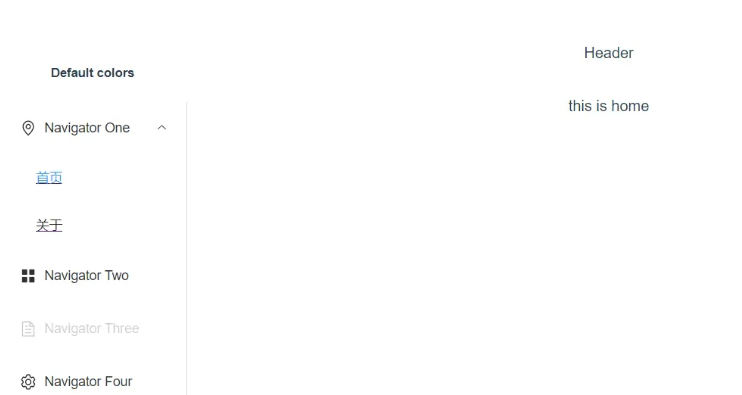
该布局为左侧菜单栏,右边内容区,右上为顶部,典型的管理后台风格
<template>
  <!-- @@##@@ -->
  <div class="common-layout">
    <el-container>
      <el-aside width="200px">
        <Menu></Menu>
      </el-aside>
      <el-container>
        <el-header height="20px">Header</el-header>
        <el-main>
          <router-view></router-view>
        </el-main>
      </el-container>
    </el-container>
  </div>
<!--
  <div>
      <p>
        <router-link to="/home">Go to Home</router-link>


        <router-link to="/about">Go to about</router-link>
        <router-view></router-view>
      </p>
    </div>
  <HelloWorld msg="Welcome to Your Vue.js App"/> -->
</template>
<script>
// import HelloWorld from './components/HelloWorld.vue'
import Menu from './components/Menu.vue'
export default {
  name: 'App',
  components: {
    // HelloWorld
    Menu
  }
}
</script>
上述代码中有Menu.vue组件,需要新建,稍后再添加内容
路由定义
在src目录新建routes.js文件,将路由列表写入,方便其它组件使用
const routes = [
    { path: "/home", name: 'home', label: '首页', component: () => import('./components/home.vue'), },
    { path: "/about", name: 'about', label: '关于', component: () => import('./components/about.vue'), },
]
export default routes
内容没有什么变化,就是将router.js 中的routes抽出来,单独写一个文件
立即学习“前端免费学习笔记(深入)”;
router.js引入并使用routes
import { createRouter, createWebHashHistory } from 'vue-router'
import routes from './routes'
const router = createRouter({
    history: createWebHashHistory(),
    routes: routes,
})
export default router
左侧菜单
在components目录中新建Menu.vue页面,然后将element-plus中菜单组件中Side bar 复制过来。

<template>
  <el-row class="tac">
    <el-col :span="24">
      <h6 class="mb-2">Default colors</h6>
      <el-menu default-active="2" class="el-menu-vertical-demo" @open="handleOpen" @close="handleClose">
        <el-sub-menu index="1">
          <template #title>
            <el-icon>
              <location />
            </el-icon>
            <span>Navigator One</span>
          </template>
          <router-link v-for="(item, index) in routes" :to="{ name: item.name }" :key="item.name">
            <el-menu-item :index="index">
              <span v-text="item.label"></span>
            </el-menu-item>
          </router-link>
        </el-sub-menu>
        <el-menu-item index="2">
          <el-icon>
            <icon-menu />
          </el-icon>
          <span>Navigator Two</span>
        </el-menu-item>
        <el-menu-item index="3" disabled>
          <el-icon>
            <document />
          </el-icon>
          <span>Navigator Three</span>
        </el-menu-item>
        <el-menu-item index="4">
          <el-icon>
            <setting />
          </el-icon>
          <span>Navigator Four</span>
        </el-menu-item>
      </el-menu>
    </el-col>
  </el-row>
</template>
<script>
import {
  Document,
  Menu as IconMenu,
  Location,
  Setting,
} from '@element-plus/icons-vue'
import routes from '../routes'
export default {
  name: 'Menu',
  components: { Document, IconMenu,Location, Setting },
  data() {
    return {
      routes: routes,
    }
  },
  methods: {
    handleOpen() {
      console.log("111")
    },
    handleClose() {
      console.log("222")
    },
  }
}
</script>
@element-plus/icons-vue 此包需要安装(npm install @element-plus/icons-vue)
element-plus官网中的例子都是ts+setup语法写的,这里我们改成js+响应式语法
列宽改成:span="24"或更大值,列宽太小会发现灰线在字体中间
引入定义的路由列表routes.js,将内容循环到 router-link中
运行效果如下