



环境准备
1、准备一台nginx服务器 ip192.168.1.133 端口81
安装过程:
#首先安装依赖:
yum -y install gcc-c++
yum -y install pcre pcre-devel
yum -y install zlib zlib-devel
yum -y install openssl openssl—devel
#注意 : 安装nginx必须使用 root 用户安装
#创建一个nginx目录
mkdir /usr/local/src/nginx
#进入到nginx目录
cd /usr/local/src/nginx
#下载或上传安装包
wget http://nginx.org/download/nginx.tar.gz 或 rz上传
#解压安装包
tar -xvf nginx.tar.gz
#进入到解压后的目录
cd nginx
# 下面 才开始正式安装
#把nginx安装到指定用户的目录
mkdir -p /ucenter/soft/nginx
#安装配置 prefix为安装目录 user为用户 group为 组
./configure --prefix=/ucenter/soft/nginx --user=ucenter --group=ucenter
#编译
make
#安装
make install
#在linux系统中由于非root用户不能占用80端口,所以需要使普通用户以root身份启动nginx。
cd /ucenter/soft/nginx/sbin
#把soft文件下所有的文件所属者修改为ucener -r 表示递归
chown ucenter:ucenter ./soft/ -r
#修改 ./nginx 的所属为root
chown root nginx
#让普通用户可以使用80端口,可以使用root权限启用nginx
chmod u+s nginx
#修改配置文件 在修改配置文件之前 ,要备份该文件
cd conf/
# 要注意nginx 的工作进程,一般根据cpu的核数去修改
vim nginx.conf
#关闭防火墙,打开80端口
service iptables stop
#启动nginx
./nginx
#重启nginx
./nginx -s reload
#关闭nginx
./nginx -s stop
准备一台tomcat服务器,先准备java环境,安装jdk步骤省略
然后分别安装3个tomcat 服务器ip地址:192.168.1.143,tomcat1 8080端口,tomcat2 8081端口,tomcat3 8082端口。
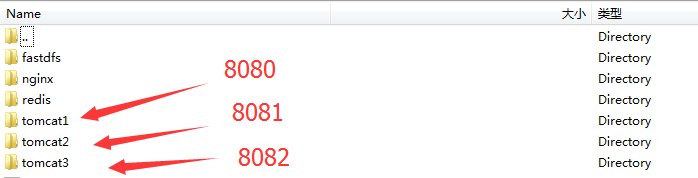
apache-tomcat-7.0.64/conf/server.xml配置文件修改这三个地方,这样端口就不会冲突
<server port="8005" shutdown="shutdown">
<connector port="8080" protocol="http/1.1"
connectiontimeout="20000"
redirectport="8443" />
<connector port="8009" protocol="ajp/1.3" redirectport="8443" />
修改tomcat root目录下index.jsp,分别增加每个tomcat的标识,以及在页面上显示session id
<%--
licensed to the apache software foundation (asf) under one or more
contributor license agreements. see the notice file distributed with
this work for additional information regarding copyright ownership.
the asf licenses this file to you under the apache license, version 2.0
(the "license"); you may not use this file except in compliance with
the license. you may obtain a copy of the license at

 http://www.apache.org/licenses/license-2.0

unless required by applicable law or agreed to in writing, software
distributed under the license is distributed on an "as is" basis,
without warranties or conditions of any kind, either express or implied.
see the license for the specific language governing permissions and
limitations under the license.
--%>
<!doctype html>
<%@ page session="true" %>
<%
java.text.simpledateformat sdf = new java.text.simpledateformat("yyyy");
request.setattribute("year", sdf.format(new java.util.date()));
request.setattribute("tomcaturl", "http://tomcat.apache.org/");
request.setattribute("tomcatdocurl", "/docs/");
request.setattribute("tomcatexamplesurl", "/examples/");
%>
<html>
 <head>
  <title><%=request.getservletcontext().getserverinfo() %></title>
  <link href="favicon.ico" rel="icon" type="image/x-icon" />
  <link href="favicon.ico" rel="shortcut icon" type="image/x-icon" />
  <link href="tomcat.css" rel="stylesheet" type="text/css" />
 </head>

 <body>
  <div id="wrapper">
   <div id="navigation" class="curved container">
    <span id="nav-home"><a href="${tomcaturl}">home--<%=request.getsession().getid() %></a></span>
    <span id="nav-hosts"><a href="${tomcatdocurl}">documentation</a></span>
    <span id="nav-config"><a href="${tomcatdocurl}config/">configuration</a></span>
    <span id="nav-examples"><a href="${tomcatexamplesurl}">examples</a></span>
    <span id="nav-wiki"><a href="http://wiki.apache.org/tomcat/frontpage">wiki</a></span>
    <span id="nav-lists"><a href="${tomcaturl}lists.html">mailing lists</a></span>
    <span id="nav-help"><a href="${tomcaturl}findhelp.html">find help</a></span>
    <br />
   </div>
   <div id="asf-box">
    <h1>${pagecontext.servletcontext.serverinfo}--8080</h1>
   </div>
   <div id="upper" class="curved container">
    <div id="congrats" class="curved container">
     <h2>if you're seeing this, you've successfully installed tomcat. congratulations!</h2>
    </div>
    <div id="notice">
     @@##@@
     <div id="tasks">
      <h3>recommended reading:</h3>
      <h4><a href="${tomcatdocurl}security-howto.html">security considerations how-to</a></h4>
      <h4><a href="${tomcatdocurl}manager-howto.html">manager application how-to</a></h4>
      <h4><a href="${tomcatdocurl}cluster-howto.html">clustering/session replication how-to</a></h4>
     </div>
    </div>
    <div id="actions">
     <div>
      <a class="container shadow" href="/manager/status"><span>server status</span></a>
     </div>
     <div>
      <a class="container shadow" href="/manager/html"><span>manager app</span></a>
     </div>
     <div>
      <a class="container shadow" href="/host-manager/html"><span>host manager</span></a>
     </div>
    </div>
    <!--
    <br />
    -->
    <br />
   </div>
   <div id="middle" class="curved container">
    <h3>developer quick start</h3>
    <div>
     <div>
      <p><a href="${tomcatdocurl}setup.html">tomcat setup</a></p>
      <p><a href="${tomcatdocurl}appdev/">first web application</a></p><div class="aritcle_card flexRow">
                                                        <div class="artcardd flexRow">
                                                                <a class="aritcle_card_img" href="/ai/1340" title="云雀语言模型"><img
                                                                                src="https://img.php.cn/upload/ai_manual/000/000/000/175680205024673.png" alt="云雀语言模型"  onerror="this.onerror='';this.src='/static/lhimages/moren/morentu.png'" ></a>
                                                                <div class="aritcle_card_info flexColumn">
                                                                        <a href="/ai/1340" title="云雀语言模型">云雀语言模型</a>
                                                                        <p>云雀是一款由字节跳动研发的语言模型,通过便捷的自然语言交互,能够高效的完成互动对话</p>
                                                                </div>
                                                                <a href="/ai/1340" title="云雀语言模型" class="aritcle_card_btn flexRow flexcenter"><b></b><span>下载</span> </a>
                                                        </div>
                                                </div>
     </div>
    </div>
    <div>
     <div>
      <p><a href="${tomcatdocurl}realm-howto.html">realms & aaa</a></p>
      <p><a href="${tomcatdocurl}jndi-datasource-examples-howto.html">jdbc datasources</a></p>
     </div>
    </div>
    <div>
     <div>
      <p><a href="${tomcatexamplesurl}">examples</a></p>
     </div>
    </div>
    <div>
     <div>
      <p><a href="http://wiki.apache.org/tomcat/specifications">servlet specifications</a></p>
      <p><a href="http://wiki.apache.org/tomcat/tomcatversions">tomcat versions</a></p>
     </div>
    </div>
    <br />
   </div>
   <div id="lower">
    <div id="low-manage" class="">
     <div class="curved container">
      <h3>managing tomcat</h3>
      <p>for security, access to the <a href="/manager/html">manager webapp</a> is restricted.
      users are defined in:</p>
      <pre class="brush:php;toolbar:false;">$catalina_home/conf/tomcat-users.xml
in tomcat 7.0 access to the manager application is split between different users. read more...
release notes
changelog
migration guide
security notices
documentation
tomcat 7.0 documentation
tomcat 7.0 configuration
tomcat wiki
find additional important configuration information in:
$catalina_home/running.txt
developers may be interested in:
getting help
release notes1 and release notes2
the following mailing lists are available:
-
release notes3
important announcements, releases, security vulnerability notifications. (low volume). -
release notes4
user support and discussion -
release notes5
user support and discussion for release notes6 -
release notes7
development mailing list, including commit messages
other downloads
get involved
miscellaneous
apache software foundation
copyright ©1999-${year} apache software foundation. all rights reserved




