0

0

HTML5几个设计和修改的页面范例分享_html5教程技巧

php中文网

php中文网

发布时间:2016-05-16 15:46:27

|

2120人浏览过

|

来源于php中文网

原创

要了解和熟悉 html5 中的新的语义元素,最好的方式就是拿一经典的 html 文档作例子,然后把 html5 的一些新鲜营养充实进入。如下就是我们要改造的页面,该页面很简单,只包含一篇文章。

ApocalypsePage_Original.html,这是一个格式非常规范的页面,所有的样式均来自于外部样式表。

XML/HTML Code复制内容到剪贴板
  1. nbsp;html>  
  2. html lang="zh-CN">  
  3. head>  
  4.   meta charset="utf-8">  
  5.   title>Apocalypse Nowtitle>  
  6.   link rel="stylesheet" href="ApocalypsePage_Original.css">  
  7. head>  
  8.   
  9. body>  
  10. div class="Header">  
  11.   h1>How the World Could Endh1>  
  12.   p class="Teaser">Scenarios that spell the end of life as we knowp>  
  13.   p class="Byline">by Ray N. Carnationp>  
  14. div>  
  15.   
  16. div class="Content">  
  17.   p>span class="LeadIn">Right nowspan>, you're probably feeling pretty good. After all, life in the developed world is comfortablespan class="style1">span>probably more comfortable than it's been for the average human being throughout all of recorded history.p>  
  18.   p>But don't get too smug. There's still plenty of horrific ways it could all fall apart. In this article, you'll learn about a few of our favorites.p>  
  19.      
  20.   h2>Mayan Doomsdayh2>  
  21.   p>Skeptics suggest that the Mayan calendar simply rolls to a new 5,126-year era after 2012, and doesn't actually predict a life-ending apocalypse. But given that the long-dead Mayans were wrong about virtually everything else, why should we trust them on this?p>  
  22.      
  23.   h2>Robot Takeoverh2>  
  24.   p>Not quite as frightening as a Vampire Takeover or Living-Dead Takeover, a robot rebellion is still a disquieting thought. We are already outnumbered by our technological gadgets, and even Bill Gates fears the day his Japanese robot slave turns him over by the ankles and asks (in a suitably robotic voice) "Who's your daddy now?"p>  
  25.      
  26.   h2>Unexplained Singularityh2>  
  27.   p>We don't know how the universe started, so we can't be sure it won't just end, maybe today, and maybe with nothing more exciting than a puff of anti-matter and a slight fizzing noise.p>  
  28.      
  29.   h2>Runaway Climate Changeh2>  
  30.   p>Dismissed by some, Al Gore's prophecy of doom may still come true. If it does, we may have to contend with vicious storms, widespread food shortages, and surly air conditioning repairmen.p>  
  31.      
  32.   h2>Global Epidemich2>  
  33.   p>Some time in the future, a lethal virus could strike. Predictions differ about the source of the disease, but candidates include monkeys in the African jungle, bioterrorists, birds and pigs with the flu, warriors from the future, an alien race, hospitals that use too many antibiotics, vampires, the CIA, and unwashed brussel sprouts. Whatever the source, it's clearly bad news.p>  
  34.   
  35. div>  
  36.   
  37. div class="Footer">  
  38.   p class="Disclaimer">These apocalyptic predictions do not reflect the views of the author.p>  
  39.   p>  
  40.     a href="AboutUs.html">About Usa>  
  41.     a href="Disclaimer.html">Disclaimera>  
  42.     a href="ContactUs.html">Contact Usa>  
  43.   p>  
  44.   p>Copyright © 2014p>  
  45. div>  
  46. body>  
  47. html>  

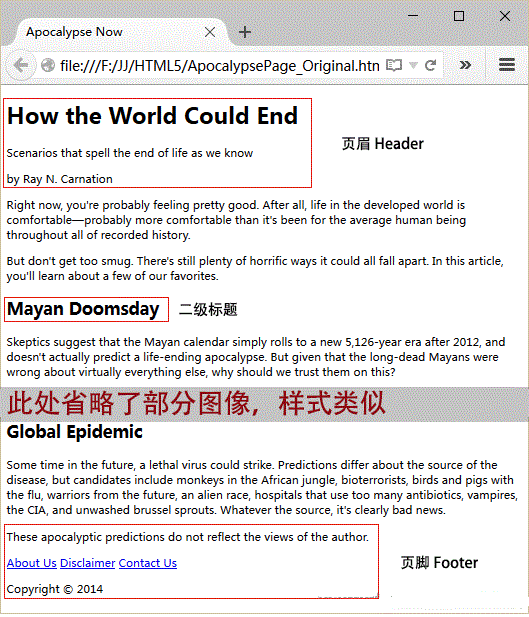
在不增加任何 CSS 样式表之前,效果如下:

上面通过三个

将页面分成了三个部分,顶部的页眉,中部的内容和底部的页脚。

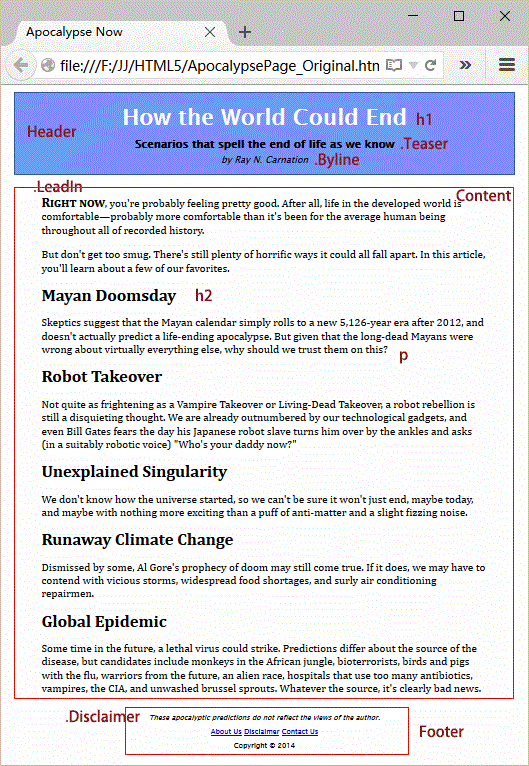
这个例子中的样式表很简单,整个页面最大宽度设置为 800 像素,避免文本在宽屏显示器上显示过长。页眉位于一个带有蓝色边框的盒子中,内容区的两侧都增加了内边距,而页脚在整个页面的底部居中。

ApocalypsePage_Original.css样式文件内容如下:

立即学习前端免费学习笔记(深入)”;

XML/HTML Code复制内容到剪贴板
  1. @charset "utf-8";   
  2. /* CSS Document */   
  3. body{   
  4.   /*font-family 要使用安全字体,按照先特殊后一般的原则,   
  5.   先给出你想要的字体,然后是保险一些的字体,   
  6.   最后以 sans-serif 字体结尾*/   
  7.   font-family: "Lucida sans Unicode", "Lucida Grande", Geneva, sans-serif;   
  8.   max-width: 800px; /*最大宽度不超过 800 像素*/   
  9. }   
  10. /*页面顶部的标题区样式*/   
  11. .Header {   
  12.   background-color: #7695FE; /*可接受任何颜色值*/   
  13.   border: thin #336699 solid; /*多合一的 border 属性*/   
  14.   padding: 10px; /* 10像素的内边距,边框与内容之间的距离*/   
  15.   margin: 10px; /* 10像素的外边距,边框与周围元素之间的距离*/   
  16.   text-align: center; /*头部文本居中*/   
  17. }   
  18. /*页眉中标题h1>样式*/   
  19. .Header h1{   
  20.   margin: 0px;   
  21.   color: white;   
  22.   font-size: xx-large; /*精确控制可以用像素或者em单位*/   
  23. }   
  24. /*页眉中子标题样式*/   
  25. .Header .Teaser{   
  26.   margin: 0px;   
  27.   font-weight: bold;   
  28. }   
  29. /*页眉中署名行样式*/   
  30. .Header .Byline{   
  31.   font-style: italic;   
  32.   font-size: small;   
  33.   margin: 0px;   
  34. }   
  35. .Content{   
  36.   font-size: medium;   
  37.   font-family: Cambria, Cochin, Georgia, "Times New Roman", Times, serif;   
  38.   /*左右内边距最大*/   
  39.   padding-top: 20px;   
  40.   padding-right: 50px;   
  41.   padding-bottom: 5px;   
  42.   padding-left: 50px;   
  43.   line-height: 120%; /*相邻两个文本行之间的距离*/   
  44. }   
  45. .Content .LeadIn{   
  46.   font-weight: bold;   
  47.   font-size: large;   
  48.   font-variant: small-caps;   
  49. }   
  50. .Content .h2{   
  51.   color: #24486C;   
  52.   margin-bottom: 2px;   
  53.   font-size: medium;   
  54. }   
  55. .Content p{   
  56.   margin-top: 0px;   
  57. }   
  58. .Footer{   
  59.   text-align: center;   
  60.   font-size: x-small;   
  61. }   
  62. .Footer .Disclaimer{   
  63.   font-style: italic;   
  64. }   
  65. .Footer p{   
  66.   margin: 3px;   
  67. }  

这样我们的样式表就弯沉过了,现在去看看结果会怎样呢?如下图:

使用 HTML5 来构造页面

目前仍旧是 Web 设计的必备元素,它是一个直观、多用途的容器,可以通过它为页面中的任何区块应用样式。但
的问题在于,它本身不反映与页面相关的任何信息。

要通过 HTML5 改进这种情况,可以把

替换成更具有描述性语义的元素。

ApocalypsePage_Revised.html中已经将 class 属性为 Header 和 Footer 两个

替换为
, 部分代码如下:
XML/HTML Code复制内容到剪贴板
  1. header>  
  2.   h1>How the World Could Endh1>  
  3.   p class="Teaser">Scenarios that spell the end of life as we knowp>  
  4.   p class="Byline">by Ray N. Carnationp>  
  5. header>  
  6. ...   
  7. footer>  
  8.   p class="Disclaimer">These apocalyptic predictions do not reflect the views of the author.p>  
  9.   p>  
  10.     a href="AboutUs.html">About Usa>  
  11. ...   
  12.   p>  
  13.   p>Copyright © 2014p>  
  14. footer>  

当然,对应的 ApocalypsePage_Revised.css 文件也需要进行修改,将其中的 .Header 和 .Footer 替换为 header 和 footer 。部分代码如下:

XML/HTML Code复制内容到剪贴板
  1. /*页面顶部的标题区样式*/   
  2. header {   
  3.   background-color: #7695FE; /*可接受任何颜色值*/   
  4.   border: thin #336699 solid; /*多合一的 border 属性*/   
  5.   padding: 10px; /* 10像素的内边距,边框与内容之间的距离*/   
  6.   margin: 10px; /* 10像素的外边距,边框与周围元素之间的距离*/   
  7.   text-align: center; /*头部文本居中*/   
  8. }   
  9. /*页眉中标题h1>样式*/   
  10. header h1{   
  11.   margin: 0px;   
  12.   color: white;   
  13.   font-size: xx-large; /*精确控制可以用像素或者em单位*/   
  14. }  

最后还有一个元素需要用在示例文件中,就是

元素,表示一个完整的、自成一体的内容。

元素应该包含新闻报道或文章的内容,包括标题、署名和正文。因此添加了

元素后的结构如下:

XML/HTML Code复制内容到剪贴板
  1. article>  
  2.   header>  
  3.   h1>How the World Could Endh1>  
  4.   p class="Teaser">Scenarios that spell the end of life as we knowp>  
  5.   p class="Byline">by Ray N. Carnationp>  
  6.   header>  
  7.   div class="Content">  
  8.   p>span class="LeadIn">Right nowspan>, you're probably feeling pretty good. After all, life in the developed world is comfortablespan class="style1">span>probably more comfortable than it's been for the average human being throughout all of recorded history.p>  
  9. ...   
  10.   div>  
  11. article>  


重新设计后,页面结构如下:

PicWish
PicWish

推荐!专业的AI抠图修图,支持格式转化

下载

添加插图

很多页面都是包含图片的。但是,插图 (figure) 与图片的概念还不完全一样。插图虽然独立于文本,但是文本中会提到它。

一般来说插图应该是浮动的,还会有浮动图题。下面是在文章中添加插图的 HTML 标记,在正文的第一段和第二段之间的位置,部分代码如下:

XML/HTML Code复制内容到剪贴板
  1. ...   
  2. div class="Content">  
  3. p>span class="LeadIn">Right nowspan>, you're ...p>  
  4. div class="FloatFigure">  
  5. img src="human_skull.jpg" alt="Human skull">  
  6. p>Will you be the last person standing if one of these apocalyptic   
  7. scenarios plays out?p>  
  8. div>  
  9. p>But don't get too smug. There's...p>  
  10. ...  


相应的 样式表规则如下:

XML/HTML Code复制内容到剪贴板
  1. .FloatFigure{   
  2.   float: left;   
  3.   margin: 0px 20px 0px 0px;   
  4. }   
  5. .FloatFigure p{   
  6.   max-width: 300px;   
  7.   font-size: small;   
  8.   font-style: italic;   
  9.   margin-bottom: 5px;   
  10. }  


下图展示了这个示例的外观,插图恰好在第一段文本之后,浮动在后面文本的左侧,图题的文本的宽度我们限制住了,让图题显示很充实、很优雅。

HTML5 中提供了一个

元素,图题可以放在
中的
元素里,经过改造,代码如下:

XML/HTML Code复制内容到剪贴板
  1. figure class="FloatFigure">  
  2.   img src="human_skull.jpg" alt="Human skull">  
  3.   figcaption>Will you be the last person standing if one of these apocalyptic   
  4.    scenarios plays out?figcaption>  
  5. figure>  


当然样式表中的选择符,相应修改一下即可。

XML/HTML Code复制内容到剪贴板
  1. .FloatFigure{   
  2.   float: left;   
  3.   margin: 0px 20px 0px 0px;   
  4. }   
  5. .FloatFigure figcaption{   
  6.   max-width: 300px;   
  7.   font-size: small;   
  8.   font-style: italic;   
  9.   margin-bottom: 5px;   
  10. }  


最后还有就是 HTML5几个设计和修改的页面范例分享_html5教程技巧 元素中的 alt 属性可以删除掉,因为图题中包含了图片的完整说明。

新的

下面的示例中将用作醒目引文(pull quote),使用

元素可以创造这种效果,但是用

相关文章

HTML速学教程(入门课程)
HTML速学教程(入门课程)

HTML怎么学习?HTML怎么入门?HTML在哪学?HTML怎么学才快?不用担心,这里为大家提供了HTML速学教程(入门课程),有需要的小伙伴保存下载就能学习啦!

下载

相关标签:

本站声明:本文内容由网友自发贡献,版权归原作者所有,本站不承担相应法律责任。如您发现有涉嫌抄袭侵权的内容,请联系admin@php.cn

相关专题

更多
C++ 单元测试与代码质量保障
C++ 单元测试与代码质量保障

本专题系统讲解 C++ 在单元测试与代码质量保障方面的实战方法,包括测试驱动开发理念、Google Test/Google Mock 的使用、测试用例设计、边界条件验证、持续集成中的自动化测试流程,以及常见代码质量问题的发现与修复。通过工程化示例,帮助开发者建立 可测试、可维护、高质量的 C++ 项目体系。

3

2026.01.16

java数据库连接教程大全
java数据库连接教程大全

本专题整合了java数据库连接相关教程,阅读专题下面的文章了解更多详细内容。

23

2026.01.15

Java音频处理教程汇总
Java音频处理教程汇总

本专题整合了java音频处理教程大全,阅读专题下面的文章了解更多详细内容。

7

2026.01.15

windows查看wifi密码教程大全
windows查看wifi密码教程大全

本专题整合了windows查看wifi密码教程大全,阅读专题下面的文章了解更多详细内容。

30

2026.01.15

浏览器缓存清理方法汇总
浏览器缓存清理方法汇总

本专题整合了浏览器缓存清理教程汇总,阅读专题下面的文章了解更多详细内容。

2

2026.01.15

ps图片相关教程汇总
ps图片相关教程汇总

本专题整合了ps图片设置相关教程合集,阅读专题下面的文章了解更多详细内容。

8

2026.01.15

ppt一键生成相关合集
ppt一键生成相关合集

本专题整合了ppt一键生成相关教程汇总,阅读专题下面的的文章了解更多详细内容。

3

2026.01.15

php图片上传教程汇总
php图片上传教程汇总

本专题整合了php图片上传相关教程,阅读专题下面的文章了解更多详细教程。

2

2026.01.15

phpstorm相关教程大全
phpstorm相关教程大全

本专题整合了phpstorm相关教程汇总,阅读专题下面的文章了解更多详细内容。

4

2026.01.15

热门下载

更多
网站特效
/
网站源码
/
网站素材
/
前端模板

精品课程

更多
相关推荐
/
热门推荐
/
最新课程
HTML5/CSS3/JavaScript/ES6入门课程

共102课时 | 6.7万人学习

HTML+CSS基础与实战
HTML+CSS基础与实战

共132课时 | 9.5万人学习

前端开发(基础+实战项目合集)
前端开发(基础+实战项目合集)

共60课时 | 3.8万人学习

关于我们 免责申明 举报中心 意见反馈 讲师合作 广告合作 最新更新
php中文网:公益在线php培训,帮助PHP学习者快速成长!
关注服务号 技术交流群
PHP中文网订阅号
每天精选资源文章推送

Copyright 2014-2026 https://www.php.cn/ All Rights Reserved | php.cn | 湘ICP备2023035733号