在本文中,我们将搜索特定模式,并且仅传递与给定模式匹配的字符串。我们将使用以下方法来实现此功能 -
方法 1
在这种方法中,我们将搜索与给定模式匹配的字符串,并从细绳。 string.search() 是 JavaScript 提供的用于搜索字符串的内置方法。我们还可以在此方法中传递正则表达式或普通字符串。
语法
str.search( expression )
参数
str - 定义需要比较的字符串。
表达式 - 定义将与字符串进行比较的字符串表达式
这将返回字符串的索引,其中字符串已开始匹配,如果字符串不匹配,将返回“-1”。
立即学习“Java免费学习笔记(深入)”;
示例 1
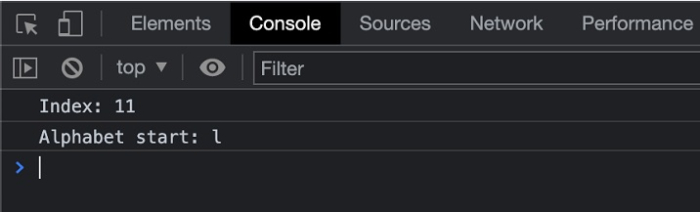
在下面的示例中,我们将字符串与正则表达式进行比较,如果字符串匹配则返回其索引。如果没有,将返回-1。

#index.html
<!DOCTYPE html>
<html>
<head>
   <title>
      Creating Objects from Prototype
   </title>
</head>
<body>
   <h2 style="color:green">
      Welcome To Tutorials Point
   </h2>
</body>
   <script>
      const paragraph = 'Start your learning journey with tutorials point today!';
      // any character that is not a word character or whitespace
      const regex = /(lear)\w+/g;
      console.log("Index: " + paragraph.search(regex));
      console.log("Alphabet start: " + paragraph[paragraph.search(regex)]);
      // expected output: "."
   </script>
</html>
输出
示例 2
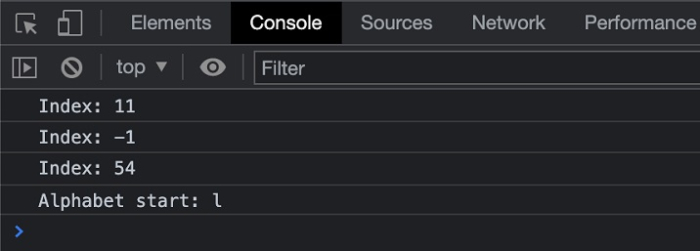
在下面的示例中,我们创建了多个正则表达式,并在字符串上检查它们是否满足要求。
# index. html
<!DOCTYPE html>
<html>
<head>
   <title>
      Creating Objects from Prototype
   </title>
</head>
<body>
   <h2 style="color:green">
      Welcome To Tutorials Point
   </h2>
</body>
   <script>
      const paragraph = 'Start your learning journey with tutorials point today!';
      // any character that is not a word character or whitespace
      const regex = /(lear)\w+/g;
      const regex1 = /(!)\w+/g;
      const regex2 = /(!)/g;
      console.log("Index: " + paragraph.search(regex));
      console.log("Index: " + paragraph.search(regex1));
      console.log("Index: " + paragraph.search(regex2));
      console.log("Alphabet start: " + paragraph[paragraph.search(regex)]);
      // expected output: "."
   </script>
</html>
输出