



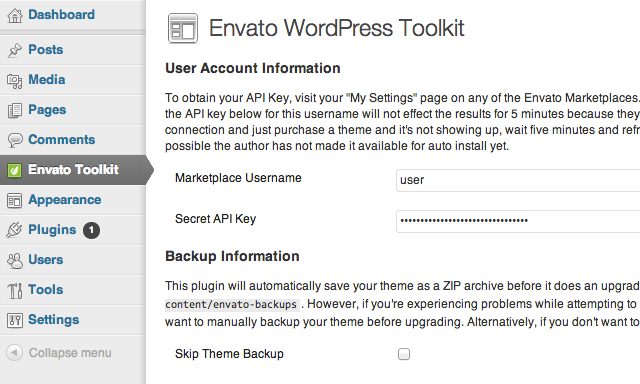
作为 ThemeForest 中的 WordPress 作者,我们希望通过偶尔为客户提供错误修复和主题增强功能来让他们满意。但我们面临的一个关键问题是如何在有更新可供下载时通知我们的用户。
在过去,我们每个人都必须在自己的主题更新通知程序实现中进行编码。虽然现在有一个复选框可以启用 Envato 市场中的项目更新通知,但用户仍然必须针对每个项目打开它,并手动执行主题更新。
如果更新通知显示在 WordPress 管理中心内不是更好吗?并且可以在管理员中立即执行更新吗?幸运的是,我们现在拥有 Envato WordPress 工具包插件和工具包库。
在本系列中,您将学习如何将这些工具包集成到您的主题中。
我们将在本系列中介绍什么内容
在本教程中,我们将在我们的主题中实现 Envato WordPress 工具包插件和库。当我们的主题被激活时,用户将被要求安装并激活 Toolkit 插件。
一旦插件处于活动状态,我们的主题将定期检查更新,如果发现更新,则会在管理中显示一条通知,引导用户访问插件以更新主题。
本教程分为两部分:
- 第 1 部分 - 集成 TGM 插件激活类,使使用我们的主题时需要 Envato WordPress Toolkit 插件;和
- 第 2 部分 - 在我们的主题中实现 Envato WordPress 工具包库,以允许新的主题版本检查和更新。
插件和库?
Envato WordPress 工具包有两种形式,具有不同的用途和目的。为了避免混淆这两者,这里有一个比较:
- 工具包插件 - 这是一个独立的插件,任何 Envato 客户都可以在其 WordPress 网站中安装。激活后,所有以前购买的主题以及主题更新都可以直接从管理员下载。
- 工具包库 - 作者可以在其 WordPress 主题中包含代码,使主题能够使用 Envato Marketplace API 检查主题版本更新并进行自我更新。
1.包括所需的文件
我们首先需要在项目中包含一些文件。我们将把 Toolkit 插件与我们的主题捆绑在一起,并使用 TGM 插件激活来安装和激活 Toolkit。
- 下载 TGM 插件激活并将主类脚本放入主题中的 inc 文件夹中。路径应为:mytheme/inc/class-tgm-plugin-activation.php
- 接下来,下载 Envato WordPress Toolkit 插件 ZIP 文件并将其放入主题中名为“plugins”的新文件夹中。路径应为:mytheme/plugins/envato-wordpress-toolkit-master.zip
注意:您可以更改上述文件的位置以满足您的需要。 或者,您可以从本文顶部的下载链接下载完整源代码。

2.TGM钩子函数
现在我们已经有了所需的文件,让我们开始编码。我们需要在 functions.php 中包含 TGM 插件激活类,并挂钩到自定义 WordPress 操作。我们将在此处设置 TGM 的一些设置,并定义要包含的插件。
/**
 * Load the TGM Plugin Activator class to notify the user
 * to install the Envato WordPress Toolkit Plugin
 */
require_once( get_template_directory() . '/inc/class-tgm-plugin-activation.php' );
function tgmpa_register_toolkit() {

	// Code here

}
add_action( 'tgmpa_register', 'tgmpa_register_toolkit' );
3.指定Toolkit插件
接下来,我们配置包含 Toolkit 插件所需的参数。在 tgmpa_register_toolkit 函数内,添加以下代码。如果您在第 1 步中指定了另一个插件文件夹,请更改源参数中的路径。
// Specify the Envato Toolkit plugin
$plugins = array(
	array(
		'name' => 'Envato WordPress Toolkit',
		'slug' => 'envato-wordpress-toolkit-master',
		'source' => get_template_directory() . '/plugins/envato-wordpress-toolkit-master.zip',
		'required' => true,
		'version' => '1.5',
		'force_activation' => true,
		'force_deactivation' => false,
		'external_url' => '',
	),
);
您还可以通过向 $plugins 变量添加更多数组来添加其他插件。
4.配置TGM
然后设置 TGM 的选项。同样在 tgmpa_register_toolkit 函数中,在上一步下方添加以下代码来配置 TGM。我不会深入探讨各个设置的具体作用。如果您想了解有关这些设置的更多信息,TGM 插件激活网站可以很好地解释每一个细节。
// i18n text domain used for translation purposes
$theme_text_domain = 'default';

// Configuration of TGM
$config = array(
	'domain'       	   => $theme_text_domain,
	'default_path' 	   => '',
	'parent_menu_slug' => 'admin.php',
	'parent_url_slug'  => 'admin.php',
	'menu'         	   => 'install-required-plugins',
	'has_notices'      => true,
	'is_automatic'     => true,
	'message' 		   => '',
	'strings'      	   => array(
		'page_title'                      => __( 'Install Required Plugins', $theme_text_domain ),
		'menu_title'                      => __( 'Install Plugins', $theme_text_domain ),
		'installing'                      => __( 'Installing Plugin: %s', $theme_text_domain ),
		'oops'                            => __( 'Something went wrong with the plugin API.', $theme_text_domain ),
		'notice_can_install_required'     => _n_noop( 'This theme requires the following plugin: %1$s.', 'This theme requires the following plugins: %1$s.' ),
		'notice_can_install_recommended'  => _n_noop( 'This theme recommends the following plugin: %1$s.', 'This theme recommends the following plugins: %1$s.' ),
		'notice_cannot_install'  		  => _n_noop( 'Sorry, but you do not have the correct permissions to install the %s plugin. Contact the administrator of this site for help on getting the plugin installed.', 'Sorry, but you do not have the correct permissions to install the %s plugins. Contact the administrator of this site for help on getting the plugins installed.' ),
		'notice_can_activate_required'    => _n_noop( 'The following required plugin is currently inactive: %1$s.', 'The following required plugins are currently inactive: %1$s.' ),
		'notice_can_activate_recommended' => _n_noop( 'The following recommended plugin is currently inactive: %1$s.', 'The following recommended plugins are currently inactive: %1$s.' ),
		'notice_cannot_activate' 		  => _n_noop( 'Sorry, but you do not have the correct permissions to activate the %s plugin. Contact the administrator of this site for help on getting the plugin activated.', 'Sorry, but you do not have the correct permissions to activate the %s plugins. Contact the administrator of this site for help on getting the plugins activated.' ),
		'notice_ask_to_update' 			  => _n_noop( 'The following plugin needs to be updated to its latest version to ensure maximum compatibility with this theme: %1$s.', 'The following plugins need to be updated to their latest version to ensure maximum compatibility with this theme: %1$s.' ),
		'notice_cannot_update' 			  => _n_noop( 'Sorry, but you do not have the correct permissions to update the %s plugin. Contact the administrator of this site for help on getting the plugin updated.', 'Sorry, but you do not have the correct permissions to update the %s plugins. Contact the administrator of this site for help on getting the plugins updated.' ),
		'install_link' 					  => _n_noop( 'Begin installing plugin', 'Begin installing plugins' ),
		'activate_link' 				  => _n_noop( 'Activate installed plugin', 'Activate installed plugins' ),
		'return'                          => __( 'Return to Required Plugins Installer', $theme_text_domain ),
		'plugin_activated'                => __( 'Plugin activated successfully.', $theme_text_domain ),
		'complete' 						  => __( 'All plugins installed and activated successfully. %s', $theme_text_domain ),
		'nag_type'						  => 'updated'
	)
);
将 $theme_text_domain 变量更改为您正在使用的文本域,或将其保留为 default。
5.启动TGM
最后,让我们在 tgmpa_register_toolkit 函数结束之前初始化 TGM。
tgmpa( $plugins, $config );
现在保存您的functions.php
尝试一下
尝试激活您的主题。如果您尚未安装或激活 Envato WordPress Toolkit 插件,那么您应该会看到与此类似的通知:

结论
从我们现在所掌握的情况来看,我们实际上可以停止该系列,您的用户将能够从管理员内部更新主题;但是,用户只有在 Toolkit 管理面板中才能看到更新。
本教程的第 2 部分将教您如何集成 Envato WordPress 工具包库,以及如何在 ThemeForest 中出现主题更新时显示管理通知。




