



HTML5 Canvas中提供了实现图形平移,旋转,放缩的API。
平移(translate)
平移坐标translate(x, y)意思是把(0,0)坐标平移到(x, y),原来的(0,0)坐标则变成(-x, -y)
图示如下: 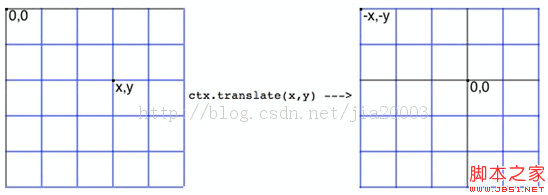
任何原来的坐标点p(ox, oy)在translate之后的坐标点为p(ox-x, oy-y),其中点(x, y)为平移
点坐标translate(x, y)。
代码演示:

复制代码
代码如下:// translate is move the startpoint to centera and back to top left corner
function renderText(width, height, context) {
context.translate(width/ 2, height / 2); // 中心点坐标为(0, 0)
context.font="18px Arial";
context.fillStyle="blue";
context.fillText("Please Press
context.translate(-width/2, -height/2); // 平移恢复(0,0)坐标为左上角
context.fillText("I'm Back to Top",5,50);
}
放缩(Scale)
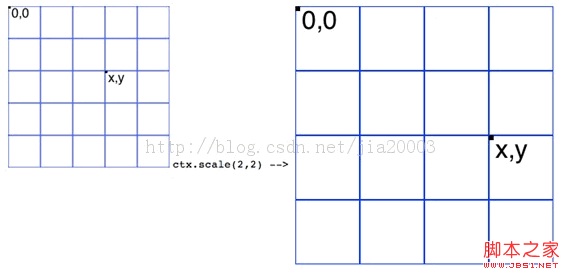
Scale(a, b)意思是将对象沿着XY轴分别放缩至a*x, b*y大小。效果如图示:
复制代码
代码如下:// translation the rectangle.
function drawPath(context) {
context.translate(200,200);
context.scale(2,2);// Scale twice size of original shape
context.strokeStyle= "green";
context.beginPath();
context.moveTo(0,40);
context.lineTo(80,40);
context.lineTo(40,80);
context.closePath();
context.stroke();
}
旋转(rotate)
旋转角度rotate(Math.PI/8)
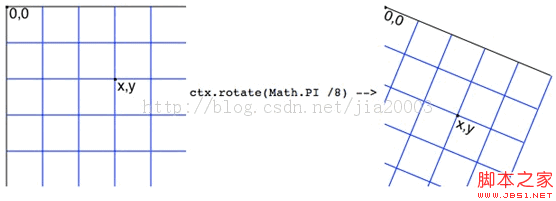
旋转前的坐标p(x, y)在对应的旋转后的坐标P(rx, ry)为
Rx = x * cos(-angle) - y * sin(-angle);
Ry = y * cos(-angle) + x * sin(-angle);
旋转90度可以简化为:
Rx = y;
Ry = -x;
Canvas中旋转默认的方向为顺时针方向。演示代码如下:
复制代码
代码如下:// new point.x = x * cos(-angle) -y * sin(-angle),
// new point.y = y * cos(-angle) +x * sin(-angle)
function renderRotateText(context) {
context.font="24px Arial";
context.fillStyle="red";
context.fillText("i'm here!!!",5,50);
// rotate -90 degreee
// context.rotate(-Math.PI/2);
// context.fillStyle="blue";
// context.fillText("i'm here!!!", -400,30);
// rotate 90 degreee
context.rotate(Math.PI/2);
context.fillStyle="blue";
context.fillText("i'm here!!!",350,-420);
console.log(Math.sin(Math.PI/2));
// rotae 90 degree and draw 10 lines
context.fillStyle="green";
for(var i=0; ivar x = (i+1)*20;
var y = (i+1)*60;
var newX = y;
var newY = -x;
context.fillRect(newX,newY, 200, 6);
}
}
通常做法是旋转与平移一起使用,先将坐标(0,0)平移到中心位置
translate (width/2, height/2)然后再使用rotate(Math.PI/2)完成旋转
代码示例如下:
复制代码
代码如下:function saveAndRestoreContext(context) {
context.save();
context.translate(200,200);
context.rotate(Math.PI/2);
context.fillStyle="black";
context.fillText("2D Context Rotate And Translate", 10, 10);
context.restore();
context.fillText("2D Context Rotate And Translate", 10, 10);
}
全部JavaScript代码:
复制代码
代码如下:var tempContext = null; // global variable 2d context
window.onload = function() {
var canvas = document.getElementById("target");
canvas.width = 450;
canvas.height = 450;
if (!canvas.getContext) {
console.log("Canvas not supported. Please install a HTML5 compatible browser.");
return;
}
// get 2D context of canvas and draw image
tempContext = canvas.getContext("2d");
// renderText(canvas.width, canvas.height, tempContext);
saveAndRestoreContext(tempContext);
// drawPath(tempContext);
}
// translate is move the start point to centera and back to top left corner
function renderText(width, height, context) {
context.translate(width / 2, height / 2);
context.font="18px Arial";
context.fillStyle="blue";
context.fillText("Please Press
context.translate(-width / 2, -height / 2);
context.fillText("I'm Back to Top",5,50);
}
// translation the rectangle.
function drawPath(context) {
context.translate(200, 200);
context.scale(2,2); // Scale twice size of original shape
context.strokeStyle = "green";
context.beginPath();
context.moveTo(0, 40);
context.lineTo(80, 40);
context.lineTo(40, 80);
context.closePath();
context.stroke();
}
// new point.x = x * cos(-angle) - y * sin(-angle),
// new point.y = y * cos(-angle) + x * sin(-angle)
function renderRotateText(context) {
context.font="24px Arial";
context.fillStyle="red";
context.fillText("i'm here!!!",5,50);
// rotate -90 degreee
// context.rotate(-Math.PI/2);
// context.fillStyle="blue";
// context.fillText("i'm here!!!", -400,30);
// rotate 90 degreee
context.rotate(Math.PI/2);
context.fillStyle="blue";
context.fillText("i'm here!!!", 350,-420);
console.log(Math.sin(Math.PI/2));
// rotae 90 degree and draw 10 lines
context.fillStyle="green";
for(var i=0; ivar x = (i+1)*20;
var y = (i+1)*60;
var newX = y;
var newY = -x;
context.fillRect(newX, newY, 200, 6);
}
}
function saveAndRestoreContext(context) {
context.save();
context.translate(200,200);
context.rotate(Math.PI/2);
context.fillStyle="black";
context.fillText("2D Context Rotate And Translate", 10, 10);
context.restore();
context.fillText("2D Context Rotate And Translate", 10, 10);
}




