



概述
为了使modelscope的用户能够快速、方便的使用平台提供的各类模型,提供了一套功能完备的python library,其中包含了modelscope官方模型的实现,以及使用这些模型进行推理,finetune等任务所需的数据预处理,后处理,效果评估等功能相关的代码,同时也提供了简单易用的api,以及丰富的使用样例。通过调用library,用户可以只写短短的几行代码,就可以完成模型的推理、训练和评估等任务,也可以在此基础上快速进行二次开发,实现自己的创新想法。
目前library提供的算法模型,涵盖了图像,自然语言处理,语音,多模态,科学5个主要的AI领域,数十个应用场景任务,具体任务可参考文档:任务的介绍。
深度学习框架
ModelScope Library目前已支持Pytorch和Tensorflow等深度学习框架,未来将不断更新和扩展更多框架,敬请期待!所有官方模型均可通过ModelScope Library进行模型推理,有些模型还能够使用该库进行训练和评估。如需获取完整的使用信息,请查看相应模型的模型卡片。
模型推理Pipeline
模型的推理
在深度学习中,推理是指模型对数据进行预测的过程。ModelScope执行推理时会利用pipeline来顺序执行必要的操作。一个典型的pipeline通常包括数据预处理、模型前向推理和数据后处理三个步骤。
Pipeline介绍
pipeline()方法是ModelScope框架中最基础的用户方法之一,可用于快速进行各种领域的模型推理。借助pipeline()方法,用户只需一行代码即可轻松完成对特定任务的模型推理。
pipeline()方法是ModelScope框架中最基础的用户方法之一,可用于快速进行各种领域的模型推理。借助pipeline()方法,用户只需一行代码即可轻松完成对特定任务的模型推理。
Pipeline的使用
本文将简要介绍如何使用pipeline方法加载模型进行推理。通过pipeline方法,用户可以方便地从模型仓库中根据任务类型和模型名称拉取所需模型进行推理。这一方法的主要优势在于简便易用,能够快速高效地进行模型推断。pipeline方法的便利之处在于它提供了一种直接的方式来获取和应用模型,无需用户深入了解模型的具体细节,从而降低了使用模型的门槛。通过pipeline方法,用户可以更加专注于解决问题和
- 环境准备
- 重要参数
- Pipeline基本用法
- 指定预处理、模型进行推理
- 不同场景任务推理pipeline使用示例
Pipeline基本用法
中文分词
pipeline函数支持指定特定任务名称,加载任务默认模型,创建对应pipeline对象。
Python代码
from modelscope.pipelines import pipelineword_segmentation = pipeline('word-segmentation')input_str = '开源技术小栈作者是Tinywan,你知道不?'print(word_segmentation(input_str))PHP 代码
<?php$operator = PyCore::import("operator");$builtins = PyCore::import("builtins");$pipeline = PyCore::import('modelscope.pipelines')->pipeline;$word_segmentation = $pipeline("word-segmentation");$input_str = "开源技术小栈作者是Tinywan,你知道不?";PyCore::print($word_segmentation($input_str));在线转换工具:https://www.swoole.com/py2php/
输出结果
/usr/local/php-8.2.14/bin/php demo.php 2024-03-25 21:41:42,434 - modelscope - INFO - PyTorch version 2.2.1 Found.2024-03-25 21:41:42,434 - modelscope - INFO - Loading ast index from /home/www/.cache/modelscope/ast_indexer2024-03-25 21:41:42,577 - modelscope - INFO - Loading done! Current index file version is 1.13.0, with md5 f54e9d2dceb89a6c989540d66db83a65 and a total number of 972 components indexed2024-03-25 21:41:44,661 - modelscope - WARNING - Model revision not specified, use revision: v1.0.32024-03-25 21:41:44,879 - modelscope - INFO - initiate model from /home/www/.cache/modelscope/hub/damo/nlp_structbert_word-segmentation_chinese-base2024-03-25 21:41:44,879 - modelscope - INFO - initiate model from location /home/www/.cache/modelscope/hub/damo/nlp_structbert_word-segmentation_chinese-base.2024-03-25 21:41:44,880 - modelscope - INFO - initialize model from /home/www/.cache/modelscope/hub/damo/nlp_structbert_word-segmentation_chinese-baseYou are using a model of type bert to instantiate a model of type structbert. This is not supported for all configurations of models and can yield errors.2024-03-25 21:41:48,633 - modelscope - WARNING - No preprocessor field found in cfg.2024-03-25 21:41:48,633 - modelscope - WARNING - No val key and type key found in preprocessor domain of configuration.json file.2024-03-25 21:41:48,633 - modelscope - WARNING - Cannot find available config to build preprocessor at mode inference, current config: {'model_dir': '/home/www/.cache/modelscope/hub/damo/nlp_structbert_word-segmentation_chinese-base'}. trying to build by task and model information.2024-03-25 21:41:48,639 - modelscope - INFO - cuda is not available, using cpu instead.2024-03-25 21:41:48,640 - modelscope - WARNING - No preprocessor field found in cfg.2024-03-25 21:41:48,640 - modelscope - WARNING - No val key and type key found in preprocessor domain of configuration.json file.2024-03-25 21:41:48,640 - modelscope - WARNING - Cannot find available config to build preprocessor at mode inference, current config: {'model_dir': '/home/www/.cache/modelscope/hub/damo/nlp_structbert_word-segmentation_chinese-base', 'sequence_length': 512}. trying to build by task and model information./home/www/anaconda3/envs/tinywan-modelscope/lib/python3.10/site-packages/transformers/modeling_utils.py:962: FutureWarning: The `device` argument is deprecated and will be removed in v5 of Transformers.warnings.warn({'output': ['开源', '技术', '小', '栈', '作者', '是', 'Tinywan', ',', '你', '知道', '不', '?']}输入多条样本
pipeline对象也支持传入多个样本列表输入,返回对应输出列表,每个元素对应输入样本的返回结果。多条文本的推理方式是输入data在pipeline内部用迭代器单条处理后append到同一个返回List中。
Python代码
from modelscope.pipelines import pipelineword_segmentation = pipeline('word-segmentation')inputs =['开源技术小栈作者是Tinywan,你知道不?','webman这个框架不错,建议你看看']print(word_segmentation(inputs))PHP 代码
<?php$operator = PyCore::import("operator");$builtins = PyCore::import("builtins");$pipeline = PyCore::import('modelscope.pipelines')->pipeline;$word_segmentation = $pipeline("word-segmentation");$inputs = new PyList(["开源技术小栈作者是Tinywan,你知道不?", "webman这个框架不错,建议你看看"]);PyCore::print($word_segmentation($inputs));输出
[{'output': ['开源', '技术', '小', '栈', '作者', '是', 'Tinywan', ',', '你', '知道', '不', '?']},{'output': ['webman', '这个', '框架', '不错', ',', '建议', '你', '看看']}]批量推理
pipeline对于批量推理的支持类似于上面的“输入多条文本”,区别在于会在用户指定的batch_size尺度上,在模型forward过程实现批量前向推理。

inputs =['今天天气不错,适合出去游玩','这本书很好,建议你看看']# 指定batch_size参数来支持批量推理print(word_segmentation(inputs, batch_size=2))# 输出[{'output': ['今天', '天气', '不错', ',', '适合', '出去', '游玩']}, {'output': ['这', '本', '书', '很', '好', ',', '建议', '你', '看看']}]输入一个数据集
from modelscope.msdatasets import MsDatasetfrom modelscope.pipelines import pipelineinputs = ['今天天气不错,适合出去游玩', '这本书很好,建议你看看']dataset = MsDataset.load(inputs, target='sentence')word_segmentation = pipeline('word-segmentation')outputs = word_segmentation(dataset)for o in outputs:print(o)# 输出{'output': ['今天', '天气', '不错', ',', '适合', '出去', '游玩']}{'output': ['这', '本', '书', '很', '好', ',', '建议', '你', '看看']}指定预处理、模型进行推理
pipeline函数支持传入实例化的预处理对象、模型对象,从而支持用户在推理过程中定制化预处理、模型。
创建模型对象进行推理
Python代码
from modelscope.models import Modelfrom modelscope.pipelines import pipelinemodel = Model.from_pretrained('damo/nlp_structbert_word-segmentation_chinese-base')word_segmentation = pipeline('word-segmentation', model=model)inputs =['开源技术小栈作者是Tinywan,你知道不?','webman这个框架不错,建议你看看']print(word_segmentation(inputs))PHP 代码
<?php$operator = PyCore::import("operator");$builtins = PyCore::import("builtins");$Model = PyCore::import('modelscope.models')->Model;$pipeline = PyCore::import('modelscope.pipelines')->pipeline;$model = $Model->from_pretrained("damo/nlp_structbert_word-segmentation_chinese-base");$word_segmentation = $pipeline("word-segmentation", model: $model);$inputs = new PyList(["开源技术小栈作者是Tinywan,你知道不?", "webman这个框架不错,建议你看看"]);PyCore::print($word_segmentation($inputs));输出
[{'output': ['开源', '技术', '小', '栈', '作者', '是', 'Tinywan', ',', '你', '知道', '不', '?']},{'output': ['webman', '这个', '框架', '不错', ',', '建议', '你', '看看']}]创建预处理器和模型对象进行推理
from modelscope.models import Modelfrom modelscope.pipelines import pipelinefrom modelscope.preprocessors import Preprocessor, TokenClassificationTransformersPreprocessormodel = Model.from_pretrained('damo/nlp_structbert_word-segmentation_chinese-base')tokenizer = Preprocessor.from_pretrained(model.model_dir)# Or call the constructor directly: # tokenizer = TokenClassificationTransformersPreprocessor(model.model_dir)word_segmentation = pipeline('word-segmentation', model=model, preprocessor=tokenizer)inputs =['开源技术小栈作者是Tinywan,你知道不?','webman这个框架不错,建议你看看']print(word_segmentation(inputs))[{'output': ['开源', '技术', '小', '栈', '作者', '是', 'Tinywan', ',', '你', '知道', '不', '?']},{'output': ['webman', '这个', '框架', '不错', ',', '建议', '你', '看看']}]图像
注意:
- 确保你已经安装了OpenCV库。如果没有安装,你可以通过pip安装
pip install opencv-python
没有安装会提示:PHP Fatal error: Uncaught PyError: No module named 'cv2' in /home/www/build/ai/demo3.php:4
- 确保你已经安装深度学习框架包TensorFlow库
否则提示modelscope.pipelines.cv.image_matting_pipeline requires the TensorFlow library but it was not found in your environment. Checkout the instructions on the installation page: https://www.tensorflow.org/install and follow the ones that match your environment.。
报错信息表明,你正在尝试使用一个名为 modelscope.pipelines.cv.image_matting_pipeline 的模块,该模块依赖于 TensorFlow 库。然而,该模块无法正常工作,因为缺少必要的 TensorFlow 依赖。
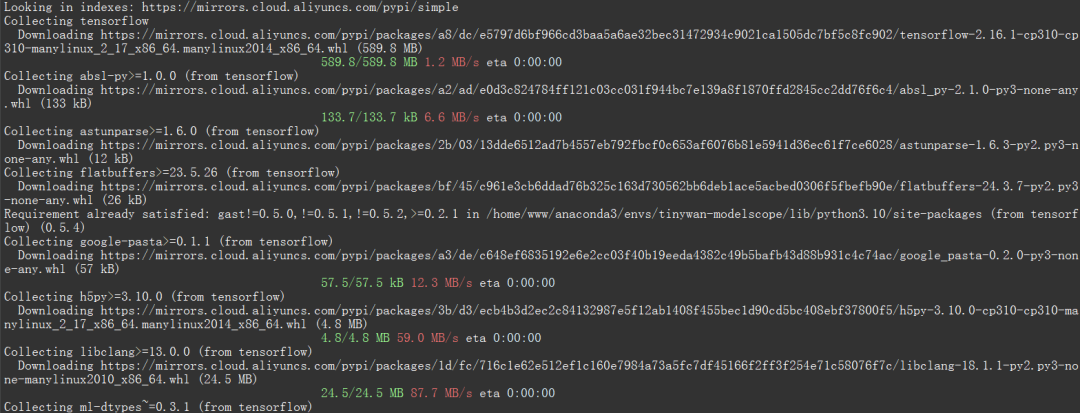
可以使用以下命令安装最新版本的 TensorFlow
pip install tensorflow
☞☞☞AI 智能聊天, 问答助手, AI 智能搜索, 免费无限量使用 DeepSeek R1 模型☜☜☜
 图片
图片
人像抠图('portrait-matting')
输入图片
 图片
图片
Python 代码
import cv2from modelscope.pipelines import pipelineportrait_matting = pipeline('portrait-matting')result = portrait_matting('https://modelscope.oss-cn-beijing.aliyuncs.com/test/images/image_matting.png')cv2.imwrite('result.png', result['output_img'])PHP 代码 tinywan-images.php
<?php$operator = PyCore::import("operator");$builtins = PyCore::import("builtins");$cv2 = PyCore::import('cv2');$pipeline = PyCore::import('modelscope.pipelines')->pipeline;$portrait_matting = $pipeline("portrait-matting");$result = $portrait_matting("https://modelscope.oss-cn-beijing.aliyuncs.com/test/images/image_matting.png");$cv2->imwrite("tinywan_result.png", $result->__getitem__("output_img"));加载本地文件图片$result = $portrait_matting("./tinywan.png");
执行结果
/usr/local/php-8.2.14/bin/php tinywan-images.php 2024-03-25 22:17:25,630 - modelscope - INFO - PyTorch version 2.2.1 Found.2024-03-25 22:17:25,631 - modelscope - INFO - TensorFlow version 2.16.1 Found.2024-03-25 22:17:25,631 - modelscope - INFO - Loading ast index from /home/www/.cache/modelscope/ast_indexer2024-03-25 22:17:25,668 - modelscope - INFO - Loading done! Current index file version is 1.13.0, with md5 f54e9d2dceb89a6c989540d66db83a65 and a total number of 972 components indexed2024-03-25 22:17:26,990 - modelscope - WARNING - Model revision not specified, use revision: v1.0.02024-03-25 22:17:27.623085: I tensorflow/core/util/port.cc:113] oneDNN custom operations are on. You may see slightly different numerical results due to floating-point round-off errors from different computation orders. To turn them off, set the environment variable `TF_ENABLE_ONEDNN_OPTS=0`.2024-03-25 22:17:27.678592: I tensorflow/core/platform/cpu_feature_guard.cc:210] This TensorFlow binary is optimized to use available CPU instructions in performance-critical operations.To enable the following instructions: AVX2 AVX512F AVX512_VNNI FMA, in other operations, rebuild TensorFlow with the appropriate compiler flags.2024-03-25 22:17:28.551510: W tensorflow/compiler/tf2tensorrt/utils/py_utils.cc:38] TF-TRT Warning: Could not find TensorRT2024-03-25 22:17:29,206 - modelscope - INFO - initiate model from /home/www/.cache/modelscope/hub/damo/cv_unet_image-matting2024-03-25 22:17:29,206 - modelscope - INFO - initiate model from location /home/www/.cache/modelscope/hub/damo/cv_unet_image-matting.2024-03-25 22:17:29,209 - modelscope - WARNING - No preprocessor field found in cfg.2024-03-25 22:17:29,210 - modelscope - WARNING - No val key and type key found in preprocessor domain of configuration.json file.2024-03-25 22:17:29,210 - modelscope - WARNING - Cannot find available config to build preprocessor at mode inference, current config: {'model_dir': '/home/www/.cache/modelscope/hub/damo/cv_unet_image-matting'}. trying to build by task and model information.2024-03-25 22:17:29,210 - modelscope - WARNING - Find task: portrait-matting, model type: None. Insufficient information to build preprocessor, skip building preprocessorWARNING:tensorflow:From /home/www/anaconda3/envs/tinywan-modelscope/lib/python3.10/site-packages/modelscope/utils/device.py:60: is_gpu_available (from tensorflow.python.framework.test_util) is deprecated and will be removed in a future version.Instructions for updating:Use `tf.config.list_physical_devices('GPU')` instead.2024-03-25 22:17:29,213 - modelscope - INFO - loading model from /home/www/.cache/modelscope/hub/damo/cv_unet_image-matting/tf_graph.pbWARNING:tensorflow:From /home/www/anaconda3/envs/tinywan-modelscope/lib/python3.10/site-packages/modelscope/pipelines/cv/image_matting_pipeline.py:45: FastGFile.__init__ (from tensorflow.python.platform.gfile) is deprecated and will be removed in a future version.Instructions for updating:Use tf.gfile.GFile.2024-03-25 22:17:29,745 - modelscope - INFO - load model done输出图片
 图片
图片




