



我想了解 shadcn-ui cli 是如何工作的。在本文中,我讨论用于构建 shadcn-ui/ui cli 的代码。
在第2.10部分中,我们查看了getregistrybasecolors函数、提示、创建components.json和resolveconfigpaths。
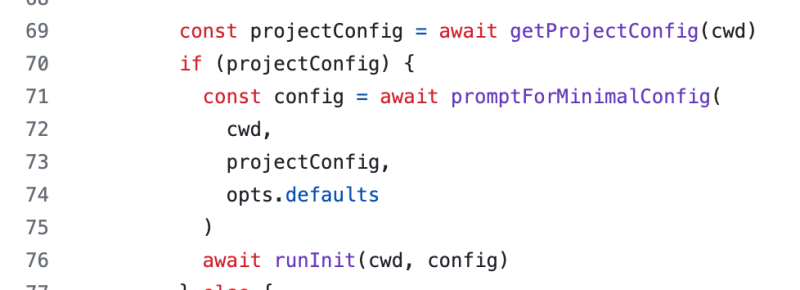
现在我们了解了promptforminimalconfig函数是如何工作的,是时候我们来了解runinit函数是如何工作的了。
运行初始化
export async function runinit(cwd: string, config: config) {
  const spinner = ora(\`initializing project...\`)?.start()

  // ensure all resolved paths directories exist.
  for (const \[key, resolvedpath\] of object.entries(config.resolvedpaths)) {
    // determine if the path is a file or directory.
    // todo: is there a better way to do this?
    let dirname = path.extname(resolvedpath)
      ? path.dirname(resolvedpath)
      : resolvedpath

    // if the utils alias is set to something like "@/lib/utils",
    // assume this is a file and remove the "utils" file name.
    // todo: in future releases we should add support for individual utils.
    if (key === "utils" && resolvedpath.endswith("/utils")) {
      // remove /utils at the end.
      dirname = dirname.replace(/\\/utils$/, "")
    }

    if (!existssync(dirname)) {
      await fs.mkdir(dirname, { recursive: true })
    }
  }

  const extension = config.tsx ? "ts" : "js"

  const tailwindconfigextension = path.extname(
    config.resolvedpaths.tailwindconfig
  )

  let tailwindconfigtemplate: string
  if (tailwindconfigextension === ".ts") {
    tailwindconfigtemplate = config.tailwind.cssvariables
      ? templates.tailwind\_config\_ts\_with\_variables
      : templates.tailwind\_config\_ts
  } else {
    tailwindconfigtemplate = config.tailwind.cssvariables
      ? templates.tailwind\_config\_with\_variables
      : templates.tailwind\_config
  }

  // write tailwind config.
  await fs.writefile(
    config.resolvedpaths.tailwindconfig,
    template(tailwindconfigtemplate)({
      extension,
      prefix: config.tailwind.prefix,
    }),
    "utf8"
  )

  // write css file.
  const basecolor = await getregistrybasecolor(config.tailwind.basecolor)
  if (basecolor) {
    await fs.writefile(
      config.resolvedpaths.tailwindcss,
      config.tailwind.cssvariables
        ? config.tailwind.prefix
          ? applyprefixescss(basecolor.cssvarstemplate, config.tailwind.prefix)
          : basecolor.cssvarstemplate
        : basecolor.inlinecolorstemplate,
      "utf8"
    )
  }

  // write cn file.
  await fs.writefile(
    \`${config.resolvedpaths.utils}.${extension}\`,
    extension === "ts" ? templates.utils : templates.utils\_js,
    "utf8"
  )

  spinner?.succeed()

  // install dependencies.
  const dependenciesspinner = ora(\`installing dependencies...\`)?.start()
  const packagemanager = await getpackagemanager(cwd)

  // todo: add support for other icon libraries.
  const deps = \[
    ...project\_dependencies,
    config.style === "new-york" ? "@radix-ui/react-icons" : "lucide-react",
  \]

  await execa(
    packagemanager,
    \[packagemanager === "npm" ? "install" : "add", ...deps\],
    {
      cwd,
    }
  )
  dependenciesspinner?.succeed()
}
这个函数相当大,让我们通过研究小代码块来分解这个分析。
嗯,这段代码已经添加了一些特定于操作的注释。我们可以遵循相同的评论将此分析分解为多个部分。
- 确保所有已解析的路径目录都存在。
- 编写 tailwind 配置。
- 编写css文件。
- 写入 cn 文件。
- 安装依赖项。
在本文中,我们来看看 shadcn-ui/ui cli 如何确保所有已解析的路径目录都存在。
确保所有已解析的路径目录都存在。
// ensure all resolved paths directories exist.
  for (const \[key, resolvedpath\] of object.entries(config.resolvedpaths)) {
    // determine if the path is a file or directory.
    // todo: is there a better way to do this?
    let dirname = path.extname(resolvedpath)
      ? path.dirname(resolvedpath)
      : resolvedpath

    // if the utils alias is set to something like "@/lib/utils",
    // assume this is a file and remove the "utils" file name.
    // todo: in future releases we should add support for individual utils.
    if (key === "utils" && resolvedpath.endswith("/utils")) {
      // remove /utils at the end.
      dirname = dirname.replace(/\\/utils$/, "")
    }

    if (!existssync(dirname)) {
      await fs.mkdir(dirname, { recursive: true })
    }
  }
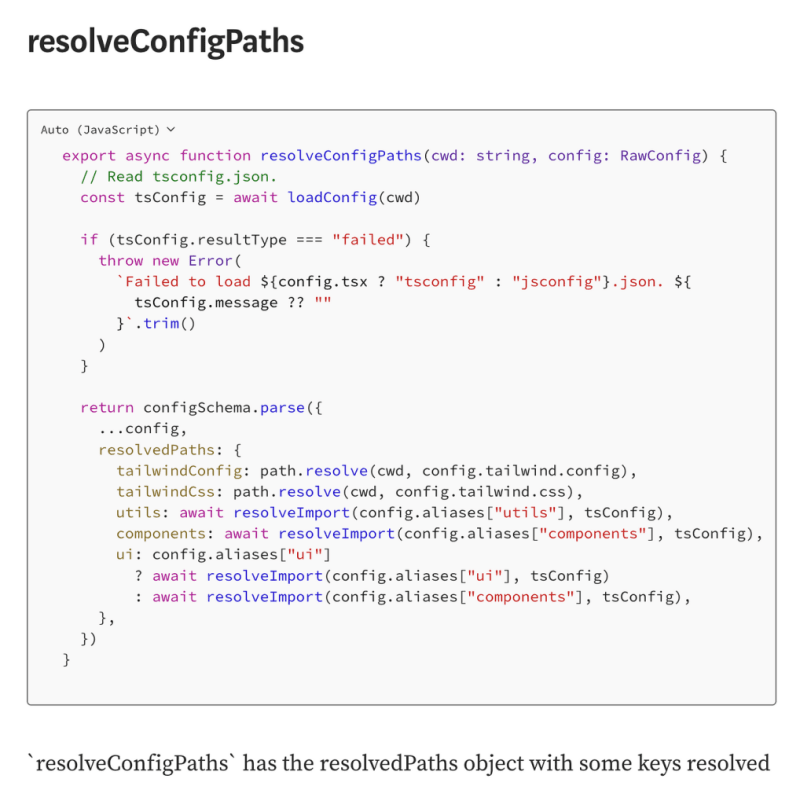
在2.10文章中,我谈到了config如何添加resolvedpaths对象。
// determine if the path is a file or directory.
// todo: is there a better way to do this?
let dirname = path.extname(resolvedpath)
  ? path.dirname(resolvedpath)
  : resolvedpath
上面的代码使用了path。 path.extname() 方法返回路径的扩展名,从最后一次出现的 . (句点)字符到路径最后部分中字符串的末尾。如果没有 .在路径的最后部分,或者如果没有 .路径基本名称的第一个字符以外的字符(请参阅path.basename()),返回空字符串。
// if the utils alias is set to something like "@/lib/utils",
// assume this is a file and remove the "utils" file name.
// todo: in future releases we should add support for individual utils.
if (key === "utils" && resolvedpath.endswith("/utils")) {
  // remove /utils at the end.
  dirname = dirname.replace(/\\/utils$/, "")
}
上面代码中的注释已经说明了一切。
if (!existsSync(dirname)) {
  await fs.mkdir(dirname, { recursive: true })
}
existssync 是“fs”包中的函数,如果路径存在则返回 true,否则返回 false。

如果目录不存在,则使用fs.mkdir创建目录。
结论:
现在我了解了promptforminimalconfig函数的工作原理,是时候继续了解runinit函数在shadcn-ui/ui cli相关源代码中的工作原理了。
runinit 函数相当大,让我们通过研究小代码块来分解这个分析。这已经有一些注释解释了它的作用。这些带注释的操作如下:
- 确保所有已解析的路径目录都存在。
- 编写 tailwind 配置。
- 编写css文件。
- 写入 cn 文件。
- 安装依赖项。
我讨论了shadcn的init命令如何通过使用“fs”包中的existssync来确保所有已解析的路径目录都存在,如果目录不存在,该函数只需使用mkdir创建一个新目录。
想学习如何从头开始构建 shadcn-ui/ui 吗?查看 从头开始构建
关于我:
网站:https://ramunarasinga.com/
linkedin:https://www.linkedin.com/in/ramu-narasinga-189361128/
github:https://github.com/ramu-narasinga
电子邮件:ramu.narasinga@gmail.com
从头开始构建 shadcn-ui/ui
参考:
- https://github.com/shadcn-ui/ui/blob/main/packages/cli/src/commands/init.ts#l81
- https://github.com/shadcn-ui/ui/blob/main/packages/cli/src/commands/init.ts#l307




