



反应表单动作。
react 引入了新的表单 actions 和相关的钩子来增强原生表单并简化客户端-服务器通信。这些功能使开发人员能够更有效地处理表单提交,从而提高用户体验和代码可维护性。对于react form actions的深入探索,你可以参考我关于react form actions的文章中的详细帖子。
服务器操作
react 18 引入了服务器组件功能。服务器组件不是服务器端渲染(ssr),服务器组件在运行时和构建时都在服务器上专门执行。这些组件可以访问服务器端资源,例如数据库和文件系统,但它们无法执行事件侦听器或挂钩等客户端操作。
先决条件
为了演示服务器组件和服务器操作的功能,我们将使用 next.js 和 prisma。
next.js 是一个用于构建全栈 web 应用程序的 react 框架。您可以使用 react components 来构建用户界面,并使用 next.js 来实现附加功能和优化。在底层,next.js 还抽象并自动配置 react 所需的工具,例如捆绑、编译等。这使您可以专注于构建应用程序,而不是花时间进行配置。了解更多 prisma 是一个简化数据库访问和操作的 orm,让您无需编写 sql 即可查询和操作数据。了解更多
初始设置
首先创建一个新的 next.js 应用程序:
纱线创建下一个应用程序服务器示例
您的初始文件夹结构将如下所示:
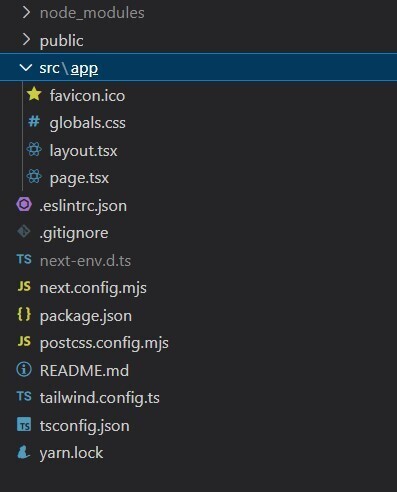
升级到 canary 版本以访问 react 19 功能,包括服务器操作:
yarn add next@rc react@rc react-dom@rc
安装 prisma
yarn add prisma
prisma 配置
在 src/lib/prisma/schema.prisma 创建 prisma 架构文件:
generator client {
  provider = "prisma-client-js"
}

datasource db {
  provider = "sqlite"
  url      = "file:./dev.db"
}

model user {
  id    int     @id @default(autoincrement())
  email string  @unique
  name  string?
  age int
}
出于演示目的,我们使用 sqlite。对于生产,您应该使用更强大的数据库。
接下来,在 src/lib/prisma/prisma.ts 添加 prisma 客户端文件
// ts-ignore 7017 is used to ignore the error that the global object is not
// defined in the global scope. this is because the global object is only
// defined in the global scope in node.js and not in the browser.

import { prismaclient } from '@prisma/client'

// prismaclient is attached to the `global` object in development to prevent
// exhausting your database connection limit.
//
// learn more:
// https://pris.ly/d/help/next-js-best-practices

const globalforprisma = global as unknown as { prisma: prismaclient }

export const prisma = globalforprisma.prisma || new prismaclient()

if (process.env.node_env !== 'production') globalforprisma.prisma = prisma

export default prisma
在package.json中配置prisma:
{
  //other settings
  "prisma": {
    "schema": "src/lib/prisma/schema.prisma",
    "seed": "ts-node src/lib/prisma/seed.ts"
  }
}
并更新 tsconfig.json 中的 typescript 设置:
{
  //other settings here...

  "ts-node": {
    // these options are overrides used only by ts-node
    // same as the --compileroptions flag and the
    // ts_node_compiler_options environment variable
    "compileroptions": {
      "module": "commonjs"
    }
  }
}
全局安装 ts-node:
yarn global add ts-node
播种初始数据
在 src/lib/prisma/seed.ts 添加种子文件以填充初始数据:
import { prismaclient } from "@prisma/client";
const prisma = new prismaclient();
async function main() {
  await prisma.user.create({
    email: "anto@prisma.io",
    name: "anto",
    age: 35,
  });
  await prisma.user.create({
    email: "vinish@prisma.io",
    name: "vinish",
    age: 32,
  });
}
main()
  .then(async () => {
    await prisma.$disconnect();
  })
  .catch(async (e) => {
    console.error(e);
    await prisma.$disconnect();
    process.exit(1);
  });
安装 prisma 客户端
yarn add @prisma/client
运行迁移命令:
yarn prisma migrate dev --name init
如果种子数据没有体现,请手动添加:
yarn prisma db seed
太棒了!由于安装已准备就绪,您可以创建一个执行数据库操作的操作文件。
创建服务器操作
服务器操作是一项强大的功能,可实现无缝的客户端-服务器相互通信。让我们在 src/actions/user.ts 创建一个用于数据库操作的文件:
"use server";
import prisma from '@/lib/prisma/prisma'
import { revalidatepath } from "next/cache";

// export type for user
export type user = {
  id: number;
  name: string | null;
  email: string;
  age: number;
};


export async function createuser(user: any) {
  const resp = await prisma.user.create({ data: user });
  console.log("server response");
  revalidatepath("/");
  return resp;
}

export async function getusers() {
  return await prisma.user.findmany();
}

export async function deleteuser(id: number) {
  await prisma.user.delete({
    where: {
      id: id,
    },
  });
  revalidatepath("/");
}
实施服务器组件
让我们创建一个 react 服务器组件来从数据库读取和渲染数据。创建 src/app/serverexample/page.tsx:
import userlist from "./users";
import "./app.css"

export default async function serverpage() {
  return (
    <div classname="app">
      <header classname="app-header">
        <userlist  />
      </header>
    </div>
  );
}
在 src/app/serverexample/app.css 中添加一些样式

.app {
  text-align: center;
}

.app-logo {
  height: 40vmin;
  pointer-events: none;
}

.app-header {
  background-color: #282c34;
  min-height: 100vh;
  display: flex;
  flex-direction: column;
  align-items: center;
  justify-content: center;
  font-size: calc(10px + 2vmin);
  color: white;
}

input {
  color: #000;
}

.app-link {
  color: #61dafb;
}
创建组件来获取和渲染用户列表:
src/app/serverexample/userlist.tsx
import { getusers } from "@/actions/user";
import { userdetail } from "./userdetail";

export default async function userlist() {
  //api call to fetch user details
  const users = await getusers();

  return (
    <div classname="grid grid-cols-3 gap-5">
      {users.length ? (
        users.map((user) => <userdetail user={user} />)
      ) : (
        <div classname="col-span3 opacity-60 text-sm text-center">
          no user found
        </div>
      )}
    </div>
  );
}
src/app/serverexample/userdetail.tsx
export function userdetail({ user }) {
  return (
    <div classname="flex items-center gap-4 border border-gray-600 py-1 px-4">
      <img
        classname="w-10 h-10 rounded-full"
        src="https://api.dicebear.com/9.x/personas/svg?seed=shadow"
        alt="avatar"
      />
      <div classname="font-medium text-base dark:text-white">
        <div>{user.name}</div>
        <div classname="text-sm text-gray-500 dark:text-gray-400">
          {user.email}
        </div>
      </div>
    </div>
  );
}
运行开发服务器:
yarn dev
导航到 http://localhost:3000/serverexample 查看渲染的用户列表: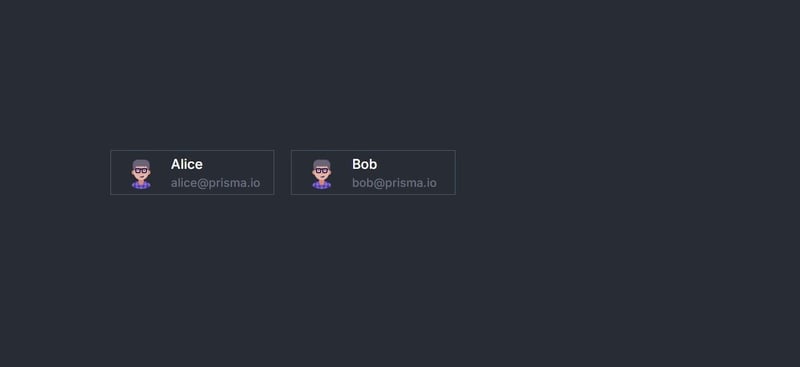
默认情况下,next.js 中的组件是服务器组件,除非您指定“使用客户端”指令。注意两点:
- 异步组件定义:服务器组件可以是异步的,因为它们不会重新渲染并且只生成一次。
- 数据获取:行 const users = wait getusers();从服务器获取数据并在运行时渲染它。
探索服务器操作
服务器操作可实现无缝的客户端-服务器相互通信。让我们添加一个表单来创建新用户。
在 src/app/serverexample/adduser.tsx 创建一个新文件:
"use client";

import "./app.css";
import { useactionstate } from "react";
import { createuser } from "../../actions/user";

const initialstate = {
  error: undefined,
};

export default function adduser() {
  const submithandler = async (_previousstate: object, formdata: formdata) => {
    try {
      // this is the server action method that transfers the control
      // back to the server to do db operations and get back the result.
      const response = await createuser({
        name: formdata.get("name") as string,
        email: formdata.get("email") as string,
        age: parseint(formdata.get("age") as string),
      });
      return { response };
    } catch (error) {
      return { error };
    }
  };
  const [state, submitaction, ispending] = useactionstate(
    submithandler,
    initialstate
  );

  return (
    <div classname="mt-10">
      <h4 classname="text-center">add new user</h4>{" "}
      <form action={submitaction} classname="text-base">
        <div classname="mt-6 text-right">
          name:{" "}
          <input
            classname="ml-2"
            required
            name="name"
            type="text"
            placeholder="name"
          />
        </div>
        <div classname="mt-6 text-right">
          email:{" "}
          <input
            classname="ml-2"
            name="email"
            type="email"
            placeholder="email"
          />
        </div>
        <div classname="mt-6 text-right">
          age:{" "}
          <input classname="ml-2" name="age" type="text" placeholder="age" />
        </div>
        <div classname="mt-6 text-right">
          <button
            disabled={ispending}
            classname="bg-green-600 text-white px-5 py-1 text-base disabled:opacity-30"
          >
            {ispending ? "adding" : "add user"}
          </button>
        </div>

        {(state?.error as string) && <p>{state.error as string}</p>}
      </form>
    </div>
  );
}
更新 src/app/serverexample/page.tsx 以包含 adduser 组件:
import userlist from "./userlist";
// import new line
import adduser from "./adduser";
import "./app.css"

export default async function serverpage() {
  return (
    <div classname="app">
      <header classname="app-header">
        <userlist  />
        {/* insert add user here */}
        <adduser />
      </header>
    </div>
  );
}
运行应用程序现在将允许您通过表单添加新用户,并无缝处理服务器端处理。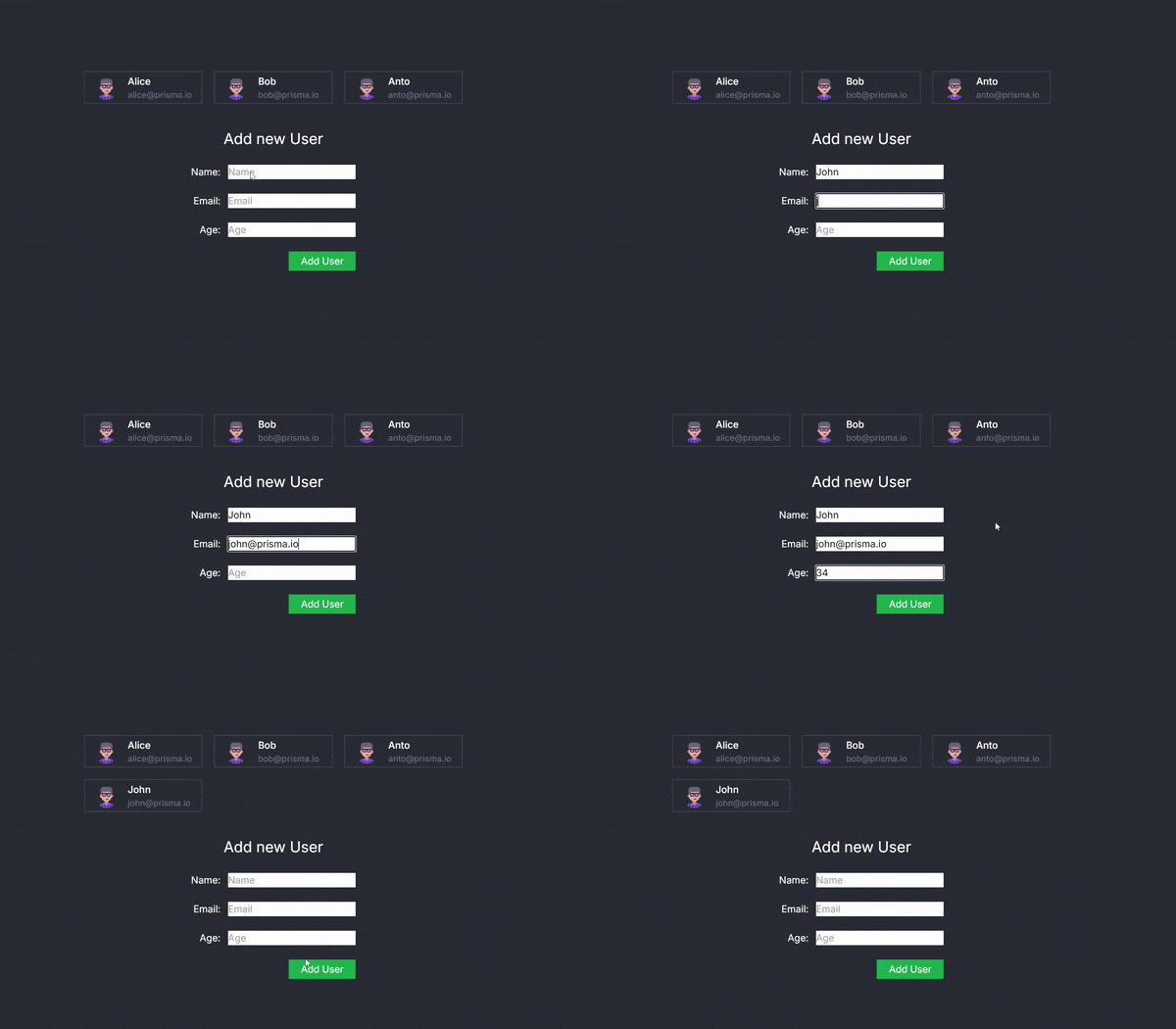
adduser 组件和无缝客户端-服务器交互
adduser 组件是此示例的核心,展示了 react server actions 如何彻底改变我们处理客户端-服务器交互的方式。该组件呈现一个用于添加新用户的表单,并利用 useactionstate 挂钩在客户端界面和服务器端操作之间创建平滑、无缝的桥梁。
它是如何运作的
- 表单渲染和数据处理:
- adduser 组件提供了一个表单,用户可以在其中输入他们的姓名、电子邮件和年龄。
- 提交表单后,数据将被捕获并准备发送到服务器。
- 使用actionstate hook:
- useactionstate 钩子是此设置的关键部分。它通过将客户端状态和服务器端操作抽象为统一的接口,简化了管理客户端状态和服务器端操作的复杂性。
- 此钩子接受一个异步处理函数,该函数处理表单数据,然后调用服务器操作方法。
- 这种方法的优点在于它的抽象:感觉就像是在同一个文件中调用常规函数,即使它实际上触发了服务器端操作。
- 服务器操作方法:
- createuser 函数,定义为服务器操作,在服务器端执行。它从表单中获取用户数据,通过 prisma 执行必要的数据库操作,并返回结果。
- 这种服务器端方法对于保持客户端和服务器之间的干净分离至关重要,同时仍然使它们能够有效地通信。
- 无缝集成:
从在客户端工作的开发人员的角度来看,表单提交似乎是在本地处理的。然而,诸如数据库操作之类的繁重工作发生在服务器上。
useactionstate 钩子封装了这个过程,管理状态转换和处理错误,同时为开发人员维护直观的 api。
没有表单的服务器操作
这就是表单,现在让我们测试一个没有表单的示例。
更新 src/app/serverexample/userdetail.tsx
"use client";
import { deleteUser } from "@/actions/user";
import { useTransition } from "react";

export function UserDetail({ user }) {
  const [pending, startTransition] = useTransition();

  const handleDelete = () => {
    startTransition(() => {
      deleteUser(user.id);
    });
  };

  return (
    <div className="flex items-center gap-4 border border-gray-600 py-1 px-4">
      {pending ? (
        <p>Deleting...</p>
      ) : (
        <>
          <img
            className="w-10 h-10 rounded-full"
            src="https://api.dicebear.com/9.x/personas/svg?seed=Shadow"
            alt="avatar"
          />
          <div className="font-medium text-base dark:text-white">
            <div>{user.name}</div>
            <div className="text-sm text-gray-500 dark:text-gray-400">
              {user.email}
            </div>
          </div>
          <button className="ml-auto" onClick={handleDelete}>
            <img className="w-4 h-4" src="/delete.png" alt="" />
          </button>
        </>
      )}
    </div>
  );
}
要点:
- 服务器操作:deleteuser(user.id) 是从数据库中删除用户的服务器操作。无需提交任何表单即可触发此操作。
- usetransition: 这个钩子允许您管理删除过程的异步状态,在操作进行时显示“正在删除...”消息。
- 用户界面: 该组件维护一个干净的 ui,根据操作状态动态更新。
现在,您可以在应用程序内无缝删除用户: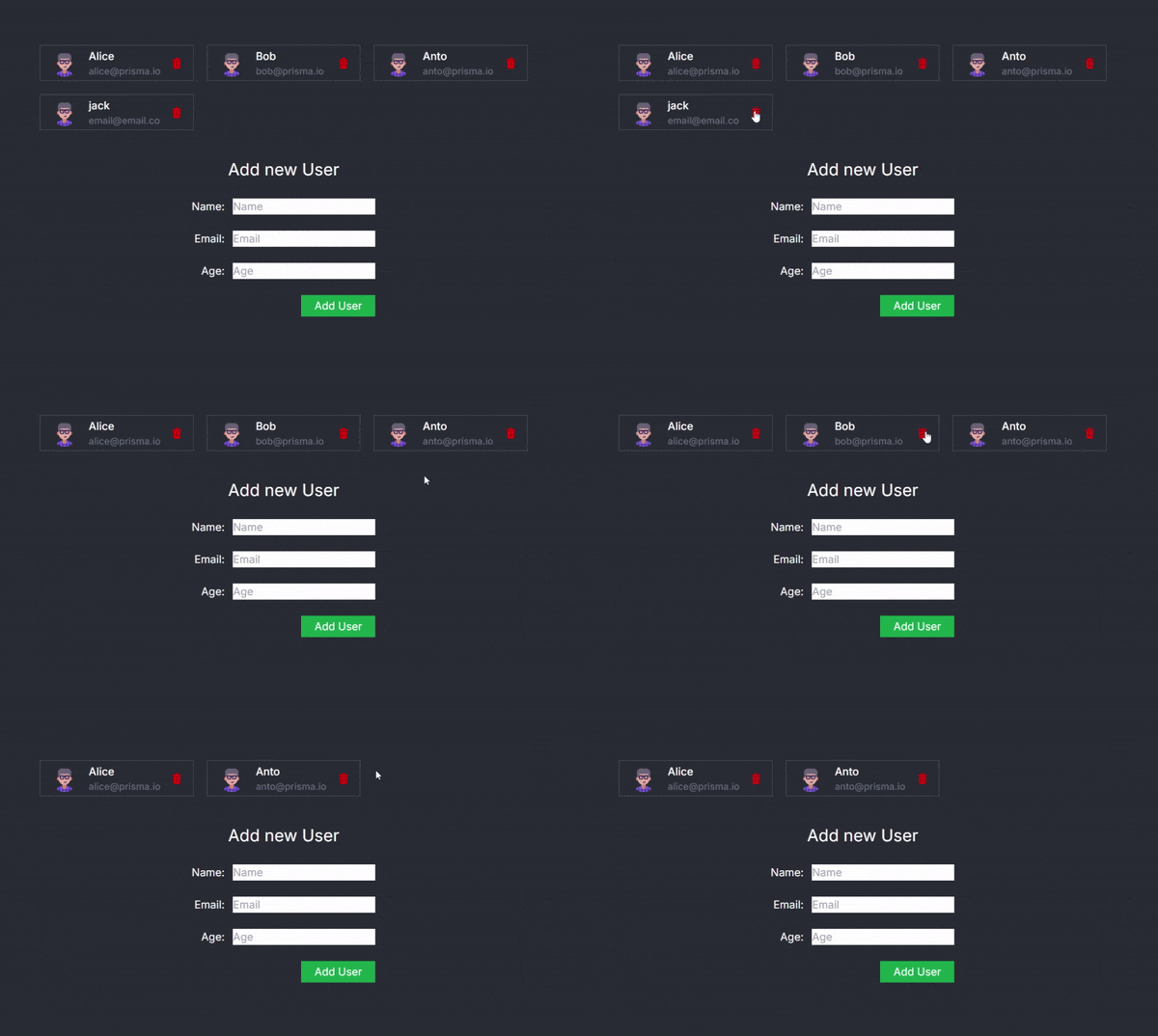
结论
这种方法具有变革性,因为它抽象了客户端-服务器通信的复杂性。传统上,此类交互需要处理 api 端点、管理异步请求以及仔细协调客户端状态与服务器响应。通过 react server actions 和 useactionstate 钩子,这种复杂性得以降低,使开发人员能够更多地专注于构建功能,而不是担心底层基础设施。
通过使用此模式,您将获得:
- 更干净的代码: 客户端代码保持简单和专注,不需要显式的 api 调用。
- 改善开发者体验:服务器端操作无缝集成,减少认知负荷和潜在的错误。
- 增强的性能:服务器操作针对性能进行了优化,减少了不必要的客户端-服务器往返并确保服务器端资源得到有效利用。
您可以在存储库中找到完整的代码




