
问题:
点击导航栏右侧小图标,但是却触发了父元素的事件(透明度变化);
怎么阻止,父元素的事件;
父元素(导航栏)的事件是:mousedown,mousemove;
导航栏小图标的事件是 :click;
已经尝试的方法(无效):
使用了jquery的阻止父元素事件 event.stopPropagation();
效果图: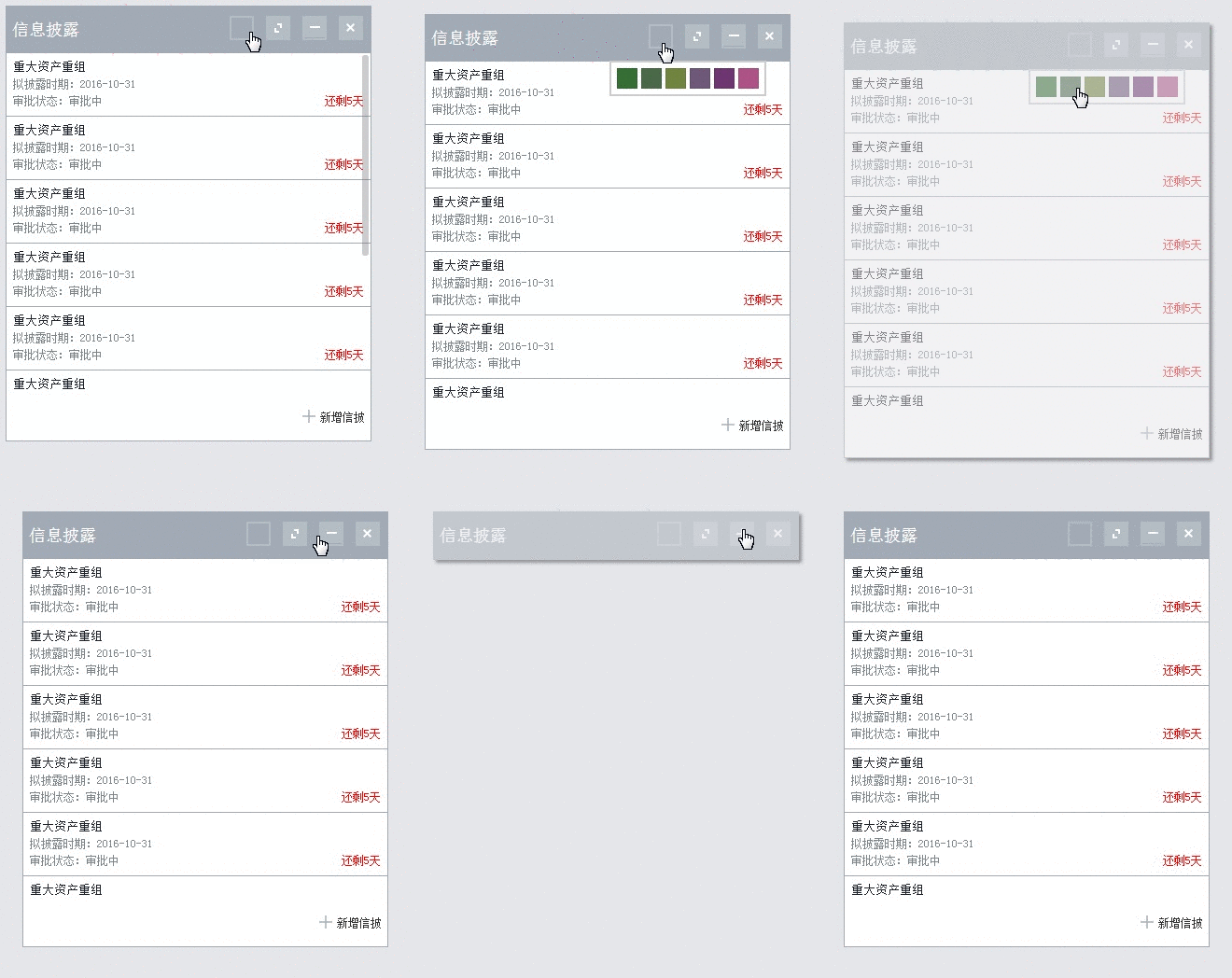
html+js部分
可自由拖动,设置样式,收缩的面板
信息披露
-
重大资产重组
拟披露时期:2016-10-31
审批状态:审批中还剩5天
-
重大资产重组
拟披露时期:2016-10-31
审批状态:审批中还剩5天
-
重大资产重组
拟披露时期:2016-10-31
审批状态:审批中还剩5天
-
重大资产重组
拟披露时期:2016-10-31
审批状态:审批中还剩5天
-
重大资产重组
拟披露时期:2016-10-31
审批状态:审批中还剩5天
-
重大资产重组
拟披露时期:2016-10-31
审批状态:审批中还剩5天
-
重大资产重组
拟披露时期:2016-10-31
审批状态:审批中还剩5天
-
重大资产重组
拟披露时期:2016-10-31
审批状态:审批中还剩5天
-
重大资产重组
拟披露时期:2016-10-31
审批状态:审批中还剩5天
css部分
 body,ul,li,p,input,dt,dl,dd,form,textarea,th,td,select,h1,h2,h3,h4,h5,h6 {padding:0px;margin:0px;}
body{font:14px/1.5 SimSun,"Helvetica Neue",Helvetica,Arial,sans-serif}
li{list-style:none;}
a{text-decoration:none;color:#333;}
a,em{display:inline-block;}
img{border:none;vertical-align:top;}
table{border-collapse:collapse;}
.clear{zoom:1;}
.clear:after{}
/*主要样式*/
body{
    background: #e5e6e9;
}
.panel{
    border: 1px #a1aab5 solid;
    width:390px;
    position: relative;
    // cursor: pointer;
    /*margin: 30px;*/
}
.pannel_heading{
    padding: 6px;
    background: #a1aab5;
    font-size: 18px;
    color: #fff;
    height: 38px;
    line-height: 38px;
}
.hide{
    display:none;
}
.publish_body{
    height:365px;
    /*overflow: auto;*/
    // overflow-y: scroll;
    /*overflow-y:hidden*/
     /*scrollbar-face-color: #b46868;*/
}
.actions{
    float: right;
    text-align: center;
    margin-top: 4px;
}
.action{
    // background: #b5bdc4;
    // width: 20px;
    // height: 20px;
    margin:0 2px;
    /*padding: 1px;*/
}
.action i{
    display: inline-block;
    width: 16px;
    height: 16px;
    padding:3px;
   border: 2px #b5bdc4 solid;
}
.a1{
    border: 2px #cad0d4 solid;
    // background:#a1aab5;
    width: 12px;
    height: 12px;


}
.a2{
    background:url(../images/home.png) no-repeat -88px -54px;
}
.a3{
    background:url(../images/home.png) no-repeat;
    background-position:-44px -55px;
    /*background-position-x: -44px;
    background-position-y: -55px;*/
}
.icon_add2{
    background-position:-176px -54px !important;
}
.panel2{
    width: 100% !important;
    top:0px !important;
    left:0px !important;
    position: absolute !important;
}
.a4{
    background: url(../images/home.png) no-repeat -132px -54px;

}
.icon_declare{
    background:url(../images/home.png) no-repeat -130px -28px;
    display: inline-block;
    width: 26px;
    height: 26px;
}
.panel-title{
    /*vertical-align:text-top;*/
}
/*下部分*/
.pannel_body{
    /*height:365;*/
    background: #fff;
}
.pannel_body ul{
     margin: 0px;
    padding: 0px;
}
.publish{
    padding: 7px 0px 7px 7px;
    font-size: 12px;
    color: #7d878e;
    border-bottom: 1px #a1aab5 solid;
    padding-top: 5px;
}
.pannel_body h3{
    margin: 0px;
    padding: 0px;
    color: #1c2230;
    font-size: 13px;
    font-weight: normal;
}
.time{}
.backwards{
    float: right;
    padding-right: 7px;
    color: red;
}
.pannel_heading{
    cursor: pointer;
}
.icon_add{
    background: url(../images/home.png) no-repeat -298px -57px;
    display: inline-block;
    width: 14px;
    height: 16px;
    vertical-align: sub;
    margin-right: 5px;
}
.publish_footer{
    text-align: right;
    background: #fff;
    padding:16px 6px;
    font-size: 12px;
}
.color_select{
    list-style: none;
    margin: 0;
    padding: 4px;
    /*min-width: 170px;*/
    max-width: 156px;
    right:25px;
    position: absolute;
    background: #fff;
    overflow: hidden;
    border: 2px solid #ccc;
    z-index:10;
}
.color_select li{
    display: block;
    margin: 2px;
    float: left;
}
.color_select li span{
    display: block;
    width: 22px;
    height: 22px;
    padding: 0;
    // background: #333;
    box-sizing: border-box;
    -moz-box-sizing: border-box;
    -webkit-box-sizing: border-box;
    border: 1px solid rgba(0, 0, 0, .1);
    // cursor: pointer;
}
.green{
    background-color: #356e35;
}
.greenDark{
    background-color: #496949;
}
.greenLight{
    background-color: #71843f;
}
.purple{
background-color: #6e587a;
}
.magenta{
        background-color: #6e3671;
}
.pink{
        background-color: #ac5287;
}
.pinkDark{
        background-color: #a8829f;
}

.moveactive{
    opacity:0.5;
    box-shadow:2px 2px 10px #444;
    -moz-box-shadow: 3px 3px 4px #444;
    -webkit-box-shadow: 3px 3px 4px #444;
    box-shadow: 3px 3px 4px #444;
    -ms-filter: "progid:DXImageTransform.Microsoft.Shadow(Strength=4, Direction=135, Color='#444444')";
    filter: progid:DXImageTransform.Microsoft.Shadow(Strength=4, Direction=135, Color='#444444');
}

/*滚动条整体部分*/
.scroll-wrapper {
    overflow: hidden !important;
    padding: 0 !important;
    position: relative;
}

.scroll-wrapper > .scroll-content {
    border: none !important;
    box-sizing: content-box !important;
    height: auto;
    left: 0;
    margin: 0;
    max-height: none;
    max-width: none !important;
    overflow: scroll !important;
    padding: 0;
    position: relative !important;
    top: 0;
    width: auto !important;
}

.scroll-wrapper > .scroll-content::-webkit-scrollbar {
    height: 0;
    width: 0;
}

.scroll-element {
    display: none;
}
.scroll-element, .scroll-element p {
    box-sizing: content-box;
}

.scroll-element.scroll-x.scroll-scrollx_visible,
.scroll-element.scroll-y.scroll-scrolly_visible {
    display: block;
}

.scroll-element .scroll-bar,
.scroll-element .scroll-arrow {
    cursor: default;
}

.scroll-textarea {
    border: 1px solid #cccccc;
    border-top-color: #999999;
}
.scroll-textarea > .scroll-content {
    overflow: hidden !important;
}
.scroll-textarea > .scroll-content > textarea {
    border: none !important;
    box-sizing: border-box;
    height: 100% !important;
    margin: 0;
    max-height: none !important;
    max-width: none !important;
    overflow: scroll !important;
    outline: none;
    padding: 2px;
    position: relative !important;
    top: 0;
    width: 100% !important;
}
.scroll-textarea > .scroll-content > textarea::-webkit-scrollbar {
    height: 0;
    width: 0;
}
/*************** SCROLLBAR MAC OS X ***************/

.publish_body > .scroll-element,
.publish_body > .scroll-element p
{
    background: none;
    border: none;
    margin: 0;
    padding: 0;
    position: absolute;
    z-index: 10;
}

.publish_body > .scroll-element p {
    display: block;
    height: 100%;
    left: 0;
    top: 0;
    width: 100%;
}

.publish_body > .scroll-element .scroll-element_track { display: none; }
.publish_body > .scroll-element .scroll-bar {
    background-color: #6C6E71;
    display: block;

    -ms-filter:"progid:DXImageTransform.Microsoft.Alpha(Opacity=0)";
    filter: alpha(opacity=0);
    opacity: 0;

    -webkit-border-radius: 7px;
    -moz-border-radius: 7px;
    border-radius: 7px;

    -webkit-transition: opacity 0.2s linear;
    -moz-transition: opacity 0.2s linear;
    -o-transition: opacity 0.2s linear;
    -ms-transition: opacity 0.2s linear;
    transition: opacity 0.2s linear;
}
.publish_body:hover > .scroll-element .scroll-bar,
.publish_body > .scroll-element.scroll-draggable .scroll-bar {
    -ms-filter:"progid:DXImageTransform.Microsoft.Alpha(Opacity=70)";
    filter: alpha(opacity=70);
    opacity: 0.7;
}


.publish_body > .scroll-element.scroll-x {
    bottom: 0px;
    height: 0px;
    left: 0;
    min-width: 100%;
    overflow: visible;
    width: 100%;
}

.publish_body > .scroll-element.scroll-y {
    height: 100%;
    min-height: 100%;
    right: 0px;
    top: 0;
    width: 0px;
}

/* scrollbar height/width & offset from container borders */
.publish_body > .scroll-element.scroll-x .scroll-bar { height: 7px; min-width: 10px; top: -9px; }
.publish_body > .scroll-element.scroll-y .scroll-bar { left: -9px; min-height: 10px; width: 7px; }

.publish_body > .scroll-element.scroll-x .scroll-element_outer { left: 2px; }
.publish_body > .scroll-element.scroll-x .scroll-element_size { left: -4px; }

.publish_body > .scroll-element.scroll-y .scroll-element_outer { top: 2px; }
.publish_body > .scroll-element.scroll-y .scroll-element_size { top: -4px; }

/* update scrollbar offset if both scrolls are visible */
.publish_body > .scroll-element.scroll-x.scroll-scrolly_visible .scroll-element_size { left: -11px; }
.publish_body > .scroll-element.scroll-y.scroll-scrollx_visible .scroll-element_size { top: -11px; }


Copyright 2014-2026 https://www.php.cn/ All Rights Reserved | php.cn | 湘ICP备2023035733号


 4
4 848
848



 收藏
收藏










你的event.stopPropagation();是对click事件的操作,而里的面板透明度变化是mousedown的动作的事件。
function stopPropagation(e) {
}
或者直接return false
我没有找到停止冒泡的方法但是我觉得可以换种方式用:hover来代替鼠标移到上面的事件
清除mousedown的冒泡