
扫码关注官方订阅号
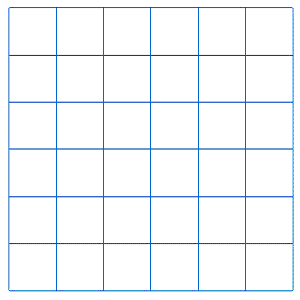
鼠标移到小方格内,小方格内颜色变为红色,离开恢复原色,用canvas怎么实现?注:只能用canvas实现。
Your browser does not support the HTML5 canvas tag.
监听mousemove事件,然后判断当前在那个方格内
mousemove
用mousemouve事件,然后可以从event上获取当前鼠标位置。然后判断当前的xy在那个区域块中,给区域块改变颜色,同时将其他区域块改变成默认颜色
<!DOCTYPE HTML> <html> <body> <canvas id="myCanvas">your browser does not support the canvas tag </canvas> <script type="text/javascript"> var canvas=document.getElementById('myCanvas'); var ctx=canvas.getContext('2d'); ctx.fillStyle='#FF0000'; ctx.fillRect(0,0,80,100); canvas.onmousemove=function(event){ //console.log(event); var _pagex = event.pageX; var _pagey = event.pageY; var _pageLengthX = (_pagex / 40)|0; var _pageLengthY = (_pagey / 40)|0; ctx.fillStyle='#FF0000'; ctx.fillRect(0,0,80,100); ctx.fillStyle='#FFFFFF'; ctx.fillRect( _pageLengthX*40, _pageLengthY*40, 40, 40); } </script> </body> </html>
需要事件你应该知道,然后就是event这个参数中,会有event.pageX和Y,根据你方格的区域判断距离的差值是否在你的这个方格内,然后绘图这个方块就可以了。记住画图钱save和restore比较好。
<!DOCTYPE html> <html> <body> <canvas id="canvas"> Your browser does not support the HTML5 canvas tag. </canvas> <script> !function () { class Panel { constructor(canvas, x, y, r, n) { this.canvas = canvas; this.ctx = canvas.getContext('2d'); this.ratio = 1; this.initScreenRatio(); this.x = x * this.ratio; this.y = y * this.ratio; this.r = r * this.ratio; this.n = n * this.ratio; this.dr = Math.round(this.r / this.n); this.basePos = this.canvas.getBoundingClientRect(); this.prePos = null; this.drawPanel(); this.initEvent(); } initScreenRatio() { const devicePixelRatio = window.devicePixelRatio || 1; const backingStoreRatio = this.ctx.webkitBackingStorePixelRatio || this.ctx.mozBackingStorePixelRatio || this.ctx.msBackingStorePixelRatio || this.ctx.oBackingStorePixelRatio || this.ctx.backingStorePixelRatio || 1; const ratio = devicePixelRatio / backingStoreRatio; this.canvas.style.borderWidth = 0; this.canvas.style.width = this.canvas.offsetWidth; this.canvas.style.height = this.canvas.offsetHeight; this.canvas.width = ratio * this.canvas.offsetWidth; this.canvas.height = ratio * this.canvas.offsetHeight; this.ratio = ratio; } drawPanel(clear) { const {x, y, ctx, r, dr, n,actived} = this; const _2PI = 2 * Math.PI; let i = 1; if(clear!==false){ this.clear(); } ctx.save(); ctx.strokeStyle = '#ddd'; ctx.setLineDash([8, 4]); //圆盘 ctx.save(); for (; i < n + 1; i++) { ctx.beginPath(); ctx.arc(x, y, i * dr, 0, _2PI); if(i===n){ ctx.strokeStyle = actived?'#f00':'#ddd'; } ctx.stroke(); } ctx.restore(); //分割线 ctx.translate(x, y); ctx.setLineDash([]); for (i = 0; i < 8; i++) { ctx.beginPath(); ctx.moveTo(0, 0); ctx.lineTo(0, r); ctx.stroke(); ctx.rotate(_2PI / 8); } ctx.restore(); } clear(){ this.ctx.clearRect(0,0,this.canvas.width,this.canvas.height); } getArea(px, py) { const {basePos, x, y, dr} = this; const dx = (px - basePos.left) * this.ratio - x; const dy = (py - basePos.top) * this.ratio - y; const d = Math.ceil(Math.sqrt(Math.pow(dx, 2) + Math.pow(dy, 2))); let anum = Math.ceil(d / dr); if (dx === 0) { anum = 0; } const actan = dx > 0 ? (dy > 0 ? Math.atan(dy / dx) : 2 * Math.PI + Math.atan(dy / dx)) : Math.PI + Math.atan(dy / dx); return { n: anum > this.n ? null : anum, rotate: Math.floor(actan * 4 / Math.PI) } } fillCellPath(pos, col) { const {ctx, dr, x, y} = this; if (pos.n) { this.clear(); ctx.save(); ctx.translate(x, y); ctx.rotate(pos.rotate * Math.PI / 4); ctx.beginPath(); ctx.moveTo(0, 0); ctx.arc(0, 0, (pos.n) * dr, 0, Math.PI / 4); ctx.closePath(); ctx.fillStyle = col || '#000'; ctx.fill(); ctx.beginPath(); ctx.moveTo(0, 0); ctx.arc(0, 0, (pos.n - 1) * dr, 0, Math.PI / 4); ctx.closePath(); ctx.fillStyle = '#fff'; ctx.fill(); ctx.restore(); this.drawPanel(false); } } initEvent() { this.canvas.addEventListener('mousemove', (e) => { const pos = this.getArea(e.pageX, e.pageY); if (!this.prePos || this.prePos.n !== pos.n || this.prePos.rotate !== pos.rotate && pos.n) { this.actived = true; if (this.prePos) { this.fillCellPath(this.prePos, '#fff'); } this.fillCellPath(pos, '#000'); this.prePos = pos; }else if(!pos.n){ this.actived = false; this.drawPanel(); } }) } } const canvas = document.getElementById('canvas'); const panel = new Panel(canvas, 100, 100, 250, 5); } () </script> </body> </html>
谁能解释下
微信扫码关注PHP中文网服务号
QQ扫码加入技术交流群
Copyright 2014-2026 https://www.php.cn/ All Rights Reserved | php.cn | 湘ICP备2023035733号
PHP学习
技术支持
返回顶部
监听
mousemove事件,然后判断当前在那个方格内用mousemouve事件,然后可以从event上获取当前鼠标位置。然后判断当前的xy在那个区域块中,给区域块改变颜色,同时将其他区域块改变成默认颜色
需要事件你应该知道,然后就是event这个参数中,会有event.pageX和Y,根据你方格的区域判断距离的差值是否在你的这个方格内,然后绘图这个方块就可以了。记住画图钱save和restore比较好。
谁能解释下











