css3 - css flex 的问题
迷茫
迷茫 2017-04-17 11:32:36
[CSS3讨论组]


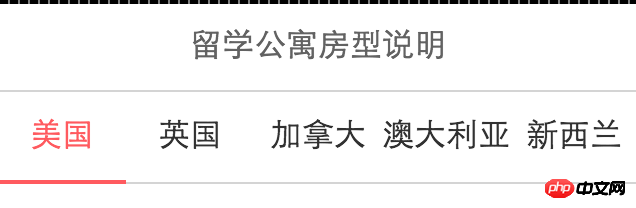
如图,移动端导航用了flex均匀分布。但是视觉上不对。因为字数不相同。导致间隔不整齐。
现在想调整css 能让字的间隔均匀分布。同时满足

  1. 移动端同行100%

  2. 注意下面红线

迷茫
迷茫

业精于勤,荒于嬉;行成于思,毁于随。

全部回复(2)
迷茫

貌似css还没有这么强大的功能,而且每一个元素的字数不一样,计算出来的间距也会不一致。
题主也可以试一试两端对齐这个方式

         .nav{
          display:flex;
          width:100%;
          height:50px;
          line-height: 50px;
          border-bottom:1px solid #ccc;
          font-size: 12px;
          text-align: center;
        }
        a{
          display:block;
          padding:0 10px;
          box-sizing: border-box;
          flex:1;
          width:1%;
          text-align:justify;
          color:#000;   
        }
        a:after{
            overflow:hidden;
            display: inline-block;
            height:0; 
            content:"\200B";//利用伪元素来产生一个换行符,不然text-align:justify;属性不会生效
            width: 100%;
        }
        .cur{
          position: relative;
          color:#e22828;
        }
        .cur:before{
          width: 100%;
          height:1px;
          content:"";
          position: absolute;
          left:0;
          bottom:-1px;
          border-bottom:1px solid #e22828;
          z-index: 100;
        }

有三个以上字体的分配的比较均匀

PHPz

根据字数设置相应的flex-grow

<!DOCTYPE html>
<html lang="en">
<head>
    <meta charset="UTF-8">
    <title></title>
    <style>
    .list {
        display: flex;
        flex-flow: row nowrap;
        height: 50px;
        background-color: #aaa;
    }

    .item {
        line-height: 50px;
        text-align: center;
        border: 1px solid #8cb;
        background-color: #ccc;
    }

    .item:nth-child(1) {
        flex-grow: 2;
    }

    .item:nth-child(2) {
        flex-grow: 2;
    }

    .item:nth-child(3) {
        flex-grow: 3;
    }

    .item:nth-child(4) {
        flex-grow: 4;
    }

    .item:nth-child(5) {
        flex-grow: 3;
    }
    </style>
</head>
<body>
    <p class="list">
        <p class="item">中国</p>
        <p class="item">中国</p>
        <p class="item">大中国</p>
        <p class="item">大大中国</p>
        <p class="item">大中国</p>
    </p>
</body>
</html>
热门教程
更多>
最新下载
更多>
网站特效
网站源码
网站素材
前端模板
关于我们 免责申明 举报中心 意见反馈 讲师合作 广告合作 最新更新
php中文网:公益在线php培训,帮助PHP学习者快速成长!
关注服务号 技术交流群
PHP中文网订阅号
每天精选资源文章推送

Copyright 2014-2026 https://www.php.cn/ All Rights Reserved | php.cn | 湘ICP备2023035733号