

最新下载


24小时阅读排行榜
- 1 C++ vector at和[]区别 C++ 越界检查与性能差异分析【安全】
- 2 C# 写入文件方法 C#如何实现写入文件
- 3 mysql安装过程中常见错误如何解决_mysql故障排查指南
- 4 css 初级项目导航栏不居中怎么办_通过 flex 布局实现水平垂直居中
- 5 C++ 怎么格式化时间 C++ strftime与put_time用法【日期】
- 6 mysql如何配置innodb缓冲池_mysql性能优化环境设置
- 7 XML上传接口的API文档怎么写 Swagger/OpenAPI如何定义文件上传
- 8 css动画元素旋转角度不正确怎么办_检查transform-origin设置
- 9 C# RSA加密解密方法 C#如何使用RSA进行非对称加密
- 10 mysql中存储引擎的ACID特性与应用场景
- 11 R语言怎么读取和处理XML数据 R语言XML包教程
- 12 php怎么检测变量是闭包类型_php闭包识别技巧【示例】
- 13 C++递归函数怎么理解 C++斐波那契数列递归与迭代写法【逻辑】
- 14 mysql中的存储引擎错误与性能问题分析
- 15 css 盒模型 行高会影响盒子高度吗_通过理解 line height 参与计算方式
最新教程

-
- Node.js 教程
- 16464 2025-08-28
-
- CSS3 教程
- 1547304 2025-08-27
-
- Rust 教程
- 23554 2025-08-27
-
- Vue 教程
- 25953 2025-08-22
-
- PostgreSQL 教程
- 22463 2025-08-21
-
- Git 教程
- 9376 2025-08-21
<style type="text/css">
.demo { padding: 2em 0; background: #fff; }
a:hover, a:focus { outline: none; text-decoration: none; }
.tab .nav-tabs { border-bottom: none; position: relative; }
.tab .nav-tabs li { margin-right: 60px; z-index: 1; }
.tab .nav-tabs li:after { content: ""; width: 100%; border: 1px solid #ccc6c6; position: absolute; top: 50%; right: -60%; z-index: -1; }
.tab .nav-tabs li:last-child:after { border: none; }
.tab .nav-tabs li a { display: block; padding: 15px 20px; background: #fff; font-size: 15px; font-weight: 600; color: #956cae; text-transform: uppercase; border-radius: 0; margin-right: 0; border: 2px solid #956cae; position: relative; overflow: hidden; z-index: 1; transition: all 0.3s ease 0s; }
.tab .nav-tabs li.active a, .tab .nav-tabs li a:hover { color: #fff; border: 2px solid #956cae; }
.tab .nav-tabs li a:after { content: ""; display: block; width: 100%; height: 0; position: absolute; top: 0; left: 0; z-index: -1; transition: all 0.3s ease 0s; }
.tab .nav-tabs li.active a:after, .tab .nav-tabs li a:hover:after { height: 100%; background: #956cae; }
.tab .tab-content { padding: 20px 10px; margin-top: 0; font-size: 14px; color: #999; line-height: 26px; }
.tab .tab-content h3 { font-size: 24px; margin-top: 0; }
@media only screen and (max-width: 767px) {
.tab .nav-tabs li { margin: 0 25px 0 0; }
}
@media only screen and (max-width: 479px) {
.tab .nav-tabs li { width: 100%; text-align: center; margin: 0 0 10px 0; }
.tab .nav-tabs li:after { width: 0; height: 100%; top: auto; bottom: -60%; right: 50%; }
}
</style>
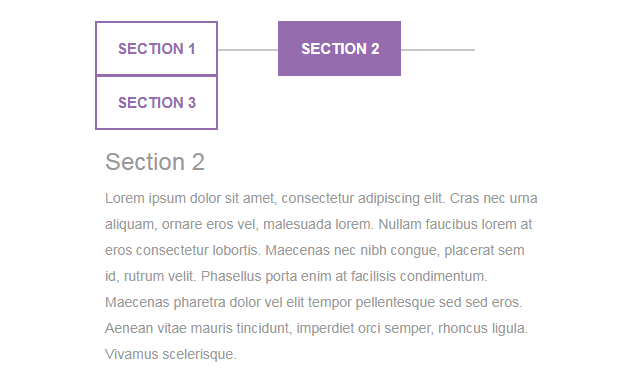
这是一款基于jQuery+Bootstrap实现的滑动选项卡代码,简洁扁平风格个性选项卡切换特效,鼠标悬停时还有动画效果。


相关推荐






热门下载




canvas音谱可视化mp3音乐播放器代码






