



1、遇到问题
在RedHat系统中,默认的yum源需要注册到RedHat Subscription Management才能更新。为了避免花费,我们需要替换为国内的yum源。
2、解决办法
由于CentOS和RedHat系统非常相似,替换为CentOS的yum源是可行的,但过程中可能遇到一些挑战。以下是解决方案的详细步骤,参考了博文:https://www.php.cn/link/95d8f6ff68222377d570a652eb96f082。
(1)删除RedHat自带的yum包
[root@node1 ~]# rpm -qa|grep yum|xargs rpm -e --nodeps
warning: /etc/yum/pluginconf.d/langpacks.conf saved as /etc/yum/pluginconf.d/langpacks.conf.rpmsave
[root@node1 ~]# rpm -qa |grep yum
[root@node1 ~]#
[root@node1 ~]# rpm -qa|grep python-urlgrabber|xargs rpm -e --nodeps
(2)下载yum软件包
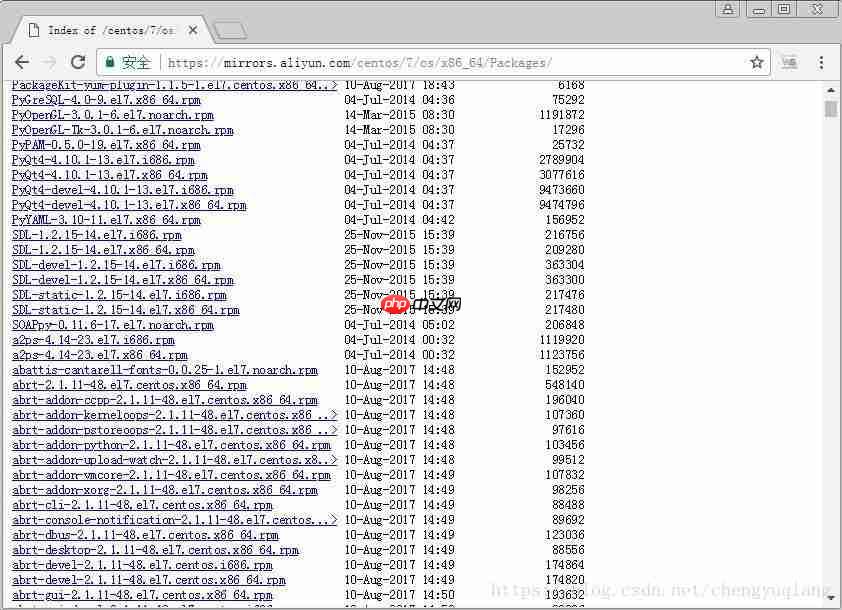
从阿里镜像中查找所需的yum包:

wget https://mirrors.aliyun.com/centos/7/os/x86_64/Packages/yum-metadata-parser-1.1.4-10.el7.x86_64.rpm
wget https://mirrors.aliyun.com/centos/7/os/x86_64/Packages/yum-3.4.3-154.el7.centos.noarch.rpm
wget https://mirrors.aliyun.com/centos/7/os/x86_64/Packages/yum-plugin-fastestmirror-1.1.31-42.el7.noarch.rpm
wget https://mirrors.aliyun.com/centos/7/os/x86_64/Packages/yum-utils-1.1.31-42.el7.noarch.rpm
wget https://mirrors.aliyun.com/centos/7/os/x86_64/Packages/python-urlgrabber-3.10-8.el7.noarch.rpm
wget https://mirrors.aliyun.com/centos/7/os/x86_64/Packages/yum-langpacks-0.4.2-7.el7.noarch.rpm
wget https://mirrors.aliyun.com/centos/7/os/x86_64/Packages/yum-rhn-plugin-2.0.1-9.el7.noarch.rpm
wget https://mirrors.aliyun.com/centos/7/os/x86_64/Packages/rpm-4.11.3-25.el7.x86_64.rpm
(3)安装依赖
[root@node1 ~]# rpm -ivh python-urlgrabber-3.10-8.el7.noarch.rpm
warning: python-urlgrabber-3.10-8.el7.noarch.rpm: Header V3 RSA/SHA256 Signature, key ID f4a80eb5: NOKEY
Preparing...                          ################################# [100%]
Updating / installing...
   1:python-urlgrabber-3.10-8.el7     ################################# [100%]
[root@node1 ~]#
[root@node1 ~]# rpm -Uvh rpm-4.11.3-25.el7.x86_64.rpm --nodeps
warning: rpm-4.11.3-25.el7.x86_64.rpm: Header V3 RSA/SHA256 Signature, key ID f4a80eb5: NOKEY
Preparing...                          ################################# [100%]
Updating / installing...
   1:rpm-4.11.3-25.el7                ################################# [ 50%]
Cleaning up / removing...
   2:rpm-4.11.3-21.el7                ################################# [100%]
[root@node1 ~]#
(4)安装yum包
[root@node1 ~]# rpm -ivh yum-*
warning: yum-3.4.3-154.el7.centos.noarch.rpm: Header V3 RSA/SHA256 Signature, key ID f4a80eb5: NOKEY
Preparing...                          ################################# [100%]
Updating / installing...
   1:yum-metadata-parser-1.1.4-10.el7 ################################# [ 17%]
   2:yum-plugin-fastestmirror-1.1.31-4################################# [ 33%]
   3:yum-3.4.3-154.el7.centos         ################################# [ 50%]
   4:yum-langpacks-0.4.2-7.el7        ################################# [ 67%]
   5:yum-rhn-plugin-2.0.1-9.el7       ################################# [ 83%]
   6:yum-utils-1.1.31-42.el7          ################################# [100%]
[root@node1 ~]#
3、更新源
完成上述步骤后,可以使用CentOS的yum源进行更新。
[root@node1 ~]# wget -O /etc/yum.repos.d/CentOS-Base.repo http://mirrors.aliyun.com/repo/Centos-7.repo
更新缓存时可能遇到错误:
[root@node1 ~]# yum makecache
Loaded plugins: fastestmirror, langpacks, product-id, search-disabled-repos, subscription-              : manager
This system is not registered to Red Hat Subscription Management. You can use subscription-manager to register.
http://mirrors.aliyun.com/centos/%24releasever/os/x86_64/repodata/repomd.xml: [Errno 14] HTTP Error 404 - Not Found
Trying other mirror.
To address this issue please refer to the below knowledge base article https://access.redhat.com/articles/1320623
If above article doesn't help to resolve this issue please create a bug on https://bugs.centos.org/
http://mirrors.aliyuncs.com/centos/%24releasever/os/x86_64/repodata/repomd.xml: [Errno 14] curl#7 - "Failed connect to mirrors.aliyuncs.com:80; No route to host"
Trying other mirror.
http://mirrors.aliyuncs.com/centos/%24releasever/os/x86_64/repodata/repomd.xml: [Errno 14] curl#7 - "Failed connect to mirrors.aliyuncs.com:80; No route to host"
Trying other mirror.
http://mirrors.aliyuncs.com/centos/%24releasever/os/x86_64/repodata/repomd.xml: [Errno 14] curl#7 - "Failed connect to mirrors.aliyuncs.com:80; No route to host"
Trying other mirror.
http://mirrors.aliyuncs.com/centos/%24releasever/os/x86_64/repodata/repomd.xml: [Errno 14] curl#7 - "Failed connect to mirrors.aliyuncs.com:80; No route to host"
Trying other mirror.
http://mirrors.aliyuncs.com/centos/%24releasever/os/x86_64/repodata/repomd.xml: [Errno 14] curl#7 - "Failed connect to mirrors.aliyuncs.com:80; No route to host"
Trying other mirror.
http://mirrors.aliyuncs.com/centos/%24releasever/os/x86_64/repodata/repomd.xml: [Errno 14] curl#7 - "Failed connect to mirrors.aliyuncs.com:80; No route to host"
Trying other mirror.
http://mirrors.aliyuncs.com/centos/%24releasever/os/x86_64/repodata/repomd.xml: [Errno 14] curl#7 - "Failed connect to mirrors.aliyuncs.com:80; No route to host"
Trying other mirror.
尝试将CentOS-Base.repo内容更改为163的源:
#CentOS-Base.repo
<h2>The mirror system uses the connecting IP address of the client and the</h2><h2>update status of each mirror to pick mirrors that are updated to and</h2><h2>geographically close to the client.  You should use this for CentOS updates</h2><h2>unless you are manually picking other mirrors.</h2><h2>If the mirrorlist= does not work for you, as a fall back you can try the</h2><h2>remarked out baseurl= line instead.</h2><h2></h2><p>[base]
name=CentOS-$7 - Base - 163.com</p><h1>mirrorlist=<a href="https://www.php.cn/link/588fad4e41a1544c03e7d5625c37cbf0">https://www.php.cn/link/588fad4e41a1544c03e7d5625c37cbf0</a></h1><p>baseurl=<a href="https://www.php.cn/link/8f5f383cc40b32666bf48521713980f4">https://www.php.cn/link/8f5f383cc40b32666bf48521713980f4</a>
gpgcheck=1
gpgkey=<a href="https://www.php.cn/link/aa799ad70bea3029d4141c7b773c1a46">https://www.php.cn/link/aa799ad70bea3029d4141c7b773c1a46</a></p><h1>released updates</h1><p>[updates]
name=CentOS-$7 - Updates - 163.com</p><h1>mirrorlist=<a href="https://www.php.cn/link/1a795f72604e4e1d35075019929d5b95">https://www.php.cn/link/1a795f72604e4e1d35075019929d5b95</a></h1><p>baseurl=<a href="https://www.php.cn/link/e8d2fc41fb98705874a309ed648806a0">https://www.php.cn/link/e8d2fc41fb98705874a309ed648806a0</a>
gpgcheck=1
gpgkey=<a href="https://www.php.cn/link/aa799ad70bea3029d4141c7b773c1a46">https://www.php.cn/link/aa799ad70bea3029d4141c7b773c1a46</a></p><h1>additional packages that may be useful</h1><p>[extras]
name=CentOS-$7 - Extras - 163.com</p><h1>mirrorlist=<a href="https://www.php.cn/link/edb636f69bf78b885117a47ec1a455d4">https://www.php.cn/link/edb636f69bf78b885117a47ec1a455d4</a></h1><p>baseurl=<a href="https://www.php.cn/link/bf6423635e56a99e9df17852c6bfadca">https://www.php.cn/link/bf6423635e56a99e9df17852c6bfadca</a>
gpgcheck=1
gpgkey=<a href="https://www.php.cn/link/aa799ad70bea3029d4141c7b773c1a46">https://www.php.cn/link/aa799ad70bea3029d4141c7b773c1a46</a></p><h1>additional packages that extend functionality of existing packages</h1><p>[centosplus]
name=CentOS-$7 - Plus - 163.com
baseurl=<a href="https://www.php.cn/link/ea14b04d59d604daf500d9a35bdd01be">https://www.php.cn/link/ea14b04d59d604daf500d9a35bdd01be</a>
gpgcheck=1
enabled=0
gpgkey=<a href="https://www.php.cn/link/aa799ad70bea3029d4141c7b773c1a46">https://www.php.cn/link/aa799ad70bea3029d4141c7b773c1a46</a>
[root@node1 yum.repos.d]# vi CentOS-Base.repo
[root@node1 yum.repos.d]# yum makecache
Loaded plugins: fastestmirror, langpacks, product-id, search-disabled-repos, subscription-manager
This system is not registered to Red Hat Subscription Management. You can use subscription-manager to register.
base                                                                                                                      | 3.6 kB  00:00:00<br />
extras                                                                                                                    | 3.4 kB  00:00:00<br />
updates                                                                                                                   | 3.4 kB  00:00:00<br />
(1/12): base/x86_64/group_gz                                                                                              | 156 kB  00:00:05<br />
(2/12): base/x86_64/filelists_db                                                                                          | 6.7 MB  00:00:06<br />
(3/12): base/x86_64/other_db                                                                                              | 2.5 MB  00:00:00<br />
(4/12): base/x86_64/primary_db                                                                                            | 5.7 MB  00:00:03<br />
(5/12): extras/x86_64/prestodelta                                                                                         | 129 kB  00:00:05<br />
(6/12): extras/x86_64/primary_db                                                                                          | 185 kB  00:00:00<br />
(7/12): extras/x86_64/other_db                                                                                            | 121 kB  00:00:00<br />
(8/12): extras/x86_64/filelists_db                                                                                        | 709 kB  00:00:10<br />
(9/12): updates/x86_64/filelists_db                                                                                       | 4.2 MB  00:00:06<br />
(10/12): updates/x86_64/prestodelta                                                                                       | 960 kB  00:00:06<br />
(11/12): updates/x86_64/primary_db                                                                                        | 6.9 MB  00:00:01<br />
(12/12): updates/x86_64/other_db                                                                                          | 734 kB  00:00:01<br />
Determining fastest mirrors
Metadata Cache Created
[root@node1 yum.repos.d]#




