



-----原本今天的文章是昨天晚上就要更新的,但是由于昨天晚上下班回到住的地方,发现停电了,所以就没写成。今天是在上一篇文章--linux系统中文件类型的基础上,继续进行深入的学习。好了,直接开干。
一、文件的操作权限:
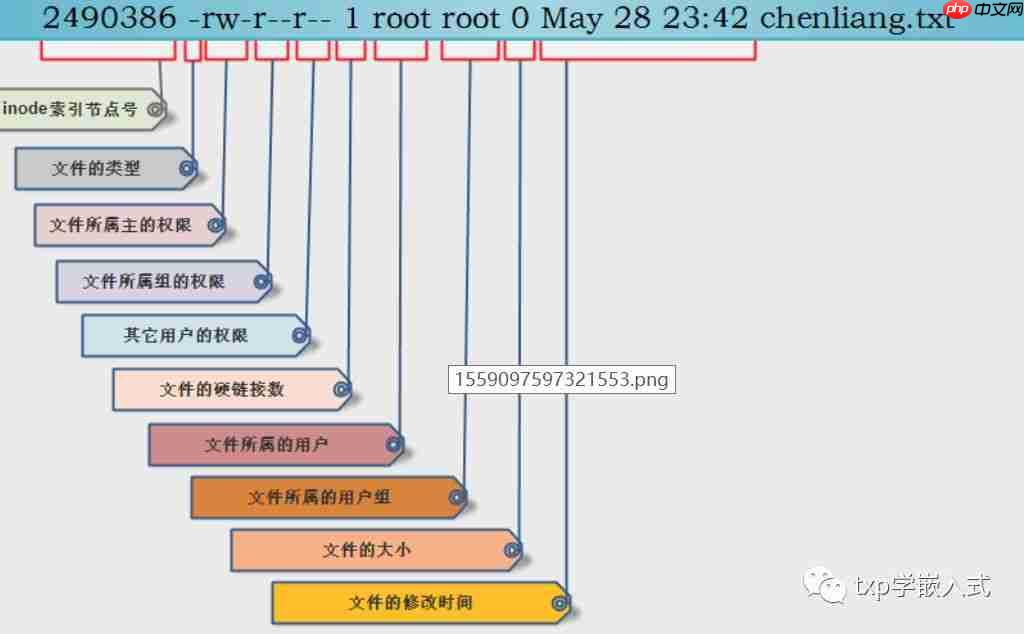
1、在这之前我想还是很有必要介绍对文件的操作权限(特别是第一次接触这个的好友),主要是为了下次大家在使用命令ls -al,看不懂所查的信息。在Linux系统中,每个文件都有所属的所有者和所有组,并且规定了文件的所有者、所有组以及其他人对文件所拥有的可读(r)、可写(w)、可执行(x)等权限。对于一般文件来说,权限比较容易理解:“可读”表示能够读取文件的实际内容;“可写”表示能够编辑、新增、修改、删除文件的实际内容;“可执行”则表示能够运行一个脚本程序。但是对目录文件来说,就有点不一样了“可读”表示能够读取目录内的文件列表;“可写”表示能够在目录内新增、删除、重命名文件;而“可执行”则表示能够进入该目录(不过这里还是主要以普通文件来介绍,所以这个就不深入介绍了)。文件的读、写、执行权限可以简写为rwx,也可以可分别用数字4、2、1来表示,文件所有者,所属组及其他用户权限之间无关联,可以通过下面的表格来理解:
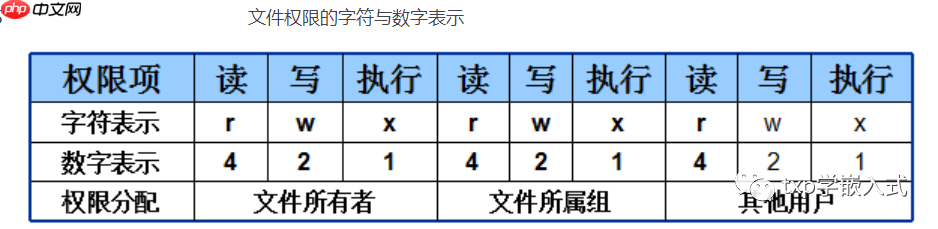
文件权限的数字法表示基于字符表示(rwx)的权限计算而来,其目的是简化权限的表示。例如,若某个文件的权限为7则代表可读、可写、可执行(4+2+1);若权限为6则代表可读、可写(4+2)。下面我以一个示例来演示:
二、文件属性操作:
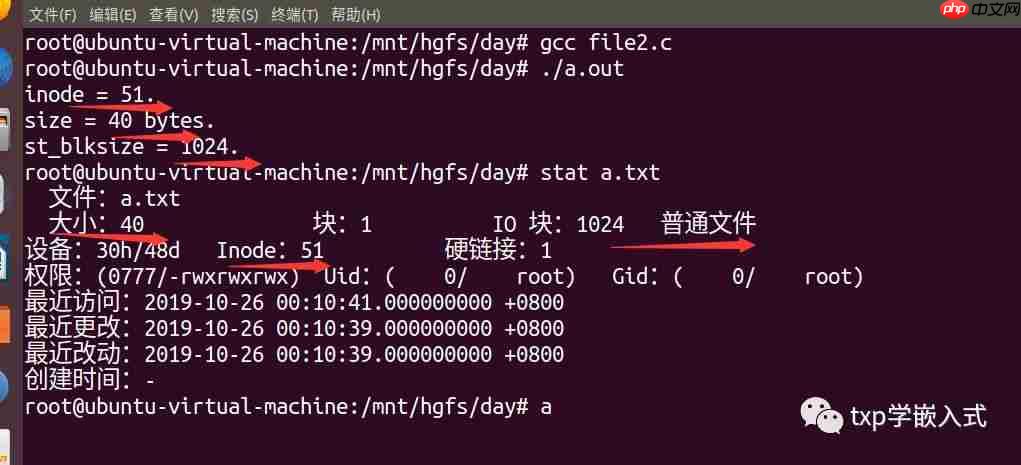
1、在Linux系统中,每个文件中都附带了这个文件的一些属性(属性信息是存在于文件本身中的,但是它不像文件的内容一样可以被vi打开看到,属性信息只能被专用的API打开看到;常见文件属性信息查看的API有三个:stat、fstat、lstat,三个作用一样,参数不同,细节略有不同(-----fstat和stat的区别是:stat是从文件名出发得到文件属性信息结构体(命令使用时,直接就是stat FILENAME),而且这个文件时未打开的;而fstat是从一个已经打开的文件fd(文件描述符,这个我前面的文章里面有详细的介绍)出发得到一个文件的属性信息。所以用的时候如果文件没有打开(我们并不想打开文件操作而只是希望得到文件属性)那就用stat,如果文件已经被打开了然后要属性那就用fstat效率会更高(stat是从磁盘去读取文件的,而fstat是从内存读取动态文件的)----------lstat和stat/fstat的差别在于:对于符号链接文件,stat和fstat查阅的是【符号链接文件指向的那个文件的属性】,而lstat查阅的是符号链接文件本身的属性----------)。我们也可以使用命令stat来查看文件的属性的,但是实际上stat命令内部就是使用stat系统调用(也就是我们api函数stat)来实现的,查看的结果如下:
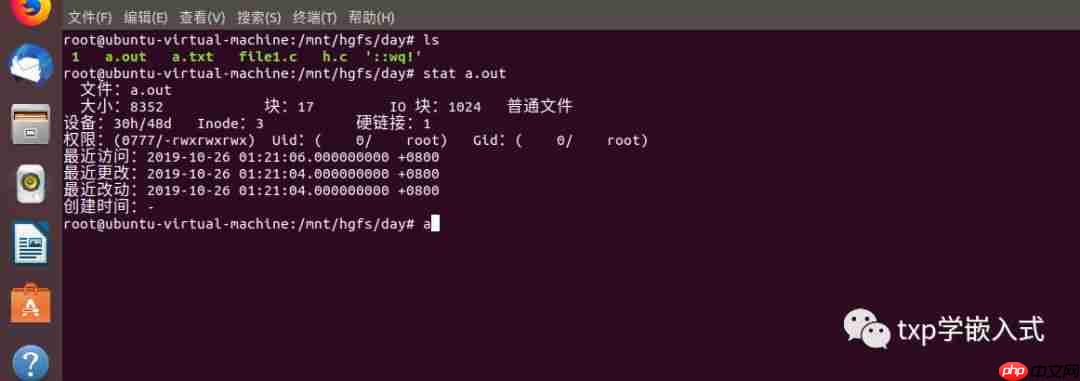
注:这里的最近更改(modify)指的是修改文件的内容;而最近改动(change)指的是修改文件的属性。
2、在代码实战之前,我们先来简单了解一下stat函数的使用,还是老办法,使用man 手册来查看它的用法(man 2 stat):
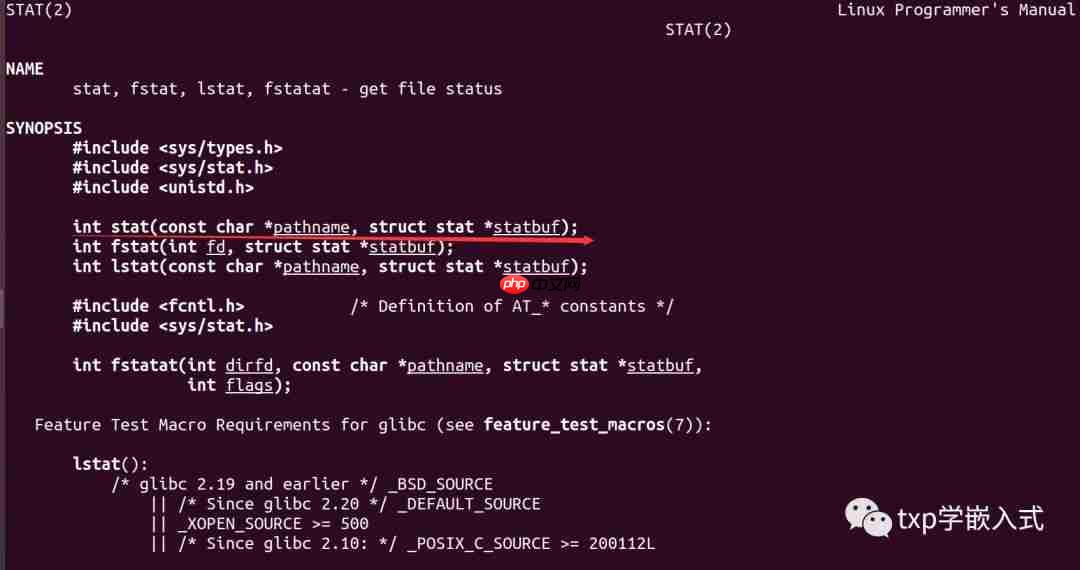
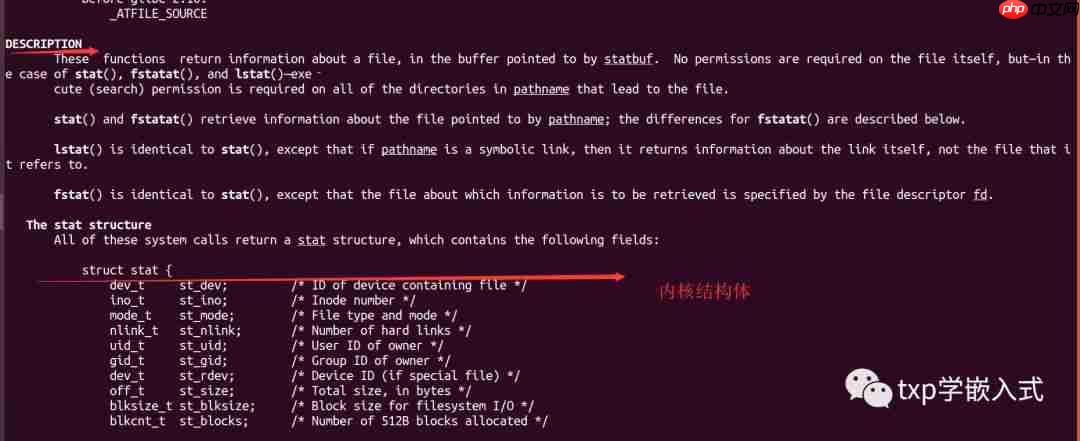
<code class="javascript">struct stat { dev_t st_dev; /* ID of device containing file */ ino_t st_ino; /* Inode number */ mode_t st_mode; /* File type and mode */ nlink_t st_nlink; /* Number of hard links */ uid_t st_uid; /* User ID of owner */ gid_t st_gid; /* Group ID of owner */ dev_t st_rdev; /* Device ID (if special file) */ off_t st_size; /* Total size, in bytes */ blksize_t st_blksize; /* Block size for filesystem I/O */ blkcnt_t st_blocks; /* Number of 512B blocks allocated */ /* Since Linux 2.6, the kernel supports nanosecond precision for the following timestamp fields. For the details before Linux 2.6, see NOTES. */ struct timespec st_atim; /* Time of last access */ struct timespec st_mtim; /* Time of last modification */ struct timespec st_ctim; /* Time of last status change */ #define st_atime st_atim.tv_sec /* Backward compatibility */ #define st_mtime st_mtim.tv_sec #define st_ctime st_ctim.tv_sec }; Note: the order of fields in the stat structure varies somewhat across architectures. In addition, the definition above does not show the padding bytes that may be present between some fields on various architectures. Consult the glibc and kernel source code if you need to know the details.Note: for performance and simplicity reasons, different fields in the stat structure may contain state information from different moments during the execution of the system call. For exam‐ ple, if st_mode or st_uid is changed by another process by calling chmod(2) or chown(2), stat() might return the old st_mode together with the new st_uid, or the old st_uid together with the new st_mode. The fields in the stat structure are as follows: st_dev This field describes the device on which this file resides. (The major(3) and minor(3) macros may be useful to decompose the device ID in this field.) st_ino This field contains the file's inode number. st_mode This field contains the file type and mode. See inode(7) for further information. st_nlink This field contains the number of hard links to the file. st_uid This field contains the user ID of the owner of the file. st_gid This field contains the ID of the group owner of the file. st_rdev This field describes the device that this file (inode) represents. st_size This field gives the size of the file (if it is a regular file or a symbolic link) in bytes. The size of a symbolic link is the length of the pathname it contains, without a terminat‐ ing null byte. st_blksize This field gives the "preferred" block size for efficient filesystem I/O. st_blocks This field indicates the number of blocks allocated to the file, in 512-byte units. (This may be smaller than st_size/512 when the file has holes.) st_atime This is the file's last access timestamp. This is the file's last access timestamp. st_mtime This is the file's last modification timestamp. st_ctime This is the file's last status change timestamp. For further information on the above fields, see inode(7).fstatat() The fstatat() system call is a more general interface for accessing file information which can still provide exactly the behavior of each of stat(), lstat(), and fstat(). If the pathname given in pathname is relative, then it is interpreted relative to the directory referred to by the file descriptor dirfd (rather than relative to the current working directory of the calling process, as is done by stat() and lstat() for a relative pathname). If pathname is relative and dirfd is the special value AT_FDCWD, then pathname is interpreted relative to the current working directory of the calling process (like stat() and lstat()).</code>注:上面的英文是源解释,这里不好讲解,所以拿出来了,如果你方便的话,可以自己来查看,这样看的更舒服一点,而且顺便也可以熟悉一下这个操作,哈哈,一举两得。struct stat是内核定义的一个结构体,在
3、代码实战:
a、查看文件常见属性:

TURF(开源)权限定制管理系统(以下简称“TURF系统”),是蓝水工作室推出的一套基于软件边界设计理念研发的具有可定制性的权限管理系统。TURF系统充分考虑了易用性,将配置、设定等操作进行了图形化设计,完全在web界面实现,程序员只需在所要控制的程序中简单调用一个函数,即可实现严格的程序权限管控,管控力度除可达到文件级别外,还可达到代码级别,即可精确控制到
<code class="javascript">#include <stdio.h>#include <sys/types.h>#include <sys/stat.h>#include <unistd.h>#include <string.h>#include <stdlib.h>#define NAME "a.txt"int main(void){int ret = -1;struct stat buf;memset(&buf, 0, sizeof(buf)); // memset后buf中全是0ret = stat(NAME, &buf); // stat后buf中有内容了if (ret < 0){ perror("stat"); exit(-1);}// 成功获取了stat结构体,从中可以得到各种属性信息了printf("inode = %d.\n", buf.st_ino);printf("size = %d bytes.\n", buf.st_size);printf("st_blksize = %d.\n", buf.st_blksize);return 0;}</code>演示效果:
b、判断文件类型:
文件属性中的文件类型标志在struct stat结构体的mode_t st_mode元素中,这个元素其实是一个按位来定义的一个位标志(有点类似于ARM CPU的CPSR寄存器的模式位定义)。这个东西有很多个标志位共同构成,记录了很多信息,如果要查找文件权限功能时按位&操作就知道结果了,但是因为这些位定义不容易记住,因此linux系统给大家事先定义好了很多宏来进行相应操作,我们(只要把stat结构体中的mode_t st_mode元素作为参数传给这些宏中),根据宏的返回值就可以判断文件类型等。这个宏有以下类型:
代码语言:javascript代码运行次数:0运行复制<code class="javascript"> S_ISREG(m) is it a regular file? S_ISDIR(m) directory? S_ISCHR(m) character device? S_ISBLK(m) block device? S_ISFIFO(m) FIFO (named pipe)? S_ISLNK(m) symbolic link? (Not in POSIX.1-1996.) //是不是一个符号链接文件 S_ISSOCK(m) socket? (Not in POSIX.1-1996.)</code>
譬如S_ISREG宏返回值是1表示这个文件是一个普通文件,如果文件不是普通文件则返回值是0
代码语言:javascript代码运行次数:0运行复制<code class="javascript">#include <stdio.h>#include <sys/types.h>#include <sys/stat.h>#include <unistd.h>#include <string.h>#include <stdlib.h>#define NAME "a.txt"int main(void){ int ret = -1; struct stat buf; memset(&buf, 0, sizeof(buf)); // memset后buf中全是0 ret = stat(NAME, &buf); // stat后buf中有内容了 if (ret < 0) { perror("stat"); exit(-1); } int result = S_ISDIR(buf.st_mode); printf("result = %d\n", result); return 0;}</code>演示结果:

代码可以在我的github上看:
https://github.com/1121518wo/linux-/tree/master
三、总结:
这里推荐一个有关Linux基础入门的知识,可以看刘遄老师的书---
https://www.linuxprobe.com/chapter-02.html




