



本文介绍old photo restoration的paddle实现,复现相关论文。采用voc数据集及部分真实老照片,提供模型、配置文件、训练数据等资源。训练分三阶段,给出终端和notebook启动方式及参数。测试可查看指标和可视化效果,20个epoch训练的模型已呈现较好效果,随训练轮数增加有望提升。
☞☞☞AI 智能聊天, 问答助手, AI 智能搜索, 免费无限量使用 DeepSeek R1 模型☜☜☜

Old Photo Restoration (Paddle Implementation)
github链接:https://github.com/buriedms/Old2Life-Paddle.git
复现论文为:Old Photo Restoration via Deep Latent Space Translation
官方开源 pytorch 代码:Bringing-Old-Photos-Back-to-Life
数据集采用VOC数据集,和小部分真实老照片,老照片数据地址
模型及配置文件存放网盘链接,提取码:xfmp
可视化效果图网盘链接,提取码:s32p
训练数据网盘链接,提取码:07oi
复现指标
| Performance | PSNR | SSIM | FID | LPIPS |
|---|---|---|---|---|
| Target | 23.33 | 0.69 | 134.35 | 0.25 |
| stage_A/Epoch(20) | 23.929 | 0.749 | 31.928 | 0.302 |
| stage_B/Epoch(20) | 24.269 | 0.834 | 21.873 | 0.189 |
| stage_Map/Epoch(20/A:20,B:20) | 22.930 | 0.709 | 122.859 | 0.321 |
摘要
我们提出通过深度学习方法来恢复严重退化的旧照片。与传统的可以通过监督学习解决的恢复任务不同,真实照片的退化非常复杂,而且合成图像与真实旧照片之间的域差距使得网络不能泛化。因此,我们利用真实照片和大量的合成图像对,提出了一种新的三重域平移网络。
具体来说,我们训练两个变分自动编码器(VAEs)分别将旧照片和干净照片转换到两个潜在空间。这两个潜在空间之间的转换是用合成的成对数据学习的。这种平移可以很好地推广到真实的照片,因为域间隙在紧凑的潜在空间是封闭的。此外,为了解决一张老照片中混杂的多种退化问题,我们设计了一个全局分支,针对划痕和灰尘斑点等结构化缺陷,设计了一个局部非局部块,针对噪声和模糊等非结构化缺陷,设计了一个局部分支。两个分支在潜在空间融合,从而提高了从多个缺陷恢复旧照片的能力。此外,我们采用另一种人脸细化网络来恢复旧照片中人脸的精细细节,最终生成感知质量增强的照片。通过全面的实验,提出的管道证明了在旧照片恢复的视觉质量方面优于最先进的方法以及现有的商业工具。
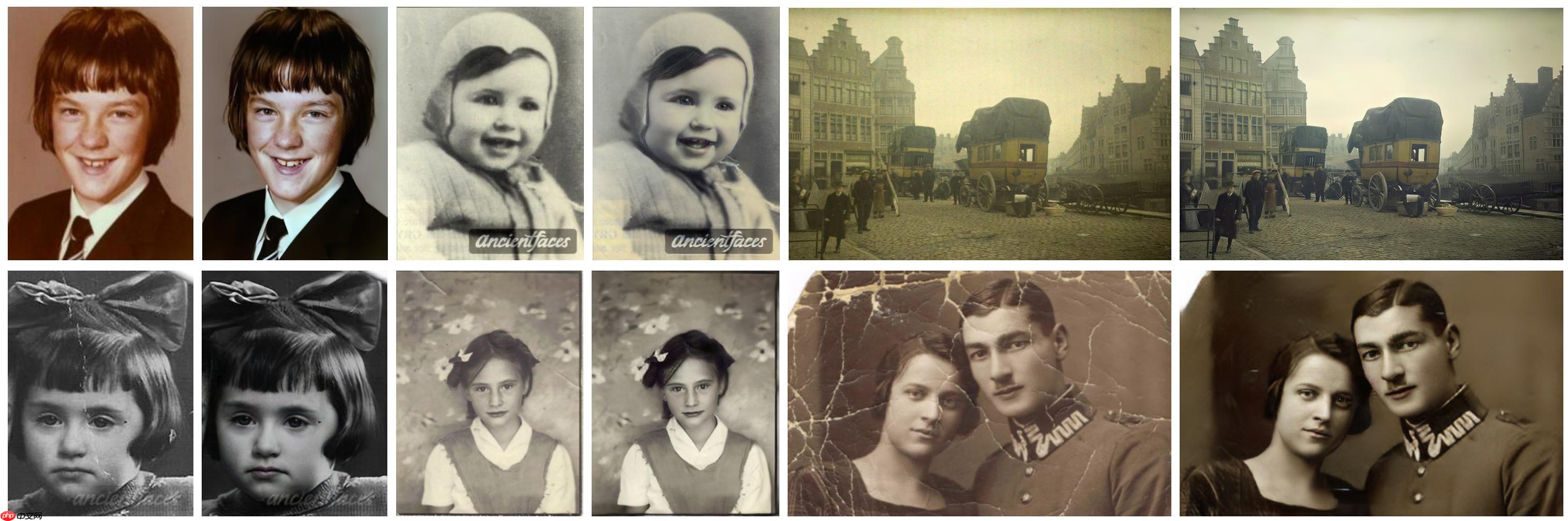
图1:我们方法产生的旧照片恢复结果。该方法能够处理真实旧照片中混杂着非结构化和结构化缺陷的复杂退化问题。特别是,我们恢复了人脸区域的高频细节,进一步提高了人像的感知质量。对于每个图像对,左边是输入,而修改后的输出显示在右边。
一、实验前的准备
数据集和预训练模型情况
训练数据
- 使用Pascal VOC数据集的图像合成虚假旧照片。
- 收集的真实图像旧照片数据集-彩色和黑白色。
数据集可以通过两种方式获取:
- 通过网盘链接下载数据集, 提取码:07oi。 注:aistudio上已公开制作好的数据集
- 通过自定义数据文件进行创建。制作详情可通过Old2Life-Paddle/Global/data/readme.md当中进行查看学习
预训练模型
已经提供每个阶段训练了20个epoch训练模型,可以自行用来进行测试。
运行环境
| Environment | version |
|---|---|
| Paddle with Tesla V-100 | 2.1.2 |
安装依赖库
!pip install x2paddle
Looking in indexes: https://pypi.tuna.tsinghua.edu.cn/simple
Collecting x2paddle
  Using cached https://pypi.tuna.tsinghua.edu.cn/packages/c1/82/49ac2659d7598ddb055316aca92b4cf24c2c3c5df9e1a3cdf7dce3c84f23/x2paddle-1.3.4-py3-none-any.whl
Installing collected packages: x2paddle
Successfully installed x2paddle-1.3.4

!unzip /home/aistudio/data/data114496/old2life.zip -d work/old2life/ #训练数据文件/home/aistudio/data/data114496/old2life.zip!unzip /home/aistudio/data/data114816/checkpoints.zip -d work/Old2Life/ # 模型配置文件/home/aistudio/data/data114816/checkpoints.zip
Archive:  /home/aistudio/data/data114496/old2life.zip
   creating: work/old2life/old2life/
  inflating: work/old2life/old2life/Real_L_old.bigfile
  inflating: work/old2life/old2life/Real_RGB_old.bigfile
  inflating: work/old2life/old2life/VOC.bigfile
Archive:  /home/aistudio/data/data114816/checkpoints.zip
   creating: work/Old2Life/checkpoints/
   creating: work/Old2Life/checkpoints/domainA_SR_old_photos/
  inflating: work/Old2Life/checkpoints/domainA_SR_old_photos/best_net_D.pdparams
  inflating: work/Old2Life/checkpoints/domainA_SR_old_photos/best_net_featD.pdparams
  inflating: work/Old2Life/checkpoints/domainA_SR_old_photos/best_net_G.pdparams
  inflating: work/Old2Life/checkpoints/domainA_SR_old_photos/best_optimizer_D.pdparams
  inflating: work/Old2Life/checkpoints/domainA_SR_old_photos/best_optimizer_featD.pdparams
  inflating: work/Old2Life/checkpoints/domainA_SR_old_photos/best_optimizer_G.pdparams
 extracting: work/Old2Life/checkpoints/domainA_SR_old_photos/iter.txt
  inflating: work/Old2Life/checkpoints/domainA_SR_old_photos/latest_net_D.pdparams
  inflating: work/Old2Life/checkpoints/domainA_SR_old_photos/latest_net_featD.pdparams
  inflating: work/Old2Life/checkpoints/domainA_SR_old_photos/latest_net_G.pdparams
  inflating: work/Old2Life/checkpoints/domainA_SR_old_photos/latest_optimizer_D.pdparams
  inflating: work/Old2Life/checkpoints/domainA_SR_old_photos/latest_optimizer_featD.pdparams
  inflating: work/Old2Life/checkpoints/domainA_SR_old_photos/latest_optimizer_G.pdparams
  inflating: work/Old2Life/checkpoints/domainA_SR_old_photos/loss_log.txt
  inflating: work/Old2Life/checkpoints/domainA_SR_old_photos/model.txt
  inflating: work/Old2Life/checkpoints/domainA_SR_old_photos/opt.txt
   creating: work/Old2Life/checkpoints/domainB_old_photos/
  inflating: work/Old2Life/checkpoints/domainB_old_photos/best_net_D.pdparams
  inflating: work/Old2Life/checkpoints/domainB_old_photos/best_net_G.pdparams
  inflating: work/Old2Life/checkpoints/domainB_old_photos/best_optimizer_D.pdparams
  inflating: work/Old2Life/checkpoints/domainB_old_photos/best_optimizer_G.pdparams
 extracting: work/Old2Life/checkpoints/domainB_old_photos/iter.txt
  inflating: work/Old2Life/checkpoints/domainB_old_photos/latest_net_D.pdparams
  inflating: work/Old2Life/checkpoints/domainB_old_photos/latest_net_G.pdparams
  inflating: work/Old2Life/checkpoints/domainB_old_photos/loss_log.txt
  inflating: work/Old2Life/checkpoints/domainB_old_photos/model.txt
   creating: work/Old2Life/checkpoints/mapping_quality/
  inflating: work/Old2Life/checkpoints/mapping_quality/best_net_mapping_net.pdparams
 extracting: work/Old2Life/checkpoints/mapping_quality/iter.txt
  inflating: work/Old2Life/checkpoints/mapping_quality/latest_net_mapping_net.pdparams
  inflating: work/Old2Life/checkpoints/mapping_quality/loss_log.txt
  inflating: work/Old2Life/checkpoints/mapping_quality/model.txt
  inflating: work/Old2Life/checkpoints/mapping_quality/opt.txt
进入工作目录
注意:使用Notebook运行必须执行这一步
# 进入到工作目录,使用Notebook进行训练必须进行这一步%cd Old2Life-Paddle/
/home/aistudio/Old2Life-Paddle
二、训练启动
1. 终端启动
- 终端在Old2Life-Paddle文件目录下执行以下命令:
bash train.sh
- 如果想要训练单个阶段,可以通过如下命令执行。
a. 训练第一阶段bash Global/run_a.sh
b. 训练第二阶段bash Global/run_b.sh
c. 训练第三阶段bash Global/run_map.sh
如果需要更改训练参数,可以在当中进行修改。
2.Notebook启动
-
在工作目录Old2Life-Paddle下执行以下命令:
bash train.sh
-
如果想要训练单个阶段,可以通过如下命令执行。
a. 训练第一阶段
!bash Global/run_a.sh
b. 训练第二阶段
!bash Global/run_b.sh
c. 训练第三阶段
!bash Global/run_map.sh
必选参数解释
| 参数 | 说明 | 案例 |
|---|---|---|
| dataroor | 存放图片数据的位置。格式为.bigfile。 | --dataroot /home/aistudio/work/Old2Life/test_old |
| output_dir | 图片输出路径。 | --outputs_dir /home/aistudio/work/Old2Life/output/ |
| checkpoints_dir | 保存结果参数和训练日志存放路径。 | --checkpoints_dir /home/aistudio/work/Old2Life/test_checkpoints |
| 重要可选参数 | - | - |
| batchSize | 一次训练选用的样本数量 | --batchSize 64 |
| gpu_ids | 选用的gpu序号 | --gpu_ids 0,1,2,4 |
| use_vae_which_epoch | 预训练选用的vae模型的版本 | --use_vae_which_epoch latest |
| which_epoch | 预训练采用的模型版本 | --which_epoch latest |
| niter | 学习率不衰减训练的轮数 | --niter 15 |
| niter_decay | 学习率衰减训练的轮数 | --niter_decay 15 |
| continue_train | 是否采用预训练模型进行持续学习,触发生效 | --continue_train |
| debug | 是否启用debug模式,触发生效 | --debug |
# Notebook测试代码 # 全阶段开始训练!bash train.sh# # A阶段开始训练# !bash Global/run_a.sh# # B阶段训练启动# !bash Global/run_b.sh# # MAP阶段训练启动# !bash Global/run_map.sh
Trian A Start !

CustomDatasetDataLoader
dataset [UnPairOldPhotos_SR] was created
start load bigfile (0.00 GB) into memory
find total 4 images
load 0 images done
load all 4 images done
start load bigfile (0.01 GB) into memory
find total 8 images
load 0 images done
load all 8 images done
start load bigfile (0.09 GB) into memory
find total 966 images
load 0 images done
load all 966 images done
-------------Filter the imgs whose size <256 in VOC-------------
--------Origin image num is [966], filtered result is [941]--------
#training images = 960
12/02/2021 11:46:02 - INFO - root -   ================ Training domainA_SR_old_photos Loss (Thu Dec  2 11:46:02 2021) ================

12/02/2021 11:46:02 - INFO - root -   Resuming from epoch 3 at iteration 0
W1202 11:46:02.908684  1475 device_context.cc:404] Please NOTE: device: 0, GPU Compute Capability: 7.0, Driver API Version: 10.1, Runtime API Version: 10.1
W1202 11:46:02.913003  1475 device_context.cc:422] device: 0, cuDNN Version: 7.6.
network import path: /home/aistudio/work/Old2Life/test_checkpoints/domainA_SR_old_photos/latest_net_G.pdparams
---------- G Networks reloaded -------------
network import path: /home/aistudio/work/Old2Life/test_checkpoints/domainA_SR_old_photos/latest_net_D.pdparams
network import path: /home/aistudio/work/Old2Life/test_checkpoints/domainA_SR_old_photos/latest_net_featD.pdparams
---------- D Networks reloaded -------------
12/02/2021 11:46:08 - INFO - paddle.utils.download -   unique_endpoints {''}
12/02/2021 11:46:08 - INFO - paddle.utils.download -   Found /home/aistudio/.cache/paddle/hapi/weights/vgg19-pt.pdparams
---------- Optimizers initialized -------------
optimizer import path: /home/aistudio/work/Old2Life/test_checkpoints/domainA_SR_old_photos/latest_optimizer_D.pdparams
optimizer import path: /home/aistudio/work/Old2Life/test_checkpoints/domainA_SR_old_photos/latest_optimizer_G.pdparams
optimizer import path: /home/aistudio/work/Old2Life/test_checkpoints/domainA_SR_old_photos/latest_optimizer_featD.pdparams
---------- Optimizers reloaded -------------
---------- Current LR is 0.00020000 -------------
12/02/2021 11:46:17 - INFO - paddle.utils.download -   unique_endpoints {''}
12/02/2021 11:46:17 - INFO - paddle.utils.download -   Found /home/aistudio/.cache/paddle/hapi/weights/InceptionV3.pdparams
Setting up [LPIPS] perceptual loss: trunk [vgg], v[0.1], spatial [off]
/opt/conda/envs/python35-paddle120-env/lib/python3.7/site-packages/paddle/tensor/creation.py:125: DeprecationWarning: `np.object` is a deprecated alias for the builtin `object`. To silence this warning, use `object` by itself. Doing this will not modify any behavior and is safe.
Deprecated in NumPy 1.20; for more details and guidance: https://numpy.org/devdocs/release/1.20.0-notes.html#deprecations
  if data.dtype == np.object:
PerceptualVGG loaded pretrained weight.
12/02/2021 11:46:23 - INFO - paddle.utils.download -   unique_endpoints {''}
12/02/2021 11:46:23 - INFO - paddle.utils.download -   Found /home/aistudio/.cache/paddle/hapi/weights/lins_0.1_vgg.pdparams
Loading model from: /home/aistudio/.cache/paddle/hapi/weights/lins_0.1_vgg.pdparams
12/02/2021 11:46:28 - INFO - root -   Epoch: 4, Iters: 64, Time: 0.036 lr: 0.00020 || G_GAN: 0.773 G_GAN_Feat: 9.242 G_VGG: 7.741 G_KL: 1.010 D_real: 0.663 D_fake: 0.648 G_featD: 0.400 featD_real: 0.355 featD_fake: 0.287
/opt/conda/envs/python35-paddle120-env/lib/python3.7/site-packages/paddle/fluid/framework.py:706: DeprecationWarning: `np.bool` is a deprecated alias for the builtin `bool`. To silence this warning, use `bool` by itself. Doing this will not modify any behavior and is safe. If you specifically wanted the numpy scalar type, use `np.bool_` here.
Deprecated in NumPy 1.20; for more details and guidance: https://numpy.org/devdocs/release/1.20.0-notes.html#deprecations
  elif dtype == np.bool:
12/02/2021 11:46:31 - INFO - root -   Epoch: 4, Iters: 128, Time: 0.014 lr: 0.00020 || G_GAN: 0.787 G_GAN_Feat: 9.330 G_VGG: 7.891 G_KL: 1.002 D_real: 0.682 D_fake: 0.655 G_featD: 0.384 featD_real: 0.323 featD_fake: 0.311
12/02/2021 11:46:35 - INFO - root -   Epoch: 4, Iters: 192, Time: 0.014 lr: 0.00020 || G_GAN: 0.803 G_GAN_Feat: 9.168 G_VGG: 7.775 G_KL: 0.977 D_real: 0.718 D_fake: 0.651 G_featD: 0.373 featD_real: 0.340 featD_fake: 0.345
12/02/2021 11:46:38 - INFO - root -   Epoch: 4, Iters: 256, Time: 0.014 lr: 0.00020 || G_GAN: 0.816 G_GAN_Feat: 10.262 G_VGG: 7.874 G_KL: 0.986 D_real: 0.704 D_fake: 0.679 G_featD: 0.419 featD_real: 0.350 featD_fake: 0.274
^C
Traceback (most recent call last):
  File "Global/train_domain_A.py", line 107, in <module>
    loss_D.backward()
  File "<decorator-gen-122>", line 2, in backward
  File "/opt/conda/envs/python35-paddle120-env/lib/python3.7/site-packages/paddle/fluid/wrapped_decorator.py", line 25, in __impl__
    return wrapped_func(*args, **kwargs)
  File "/opt/conda/envs/python35-paddle120-env/lib/python3.7/site-packages/paddle/fluid/framework.py", line 227, in __impl__
    return func(*args, **kwargs)
  File "/opt/conda/envs/python35-paddle120-env/lib/python3.7/site-packages/paddle/fluid/dygraph/varbase_patch_methods.py", line 239, in backward
    framework._dygraph_tracer())
KeyboardInterrupt

Train A Over !


Tarin B Start !

CustomDatasetDataLoader
dataset [UnPairOldPhotos_SR] was created
start load bigfile (0.09 GB) into memory
find total 966 images
load 0 images done
load all 966 images done
-------------Filter the imgs whose size <256 in VOC-------------
--------Origin image num is [966], filtered result is [941]--------
#training images = 960
12/02/2021 11:46:46 - INFO - root -   ================ Training domainB_old_photos Loss (Thu Dec  2 11:46:46 2021) ================

12/02/2021 11:46:46 - INFO - root -   Resuming from epoch 1 at iteration 0
W1202 11:46:46.363127  1628 device_context.cc:404] Please NOTE: device: 0, GPU Compute Capability: 7.0, Driver API Version: 10.1, Runtime API Version: 10.1
W1202 11:46:46.367645  1628 device_context.cc:422] device: 0, cuDNN Version: 7.6.
network import path: /home/aistudio/work/Old2Life/test_checkpoints/domainB_old_photos/latest_net_G.pdparams
---------- G Networks reloaded -------------
network import path: /home/aistudio/work/Old2Life/test_checkpoints/domainB_old_photos/latest_net_D.pdparams
---------- D Networks reloaded -------------
12/02/2021 11:46:51 - INFO - paddle.utils.download -   unique_endpoints {''}
12/02/2021 11:46:51 - INFO - paddle.utils.download -   Found /home/aistudio/.cache/paddle/hapi/weights/vgg19-pt.pdparams
---------- Optimizers initialized -------------
optimizer import path: /home/aistudio/work/Old2Life/test_checkpoints/domainB_old_photos/latest_optimizer_D.pdparams
optimizer import path: /home/aistudio/work/Old2Life/test_checkpoints/domainB_old_photos/latest_optimizer_G.pdparams
---------- Optimizers reloaded -------------
---------- Current LR is 0.00020000 -------------
12/02/2021 11:47:00 - INFO - paddle.utils.download -   unique_endpoints {''}
12/02/2021 11:47:00 - INFO - paddle.utils.download -   Found /home/aistudio/.cache/paddle/hapi/weights/InceptionV3.pdparams
Setting up [LPIPS] perceptual loss: trunk [vgg], v[0.1], spatial [off]
/opt/conda/envs/python35-paddle120-env/lib/python3.7/site-packages/paddle/tensor/creation.py:125: DeprecationWarning: `np.object` is a deprecated alias for the builtin `object`. To silence this warning, use `object` by itself. Doing this will not modify any behavior and is safe.
Deprecated in NumPy 1.20; for more details and guidance: https://numpy.org/devdocs/release/1.20.0-notes.html#deprecations
  if data.dtype == np.object:
PerceptualVGG loaded pretrained weight.
12/02/2021 11:47:07 - INFO - paddle.utils.download -   unique_endpoints {''}
12/02/2021 11:47:07 - INFO - paddle.utils.download -   Found /home/aistudio/.cache/paddle/hapi/weights/lins_0.1_vgg.pdparams
Loading model from: /home/aistudio/.cache/paddle/hapi/weights/lins_0.1_vgg.pdparams
12/02/2021 11:47:10 - INFO - root -   Epoch: 2, Iters: 64, Time: 0.034 lr: 0.00020 || G_GAN: 0.759 G_GAN_Feat: 10.868 G_VGG: 10.703 G_KL: 2.009 D_real: 0.757 D_fake: 0.760
/opt/conda/envs/python35-paddle120-env/lib/python3.7/site-packages/paddle/fluid/framework.py:706: DeprecationWarning: `np.bool` is a deprecated alias for the builtin `bool`. To silence this warning, use `bool` by itself. Doing this will not modify any behavior and is safe. If you specifically wanted the numpy scalar type, use `np.bool_` here.
Deprecated in NumPy 1.20; for more details and guidance: https://numpy.org/devdocs/release/1.20.0-notes.html#deprecations
  elif dtype == np.bool:
12/02/2021 11:47:13 - INFO - root -   Epoch: 2, Iters: 128, Time: 0.011 lr: 0.00020 || G_GAN: 0.758 G_GAN_Feat: 11.050 G_VGG: 11.088 G_KL: 1.911 D_real: 0.779 D_fake: 0.710
12/02/2021 11:47:16 - INFO - root -   Epoch: 2, Iters: 192, Time: 0.011 lr: 0.00020 || G_GAN: 0.770 G_GAN_Feat: 10.839 G_VGG: 10.811 G_KL: 1.864 D_real: 0.789 D_fake: 0.683
12/02/2021 11:47:19 - INFO - root -   Epoch: 2, Iters: 256, Time: 0.011 lr: 0.00020 || G_GAN: 0.768 G_GAN_Feat: 11.603 G_VGG: 10.854 G_KL: 1.830 D_real: 0.786 D_fake: 0.695
^C
Traceback (most recent call last):
  File "Global/train_domain_B.py", line 144, in <module>
    performance.update(generated[:5], data['image'][:5]) if dist.get_rank()==0 else None
  File "/home/aistudio/Old2Life-Paddle/Global/util/util.py", line 64, in update
    self.FID.update(preds,gts)
  File "/home/aistudio/Old2Life-Paddle/Global/util/FID.py", line 69, in update
    preds, gts, self.batch_size, self.model, self.use_GPU, self.dims)
  File "/home/aistudio/Old2Life-Paddle/Global/util/FID.py", line 153, in calculate_inception_val
    use_gpu)
  File "/home/aistudio/Old2Life-Paddle/Global/util/FID.py", line 133, in _get_activations_from_ims
    pred = model(images)[0][0]
  File "/opt/conda/envs/python35-paddle120-env/lib/python3.7/site-packages/paddle/fluid/dygraph/layers.py", line 902, in __call__
    outputs = self.forward(*inputs, **kwargs)
  File "/home/aistudio/Old2Life-Paddle/Global/util/inception.py", line 129, in forward
    x = block(x)
  File "/opt/conda/envs/python35-paddle120-env/lib/python3.7/site-packages/paddle/fluid/dygraph/layers.py", line 902, in __call__
    outputs = self.forward(*inputs, **kwargs)
  File "/opt/conda/envs/python35-paddle120-env/lib/python3.7/site-packages/paddle/fluid/dygraph/container.py", line 98, in forward
    input = layer(input)
  File "/opt/conda/envs/python35-paddle120-env/lib/python3.7/site-packages/paddle/fluid/dygraph/layers.py", line 902, in __call__
    outputs = self.forward(*inputs, **kwargs)
  File "/home/aistudio/Old2Life-Paddle/Global/util/inception.py", line 641, in forward
    branch_pool = self.branch_pool(branch_pool)
  File "/opt/conda/envs/python35-paddle120-env/lib/python3.7/site-packages/paddle/fluid/dygraph/layers.py", line 902, in __call__
    outputs = self.forward(*inputs, **kwargs)
  File "/home/aistudio/Old2Life-Paddle/Global/util/inception.py", line 746, in forward
    y = self.bn(y)
  File "/opt/conda/envs/python35-paddle120-env/lib/python3.7/site-packages/paddle/fluid/dygraph/layers.py", line 902, in __call__
    outputs = self.forward(*inputs, **kwargs)
  File "/opt/conda/envs/python35-paddle120-env/lib/python3.7/site-packages/paddle/fluid/dygraph/nn.py", line 1342, in forward
    mean_out, variance_out, *attrs)
KeyboardInterrupt

Train B Over!


Train MAP Start !

12/02/2021 11:47:23 - INFO - root -   ================ Training mapping_quality Loss (Thu Dec  2 11:47:23 2021) ================

12/02/2021 11:47:23 - INFO - root -   Resuming from epoch 1 at iteration 0
CustomDatasetDataLoader
dataset [PairOldPhotos] was created
start load bigfile (0.09 GB) into memory
find total 966 images
load 0 images done
load all 966 images done
-------------Filter the imgs whose size <256 in VOC-------------
--------Origin image num is [966], filtered result is [941]--------
#training images = 928
W1202 11:47:26.831796  1680 device_context.cc:404] Please NOTE: device: 0, GPU Compute Capability: 7.0, Driver API Version: 10.1, Runtime API Version: 10.1
W1202 11:47:26.836323  1680 device_context.cc:422] device: 0, cuDNN Version: 7.6.
Mapping: You are using the mapping model without global restoration.
network import path: /home/aistudio/work/Old2Life/checkpoints/domainA_SR_old_photos/latest_net_G.pdparams
network import path: /home/aistudio/work/Old2Life/checkpoints/domainB_old_photos/latest_net_G.pdparams
network import path: /home/aistudio/work/Old2Life/test_checkpoints/mapping_quality/latest_net_mapping_net.pdparams
L1Loss()
12/02/2021 11:47:32 - INFO - paddle.utils.download -   unique_endpoints {''}
12/02/2021 11:47:32 - INFO - paddle.utils.download -   Found /home/aistudio/.cache/paddle/hapi/weights/vgg19-pt.pdparams
---------- Optimizers initialized -------------
12/02/2021 11:47:41 - INFO - paddle.utils.download -   unique_endpoints {''}
12/02/2021 11:47:41 - INFO - paddle.utils.download -   Found /home/aistudio/.cache/paddle/hapi/weights/InceptionV3.pdparams
Setting up [LPIPS] perceptual loss: trunk [vgg], v[0.1], spatial [off]
/opt/conda/envs/python35-paddle120-env/lib/python3.7/site-packages/paddle/tensor/creation.py:125: DeprecationWarning: `np.object` is a deprecated alias for the builtin `object`. To silence this warning, use `object` by itself. Doing this will not modify any behavior and is safe.
Deprecated in NumPy 1.20; for more details and guidance: https://numpy.org/devdocs/release/1.20.0-notes.html#deprecations
  if data.dtype == np.object:
PerceptualVGG loaded pretrained weight.
12/02/2021 11:47:48 - INFO - paddle.utils.download -   unique_endpoints {''}
12/02/2021 11:47:48 - INFO - paddle.utils.download -   Found /home/aistudio/.cache/paddle/hapi/weights/lins_0.1_vgg.pdparams
Loading model from: /home/aistudio/.cache/paddle/hapi/weights/lins_0.1_vgg.pdparams
12/02/2021 11:47:53 - INFO - root -   Epoch: 2, Iters: 32, Time: 0.070 lr: 0.00020 || G_Feat_L2: 47.417 G_GAN: 2.736 G_GAN_Feat: 8.594 G_VGG: 10.082 D_real: 2.681 D_fake: 2.012
/opt/conda/envs/python35-paddle120-env/lib/python3.7/site-packages/paddle/fluid/framework.py:706: DeprecationWarning: `np.bool` is a deprecated alias for the builtin `bool`. To silence this warning, use `bool` by itself. Doing this will not modify any behavior and is safe. If you specifically wanted the numpy scalar type, use `np.bool_` here.
Deprecated in NumPy 1.20; for more details and guidance: https://numpy.org/devdocs/release/1.20.0-notes.html#deprecations
  elif dtype == np.bool:
12/02/2021 11:47:57 - INFO - root -   Epoch: 2, Iters: 64, Time: 0.031 lr: 0.00020 || G_Feat_L2: 48.239 G_GAN: 45.647 G_GAN_Feat: 8.751 G_VGG: 10.735 D_real: 41.937 D_fake: 46.040
12/02/2021 11:48:01 - INFO - root -   Epoch: 2, Iters: 96, Time: 0.031 lr: 0.00020 || G_Feat_L2: 50.760 G_GAN: 8.463 G_GAN_Feat: 11.348 G_VGG: 11.035 D_real: 11.230 D_fake: 8.833
12/02/2021 11:48:05 - INFO - root -   Epoch: 2, Iters: 128, Time: 0.031 lr: 0.00020 || G_Feat_L2: 48.898 G_GAN: 13.146 G_GAN_Feat: 10.431 G_VGG: 10.061 D_real: 13.486 D_fake: 13.112
^C
Traceback (most recent call last):
  File "Global/train_mapping.py", line 132, in <module>
    loss_D.backward()
  File "<decorator-gen-122>", line 2, in backward
  File "/opt/conda/envs/python35-paddle120-env/lib/python3.7/site-packages/paddle/fluid/wrapped_decorator.py", line 25, in __impl__
    return wrapped_func(*args, **kwargs)
  File "/opt/conda/envs/python35-paddle120-env/lib/python3.7/site-packages/paddle/fluid/framework.py", line 227, in __impl__
    return func(*args, **kwargs)
  File "/opt/conda/envs/python35-paddle120-env/lib/python3.7/site-packages/paddle/fluid/dygraph/varbase_patch_methods.py", line 239, in backward
    framework._dygraph_tracer())
KeyboardInterrupt

Train MAP Over !
三、测试评估
1.终端测试
查看测试指标
终端在Old2Life-Paddle目录下执行以下命令:
bash test_Sea.sh
查看图片重建可视化效果
终端在Old2Life-Paddle目录下执行以下命令:
bash test_Elm.sh
2.Notebook测试
!bash test_Sea.sh!bash test_Elm.sh
必选参数解释
| 参数 | 说明 | 案例 |
|---|---|---|
| load_pretrainA | 存放A阶段训练模型的路径文件夹。 | --dataroot /home/aistudio/work/Old2Life/test_old |
| load_pretrainB | 存放B阶段训练模型的路径文件夹。 | --outputs_dir /home/aistudio/work/Old2Life/output/ |
| dataroot | 测试性能指标的图片的存放路径。 | --checkpoints_dir /home/aistudio/work/Old2Life/test_checkpoints |
| checkpoints_dir | 存放配置信息和模型信息的主文件位置。 | --checkpoints_dir /home/aistudio/work/Old2Life/test_checkpoints |
| test_input | 测试老照片图片存放的位置。 | --checkpoints_dir /home/aistudio/work/Old2Life/test_checkpoints |
| output_dir | 转换的图片输出路径。 | --checkpoints_dir /home/aistudio/work/Old2Life/test_checkpoints |
| 重要可选参数 | - | - |
| batchSize | 测试选用的样本数量 | --batchSize 8 |
| gpu_ids | 选用的gpu序号 | --gpu_ids 0 |
| which_epoch | 测试采用的模型版本 | --which_epoch latest |
# Notebook测试代码# 获取图像的测试指标结果!bash test_Sea.sh# 获取图像重建的生成效果!bash test_Elm.sh
四、成品效果展示
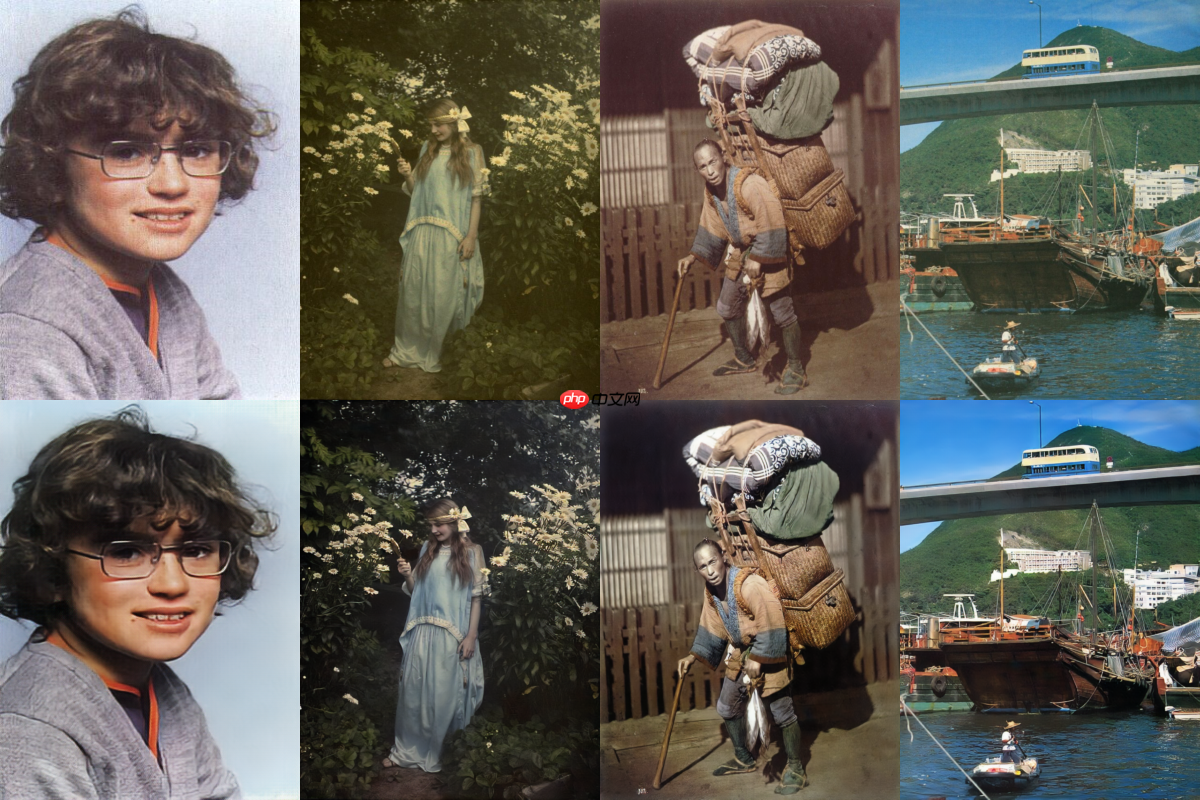
图2:上方为测试原图,下方为重建图片。
可以明显发现,通过模型重建后的图片在观感上不论是清晰度还是色彩的饱和度都更加的令人满意, 此效果是模型训练了20个epoch的结果,后续随着训练指标仍旧有所缓慢上升,原论文当中的结果是 进行训练了200个epoch的结果,我们有理由相信,我们所展示的效果不会是最佳效果,随着训练轮数 的上升,重建效果仍旧可以有所提升。




