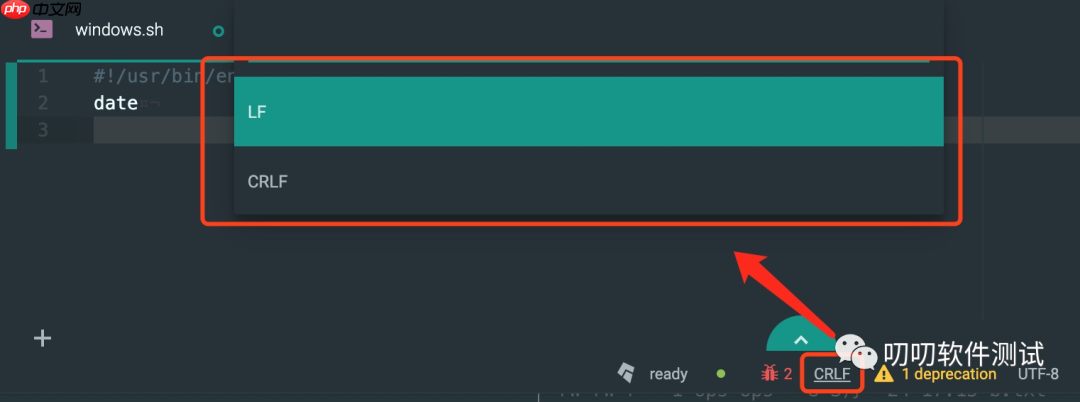
大多数情况下,shell 脚本在 windows 上编写导致的换行问题是主要原因。具体来说,windows 使用
crlf(
)作为换行符号,而 unix/linux 使用
lf(
)。
名称解释
方法一(推荐):使用 vim 转换为 Unix 换行
# 测试脚本
$ cat windows.sh
#!/usr/bin/env bash
date
<h1>重现报错</h1><p>$ sh windows.sh
windows.sh:行2: $'date
': 未找到命令</p><h1>查看文件格式信息</h1><p>$ file windows.sh
windows.sh: a /usr/bin/env bash
 script, ASCII text executable, with CRLF line terminators</p><h1>转换为 Unix 换行</h1><p>$ vim windows.sh
:set ff=unix
:wq</p><h1>再次查看文件格式信息</h1><p>$ file windows.sh
windows.sh: a /usr/bin/env bash script, ASCII text executable
方法二:使用 dos2unix

# 安装 dos2unix
$ yum install dos2unix</p><h1>转换为 unix 格式</h1><p>$ dos2unix windows.sh
dos2unix: converting file windows.sh to Unix format ...</p><h1>转换为 dos 格式</h1><p>$ unix2dos linux.sh
unix2dos: converting file linux.sh to DOS format ...
方法三:删除回车( )符号
# tr 删除
 回车符号,^M 终端输入为Ctrl+V和Ctrl+M
$ cat windows.sh | tr -d "^M" > windows2unix.sh</p><h1>sed 删除
 回车符号,^M 终端输入为Ctrl+V和Ctrl+M</h1><p>$ sed -i "s/^M//g" windows.sh
方法四:使用文本编辑器工具转换换行符号(如:atom、notepad++ 等)