



基础支持
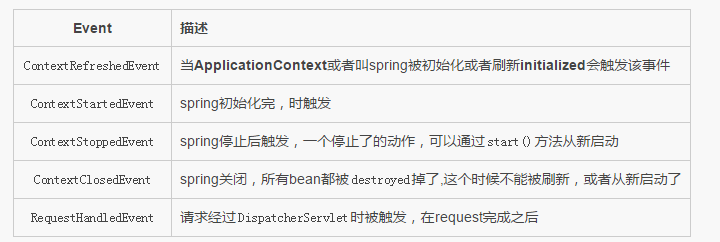
先来看看支持哪些默认事件
程序1(Service)
先看看程序
ApplicationEventPublisher这个是spring的东西,需要注入来进行发送 因为实现了ApplicationEventPublisherAware所以setApplicationEventPublisher这个方法会自动帮我们调用,拿到广播发送者
/**
 * @author Carl
 * @date 2016/8/28
 * @modify 版权所有.(c)2008-2016.广州市森锐电子科技有限公司
 */public class EmailService implements ApplicationEventPublisherAware {    private List blackList;    private ApplicationEventPublisher publisher;    public void setBlackList(List blackList) {        this.blackList = blackList;
    }    public void setApplicationEventPublisher(ApplicationEventPublisher publisher) {        this.publisher = publisher;
    }    /**
     * 具体广播类
     * @param address
     * @param text
     */
    public void sendEmail(String address, String text) {        if (blackList.contains(address)) {
            BlackListEvent event = new BlackListEvent(this, address, text);
            publisher.publishEvent(event);            return;
        }        // send email...
    }
}
程序2(Event)
这里也是需要继承ApplicationEvent,并且里面可以实现自己的一些必要参数等等,让在收到广播时进行获取,当然通过source也可以的
/**
 * @author Carl
 * @date 2016/8/28
 * @modify 版权所有.(c)2008-2016.广州市森锐电子科技有限公司
 */public class BlackListEvent extends ApplicationEvent {
  private String address;
private String test;
public BlackListEvent(Object source, String address, String test) {
    super(source);        this.address = address;        this.test = test;
    }    public String getAddress() {        return address;
    }    public void setAddress(String address) {        this.address = address;
    }    public String getTest() {        return test;
    }    public void setTest(String test) {        this.test = test;
    }
}
程序3(receiver)
用spring还是得遵循他一套规范,那么接收者的,还得实现ApplicationListener接口,那么所有收到泛型广播的对象,都会转发onApplicationEvent接口里面来的
当然了spring想得很周全,不一定通过实现ApplicationListener这个类,在bean类里面加入注解@EventListener

/** * @author Carl * @date 2016/8/28 * @modify 版权所有.(c)2008-2016.广州市森锐电子科技有限公司 */public class BlackListNotifier implements ApplicationListener{ private String notificationAddress; public void setNotificationAddress(String notificationAddress) { this.notificationAddress = notificationAddress; } @EventListener public void onApplicationEvent(BlackListEvent event) { // notify appropriate parties via notificationAddress... System.out.println("onApplicationEvent, some thing I receive:" + event.getAddress() + ",text:" + event.getTest()); } @EventListener(condition = "#event.test == 'foo'") public void onApplicationCustomerEvent(BlackListEvent event) { System.out.println("onApplicationCustomerEvent,some thing I receive:" + event.getAddress() + ",text:" + event.getTest()); // notify appropriate parties via notificationAddress... } @EventListener({ContextStartedEvent.class, ContextRefreshedEvent.class}) public void handleContextStart() { System.out.println("-------------handleContextStart"); } /** * 参数可以给BlackListEvent 可以不给 */ @EventListener(classes = {BlackListEvent.class}) public void handleBlackListEvent() { System.out.println("-------------handleBlackListEvent"); } }
@EventListener
解析一下这个注解怎么用,犹如上面的程序,除了实现接口外,可以通过@EventListener注解来实现
condition可以使用SpEL表达式,就是当满足条件才执行
classes当触发event对象是这个class才会被执行
程序4(config bean)
这里主要对一些服务以及接受广播bean的注册,以便接受
/**
 * 配置
 * @author Carl
 * @date 2016/8/28
 * @modify 版权所有.(c)2008-2016.广州市森锐电子科技有限公司
 */@Configurationpublic class AppConfig {    @Bean
    public EmailService emailService() {
        EmailService s = new EmailService();
        List emails = new ArrayList<>(3);
        emails.add("known.spammer@example.org");
        emails.add("known.hacker@example.org");
        emails.add("john.doe@example.org");
        s.setBlackList(emails);        return s;
    }    @Bean
    public BlackListNotifier notifier() {
        BlackListNotifier notifier = new BlackListNotifier();
        notifier.setNotificationAddress("blacklist@example.org");        return notifier;
    }
} 




