



本文介绍了jsp编程技术实现一个简单的购物车程序,具体如下:
1 问题描述
利用JSP编程技术实现一个简单的购物车程序,具体要求如下。
(1)用JSP编写一个登录页面,登录信息中有用户名和密码,分别用两个按钮来提交和重置登录信息。
(2)编写一个JSP程序来获取用户提交的登录信息并查询数据库,如果用户名为本小组成员的名字且密码为对应的学号时,采用JSP内置对象的方法跳转到订购页面(显示店中商品的种类和单价等目录信息);否则采用JSP动作提示用户重新登录(注:此页面上要包含前面的登录界面)。
(3)当顾客填好所需商品的数量并点击提交按钮时,将前面订购的商品放入购物车中并显示购物车里的相关信息,包括商品的名称和数量以及所有商品的总价格。
(4)将商品信息写入数据库,计算价格时通过查找数据库来完成。
以下功能选做:
(5) 实现一个简单的注册功能,使新用户能够将自己的信息(姓名和学号)写进数据库,以供后面登录时使用
(6)将数据库的相关操作改写成一个JavaBean
2 解决方案
2.1 实现功能
(1)用户登录。(通过查询MongoDB数据库,完成登录认证)
(2)用户注册。(通过写入MongoDB数据库,完成用户注册)
(3)记住密码。(通过使用Cookie,实现记住首页用户名和密码功能)
(4)查看商品。(通过查询MongoDB数据库,返回商品具体信息,并显示在客户端界面)
(5)购买商品。
(6)购物车。(显示用户购买商品具体信息,删除已购买商品或添加已购买商品数量,计算用户当前购买商品总价格)
2.2 最终运行效果图
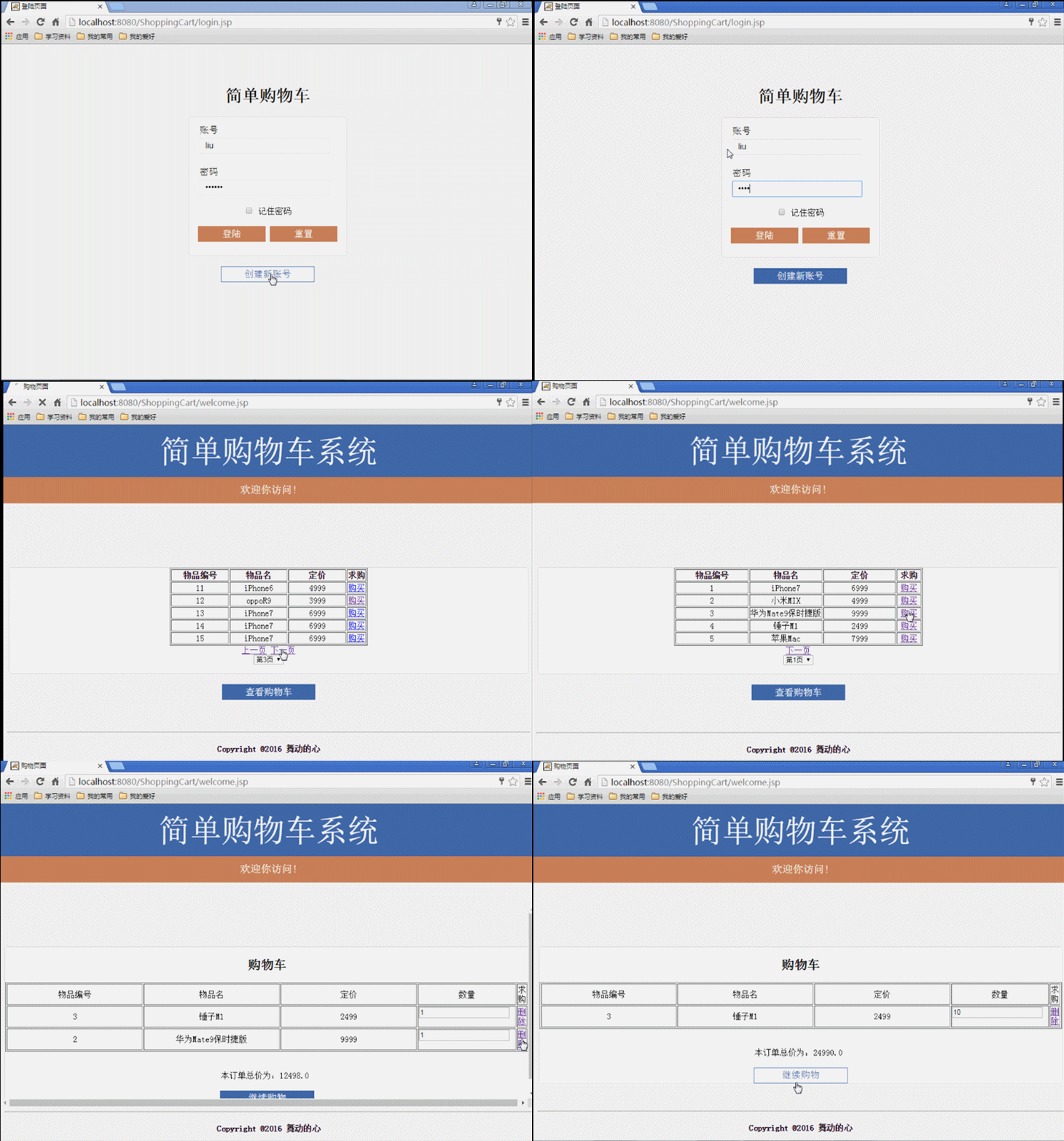
2.3 系统功能框架示意图
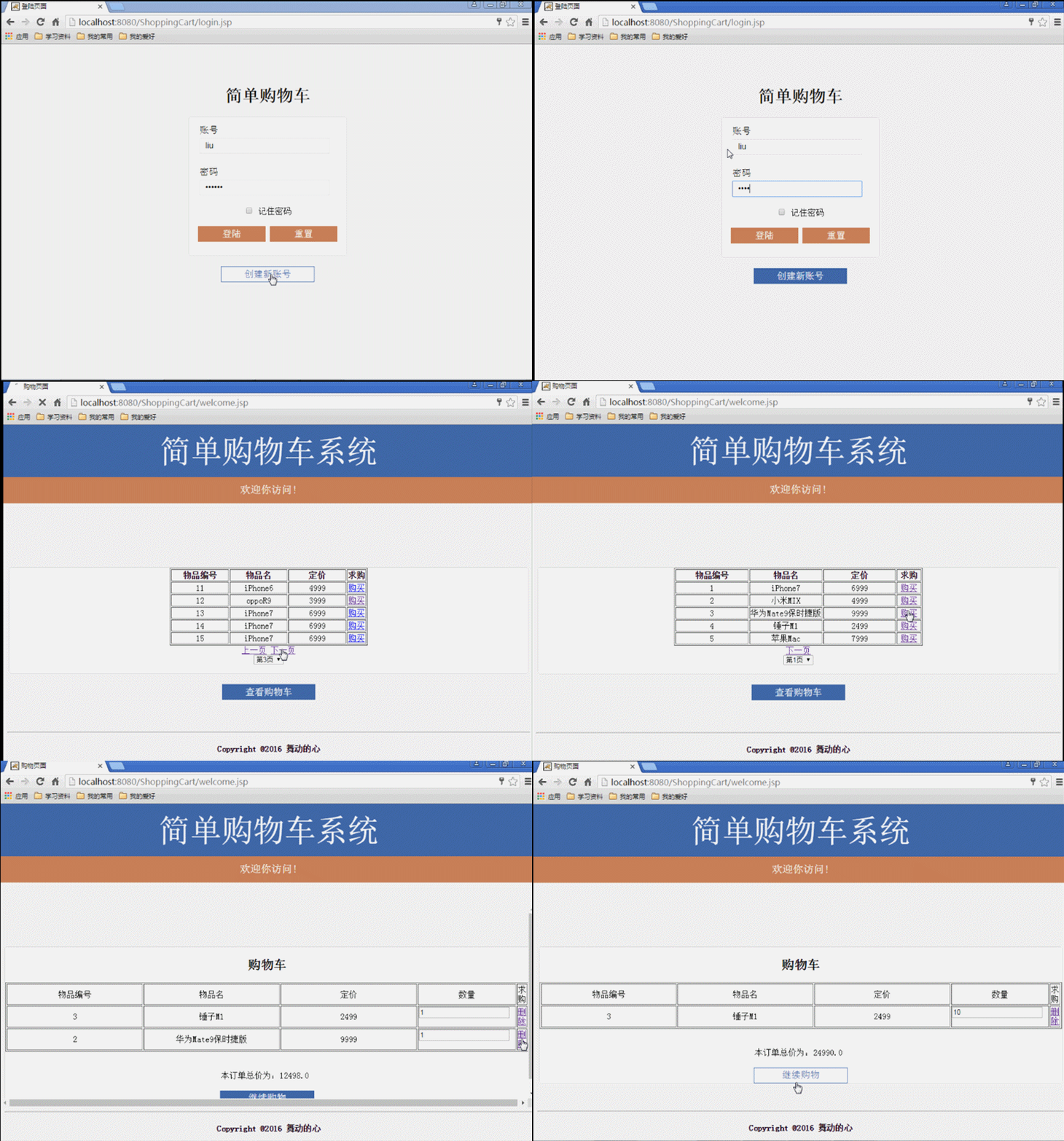
图一:系统功能框架示例图
具体解释:
(1)浏览器中打开首页login.jsp用户登录页面;
(2)点击创建新用户按钮,进入register.jsp用户注册页面;
(3)注册失败则停留在register.jsp原页面;注册成功则跳转到register_success.jsp注册成功提示页面,点击返回按钮,返回到登陆首页login.jsp页面;
(4)在首页login.jsp页面输入用户名和密码,请求发送到login_action.jsp登陆处理脚本页,数据匹配成功跳转到welcome.jsp购物首页页面,否则跳转到登陆视频login_Fail.jsp页面;
(5)进入welcome.jsp购物首页页面后,点击下一页和上一页按钮,可以查看当前商品信息;同一商品点击一次购买按钮实现购买一件商品,点击多次则实现购买多件商品;点击查看购物车按钮,实现内部跳转到Cart.jsp购物车页面,可以产看当前购买商品编号、名称、价格、购买数目以及所有商品总价格信息,并提供删除已购买商品和添加已购买商品数目功能;
(6)购物首页welcom.jsp页面由header.jsp、main_shop.jsp、bottom.jsp三个页面组成,具体如下图二所示:
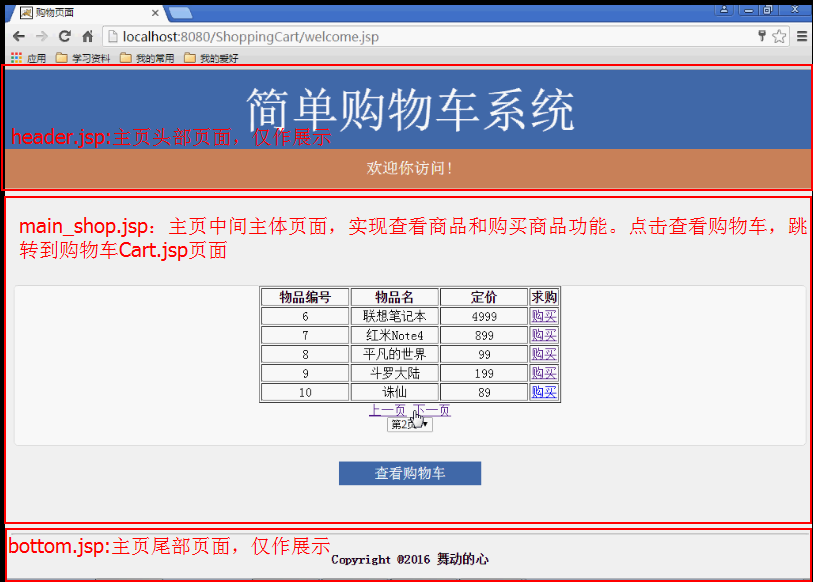
图二:购物首页welcome.jsp页面
2.4 有关MongoDB简介及系统环境配置
MongoDB是NoSQL家族的一员,和当前普遍使用的关系型数据库(例如,mysql、SQLserver等)相比来说,舍弃了其中复杂的关系及实体间的关联。换句话说,MongoDB是一种文档型数据库,就和我们日常写文档一样,不用去担心各类文档的具体内容也不用仔细分类整理,均可以存放在自己电脑的硬盘里。下面请看一张MongoDB与关系型数据库名词概念对照表:
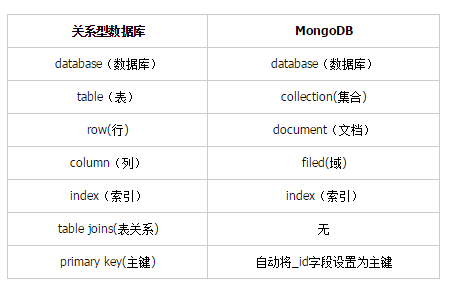
由上表可知,在我们熟悉的关系型数据库中,具体的实体表对应MongoDB中的集合,表中的行对应MongoDB集合中的文档,表中的列对应MongoDB文档中的域,最关键的主键在MongoDB中是系统自动生成,MongoDB自动的生成的主键是按照特定的方法来生成,具体有12个字节,12字节按照如下方式生成:
0|1|2|3 | 4|5|6 | 7|8 | 9|10|11
时间戳 | 机器 | PID | 计数器
以上是个人初步学习MongoDB的介绍,如有错误,欢迎各位圆友指正。
说完了概念,就要到具体运用,MongoDB中存入和读取的数据格式均为BSON格式,BSON格式是一种类似JSON格式的数据,其具体样式如下所示:

一套自选网上商城精美模版,自主商品管理,自行网店经营的网上商城平台,系统具有强大的商品管理、购物车、订单统计、会员管理等功能,同时拥有灵活多变的商品管理、新闻管理等功能,功能强劲的后台管理界面,无需登录FTP,通过IE浏览器即可管理整个网站。西亚购物平台经多方面权威调查和研究为您精心开发了很多特色实用功能。使商品展示、管理、服务全面升级。西亚购物平台为您提供了多款专业美观的店面样式、俱备完整的购物
/* 7 createdAt:2016/11/22 下午3:52:51*/
{
  "_id" : ObjectId("5833f953e9d60125601a8c8b"),
  "sid" : "7",
  "sname" : "红米Note4",
  "sprice" : "899"
},

/* 8 createdAt:2016/11/22 下午3:53:19*/
{
  "_id" : ObjectId("5833f96fe9d60125601a8c8c"),
  "sid" : "8",
  "sname" : "平凡的世界",
  "sprice" : "99"
},

/* 9 createdAt:2016/11/22 下午3:53:43*/
{
  "_id" : ObjectId("5833f987e9d60125601a8c8d"),
  "sid" : "9",
  "sname" : "斗罗大陆",
  "sprice" : "199"
},
当我们从MongoDB数据库查询获取数据后,其格式为BSON格式,不能直接与客户端获取的数据进行匹配。在这里,我在获取数据库中BSON格式数据后,调用MongoDB驱动包中BSON.toMap()方法,把BSON格式转换为Map键值对格式的字符串,然后调用Map中Map.get(“name”)方法,获取其中具体键值对的值,从而实现与客户端页面中数据的匹配。
最后,最关键的一点就是,在新建项目中导入MongoDB驱动包,方便客户端和业务层操作数据库。这里我使用的是mongo-java-driver-3.3.0.jar包,其各版本驱动包下载链接:http://central.maven.org/maven2/org/mongodb/mongo-java-driver/
2.5 核心功能代码讲解
(1)用户登录功能
实现用户登录,主要是由login_action.jsp脚本中代码来实现,代码中已给出具体注释,具体如下:
<%@ page language="java" import="java.util.*,com.mongodb.*" pageEncoding="UTF-8"%> <% String path = request.getContextPath(); String basePath = request.getScheme()+"://"+request.getServerName()+":"+request.getServerPort()+path+"/"; %>My JSP 'login_action.jsp' starting page <% response.setContentType("text/html;charset=utf-8"); //确保显示的汉字信息以正确编码方式显示 request.setCharacterEncoding("utf-8"); //确保获取的汉字信息以正确编码方法获取 String userName=(String)request.getParameter("username"); //获取登录页面用户名 String passWord=(String)request.getParameter("password");//获取登陆页面密码 String checkBox = request.getParameter("save_password");//获取登陆页面记住密码选择框属性值 boolean login_test = false; //设定登陆布尔值,若用户名和密码成功匹配,则为true try{ // 连接到 mongodb 服务 MongoClient mongoClient = new MongoClient( "localhost" , 27017 ); //此处采用无用户名和密码验证方式登陆 @SuppressWarnings("deprecation") DB db = mongoClient.getDB( "library" ); //连接到数据库library DBCollection coll = db.getCollection("userInfo"); //获取library数据库中集合userInfo System.out.println("Collection userInfo selected successfully"); DBCursor cursor = coll.find(); //查询集合userInfo中文档信息 int i=1; while (cursor.hasNext()) { //检索集合userInfo中所有文档信息 System.out.println("userInfo Document: "+i); DBObject show = cursor.next(); System.out.println(show); @SuppressWarnings("rawtypes") Map show1 = show.toMap(); //将检索结果show(Bson类型)转换为Map类型 String toname = (String)show1.get("username"); //提取Map中字段名为username的属性值 String topassword = (String)show1.get("password"); //提取Map中字段名为password的属性值 if(toname.equals(userName) && topassword.equals(passWord)){ //将从数据库中获取的用户名和密码与表单中获取的数据进行验证,匹配成功则使login_test值为true System.out.println("登陆成功!!!!!"+"username:"+toname+" password:"+topassword); //request.getRequestDispatcher("welcome.jsp").forward(request, response); login_test = true; } System.out.println(show1.get("username")); i++; } }catch(Exception e){ System.err.println( e.getClass().getName() + ": " + e.getMessage() ); } if(login_test) { if ("save".equals(checkBox)) { //Cookie存取时用URLEncoder.encode进行编码(PS:读取时URLDecoder.decode进行解码) String name1 = java.net.URLEncoder.encode(userName,"UTF-8"); //创建两个Cookie对象 Cookie nameCookie = new Cookie("username", name1); //设置Cookie的有效期为3天 nameCookie.setMaxAge(60 * 60 * 24 * 3); String pwd = java.net.URLEncoder.encode(passWord,"UTF-8"); Cookie pwdCookie = new Cookie("password", pwd); pwdCookie.setMaxAge(60 * 60 * 24 * 3); response.addCookie(nameCookie); response.addCookie(pwdCookie); } // request.getRequestDispatcher("welcome.jsp").forward(request, response); response.sendRedirect("welcome.jsp"); } else{ response.sendRedirect("login_Fail.jsp"); // request.getRequestDispatcher("loginFail.jsp").forward(request, response); } %>
(2)用户注册功能
用户注册功能实现原理基本和用户登录一致,唯一的区别在于用户登录是查询数据库,而用户注册是写入数据库,此处就不贴具体代码,在下面具体编码中展示。
(3)记住密码功能
实现记住密码,此处使用两个Cookie,当用户正确登录时,Cookie_one获取用户名,并添加到当前浏览器Cookie中,Cookie_two获取密码,也添加到当前浏览器Cookie中。在登录首页用户名和密码两个输入框中的value值填写系统从Cookie中获取的用户名和密码,从而实现记住密码功能。具体如下:
if(login_test) {
     if ("save".equals(checkBox)) {
       //Cookie存取时用URLEncoder.encode进行编码(PS:读取时URLDecoder.decode进行解码)
       String name1 = java.net.URLEncoder.encode(userName,"UTF-8");
       //创建两个Cookie对象
       Cookie nameCookie = new Cookie("username", name1);
       //设置Cookie的有效期为3天
       nameCookie.setMaxAge(60 * 60 * 24 * 3);

       String pwd = java.net.URLEncoder.encode(passWord,"UTF-8");
       Cookie pwdCookie = new Cookie("password", pwd);
       pwdCookie.setMaxAge(60 * 60 * 24 * 3);
       response.addCookie(nameCookie);
       response.addCookie(pwdCookie);
      }
     // request.getRequestDispatcher("welcome.jsp").forward(request, response);
      response.sendRedirect("welcome.jsp");
   }
   else{
      response.sendRedirect("login_Fail.jsp");
      // request.getRequestDispatcher("loginFail.jsp").forward(request, response);
   }
<%@ page language="java" import="java.util.*" pageEncoding="UTF-8"%>
<%
String path = request.getContextPath();
String basePath = request.getScheme()+"://"+request.getServerName()+":"+request.getServerPort()+path+"/";
String username = "";
String password = "";
//获取当前站点的所有Cookie
Cookie[] cookies = request.getCookies();
for (int i = 0; i < cookies.length; i++) {
//对cookies中的数据进行遍历,找到用户名、密码的数据
if ("username".equals(cookies[i].getName())) {
//读取时URLDecoder.decode进行解码(PS:Cookie存取时用URLEncoder.encode进行编码)
username = java.net.URLDecoder.decode(cookies[i].getValue(),"UTF-8");
} else if ("password".equals(cookies[i].getName())) {
password = java.net.URLDecoder.decode(cookies[i].getValue(),"UTF-8");
}
}
%>
登陆页面
简单购物车
(4)查询商品和购买商品
此处功能主要是操作MongoDB数据库,返回商品的具体信息,只要弄懂用户登录功能后,此处的功能代码就会很快弄明白,具体代码在后面展示。
(5)购物车
此处的功能也是主要操作MongoDB数据,通过和客户端的用户交互,实现购物车相关功能,具体代码在后面展示。
2.6 具体编码
具体编码的讲解,就按照实现功能大致顺序来介绍,具体如下:
2.6.1用户登录和记住密码
首先看是登录首页login.jsp页面,为了显示美观,此物使用一个login.css文件(后面多个页面均是使用login.css文件)。login.css具体代码如下:
@CHARSET "UTF-8";


/*按照样图要求,添加一个浅灰色背景*/
body{
  background-color: #F2F2F2;
}

/*设置内容模块距离顶部一个有一段距离100px*/
.content {
  margin-top: 80px;
}


/*登录和注册按钮的整体样式*/
.content button {
  height: 30px;/*登录和注册按钮的高度*/
  color: white;/*登录和注册按钮字体颜色为白色*/
  font-size: 18px;/*登录和注册按钮的字体大小*/
  border: 0px;/*无边框*/
  padding: 0px;/*无内边距*/
  cursor: pointer;/*登录和注册按钮的选择时为手形状*/
}

/*头部名称*/
.content .head {
   text-align: center;/*子内容居中*/
}


/*登录面板*/
.content .panel {
  background-color: white;/*登录面板背景颜色为白色*/
  width: 302px;/*宽度为302px*/
  text-align: center;/*子内容居中*/
  margin: 0px auto;/*自身居中*/
  padding-top: 10px;/*顶部的内边距为20px*/
  padding-bottom: 10px;/*底部的内边距为20px*/
  border: 1px solid #ddd;/*边框颜色为灰色*/
  border-radius: 5px;/*边框边角有5px的弧度*/

}


/*购物主页购物面板*/
.content .panel1 {
  background-color: white;/*购物主页面板背景颜色为白色*/
  width: 1000px;/*宽度为600px*/
  text-align: center;/*子内容居中*/
  margin: 0px auto;/*自身居中*/
  border: 1px solid #ddd;/*边框颜色为灰色*/
  border-radius: 5px;/*边框边角有5px的弧度*/

}

/*登录和密码组*/
.content .panel .group {
  text-align: left;/*子内容居中*/
  width: 262px;/*宽度为262px*/
  margin: 0px auto 20px;/*自身居中,并距离底部有20px的间距*/
}
.content .panel .group label {
  line-height: 30px;/*高度为30px*/
  font-size: 18px;/*字体大小为18px*/
}
.content .panel .group input {
  display: block;/*设置为块,是为了让输入框独占一行*/
  width: 250px;/*宽度为250px*/
  height: 30px;/*高度为30px*/
  border: 1px solid #ddd;/*输入框的边框*/
  padding: 0px 0px 0px 10px;/*左边内边距为10px,显得美观*/
  font-size: 16px;/*字体大小*/
}
.content .panel .group input:focus{

  border-left: 1px solid #CC865E;/*当输入框成为焦点时,左边框颜色编程褐色*/
}
.content .panel .login button {
  background-color: #CC865E;/*按钮的背景颜色*/
  width: 130px;/*按钮的宽度*/
}
.content .panel .login button:hover {
  background-color: white;/*按钮选中后背景颜色为白色*/
  color: #CC865E;/*按钮选中后字体颜色为褐色*/
  border: 1px solid #CC865E;/*按钮选中后边框颜色为褐色*/
}


/*注册按钮*/
.content .register {
  text-align: center;/*子内容居中*/
  margin-top: 20px;/*顶部的内边距为20px*/
}
.content .register button {
  background-color: #466BAF;/*按钮的背景颜色为蓝色*/
  width: 180px;/*按钮的宽度*/
}

.content .register button:hover {
  background-color: white;/*按钮选中后背景颜色为白色*/
  color: #466BAF;/*按钮选中后字体颜色为蓝色*/
  border: 1px solid #466BAF;/*按钮选中后边框颜色为蓝色*/
}
Login.jsp具体代码如下:
<%@ page language="java" import="java.util.*" pageEncoding="UTF-8"%>
<%
String path = request.getContextPath();
String basePath = request.getScheme()+"://"+request.getServerName()+":"+request.getServerPort()+path+"/";
String username = "";
String password = "";
//获取当前站点的所有Cookie
Cookie[] cookies = request.getCookies();
for (int i = 0; i < cookies.length; i++) {
//对cookies中的数据进行遍历,找到用户名、密码的数据
if ("username".equals(cookies[i].getName())) {
//读取时URLDecoder.decode进行解码(PS:Cookie存取时用URLEncoder.encode进行编码)
username = java.net.URLDecoder.decode(cookies[i].getValue(),"UTF-8");
} else if ("password".equals(cookies[i].getName())) {
password = java.net.URLDecoder.decode(cookies[i].getValue(),"UTF-8");
}
}
%>
登陆页面
简单购物车
登录处理脚本login_action.jsp代码如下:
<%@ page language="java" import="java.util.*,com.mongodb.*" pageEncoding="UTF-8"%> <% String path = request.getContextPath(); String basePath = request.getScheme()+"://"+request.getServerName()+":"+request.getServerPort()+path+"/"; %>My JSP 'login_action.jsp' starting page <% response.setContentType("text/html;charset=utf-8"); //确保显示的汉字信息以正确编码方式显示 request.setCharacterEncoding("utf-8"); //确保获取的汉字信息以正确编码方法获取 String userName=(String)request.getParameter("username"); //获取登录页面用户名 String passWord=(String)request.getParameter("password");//获取登陆页面密码 String checkBox = request.getParameter("save_password");//获取登陆页面记住密码选择框属性值 boolean login_test = false; //设定登陆布尔值,若用户名和密码成功匹配,则为true try{ // 连接到 mongodb 服务 MongoClient mongoClient = new MongoClient( "localhost" , 27017 ); //此处采用无用户名和密码验证方式登陆 @SuppressWarnings("deprecation") DB db = mongoClient.getDB( "library" ); //连接到数据库library DBCollection coll = db.getCollection("userInfo"); //获取library数据库中集合userInfo System.out.println("Collection userInfo selected successfully"); DBCursor cursor = coll.find(); //查询集合userInfo中文档信息 int i=1; while (cursor.hasNext()) { //检索集合userInfo中所有文档信息 System.out.println("userInfo Document: "+i); DBObject show = cursor.next(); System.out.println(show); @SuppressWarnings("rawtypes") Map show1 = show.toMap(); //将检索结果show(Bson类型)转换为Map类型 String toname = (String)show1.get("username"); //提取Map中字段名为username的属性值 String topassword = (String)show1.get("password"); //提取Map中字段名为password的属性值 if(toname.equals(userName) && topassword.equals(passWord)){ //将从数据库中获取的用户名和密码与表单中获取的数据进行验证,匹配成功则使login_test值为true System.out.println("登陆成功!!!!!"+"username:"+toname+" password:"+topassword); //request.getRequestDispatcher("welcome.jsp").forward(request, response); login_test = true; } System.out.println(show1.get("username")); i++; } }catch(Exception e){ System.err.println( e.getClass().getName() + ": " + e.getMessage() ); } if(login_test) { if ("save".equals(checkBox)) { //Cookie存取时用URLEncoder.encode进行编码(PS:读取时URLDecoder.decode进行解码) String name1 = java.net.URLEncoder.encode(userName,"UTF-8"); //创建两个Cookie对象 Cookie nameCookie = new Cookie("username", name1); //设置Cookie的有效期为3天 nameCookie.setMaxAge(60 * 60 * 24 * 3); String pwd = java.net.URLEncoder.encode(passWord,"UTF-8"); Cookie pwdCookie = new Cookie("password", pwd); pwdCookie.setMaxAge(60 * 60 * 24 * 3); response.addCookie(nameCookie); response.addCookie(pwdCookie); } // request.getRequestDispatcher("welcome.jsp").forward(request, response); response.sendRedirect("welcome.jsp"); } else{ response.sendRedirect("login_Fail.jsp"); // request.getRequestDispatcher("loginFail.jsp").forward(request, response); } %>
登录失败login_Fail.jsp页面代码如下:
<%@ page language="java" import="java.util.*" pageEncoding="UTF-8"%> <% String path = request.getContextPath(); String basePath = request.getScheme()+"://"+request.getServerName()+":"+request.getServerPort()+path+"/"; %>登陆失败 输入用户名和密码不正确,请重新登陆!!!
2.6.2用户注册
注册首页register.jsp页面代码如下:
<%@ page language="java" import="java.util.*" pageEncoding="UTF-8"%> <% String path = request.getContextPath(); String basePath = request.getScheme()+"://"+request.getServerName()+":"+request.getServerPort()+path+"/"; %>注册页面 欢迎来到简单购物车系统注册页面
注册处理脚本register_action.jsp代码如下;
<%@ page language="java" import="java.util.*,com.mongodb.*" pageEncoding="UTF-8"%> <% String path = request.getContextPath(); String basePath = request.getScheme()+"://"+request.getServerName()+":"+request.getServerPort()+path+"/"; String text_change = "等待注册"; %>My JSP 'register_action.jsp' starting page <% response.setContentType("text/html;charset=utf-8"); //确保显示的汉字信息以正确编码方式显示 request.setCharacterEncoding("utf-8"); //确保获取的汉字信息以正确编码方法获取 String userName1=(String)request.getParameter("username1"); //获取页面用户名 String passWord1=(String)request.getParameter("password1");//获取注册页面密码1 String passWord2=(String)request.getParameter("password2");//获取注册页面密码2 if(!passWord1.equals(passWord2)){ //如果用户两次输入密码不一致,则跳转到注册原页面register.jsp,即实现未跳转效果 response.sendRedirect("register.jsp"); } try{ // 连接到 mongodb 服务 MongoClient mongoClient = new MongoClient( "localhost" , 27017 ); //此处采用无用户名和密码验证方式登陆 @SuppressWarnings("deprecation") DB db = mongoClient.getDB( "library" ); //连接到数据库library DBCollection coll = db.getCollection("userInfo"); //获取library数据库中集合userInfo System.out.println("Collection userInfo selected successfully"); DBObject user = new BasicDBObject();//定义一个Bson变量,用于存储注册的用户名和密码 user.put("username", userName1); user.put("password", passWord1); coll.insert(user); //向集合userInfo中插入注册用户信息 response.sendRedirect("register_success.jsp"); //注册成功后,自动跳转到注册成功提示页面 }catch(Exception e){ System.err.println( e.getClass().getName() + ": " + e.getMessage() ); } %>
成功注册提示页面register_success.jsp页面代码如下:
<%@ page language="java" import="java.util.*" pageEncoding="UTF-8"%> <% String path = request.getContextPath(); String basePath = request.getScheme()+"://"+request.getServerName()+":"+request.getServerPort()+path+"/"; %>注册成功 恭喜您,您已经成功注册简单购物车系统
2.6.3查看商品
首先看一下购物首页welcome.jsp页面代码:
<%@ page language="java" import="java.util.*" pageEncoding="UTF-8"%> <% String path = request.getContextPath(); String basePath = request.getScheme()+"://"+request.getServerName()+":"+request.getServerPort()+path+"/"; %>购物页面
首页头部header.jsp页面代码:
<%@ page language="java" import="java.util.*" contentType="text/html;charset=gb2312" pageEncoding="gb2312"%>
<%
String path = request.getContextPath();
String basePath = request.getScheme()+"://"+request.getServerName()+":"+request.getServerPort()+path+"/";
%>
尾部bottom.jsp页面代码:
<%@ page language="java" import="java.util.*" pageEncoding="UTF-8"%> <% String path = request.getContextPath(); String basePath = request.getScheme()+"://"+request.getServerName()+":"+request.getServerPort()+path+"/"; %>My JSP 'bottom.jsp' starting page
Copyright @2016 舞动的心
首页中间主体main_shop.jsp页面代码;
<%@ page contentType="text/html;charset=GBK" import="java.util.*,com.liuzhen.shop.MongodbBean" %>
<%
String path = request.getContextPath();
String basePath = request.getScheme()+"://"+request.getServerName()+":"+request.getServerPort()+path+"/";
String cp=request.getParameter("cp");//cp为分页数
//int page_number = DBBean.getTotalPage();
//int currpage = page_number;
int currpage=(cp==null||cp=="")?1:Integer.parseInt(cp);
String[][] ss = MongodbBean.getGoodList(currpage);
int n = MongodbBean.getlength(ss);
%>
购物页面
实现查看商品的功能,主要是通过调用MongodbBean.java类来实现,其具体代码如下:
package com.liuzhen.shop;
import java.util.Map;
import java.util.Vector;
import com.mongodb.*;
public class MongodbBean {
static int span=5; //设定JSP页面表单单页显示物品信息行数为5行
//返回数据库中全部货物编号sid
public static String[] getGood_sid(){
String[] good_sid_temporary = new String[100]; //定义一个长度为100的暂时存放货物编号的一维数组
// 连接到 mongodb 服务
MongoClient mongoClient = new MongoClient( "localhost" , 27017 );
//此处采用无用户名和密码验证方式登陆
@SuppressWarnings("deprecation")
DB db = mongoClient.getDB( "library" ); //连接到数据库library
DBCollection coll = db.getCollection("good"); //获取library数据库中集合good
System.out.println("Collection userInfo selected successfully");
DBCursor cursor = coll.find(); //查询集合good中文档信息
int i=0;
while (cursor.hasNext()) { //检索集合good中所有文档信息
DBObject show = cursor.next();
@SuppressWarnings("rawtypes")
Map show1 = show.toMap(); //将检索结果show(Bson类型)转换为Map类型
String tosid = (String)show1.get("sid"); //提取Map中字段名为sid的属性值
good_sid_temporary[i] = tosid; //将数据库中查询的货物编号存储入数组good_sid
i++;
}
String[] good_sid = new String[i]; //根据查询数据遍历集合中文档信息i值来确定最终返回数组长度
for(int j=0;j v=new Vector(); //定义一个Vector集合,一个记录存放一个货物的具体信息
String[] good_sid = getGood_sid(); //获取货物编号
String[] good_sname = getGood_sname(); //获取货物名称
String[] good_sprice = getGood_sprice(); //获取货物价格
int len = good_sid.length;
for(int i=0;i= len){
//如果当前货物编号大于数据库中已有编号,则跳出循环
break;
}
String[] good_temp=new String[3]; //定义一个长度为3的数组,用于存放一个物品的编号、名称、价格信息
good_temp[0]=good_sid[t];
good_temp[1]=good_sname[t];
good_temp[2]=good_sprice[t];
v.add(good_temp); //将1个物品的信息存入Vector集合中
}
int size = v.size();
result=new String[size][]; //根据Vercotr大小,给result指定行数大小
for(int j=0;j2.6.4购买商品
实现购买商品,通过Buy.jsp业务处理脚本调用ShopCartBean.java类来实现。
ShopCartBean.java类代码如下:
package com.liuzhen.shop;
import java.util.HashMap;
import java.util.Iterator;
import java.util.Set;
public class ShopCartBean {
//ShopCartBean类构造函数
public ShopCartBean(){
}
//定义一个存储整形数值的键值对hashMap
HashMap hm=new HashMap();
//定义购物车总物品总价格,初始值为0
double total=0;
//添加购买的物品,存入哈希表hm中,并计算购买成功后的总价格
public void add(String sid)
{
if(hm.containsKey(sid))
{
//如果hm中包含键值对sid,则获取该键值对中的值,并加1
int xc=((Integer)hm.get(sid)).intValue()+1;
//把上面获取的xc值存入hm中
hm.put(sid,new Integer(xc));;
}
else
{
//如果hm中不包含键值对sid,则将该键值对存入hm中,并该键值对值为1
hm.put(sid,new Integer(1));
}
total=total+MongodbBean.getPrice(sid); //购买物品后,计算物品总价格
}
//获取购物车当前物品总价格
public double getTotal()
{
return total;
}
//根据物品编号sid,设定购买物品数目,并将购买数目存入哈希表hm中,并更新当前购物车物品总价格
public void setCount(int c,String sid)
{
int yc=((Integer)hm.get(sid)).intValue();
total=total+(c-yc)*MongodbBean.getPrice(sid);
hm.put(sid,new Integer(c));
}
//根据物品编号sid,从购物车中删除物品,并删除存入哈希表hm中物品的数目,以及当前购物车物品总价格
public void deleteFromCart(String sid)
{
int yc=((Integer)hm.get(sid)).intValue();
total=total-yc*MongodbBean.getPrice(sid);
hm.remove(sid);
}
//判断当前哈希表hm是否为空
public boolean isEmpty()
{
return hm.isEmpty();
}
//返回用户购买物品的详细信息(物品编号、物品名称、物品价格、物品购买数量)
public String[][] getCart()
{
//定义一个set集合,存放哈希表hm中键值对的键名称
Set ks=hm.keySet();
//定义一个迭代器,用于遍历set集合
Iterator ii=ks.iterator();
//获取哈希表hm中键值对的个数
int size=hm.size();
//定义二维数组,存放购买物品的信息
String rs[][]=new String[size][];
for(int i=0;iBuy.jps购物处理脚本代码如下:
<%@ page language="java" import="java.util.*" contentType="text/html;charset=utf-8" pageEncoding="gb2312"%>
<%
String path = request.getContextPath();
String basePath = request.getScheme()+"://"+request.getServerName()+":"+request.getServerPort()+path+"/";
%>
2.6.5购物车
购物车功能,主要是用过Cart.jsp页面调用ShopCartBean.java类来实现,ShopCartBean.java类代码在上面已给出,下面请看Cart.jsp购物车页面代码:
<%@ page language="java" import="java.util.*" contentType="text/html;charset=gb2312" import="com.liuzhen.shop.MongodbBean"
pageEncoding="gb2312"%>
<%
String path = request.getContextPath();
String basePath = request.getScheme()+"://"+request.getServerName()+":"+request.getServerPort()+path+"/";
%>
购物车
<%
if(cart.isEmpty())
{
%>
购物车中没有任何商品!!!
<%
}
else
{
%>
购物车
物品编号
物品名
定价
数量
求购
<%
String[][] ssa=cart.getCart();
for(int i=0;i
<%= ssa[i][0] %>
<%= ssa[i][1] %>
<%= ssa[i][2] %>
删除
<%
}
%>
本订单总价为:<%= Math.round(cart.getTotal()*100)/100.0%>
<%
}
%>
以上就是本文的全部内容,希望对大家的学习有所帮助,也希望大家多多支持PHP中文网。
更多使用MongoDB和JSP实现一个简单的购物车系统实例相关文章请关注PHP中文网!




