



最近一个项目要导出word文档,折腾老半天,发现还是用freemarker的模板来搞比较方便省事,现总结一下关键步骤,供大家参考,这里是一个简单的试卷生成例子。
一、模板的制作
先用Word做一个模板,如下图:
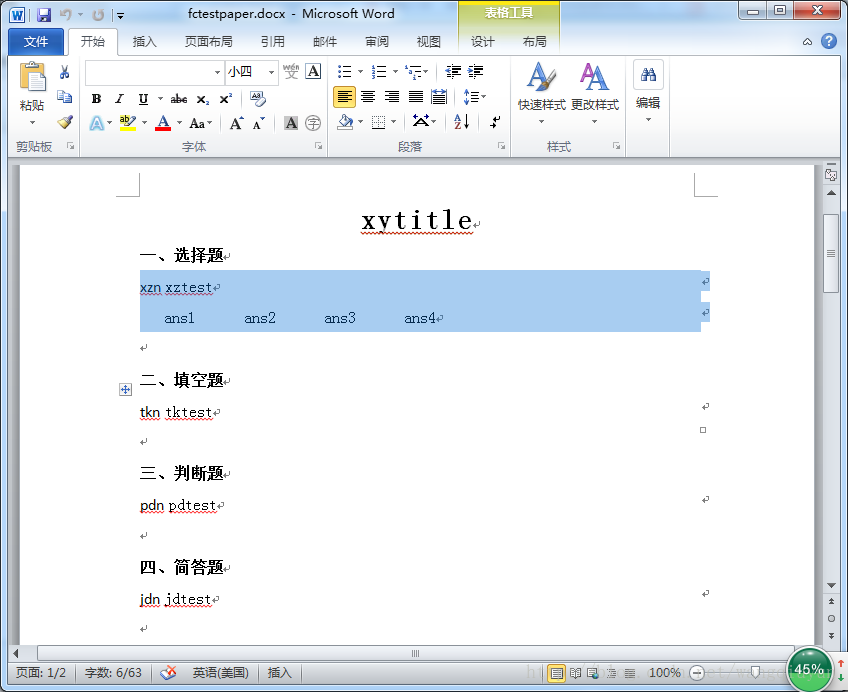
(注意,上面是有表格的,我设置了边框不可见)然后另存为XML文件,之后用工具打开这个xml文件,有人用firstobject XML Editor感觉还不如notepad++,我这里用notepad++,主要是有高亮显示,和元素自动配对,效果如下:
立即学习“Java免费学习笔记(深入)”;
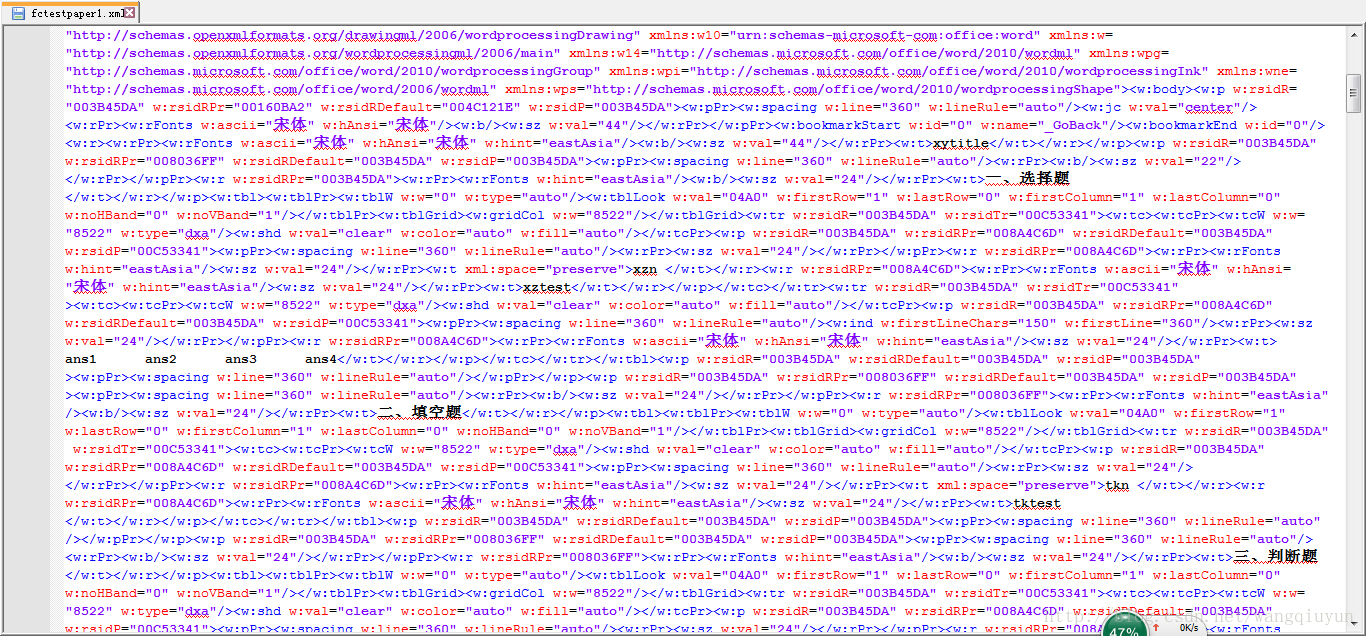
上面黑色的地方基本是我们之后要替换的地方,比如xytitle替换为${xytitle},对已表格要十分注意,比如选择题下面的表格,我们可以通过
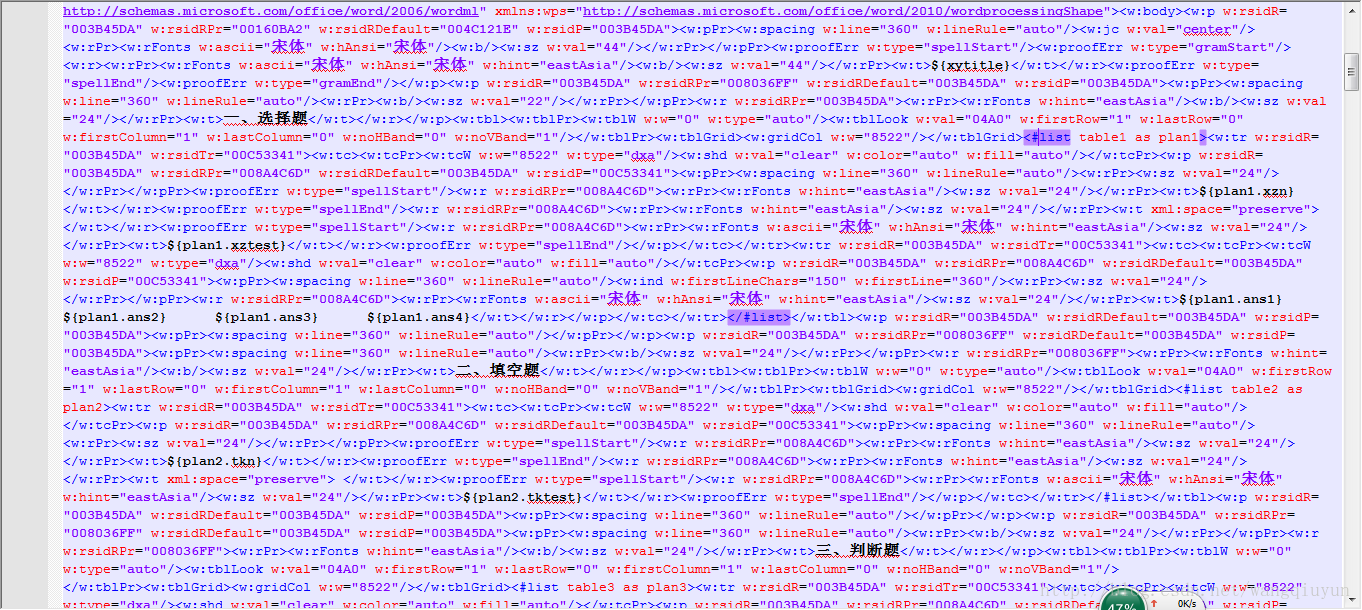
保存后,修改后缀名为ftl,至此模板制作完毕。
二、编程实现
这里用到了freemarker-2.3.13.jar包,代码如下:

package common;

import java.io.BufferedWriter;
import java.io.File;
import java.io.FileNotFoundException;
import java.io.FileOutputStream;
import java.io.IOException;
import java.io.OutputStreamWriter;
import java.io.UnsupportedEncodingException;
import java.io.Writer;
import java.util.Map;

import freemarker.template.Configuration;
import freemarker.template.Template;
import freemarker.template.TemplateException;

public class DocumentHandler {

 private Configuration configuration = null;

 public DocumentHandler() {
  configuration = new Configuration();
  configuration.setDefaultEncoding("utf-8");
 }

 public void createDoc(Map dataMap,String fileName) throws UnsupportedEncodingException {
  //dataMap 要填入模本的数据文件
  //设置模本装置方法和路径,FreeMarker支持多种模板装载方法。可以重servlet,classpath,数据库装载,
  //这里我们的模板是放在template包下面
  configuration.setClassForTemplateLoading(this.getClass(), "/template");
  Template t=null;
  try {
   //test.ftl为要装载的模板
   t = configuration.getTemplate("fctestpaper.ftl");
  } catch (IOException e) {
   e.printStackTrace();
  }
  //输出文档路径及名称
  File outFile = new File(fileName);
  Writer out = null;
  FileOutputStream fos=null;
  try {
   fos = new FileOutputStream(outFile);
   OutputStreamWriter oWriter = new OutputStreamWriter(fos,"UTF-8");
   //这个地方对流的编码不可或缺,使用main()单独调用时,应该可以,但是如果是web请求导出时导出后word文档就会打不开,并且包XML文件错误。主要是编码格式不正确,无法解析。
   //out = new BufferedWriter(new OutputStreamWriter(new FileOutputStream(outFile)));
    out = new BufferedWriter(oWriter);
  } catch (FileNotFoundException e1) {
   e1.printStackTrace();
  }

  try {
   t.process(dataMap, out);
   out.close();
   fos.close();
  } catch (TemplateException e) {
   e.printStackTrace();
  } catch (IOException e) {
   e.printStackTrace();
  }

  //System.out.println("---------------------------");
 }
}
然后是准备数据调用就行,代码如下:
package com.havenliu.document;

import java.io.UnsupportedEncodingException;
import java.util.ArrayList;
import java.util.HashMap;
import java.util.List;
import java.util.Map;

public class Main {

 /**
  * @param args
  * @throws UnsupportedEncodingException
  */
 public static void main(String[] args) throws UnsupportedEncodingException {;

  Map dataMap = new HashMap();
  dataMap.put("xytitle", "试卷");
  int index = 1;
  // 选择题
  List> list1 = new ArrayList>();//题目
  List> list11 = new ArrayList>();//答案
  index = 1;
  for (int i = 0; i < 5; i++) {

   Map map = new HashMap();
   map.put("xzn", index + ".");
   map.put("xztest",
     "( )操作系统允许在一台主机上同时连接多台终端,多个用户可以通过各自的终端同时交互地使用计算机。");
   map.put("ans1", "A" + index);
   map.put("ans2", "B" + index);
   map.put("ans3", "C" + index);
   map.put("ans4", "D" + index);
   list1.add(map);

   Map map1 = new HashMap();
   map1.put("fuck", index + ".");
   map1.put("abc", "A" + index);
   list11.add(map1);

   index++;
  }
  dataMap.put("table1", list1);
  dataMap.put("table11", list11);

  // 填空题
  List> list2 = new ArrayList>();
  List> list12 = new ArrayList>();
  index = 1;
  for (int i = 0; i < 5; i++) {

   Map map = new HashMap();
   map.put("tkn", index + ".");
   map.put("tktest",
     "操作系统是计算机系统中的一个___系统软件_______,它管理和控制计算机系统中的___资源_________.");
   list2.add(map);

   Map map1 = new HashMap();
   map1.put("fill", index + ".");
   map1.put("def", "中级调度" + index);
   list12.add(map1);

   index++;
  }
  dataMap.put("table2", list2);
  dataMap.put("table12", list12);

  // 判断题
  List> list3 = new ArrayList>();
  List> list13 = new ArrayList>();
  index = 1;
  for (int i = 0; i < 5; i++) {

   Map map = new HashMap();
   map.put("pdn", index + ".");
   map.put("pdtest",
     "复合型防火墙防火墙是内部网与外部网的隔离点,起着监视和隔绝应用层通信流的作用,同时也常结合过滤器的功能。");
   list3.add(map);

   Map map1 = new HashMap();
   map1.put("judge", index + ".");
   map1.put("hij", "对" + index);
   list13.add(map1);

   index++;
  }
  dataMap.put("table3", list3);
  dataMap.put("table13", list13);

  // 简答题
  List> list4 = new ArrayList>();
  List> list14 = new ArrayList>();
  index = 1;
  for (int i = 0; i < 5; i++) {

   Map map = new HashMap();
   map.put("jdn", index + ".");
   map.put("jdtest", "说明作业调度,中级调度和进程调度的区别,并分析下述问题应由哪一级调度程序负责。");
   list4.add(map);

   Map map1 = new HashMap();
   map1.put("answer", index + ".");
   map1.put("xyz", "说明作业调度,中级调度和进程调度的区别,并分析下述问题应由哪一级调度程序负责。");
   list14.add(map1);

   index++;
  }
  dataMap.put("table4", list4);
  dataMap.put("table14", list14);

  MDoc mdoc = new MDoc();
  mdoc.createDoc(dataMap, "E:/outFile.doc");
 }

}
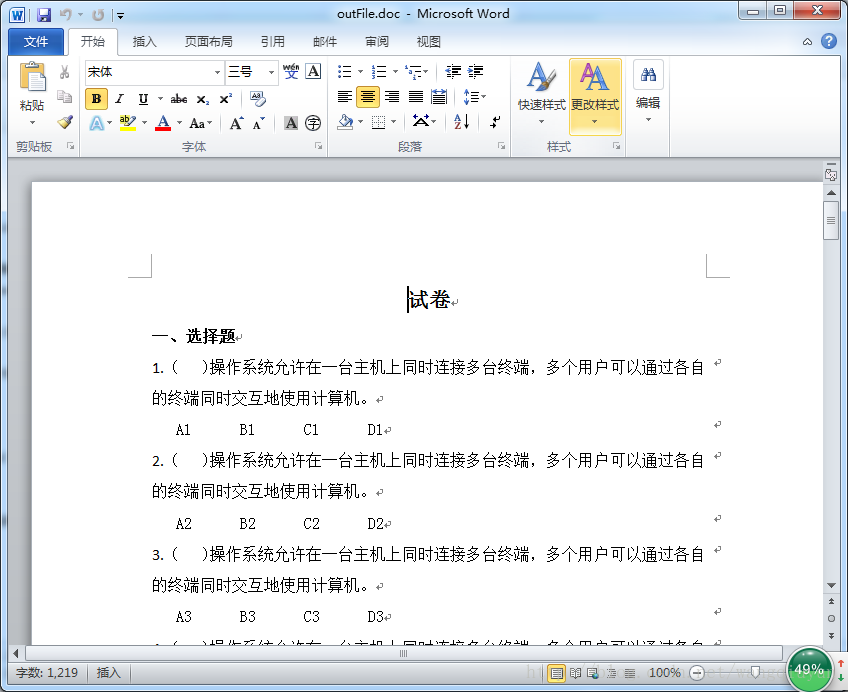
注意上面map中的key必须和模板中的对应,否则会报错。效果如下:
以上就是本文的全部内容,希望对大家的学习有所帮助,也希望大家多多支持PHP中文网。
更多Java用freemarker导出word实用示例相关文章请关注PHP中文网!




