



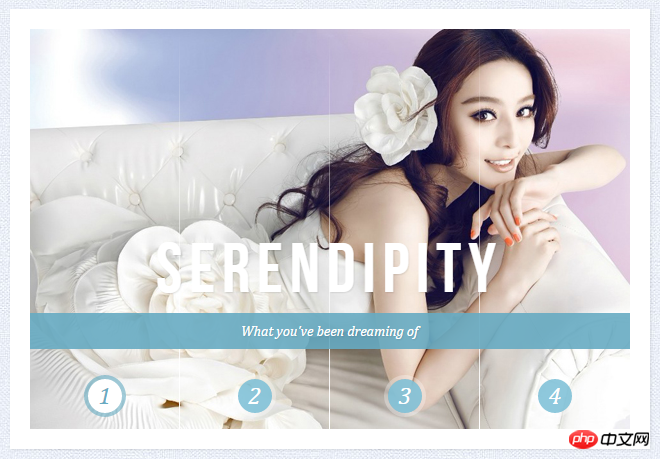
这是一款基于CSS3的百叶窗焦点图动画,一共有4种不同的百叶窗动画风格,每一个都看似非常简单,但是却又相当实用。更值得注意的是插件提供了4种不同的百叶窗特效,有水平百叶窗、垂直百叶窗和淡入淡出百叶窗等。并且,该CSS3百叶窗图片切换插件切换时非常平滑,效果很不错。
在线演示源码下载
我们列出了其中一种百叶窗风格的源代码,其他的大家可以下载源文件进行查看。

HTML代码
Slice 1 - Image 1 Slice 1 - Image 2 Slice 1 - Image 3 Slice 1 - Image 4
Slice 2 - Image 1 Slice 2 - Image 2 Slice 2 - Image 3 Slice 2 - Image 4
Slice 3 - Image 1 Slice 3 - Image 2 Slice 3 - Image 3 Slice 3 - Image 4
Slice 4 - Image 1 Slice 4 - Image 2 Slice 4 - Image 3 Slice 4 - Image 4
SerendipityWhat you've been dreaming of
AdventureWhere the fun begins
NatureUnforgettable eperiences
SerenityWhen silence touches nature
CSS代码:
.cr-container{
	width: 600px;
	height: 400px;
	position: relative;
	margin: 0 auto;
	border: 20px solid #fff;
	box-shadow: 1px 1px 3px rgba(0,0,0,0.1);
}
.cr-container label{
	font-style: italic;
	width: 150px;
	height: 30px;
	cursor: pointer;
	color: #fff;
	line-height: 32px;
	font-size: 24px;
	float:left;
	position: relative;
	margin-top:350px;
	z-index: 1000;
}
.cr-container label:before{
	content:'';
	width: 34px;
	height: 34px;
	background: rgba(130,195,217,0.9);
	position: absolute;
	left: 50%;
	margin-left: -17px;
	border-radius: 50%;
	box-shadow: 0px 0px 0px 4px rgba(255,255,255,0.3);
	z-index:-1;
}
.cr-container label:after{
	width: 1px;
	height: 400px;
	content: '';
	background: -moz-linear-gradient(top, rgba(255,255,255,0) 0%, rgba(255,255,255,1) 100%);
	background: -webkit-gradient(linear, left top, left bottom, color-stop(0%,rgba(255,255,255,0)), color-stop(100%,rgba(255,255,255,1)));
	background: -webkit-linear-gradient(top, rgba(255,255,255,0) 0%,rgba(255,255,255,1) 100%);
	background: -o-linear-gradient(top, rgba(255,255,255,0) 0%,rgba(255,255,255,1) 100%);
	background: -ms-linear-gradient(top, rgba(255,255,255,0) 0%,rgba(255,255,255,1) 100%);
	background: linear-gradient(top, rgba(255,255,255,0) 0%,rgba(255,255,255,1) 100%);
	filter: progid:DXImageTransform.Microsoft.gradient( startColorstr='#00ffffff', endColorstr='#ffffff',GradientType=0 );
	position: absolute;
	bottom: -20px;
	right: 0px;
}
.cr-container label.cr-label-img-4:after{
	width: 0px;
}
.cr-container input.cr-selector-img-1:checked ~ label.cr-label-img-1,
.cr-container input.cr-selector-img-2:checked ~ label.cr-label-img-2,
.cr-container input.cr-selector-img-3:checked ~ label.cr-label-img-3,
.cr-container input.cr-selector-img-4:checked ~ label.cr-label-img-4{
	color: #68abc2;
}
.cr-container input.cr-selector-img-1:checked ~ label.cr-label-img-1:before,
.cr-container input.cr-selector-img-2:checked ~ label.cr-label-img-2:before,
.cr-container input.cr-selector-img-3:checked ~ label.cr-label-img-3:before,
.cr-container input.cr-selector-img-4:checked ~ label.cr-label-img-4:before{
	background: #fff;
	box-shadow: 0px 0px 0px 4px rgba(104,171,194,0.6);
}
.cr-container input{
	display: none;
}
.cr-bgimg{
	width: 600px;
	height: 400px;
	position: absolute;
	left: 0px;
	top: 0px;
	z-index: 1;
}
.cr-bgimg{
	background-repeat: no-repeat;
	background-position: 0 0;
}
.cr-bgimg p{
	width: 150px;
	height: 100%;
	position: relative;
	float: left;
	overflow: hidden;
	background-repeat: no-repeat;
}
.cr-bgimg p span{
	position: absolute;
	width: 100%;
	height: 100%;
	top: 0px;
	left: -150px;
	z-index: 2;
	text-indent: -9000px;
}
.cr-container input.cr-selector-img-1:checked ~ .cr-bgimg,
.cr-bgimg p span:nth-child(1){
	background-image: url(../images/1.jpg);
}
.cr-container input.cr-selector-img-2:checked ~ .cr-bgimg,
.cr-bgimg p span:nth-child(2){
	background-image: url(../images/2.jpg);
}
.cr-container input.cr-selector-img-3:checked ~ .cr-bgimg,
.cr-bgimg p span:nth-child(3){
	background-image: url(../images/3.jpg);
}
.cr-container input.cr-selector-img-4:checked ~ .cr-bgimg,
.cr-bgimg p span:nth-child(4){
	background-image: url(../images/4.jpg);
}
.cr-bgimg p:nth-child(1) span{
	background-position: 0px 0px;
}
.cr-bgimg p:nth-child(2) span{
	background-position: -150px 0px;
}
.cr-bgimg p:nth-child(3) span{
	background-position: -300px 0px;
}
.cr-bgimg p:nth-child(4) span{
	background-position: -450px 0px;
}

.cr-container input:checked ~ .cr-bgimg p span{
	-webkit-animation: slideOut 0.6s ease-in-out;
	-moz-animation: slideOut 0.6s ease-in-out;
	-o-animation: slideOut 0.6s ease-in-out;
	-ms-animation: slideOut 0.6s ease-in-out;
	animation: slideOut 0.6s ease-in-out;
}
@-webkit-keyframes slideOut{
	0%{ left: 0px; }
	100%{ left: 150px; }
}
@-moz-keyframes slideOut{
	0%{ left: 0px; }
	100%{ left: 150px; }
}
@-o-keyframes slideOut{
	0%{ left: 0px; }
	100%{ left: 150px; }
}
@-ms-keyframes slideOut{
	0%{ left: 0px; }
	100%{ left: 150px; }
}
@keyframes slideOut{
	0%{ left: 0px; }
	100%{ left: 150px; }
}
.cr-container input.cr-selector-img-1:checked ~ .cr-bgimg p span:nth-child(1),
.cr-container input.cr-selector-img-2:checked ~ .cr-bgimg p span:nth-child(2),
.cr-container input.cr-selector-img-3:checked ~ .cr-bgimg p span:nth-child(3),
.cr-container input.cr-selector-img-4:checked ~ .cr-bgimg p span:nth-child(4)
{
	-webkit-transition: left 0.5s ease-in-out;
	-moz-transition: left 0.5s ease-in-out;
	-o-transition: left 0.5s ease-in-out;
	-ms-transition: left 0.5s ease-in-out;
	transition: left 0.5s ease-in-out;
	-webkit-animation: none;
	-moz-animation: none;
	-o-animation: none;
	-ms-animation: none;
	animation: none;
	left: 0px;
	z-index: 10;
}
.cr-titles h3{
	position: absolute;
	width: 100%;
	text-align: center;
	top: 50%;
	z-index: 10000;
	opacity: 0;
	color: #fff;
	text-shadow: 1px 1px 1px rgba(0,0,0,0.1);
	-webkit-transition: opacity 0.8s ease-in-out;
	-moz-transition: opacity 0.8s ease-in-out;
	-o-transition: opacity 0.8s ease-in-out;
	-ms-transition: opacity 0.8s ease-in-out;
	transition: opacity 0.8s ease-in-out;
}
.cr-titles h3 span:nth-child(1){
	font-family: 'BebasNeueRegular', 'Arial Narrow', Arial, sans-serif;
	font-size: 70px;
	display: block;
	letter-spacing: 7px;
}
.cr-titles h3 span:nth-child(2){
	letter-spacing: 0px;
	display: block;
	background: rgba(104,171,194,0.9);
	font-size: 14px;
	padding: 10px;
	font-style: italic;
	font-family: Cambria, Palatino, "Palatino Linotype", "Palatino LT STD", Georgia, serif;
}
.cr-container input.cr-selector-img-1:checked ~ .cr-titles h3:nth-child(1),
.cr-container input.cr-selector-img-2:checked ~ .cr-titles h3:nth-child(2),
.cr-container input.cr-selector-img-3:checked ~ .cr-titles h3:nth-child(3),
.cr-container input.cr-selector-img-4:checked ~ .cr-titles h3:nth-child(4){
	opacity: 1;
}
/* Media Query: Let's show the inputs on mobile sized browsers because they probably don't support the label trick: */
@media screen and (max-width: 768px) {
	.cr-container input{
		display: inline;
		width: 24%;
		margin-top: 350px;
		z-index: 1000;
		position: relative;
	}
	.cr-container label{
		display: none;
	}




