



基础环境:Python 3.5.1
mysql版本:5.6.35 (rpm安装方式)
操作系统:Centos7.3 和windows7
一、python连接数据库模块介绍:
目前主要用的有以下几种、MySQLdb和pymsql以及mysql官方提供的mysql-connector-python驱动,MySQLdb模块是python2.X使用比较多的,而python3.X使用的pymsql会更多一点,以后再研究官方的mysql-connector-python,本次学习以及实践全部基于pymsql模块。
PyMySQL的使用方法和MySQLdb几乎一样,习惯用MySQLdb的,只需 import MySQLdb 修改为 import pymysql 就可以了。
二、pymysql连接数据库的方法以及参数介绍:
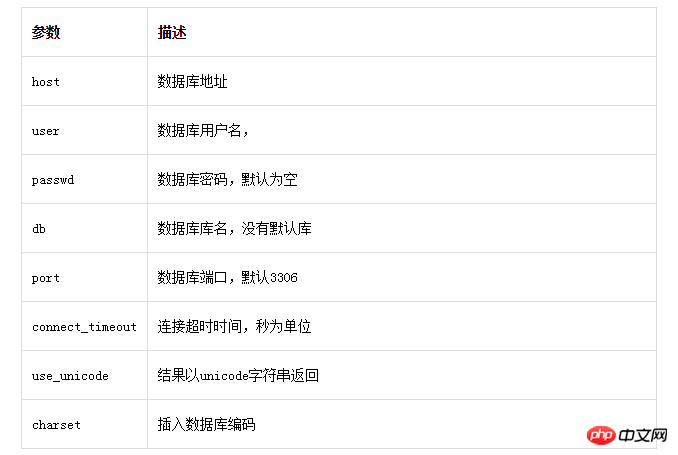
pymysql连接mysql 使用pymysql.connect()方法,可以调整很多参数:
连接示例:
connect=pymysql.connect(host="192.168.186.157",port=3306,user="winner",passwd="123123",db="DB",charset="utf8",connect_timeout=3000)
示例连接主要包含host,user,passwrd以及port等参数
连接示例2:
connect=pymysql.connect("192.168.186.157","winner","123123","test")
不用加host等参数,但是格式固定,分别是主机 、用户、 密码以及初始连接的数据库不能互换位置,
而上面的带参数的示例相对来说更随意一些。
注意:这里的端口以及连接超时时间都是int,所以不需要带引号
连接对象返回的connect()函数:
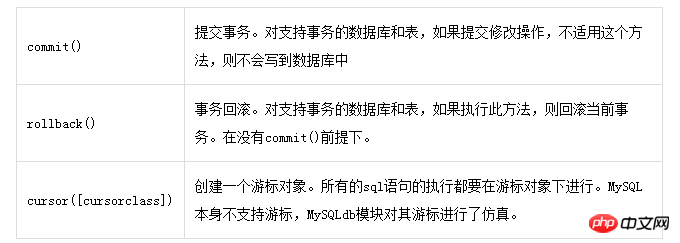
在python操作mysql数据库的过程中,我们主要是使用获取游标方法counect.cursor()和cursor.execute()方法对数据库进行操作,像创建数据库以及数据表等操作,我们一般直接在mysql客户端连接,执行SQL语句就可以了,所以我们更多的操作就是增、删、改、查等操作
游标对象也提供了几种方法:
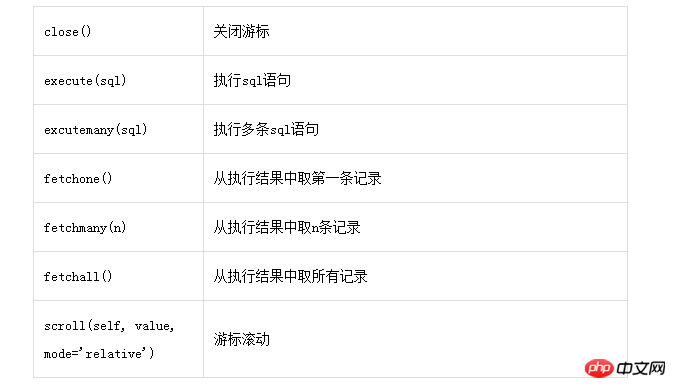
示例一、连接192.168.186.157的mysql服务端创建pymysql库字符集为utf8
#/usr/bin/env python
#_*_coding:utf-8_*_
#导入pymysql模块
import pymysql
#使用pymysql.connect()方法创建数据库链接
con=pymysql.connect(host='192.168.186.157',user='winner',passwd='123123',port=3306)
#使用con.cursor()方法创建游标
cursor=con.cursor()
sql=" create database If Not Exists pymysql default character set utf8;"
'''sql="""create table if not exists class (id int(10) primary key auto_increment,
name varchar(20) not null ,address varchar(20) not null default "gansu")"""
'''
cursor.execute(sql)
cursor.execute("show databases")
dataname=cursor.fetchall()
print(dataname)
执行结果:
(('information_schema',), ('#mysql50#2017-03-16_09-38-47',), ('DB',), ('mysql',), ('performance_schema',),
('pymysql',), ('test',), ('winner_mas',))
Process finished with exit code 0
示例二、连接刚创建的pymysql数据库创建class表
#/usr/bin/env python
#_*_coding:utf-8_*_
#导入pymysql模块
import pymysql
#使用pymysql.connect()方法创建数据库链接
con=pymysql.connect(host='192.168.186.157',user='winner',passwd='123123',port=3306,db='pymysql')
#使用con.cursor()方法创建游标
cursor=con.cursor()
#sql=" create database If Not Exists pymysql default character set utf8;"
sql="""create table if not exists class (id int(10) primary key auto_increment,
name varchar(20) not null ,address varchar(20) not null default "gansu")"""
cursor.execute(sql)
cursor.execute("show tables")
dataname=cursor.fetchall()
print(dataname)
C:\Users\Administrator\AppData\Local\Programs\Python\Python35\python.exe C:/Users/Administrator/PycharmProjects/python/createdatabase.py
(('class',),)
C:\Users\Administrator\AppData\Local\Programs\Python\Python35\lib\site-packages\pymysql\cursors.py:166: Warning: (1050, "Table 'class' already exists")
result = self._query(query)
Process finished with exit code 0
#/usr/bin/env python
#_*_coding:utf-8_*_
#导入pymysql模块
import pymysql
#打开数据库链接
connect=pymysql.connect(host="192.168.186.157",port=3306,user="winner",passwd="123123",db="pymysql",charset="utf8",connect_timeout=3000)
#使用cursor方法获取操作游标
cursor=connect.cursor()
sql=''' insert into class (name,address)
values("JSP","go"),("winner","back"),("GOOD","contine"),("cursor","execute");
'''
#使用execute方法操作数据库
cursor.execute(sql)
#事务提交
#connect.commit()
data=cursor.execute("select * from class order by id desc" )
#使用fetchall方法获取操作结果
data=cursor.fetchmany(5)
print(data)
注意:在这里将事务提交的部分注释掉了,特演示一下不提交事务的情况。
执行结果(执行第四次时):
C:\Users\Administrator\AppData\Local\Programs\Python\Python35\python.exe C:/Users/Administrator/PycharmProjects/python/insertmysql.py
((12, 'cursor', 'execute'), (11, 'GOOD', 'contine'), (10, 'winner', 'back'), (9, 'JSP', 'go'))
Process finished with exit code 0
由此我们发现数据库的事务关系在软件开发的过程当中是相当重要的一部分,所以在对事务处理的时候需要严谨。
提交事务的源代码:
#/usr/bin/env python
#_*_coding:utf-8_*_
#导入pymysql模块
import pymysql
#打开数据库链接
connect=pymysql.connect(host="192.168.186.157",port=3306,user="winner",passwd="123123",db="pymysql",charset="utf8",connect_timeout=3000)
#使用cursor方法获取操作游标
cursor=connect.cursor()
sql=''' insert into class (name,address)
values("JSP","go"),("winner","back"),("GOOD","contine"),("cursor","execute");
'''
#使用execute方法操作数据库
cursor.execute(sql)
#事务提交
connect.commit()
data=cursor.execute("select * from class order by id desc" )
#使用fetchall方法获取操作结果
data=cursor.fetchall()
print(data)
#!/usr/bin/python
#encoding=utf-8
# -*- coding:utf-8 -*-
import os
import calendar
import datetime
import MySQLdb
import os, sys, re,string
import time, tarfile,getopt
import socket
import struct
reload(sys)
sys.setdefaultencoding('utf-8')
optmap = {
'dbuser': 'tongji',
'dbpass': '64CE0CEE9A85F22C',
'dbhost': '192.168.1.10',
'dbport': 3306,
'dbname': 'web_basic'
}
code='201613'
now = int(time.time())
msgid=code+str(now)
print msgid
f = file('/home/haoren/nian/1550035_ACCOUNT_'+msgid+'_0001_V2.xml','w+')
f1 = file('/home/haoren/nian/1550035_RELATIONACCOUNTINFO_'+msgid+'_0001_V2.xml','w+')
def log(line):
line = line + "\r\n"
f.write(line)
return
def log1(line):
line = line + "\r\n"
f1.write(line)
return
def sql_select(reqsql):
try:
db_conn = MySQLdb.connect(user=optmap['dbuser'], passwd=optmap['dbpass'], host=optmap['dbhost'], port=optmap['dbport'], db=optmap['dbname'], charset='utf8')
db_cursor=db_conn.cursor()
db_conn.query("use %s"%optmap['dbname'])
count = db_cursor.execute(reqsql)
ret = db_cursor.fetchall()
db_cursor.close()
db_conn.close
return ret
except MySQLdb.Error,e:
print "Mysql ERROR %d:%s" %(e.args[0], e.args[1])
return ''
def getusercoin():
reqsql = "select * from singer_auth where status = 10 and ip !='NULL' AND (signtype = '1' OR signtype = '3') limit 150 ;"
#print reqsql
ret = sql_select(reqsql)
n = 0
for row in ret:
n += 1
if n
print str(row[1])+','+str(row[8])
print str(row[0])
print str(row[1])
print str(row[2])
print str(row[3])
if str(row[9]).strip() == '0' and str(row[10]).strip() == '0':
print str(row[9]) +','+ str(row[10])
elif str(row[9]).strip() == '0' and str(row[10]).strip() != '0':
print str(row[9]) +','+str(row[10]).split('/')[6]
elif str(row[9]).strip() != '0' and str(row[10]).strip() == '0':
print str(row[9]).split('/')[6] +','+str(row[10])
else:
print str(row[9]).split('/')[6] +','+str(row[10]).split('/')[6]
else:
n = 0
getusercoin()
f.close()
f1.close()
#!/usr/bin/env python
#-*-coding:utf-8-*-
#明细
import MySQLdb
import os, sys, re,string
import time, tarfile,getopt
optmap = {
'dbuser' : 'haoren',
'dbpass' : 'FqDxhG4d',
'dbhost' : '192.168.1.10',
'dbport' : 3306,
'dbname' : 'JSDB'
}
def get_files(dir, pattern):
res_file_list =[]
if os.path.exists(dir):
cur_file_list = os.listdir(dir)
for file_name in cur_file_list:
if re.search(pattern, file_name):
res_file_list.append(file_name)
return res_file_list
else:
return 'no'
def main():
cur_day = time.strftime("%Y%m%d", time.localtime(time.time()-86400))
opts, args = getopt.getopt(sys.argv[1:], 'd:')
for op, value in opts:
if op == '-d':
m = re.search('[0-9]{8}', value)
if m:
cur_day = value
else:
print "请输入8位日期(比如:20130215)"
return 'no'
log_day = time.strftime('%y%m%d', time.localtime(time.mktime(time.strptime(cur_day, '%Y%m%d'))))
fmt_day = time.strftime('%Y-%m-%d', time.localtime(time.mktime(time.strptime(cur_day, '%Y%m%d'))))
print '结算统计日期:',fmt_day
#log_day = time.strftime("%y%m%d", time.localtime(time.time()-86400))
dirname="/home/haoren/logdir/%s_67"%log_day
print dirname
db_conn = MySQLdb.connect(user=optmap['dbuser'], passwd=optmap['dbpass'], host=optmap['dbhost'], port=optmap['dbport'], db=optmap['dbname'])
db_cursor=db_conn.cursor()
db_conn.query("use %s"%optmap['dbname'])
tabletime = time.strftime("%y%m%d", time.localtime(time.mktime(time.strptime(cur_day, "%Y%m%d"))))
sql="CREATE TABLE IF NOT EXISTS `JIESUANTONGJI_%s` like JIESUANTONGJISAMPLE"%tabletime
db_conn.query(sql)
db_conn.query("delete from JIESUANTONGJI_%s"%tabletime)
if os.path.exists("/tmp/JieSuanTongJi2016.txt"):
os.system("rm -f /tmp/JieSuanTongJi2016.txt")
file_list2=get_files(dirname,'billserver')
for file2 in file_list2:
command = "cat %s/%s | grep -h -w 结算统计 |grep -v 人民币消费结算统计 >> /tmp/JieSuanTongJi2016.txt"%(dirname,file2)
os.system(command)
#结算统计记录放在txt文档里面
filename='/tmp/JieSuanTongJi2016.txt'
record = {}
a_file = open(filename, 'r')
#160125-11:00:14 Bill[40268] INFO: [结算统计]时间(1453690814)类别(1)名称(购物卡收入)平台(3977962)等级(2)用户(65147500)赠送(1)个购物卡(39)给客户(65147500),客户等级(28),签约(1), 消耗人民币(100), 客户获得人民币(8000), 平台获得人民币(2000),客户当前人民币(1320960)平台当前人民币(335560)
for a_line in a_file.readlines():
m = re.search("^(\S+) Bill\[\d+\] INFO: \[结算统计\]时间\((\d+)\)类别\((\d+)\)名称\((\S+)\)平台\((\d+)\)等级\((\d+)\)用户\((\d+)\)赠送\((\d+)\)个购物卡\((\d+)\)给客户\((\d+)\),客户等级\((\d+)\),签约\((\d+)\), 消耗人民币\((\d+)\), 客户获得人民币\((\d+)\), 平台获得人民币\((\d+)\),客户当前人民币\((\d+)\)平台当前人民币\((\d+)\)", a_line)
if m:
#print "第一项:"+m.group(1)
#print "第二项:"+m.group(2)
#print "第三项:"+m.group(3)
#print "第四项:"+m.group(4)
#print "第五项:"+m.group(5)
#print "第六项:"+m.group(6)
#print "第七项:"+m.group(7)
#print "第八项:"+m.group(8)
#print "第九项:"+m.group(9)
#print "第十项:"+m.group(10)
#print "第十一项:"+m.group(11)
#print "第十二项:"+m.group(12)
#print "第十三项:"+m.group(13)
#print "第十四项:"+m.group(14)
#print "第十五项:"+m.group(15)
#print "第十六项:"+m.group(16)
#print "第十七项:"+m.group(17)
#print "第十八项:"+m.group(18)
if int(m.group(14)) >0 or int(m.group(15)) >0 :
db_conn.query("insert into JIESUANTONGJI_%s(OPTIME,TYPE,ITEMNAME,CHANNELID,CHANNELLEVEL,PRESENTERID,ITEMNUM,ITEMID,SINGERID,SINGERLEVEL,SIGN,CONSUMECOIN,SINGERRECVGOLD,CHANNELRECVGOLD,CURRENTSINGERGOLD,CURRENTCHANNELGOLD) values(%d,%d,'%s',%d,%d,%d,%d,%d,%d,%d,%d,%d,%d,%d,%d,%d)"%(tabletime,int(m.group(2)),int(m.group(3)),str(m.group(4)),int(m.group(5)),int(m.group(6)),int(m.group(7)),int(m.group(8)),int(m.group(9)),int(m.group(10)),int(m.group(11)),int(m.group(12)),int(m.group(13)),int(m.group(14)),int(m.group(15)),int(m.group(16)),int(m.group(17))))
a_file.close()
db_conn.commit()
db_cursor.close()
db_conn.close()
main()
#if __name__ == "__main__":
# main()





